

QUOTE(aniq8676 @ Sep 20 2024, 12:09 AM)
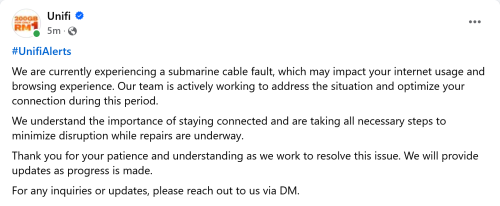

*sigh*
Unifi Official TM UniFi High Speed Broadband Thread V42, READ 1ST PAGE FOR RELEVANT WIFI INFO!
|
|
 Sep 20 2024, 06:07 AM Sep 20 2024, 06:07 AM
Return to original view | IPv6 | Post
#141
|
 
Senior Member
4,034 posts Joined: Dec 2019 
|
QUOTE(aniq8676 @ Sep 20 2024, 12:09 AM) *sigh* nnannon24 and Moogle Stiltzkin liked this post
|
|
|
|
|
|
Sep 20 2024, 11:31 AM
Return to original view | IPv6 | Post
#142
|
|
Senior Member
4,034 posts Joined: Dec 2019
|
oh, the timing. the irony... 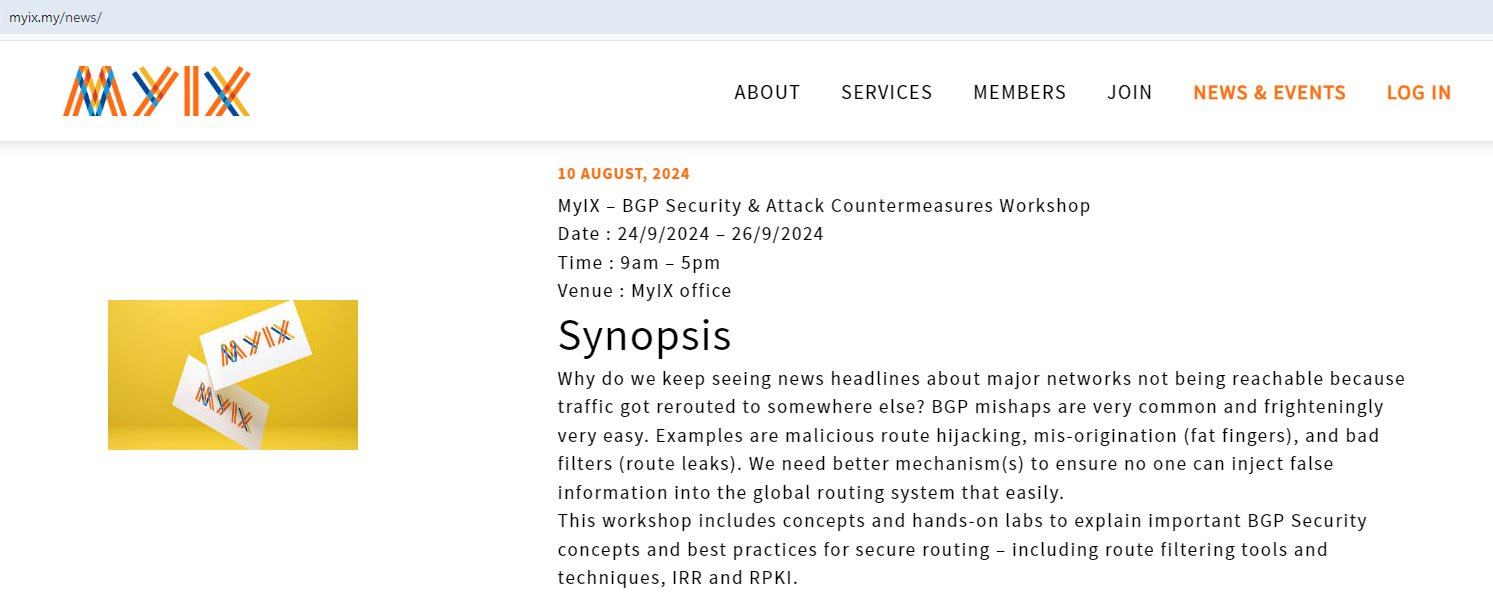 dev/numb, Moogle Stiltzkin, and 1 other liked this post
|
|
|
Sep 20 2024, 05:20 PM
Return to original view | IPv6 | Post
#143
|
|
Senior Member
4,034 posts Joined: Dec 2019
|
QUOTE(anip94 @ Sep 20 2024, 04:16 PM) which website is slow due to faulty cable? its all good on my end for overseas sites. funny how quick TM acknowledge this but not the crawling slow website loading during peak 7-10pm time for every night which persists for months now. just Bersangka Buruk™ that every website is loading shit and you won't be disappointed by expectation. |
|
|
Sep 20 2024, 07:50 PM
Return to original view | IPv6 | Post
#144
|
|
Senior Member
4,034 posts Joined: Dec 2019
|
HongKong yang putus,
tapi trafik tempatan-ke-tempatan pun jammed. REROUTE! *sigh* |
|
|
Sep 24 2024, 02:44 PM
Return to original view | IPv6 | Post
#145
|
|
Senior Member
4,034 posts Joined: Dec 2019
|
QUOTE(plumberly @ Sep 24 2024, 01:49 PM) I upgraded my Unifi to 300 Mbps a few weeks ago with a whole system replacement. just a note.Now and then over the weeks, mobiles, cctv could not get a Wi-Fi signal. I have to restart the mobiles etc to recover the signal. I have also shutdown and restarted the unfi system. Would anyone happen to have a similar experience? Hope you can share the solution. Yes, I will contact Unifi if my initial effort comes to a brick wall. Thanks. check if you have WPA3 enabled. I found that my devices go wonky whenever i feel "want to live of the bloody technological edge". |
|
|
Sep 25 2024, 06:25 PM
Return to original view | IPv6 | Post
#146
|
|
Senior Member
4,034 posts Joined: Dec 2019
|
now, cry....
might have won a battle, probably will now lose the war. https://www.pcmag.com/news/internet-provide...dflares-dns-for Internet Providers, Wi-Fi Router Vendors Can Now Ship Cloudflare's DNS for Free September 24, 2024 The program also seems to invite ISPs and gear vendors to pay for premium options with added online-safety features. Cloudflare’s new program invites partners to ship products preconfigured with one of its three core resolvers for free A draft copy of Cloudflare’s post includes a “Premium Safety & Customizations” section that outlines a “Gateway” offering that would presumably cost partner companies extra and provide additional filtering options that include time-based limits on categories of sites. |
|
|
|
|
|
Sep 26 2024, 12:42 PM
Return to original view | IPv6 | Post
#147
|
|
Senior Member
4,034 posts Joined: Dec 2019
|
i'm bad. imagine threat-actor (-ekhem- TM) can possibly subscribe for an official filtering DNS gateway from Cloudflare, "provide additional filtering options", and possibility with support including route announcement and valid SSL certificate.
QUOTE(kwss @ Sep 26 2024, 08:13 AM) Don't worry too much about it. This is an OEM thing. Malaysia government won't do this because Cloudflare will not block news site at their request, like how they block MalaysiaKini and Bersih last time, and Murray today. I think Cloudflare is trying to commercialize their DNS product like NextDNS, Adguard, Control D. QUOTE(PRSXFENG @ Sep 26 2024, 08:58 AM) the truth is, this is a better solution than whatever mcmc could cook up lol, it would absolutely do a better job of blocking stuff I don't exactly forsee any ISPs here going with this as they prefer to have their own setup with their own full control also link to CF blog post https://blog.cloudflare.com/safer-resolver/ |
|
|
Sep 27 2024, 11:12 AM
Return to original view | IPv6 | Post
#148
|
|
Senior Member
4,034 posts Joined: Dec 2019
|
QUOTE(plumberly @ Sep 27 2024, 10:59 AM) Please clarify, should I enable WPA3? don't use WPA, it's very outdated.I have some devices with old wifi systems. That may not work on WPA3. Mine is now set at WPA WPA/2. use WPA3 if you want latest standard. stick to WPA2 if your client mix can't all support WPA3. |
|
|
Sep 27 2024, 04:44 PM
Return to original view | IPv6 | Post
#149
|
|
Senior Member
4,034 posts Joined: Dec 2019
|
QUOTE(plumberly @ Sep 27 2024, 12:47 PM) My current setting is for WPA2 and 3. Maybe that is the cause of my wifi problem. Thought it should be smart to select the correct one, depending on the devices. for maximum compatibility with ALL in current generation, use WPA2. Just to be certain. If I change to WPA2 and later I need to change to the current WPA2/3, it is changing this setting and NO other setting changes. Right? Thanks. if presented with futher option whether to use WPA2-TKIP or WPA2-AES, chose AES over TKIP. PSK or Enterprise, that one is up to your environment. I don't expect humans to have RADIUS or portal or equivalent lying around at home. |
|
|
Sep 27 2024, 04:51 PM
Return to original view | IPv6 | Post
#150
|
|
Senior Member
4,034 posts Joined: Dec 2019
|
QUOTE(plumberly @ Sep 27 2024, 12:47 PM) Maybe that is the cause of my wifi problem. Thought it should be smart to select the correct one, depending on the devices. it's the same effect if you pair 2.4GHz-only clients with Access Points that can handle both 2.4GHz+5GHz SSID, and to compound the issue, with kvr protocol enabled.Thanks. the Access Point will tell 2.4GHz-only client to switch from 2.4GHz to 5GHz. and in cases, i suspect some even forcefully disconnect the client. those 2.4GHz-only client will appear misbehaving keep disconnecting and reconnecting. |
|
Topic ClosedOptions
|
| Change to: |  0.2072sec 0.2072sec
 0.99 0.99
 7 queries 7 queries
 GZIP Disabled GZIP Disabled
Time is now: 11th December 2025 - 09:45 PM |
 Quote
Quote