

QUOTE(froz3nnoob @ Oct 27 2023, 11:30 PM)
Anyone using unifi 2 GBPS ? so far how was the speed ?

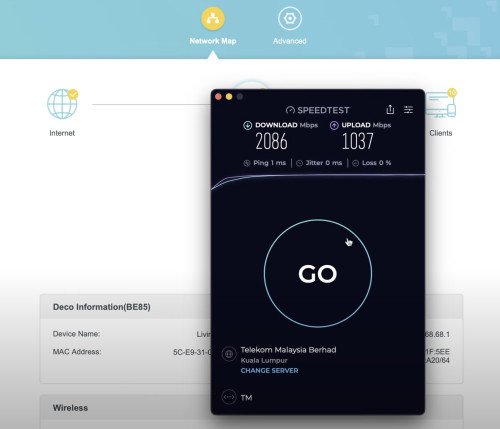
Speed was promising. Using the bridge mode from the D-Link DPN3060V-B1 (Black Unit) to my TP-Link Deco BE85.
Anyone using unifi 2gbps ?
|
|
 Jun 20 2024, 09:05 PM Jun 20 2024, 09:05 PM
Return to original view | IPv6 | Post
#1
|
 
Junior Member
87 posts Joined: Jun 2011 
|
QUOTE(froz3nnoob @ Oct 27 2023, 11:30 PM) Anyone using unifi 2 GBPS ? so far how was the speed ? Speed was promising. Using the bridge mode from the D-Link DPN3060V-B1 (Black Unit) to my TP-Link Deco BE85. |
|
|
Jun 21 2024, 05:39 PM
Return to original view | Post
#2
|
|
Junior Member
87 posts Joined: Jun 2011
|
QUOTE(msn_xander @ Jun 21 2024, 05:30 PM) I just subscribed to Unifi 2Gbps plan. It came with D-Link AX3000 DPN-FX3060V GPon WiFi Router Combo Box. I wanted to use TP-Link Deco BE85 with this setup. Should I use it as router or access point? Can any expert guide me step by step how to setup Deco BE85 to this Unifi 2Gbps plan? Is your D-Link DPN-FX3060V a white or black unit? If it's a black unit, set the Deco to router mode.Thank you in advanced Sifu!!  1) Login to your DPN-FX3060V WebGUI with the credentials below: Username: tmadmin Password: Adm@xxxx (xxxx is the last 4 digits of your MAC address of your D-Link ONU) 2) Go to Maintenance tab and backup the config first. 3) Make sure you have the Unifi PPPoE details with you. Username: example@unifi Password: xxxxxxxxxxxxxxxxxxx 4) Go to Wizard, Quick Setup, change the WAN Mode from GPON Router to GPON Bridge and apply changes. 5) Go to your Deco app, changed the Operation Mode to Wi-Fi Router. Insert your Unifi PPPoE details. Connection Type: PPPoE Username: example@unifi Password: xxxxxxxxxxxxxxxxxxx 6) Follow the screenshots below to configure the VLAN settings. 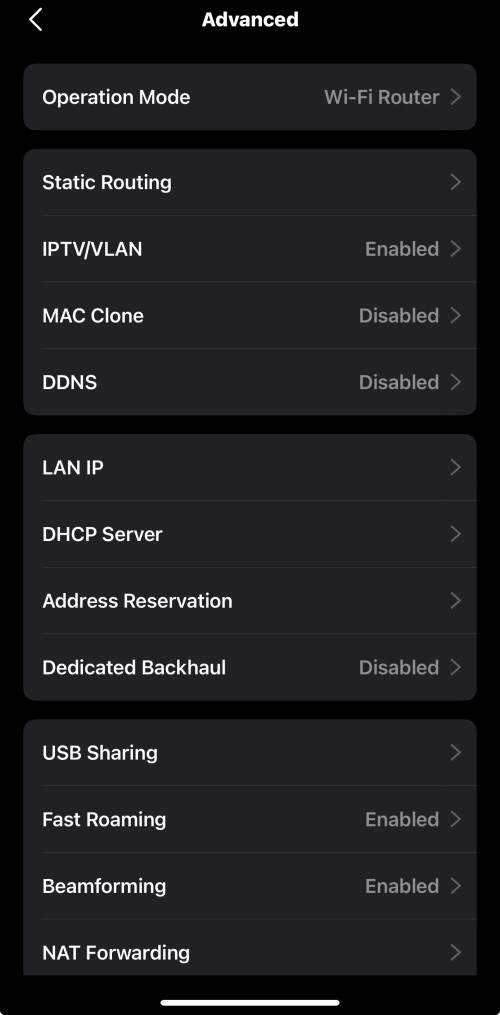 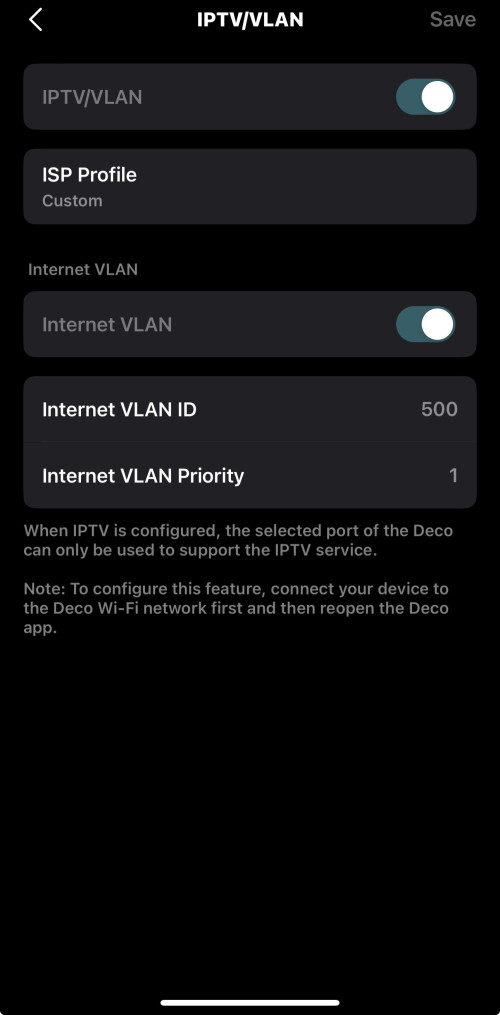 7) Configure your Wi-Fi networks. Hope it helps! |
|
|
Jun 21 2024, 10:20 PM
Return to original view | IPv6 | Post
#3
|
|
Junior Member
87 posts Joined: Jun 2011
|
QUOTE(msn_xander @ Jun 21 2024, 07:22 PM) Thanks for the guide Bro.. My DPN-FX3060V is white unit The white unit's max port speed is 1Gbps, so if you want to achieve the full 2Gbps speed, you should use the black unit instead. |
| Change to: |  0.0167sec 0.0167sec
 0.68 0.68
 6 queries 6 queries
 GZIP Disabled GZIP Disabled
Time is now: 22nd December 2025 - 09:31 PM |
 Quote
Quote