

Anyone using unifi 2 GBPS ? so far how was the speed ?
Anyone using unifi 2gbps ?
Anyone using unifi 2gbps ?
|
|
 Oct 27 2023, 10:30 PM, updated 2y ago Oct 27 2023, 10:30 PM, updated 2y ago
Show posts by this member only | Post
#1
|
 
Senior Member
837 posts Joined: Oct 2006 From: Malaysia  
|
Anyone using unifi 2 GBPS ? so far how was the speed ?
|
|
|
|
|
|
Oct 27 2023, 10:39 PM
Show posts by this member only | IPv6 | Post
#2
|

Junior Member
176 posts Joined: Feb 2008
|
QUOTE(froz3nnoob @ Oct 27 2023, 10:30 PM) Anyone using unifi 2 GBPS ? so far how was the speed ? so far so good |
|
|
Oct 27 2023, 11:05 PM
Show posts by this member only | IPv6 | Post
#3
|

Senior Member
4,034 posts Joined: Dec 2019
|
unreliable speedtest result.
if you want, just go up to 1Gbps first. at least then you can monitor whether you get the speed you subscribed for without having to renovate your premise and equipment into a laboratory. |
|
|
Oct 27 2023, 11:21 PM
Show posts by this member only | IPv6 | Post
#4
|

Senior Member
2,400 posts Joined: Jul 2009 From: /dev/null
|
QUOTE(froz3nnoob @ Oct 27 2023, 10:30 PM) Anyone using unifi 2 GBPS ? so far how was the speed ? Very good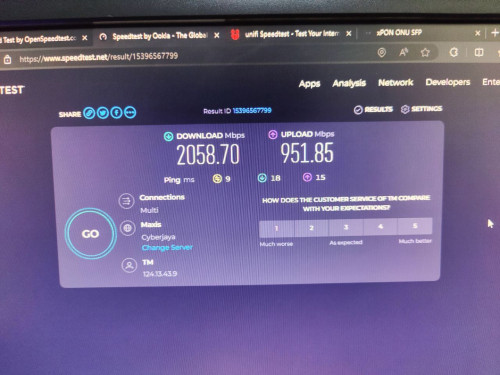 |
|
|
Oct 28 2023, 12:11 AM
Show posts by this member only | Post
#5
|

Newbie
2 posts Joined: Jul 2017
|
QUOTE(froz3nnoob @ Oct 27 2023, 10:30 PM) Anyone using unifi 2 GBPS ? so far how was the speed ? Ok, not bad. Just the TPLINK- Deco BE85, haizzz. Upload got issue for second unit. need to use wired.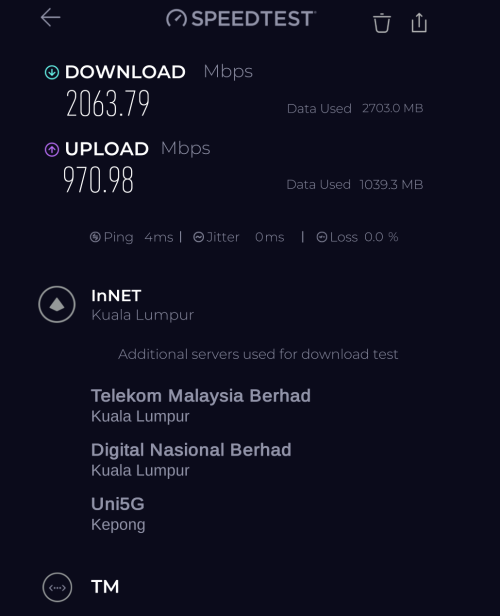 |
|
|
Oct 28 2023, 01:36 AM
Show posts by this member only | IPv6 | Post
#6
|
|
Probation
32 posts Joined: Oct 2019
|
The speed and performance of a 2 Gbps internet connection can vary depending on various factors, including the quality of your equipment, network congestion, and the capabilities of the websites or online services you're accessing. In general, a 2 Gbps connection should provide very fast and reliable internet speeds for most applications, including streaming, online gaming, and large file downloads. However, it's essential to ensure that your devices and internal network infrastructure can handle such high speeds.
|
|
|
|
|
|
Oct 28 2023, 11:59 AM
Show posts by this member only | Post
#7
|
|
Senior Member
837 posts Joined: Oct 2006 From: Malaysia
|
QUOTE(Anime4000 @ Oct 28 2023, 12:21 AM) Very good QUOTE(kw.G @ Oct 28 2023, 01:11 AM) Ok, not bad. Just the TPLINK- Deco BE85, haizzz. Upload got issue for second unit. need to use wired. I wanted to do upgrades too, can u guys help me do a ping test and let me know whats the ping ? I worry if i upgrade ping still same 😔 |
|
|
Oct 28 2023, 12:22 PM
Show posts by this member only | Post
#8
|
|
Senior Member
1,882 posts Joined: Sep 2017
|
QUOTE(froz3nnoob @ Oct 28 2023, 11:59 AM) I wanted to do upgrades too, can u guys help me do a ping test and let me know whats the ping ? I worry if i upgrade ping still same 😔 Speed upgrade does not affect latency.It will only get higher download or upload speed. Routing is the same for all plan. (The difference is depends on the public ip block) |
|
|
Oct 28 2023, 12:55 PM
Show posts by this member only | IPv6 | Post
#9
|
|
Senior Member
1,873 posts Joined: Nov 2010
|
QUOTE(go626201 @ Oct 28 2023, 12:22 PM) Speed upgrade does not affect latency. +1It will only get higher download or upload speed. Routing is the same for all plan. (The difference is depends on the public ip block) QUOTE(froz3nnoob @ Oct 28 2023, 11:59 AM) I wanted to do upgrades too, can u guys help me do a ping test and let me know whats the ping ? I worry if i upgrade ping still same 😔 If you means oversea server, go for VPN, you need better routing to fix the HIGH PING issues.Higher speed might only lower 1-2ms for oversea, but good routing can lower 50-300ms. |
|
|
Oct 28 2023, 01:41 PM
Show posts by this member only | IPv6 | Post
#10
|
|
Senior Member
2,400 posts Joined: Jul 2009 From: /dev/null
|
QUOTE(froz3nnoob @ Oct 28 2023, 11:59 AM) I wanted to do upgrades too, can u guys help me do a ping test and let me know whats the ping ? I worry if i upgrade ping still same 😔 after moving from Maxis to Unifi, my ping to Friend at Japan (Osaka & Tokyo) greatly reduced,TM has more peering compared with other ISP I live in Seremban, latency to SG (StarHub) under 10ms  kw.G liked this post
|
|
|
Jun 20 2024, 11:47 AM
|

Newbie
6 posts Joined: Jul 2005
|
QUOTE(kw.G @ Oct 28 2023, 12:11 AM) Ok, not bad. Just the TPLINK- Deco BE85, haizzz. Upload got issue for second unit. need to use wired. How do you set DECO BE85 to use it with Unifi 2Gbps plan? I just subscribed and it came with DLink AX3000 Combo Box. Did ask the technician is it possible to use 3rd party router. They said TM won't allow using 3rd party router.  Singh93 liked this post
|
|
|
Jun 20 2024, 11:50 AM
|
|
Newbie
6 posts Joined: Jul 2005
|
QUOTE(kw.G @ Oct 28 2023, 12:11 AM) Ok, not bad. Just the TPLINK- Deco BE85, haizzz. Upload got issue for second unit. need to use wired. Can you share with me how to setup DECO BE85 to use with this Unifi 2Gbps plan? |
|
|
Jun 20 2024, 01:39 PM
|
|
Senior Member
837 posts Joined: Oct 2006 From: Malaysia
|
QUOTE(Anime4000 @ Oct 28 2023, 02:41 PM) after moving from Maxis to Unifi, my ping to Friend at Japan (Osaka & Tokyo) greatly reduced, bro can u help ping this ? 103.10.125.146TM has more peering compared with other ISP I live in Seremban, latency to SG (StarHub) under 10ms thanks in advance  i use to get 104- 105 ping but recently jump to 298-296  This post has been edited by froz3nnoob: Jun 20 2024, 01:40 PM |
|
|
|
|
|
Jun 20 2024, 09:05 PM
Show posts by this member only | IPv6 | Post
#14
|
|
Junior Member
87 posts Joined: Jun 2011
|
QUOTE(froz3nnoob @ Oct 27 2023, 11:30 PM) Anyone using unifi 2 GBPS ? so far how was the speed ? 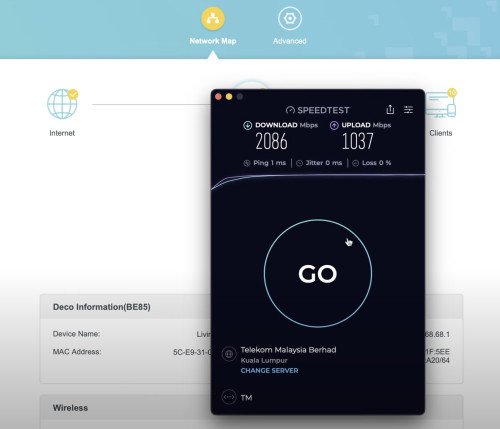 Speed was promising. Using the bridge mode from the D-Link DPN3060V-B1 (Black Unit) to my TP-Link Deco BE85. |
|
|
Jun 21 2024, 04:30 PM
|
|
Newbie
6 posts Joined: Jul 2005
|
I just subscribed to Unifi 2Gbps plan. It came with D-Link AX3000 DPN-FX3060V GPon WiFi Router Combo Box. I wanted to use TP-Link Deco BE85 with this setup. Should I use it as router or access point? Can any expert guide me step by step how to setup Deco BE85 to this Unifi 2Gbps plan?
Thank you in advanced Sifu!!  This post has been edited by msn_xander: Jun 21 2024, 04:30 PM |
|
|
Jun 21 2024, 05:39 PM
|
|
Junior Member
87 posts Joined: Jun 2011
|
QUOTE(msn_xander @ Jun 21 2024, 05:30 PM) I just subscribed to Unifi 2Gbps plan. It came with D-Link AX3000 DPN-FX3060V GPon WiFi Router Combo Box. I wanted to use TP-Link Deco BE85 with this setup. Should I use it as router or access point? Can any expert guide me step by step how to setup Deco BE85 to this Unifi 2Gbps plan? Is your D-Link DPN-FX3060V a white or black unit? If it's a black unit, set the Deco to router mode.Thank you in advanced Sifu!! 1) Login to your DPN-FX3060V WebGUI with the credentials below: Username: tmadmin Password: Adm@xxxx (xxxx is the last 4 digits of your MAC address of your D-Link ONU) 2) Go to Maintenance tab and backup the config first. 3) Make sure you have the Unifi PPPoE details with you. Username: example@unifi Password: xxxxxxxxxxxxxxxxxxx 4) Go to Wizard, Quick Setup, change the WAN Mode from GPON Router to GPON Bridge and apply changes. 5) Go to your Deco app, changed the Operation Mode to Wi-Fi Router. Insert your Unifi PPPoE details. Connection Type: PPPoE Username: example@unifi Password: xxxxxxxxxxxxxxxxxxx 6) Follow the screenshots below to configure the VLAN settings. 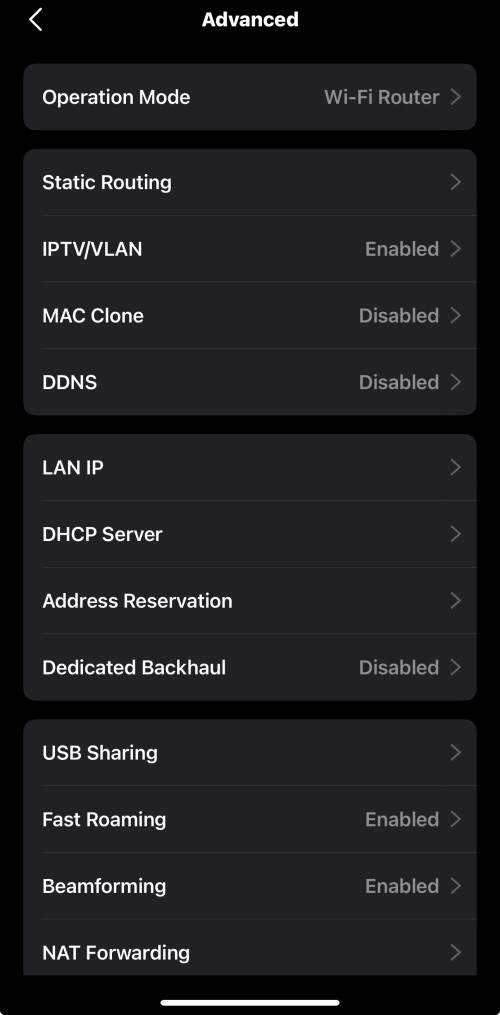 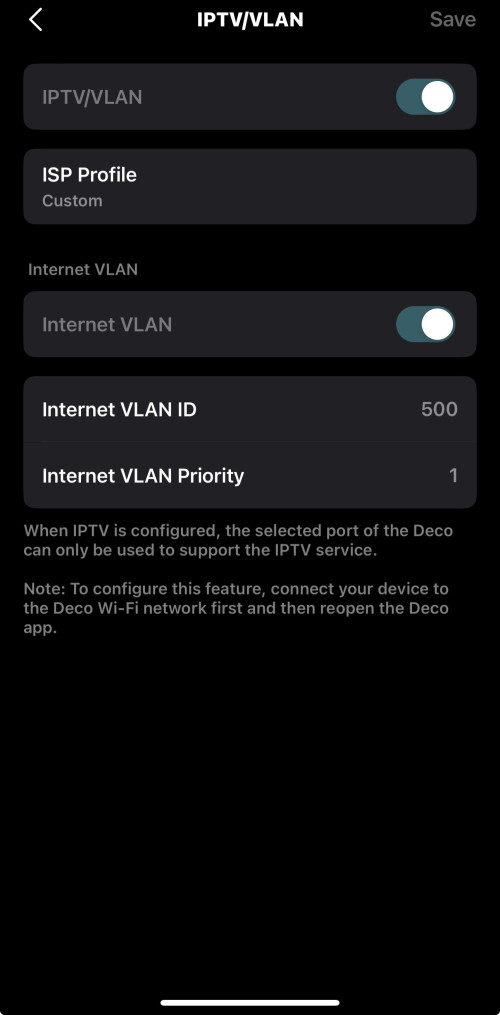 7) Configure your Wi-Fi networks. Hope it helps! |
|
|
Jun 21 2024, 06:22 PM
|
|
Newbie
6 posts Joined: Jul 2005
|
QUOTE(jonathanwhm @ Jun 21 2024, 05:39 PM) Is your D-Link DPN-FX3060V a white or black unit? If it's a black unit, set the Deco to router mode. Thanks for the guide Bro.. My DPN-FX3060V is white unit 1) Login to your DPN-FX3060V WebGUI with the credentials below: Username: tmadmin Password: Adm@xxxx (xxxx is the last 4 digits of your MAC address of your D-Link ONU) 2) Go to Maintenance tab and backup the config first. 3) Make sure you have the Unifi PPPoE details with you. Username: example@unifi Password: xxxxxxxxxxxxxxxxxxx 4) Go to Wizard, Quick Setup, change the WAN Mode from GPON Router to GPON Bridge and apply changes. 5) Go to your Deco app, changed the Operation Mode to Wi-Fi Router. Insert your Unifi PPPoE details. Connection Type: PPPoE Username: example@unifi Password: xxxxxxxxxxxxxxxxxxx 6) Follow the screenshots below to configure the VLAN settings. 7) Configure your Wi-Fi networks. Hope it helps! |
|
|
Jun 21 2024, 10:20 PM
Show posts by this member only | IPv6 | Post
#18
|
|
Junior Member
87 posts Joined: Jun 2011
|
QUOTE(msn_xander @ Jun 21 2024, 07:22 PM) Thanks for the guide Bro.. My DPN-FX3060V is white unit The white unit's max port speed is 1Gbps, so if you want to achieve the full 2Gbps speed, you should use the black unit instead. |
| Change to: |  0.0227sec 0.0227sec
 0.98 0.98
 5 queries 5 queries
 GZIP Disabled GZIP Disabled
Time is now: 20th December 2025 - 09:13 PM |
 Quote
Quote