QUOTE(firdausbhari @ Nov 21 2023, 05:02 PM)
QUOTE(mikey8811 @ Nov 21 2023, 05:23 PM)
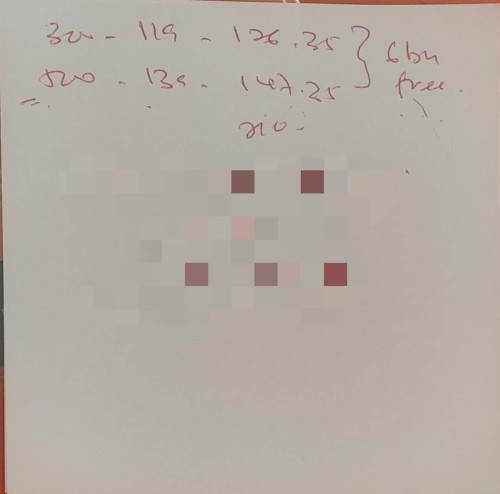
M6 = mesh WiFi 6Portal or app sometimes got bugs la. Actually originally swu3.0 119 is 300m upgraded to 500m. So 500m forever already
Unifi Official TM UniFi High Speed Broadband Thread V41, READ 1ST PAGE FOR RELEVANT WIFI INFO
|
|
Nov 21 2023, 06:15 PM
Return to original view | IPv6 | Post
#81
|
![]() ![]() ![]() ![]() ![]() ![]() ![]()
Senior Member
2,074 posts Joined: Sep 2021 From: nowhere |
QUOTE(firdausbhari @ Nov 21 2023, 05:02 PM) QUOTE(mikey8811 @ Nov 21 2023, 05:23 PM) M6 = mesh WiFi 6Portal or app sometimes got bugs la. Actually originally swu3.0 119 is 300m upgraded to 500m. So 500m forever already |
|
|
|
|
|
Nov 22 2023, 03:33 PM
Return to original view | IPv6 | Post
#82
|
![]() ![]() ![]() ![]() ![]() ![]() ![]()
Senior Member
2,074 posts Joined: Sep 2021 From: nowhere |
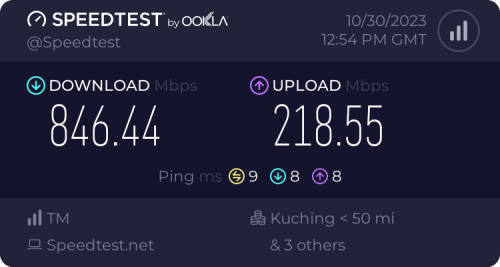
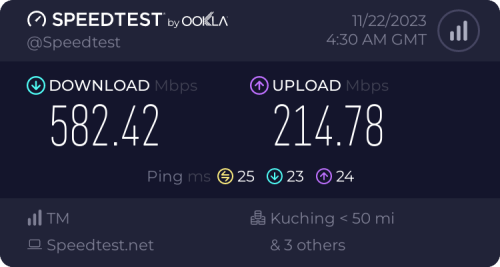
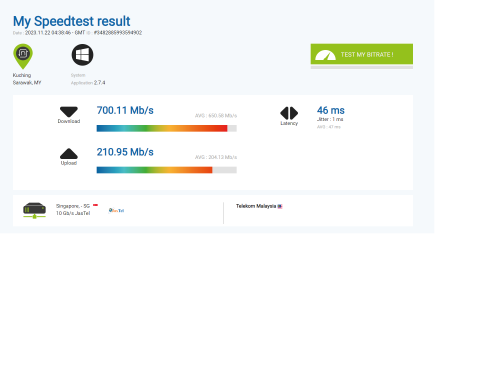
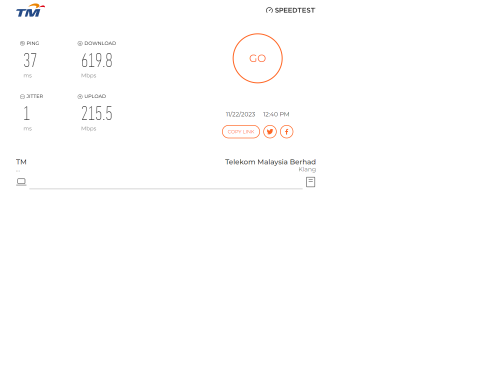
QUOTE(doket @ Nov 22 2023, 01:44 PM) i received my free upgrade from 500mb to 800mb at october. for the first month the speed seen promising. possibly the later reason (port congestion)![]() but starting this november, every times when i do a speed test, my download speed drop to 600- 615mb. upload speed still good. i am using asus RT-AC88U router. here is my speed results. ![]() ![]() ![]() here is picture of my modem ![]() call TM and some technical guy comeby and doing speed test and said cant do anything. it is either my router or the port box currently more then 2 users using 800mb speed. is that true? any solutions? should i replace my router? change router also no use in this case since you said able reach 800 last month maybe via wired lan |
|
|
Nov 23 2023, 03:07 PM
Return to original view | IPv6 | Post
#83
|
![]() ![]() ![]() ![]() ![]() ![]() ![]()
Senior Member
2,074 posts Joined: Sep 2021 From: nowhere |
|
|
|
Nov 26 2023, 12:08 AM
Return to original view | IPv6 | Post
#84
|
![]() ![]() ![]() ![]() ![]() ![]() ![]()
Senior Member
2,074 posts Joined: Sep 2021 From: nowhere |
|
|
|
Nov 26 2023, 12:10 AM
Return to original view | IPv6 | Post
#85
|
![]() ![]() ![]() ![]() ![]() ![]() ![]()
Senior Member
2,074 posts Joined: Sep 2021 From: nowhere |
QUOTE(tng55 @ Nov 25 2023, 10:16 PM) ![]() TM UNIFI should do something already. Other provider now keep doing a lot of offer and cut price. Now Astro Fibre even offer 500Mbps for RM90 per month and it is fixed price for 24 months. Just like some other carrier bundle with postpaid then only can cheaper fiber (looking at you sialkomdickgi) |
|
|
Nov 26 2023, 01:54 AM
Return to original view | IPv6 | Post
#86
|
![]() ![]() ![]() ![]() ![]() ![]() ![]()
Senior Member
2,074 posts Joined: Sep 2021 From: nowhere |
QUOTE(safe118 @ Nov 26 2023, 01:18 AM) Hi Everyone. Regarding the voice STD 20 monthly fee, can we terminate it anytime? Any penalty incurred? Dont know WTF with the TM Point staff, already told her that I dont want that & still included in my bill. Check your bill. If the std20 is actually charging zero then no point cancel it |
|
|
|
|
|
Nov 28 2023, 07:36 PM
Return to original view | IPv6 | Post
#87
|
![]() ![]() ![]() ![]() ![]() ![]() ![]()
Senior Member
2,074 posts Joined: Sep 2021 From: nowhere |
Tp link deco user: wat mat 7 u argue lol
Netis name so bad Liao, now kena rebadged jadi dlink for WiFi 6 default routers lol |
|
|
Nov 28 2023, 08:13 PM
Return to original view | IPv6 | Post
#88
|
![]() ![]() ![]() ![]() ![]() ![]() ![]()
Senior Member
2,074 posts Joined: Sep 2021 From: nowhere |
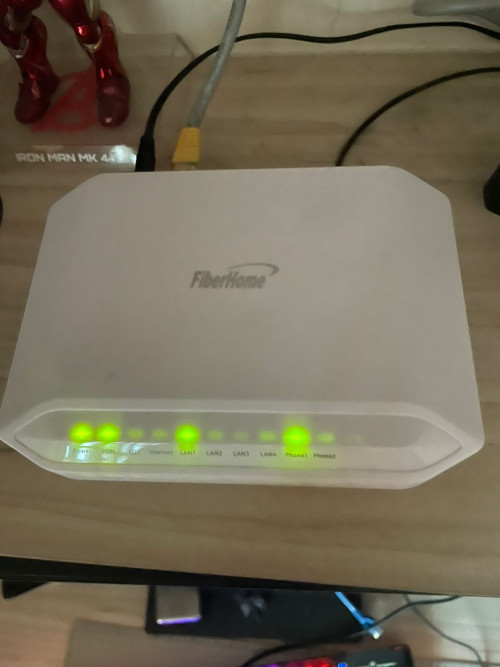
QUOTE(BenYeeHua @ Nov 28 2023, 07:46 PM) I will be interesting on FiberHome, the worst position is AC1200v2 which random reboot + 2 mins boot time(and corrupting packet, based on the only one special edition on my sister's house), who will be second? DNS relay was seen on dlink (850, 842) as well, but of course can off. Still for dlink custom model the TM DNS is kinda Hardcoded for some reasonsIgnore the Riger1 Riger2 Riger3 la, that one should not exist in this world, it should be burned!!! So far the FiberHome modem(Yes, modem) still running at my home town 24/7 hours non-stop last for >4 years, so gonna see how's the router. :thumbsup: But caused me tired and burned out again, lol. At least we know now, don't trust TM's DNS and infamous router's DNS Relay too much. C1200 is choosen fail chipset cause it's demise Above are among the worst of unifi default routers, if not mentioning az tech or some random TM brand routers which I bet is even worse than above BenYeeHua liked this post
|
|
|
Nov 29 2023, 11:38 AM
Return to original view | IPv6 | Post
#89
|
![]() ![]() ![]() ![]() ![]() ![]() ![]()
Senior Member
2,074 posts Joined: Sep 2021 From: nowhere |
QUOTE(zeese @ Nov 29 2023, 08:48 AM) Hi guys.. Will automatically removed. You can update the unifi app to latest and check from time to time in account informationI just switched from unifi+ unifi tv with streaming apps, to SWU 3.0. Now no more unifi tv, but the apps still valid (disney+, viu, spotv, bein sports). I wonder what will happens after it reaches next billing cycle. Is the streaming apps still valid and free to use without extra charge, or it will be automatically terminated? Or do I have to terminate the account mysef to avoid any charge? Can anyone share your experience? zeese liked this post
|
|
|
Nov 30 2023, 12:12 PM
Return to original view | IPv6 | Post
#90
|
![]() ![]() ![]() ![]() ![]() ![]() ![]()
Senior Member
2,074 posts Joined: Sep 2021 From: nowhere |
QUOTE(schrodinger_cat @ Nov 30 2023, 08:53 AM) Guys, need your opinion. Better downgrade to 300m/500m since 800m is very hard to achieve with wifi5 or even wifi6 over wallsI'm a Unifi 500mbps user and received the free 800 Mbps upgrade recently as well. Upon running speed tests across multiple devices (phone, laptop, and desktop PC), the WiFi speed is consistently topping at 200+ Mbps. The TM technicians came to my house and checked after I phoned to TM for assistance. They commented that the Deco M5 mesh router and satellite may not be up to to task to reach higher speed so they suggested upgrading the router instead, say something like a new WiFi 6 router. The router used to be able to hit 300-400 Mbps when it was bought new but not sure why it couldn't reach higher speed anymore. Is router deterioration a thing? (Edit: I tried rebooting and resetting the whole damn thing, problem remains the same) My main concern is that the internet DL speed could still be low after changing to a new mesh router. Do you guys think new router is warranted? This is because I don't feel it's fair that I'm paying for a 800 Mbps service but only getting 30% of the internet speed I paid for. Might as well downgrade to 300 Mbps instead if I'm only getting 200 Mbps consistently? I'm also looking at Deco X60 mesh router packs. What do you guys think about it? I'm living in a 2-storey house. If you have any other suggestions, please let me know as well. |
|
|
Nov 30 2023, 05:26 PM
Return to original view | IPv6 | Post
#91
|
![]() ![]() ![]() ![]() ![]() ![]() ![]()
Senior Member
2,074 posts Joined: Sep 2021 From: nowhere |
QUOTE(schrodinger_cat @ Nov 30 2023, 01:14 PM) 1. I installed Network Analyzer already. How do i know which one is overlapping network? I'm looking at Wi-Fi signal and I saw there are 12 networks including mine and most likely, neighbors. Might be because deco M5/M9 overheating (ipq4019 40nm tends to overheating so much especially in small body plus quad core cortex a7 1.0ghz is not very powerful )2. Yes. All of them showing 180-220 mbps on Speed Test. All connected through WiFi with only the desktop connecting via LAN to the Deco M5 satelite. 3. Understood. There are times when I'm streaming and gaming, other members would be on their phones and netflix. So yeah, more bandwidth will be good. Ipq4019 is easily got beaten by broadcom 28nm bcm675x family (3/4 core a7 at 1.5/1.7ghz) Upgrade to at least x50/x60/x68/XE75 should be great for regain the speed (x50/60 if plan to downgrade to 300m or 500m, otherwise better to choose XE75 or X95) |
|
|
Dec 3 2023, 10:57 PM
Return to original view | IPv6 | Post
#92
|
![]() ![]() ![]() ![]() ![]() ![]() ![]()
Senior Member
2,074 posts Joined: Sep 2021 From: nowhere |
SWU 4.0 (source from unifi members FB group) 300mbps rm119 500mbps rm139 Not sure is permanent speed after upgrade or before upgrade, if this is permanent speed, then swu4.0 promo price has hike a bit ![]() simmarjit liked this post
|
|
Topic ClosedOptions
|
| Change to: | 0.2365sec
0.76
7 queries
GZIP Disabled
Time is now: 4th December 2025 - 07:57 PM |