Welcome Guest ( Log In | Register )

Outline · [ Standard ] · Linear+

 U Home 5G

views
     
Subrex
post Oct 16 2023, 12:59 PM

New Member
*
Newbie
13 posts

Joined: Feb 2013


Hello, i need some help... Been complaint to umobile customer service and still not resolve after waiting for 3 weeks+ ....

So, I bought the sim card 2 month ago and there was no problem at all. But the problem starts after network disruption due to tower problem in my area 2 weeks ago. I only able to open playstore, chrome, youtube , vpn and whatsapp without any problem. But other app such as their own umobile, digi, celcom, all games and youtube on smart TV can't even be connect. All the apps that have problem can be use if i connect using VPN. I also ask all my friends that uses umobile and they don't have the problems using the prepaid sim. Call the customer service to complaint for few times and problem not solve at all.

My sim was first insert to Huawei B593s-516 without any problem, and now it cannot be use anymore. Blackshark 1, Xiaomi Mi 10t pro and all the other phones that i borrow from my friends to test also getting the same problem. When i test using Tenda 4G185 mobile wifi, it's suddenly works fine and all the apps can be open normally. But the mobile wifi have problem with it's battery that need to be charge frequently. So, I use it while waiting for the modem that recommend on u 5g home - ZTE MF286c to arrive. Yesterday got the modem and try it out, went back to the same problem with just an increase on speedtest on new modem.....
Subrex
post Oct 16 2023, 02:25 PM

New Member
*
Newbie
13 posts

Joined: Feb 2013


QUOTE(BOTAK_WAI @ Oct 16 2023, 01:51 PM)
all your devices mentioned not support 4G b28 band.

you try set your MF286C locked to b28 only and see how.

follow the video for lock band tutorial
https://www.youtube.com/watch?v=p_GoDy8jwJk

if your MF286C don't have lock band option then follow the video for javascript method.
https://www.youtube.com/watch?v=giGz7J38XvA
*
Thx for the info, will try it tonite.

Update: tested whole night and nothing works, seems like the guide only works on mf286d with TIM and ELISA firmware... Also its too complicate for me... 😅😅

This post has been edited by Subrex: Oct 16 2023, 10:58 PM
Subrex
post Oct 19 2023, 06:45 PM

New Member
*
Newbie
13 posts

Joined: Feb 2013


QUOTE(BOTAK_WAI @ Oct 18 2023, 11:52 AM)
so your mf286c no option to lock band?
step 1: open this website and copy the code
CODE

https://miononno.it/files/zte-v3.0b.min.txt


step 2: login to your mf286c router on pc web browser

step 3: after you login to your router, press F12 to enable "developer mode"

step 4: find "Console" tab on top (maybe hidden in "»")

step 5: paste the code into the blank column, press enter

step 6: if success your router page will appear the option on top
*
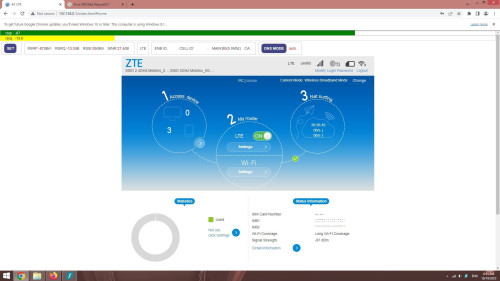
Thx for the guide, and it works well notworthy.gif notworthy.gif

user posted image
Subrex
post Oct 19 2023, 08:28 PM

New Member
*
Newbie
13 posts

Joined: Feb 2013


QUOTE(BOTAK_WAI @ Oct 19 2023, 07:05 PM)
so set to lock b28 works to solve your problem?
*
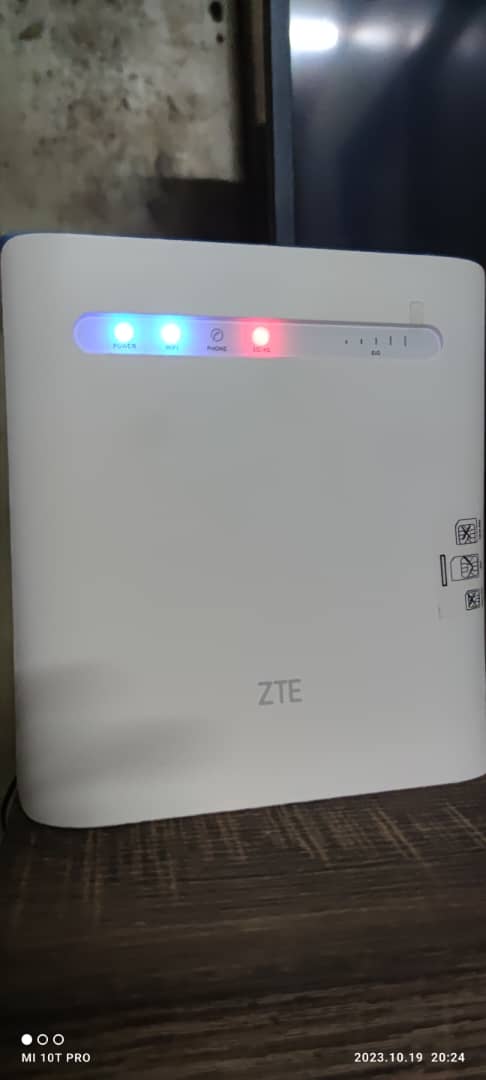
I tried to lock at 28 and my modem signal went straight to no bar.
The default band was Main: b3(15.0Mhz) CA: 8

user posted image

This post has been edited by Subrex: Oct 19 2023, 08:53 PM
Subrex
post Oct 19 2023, 08:54 PM

New Member
*
Newbie
13 posts

Joined: Feb 2013


QUOTE(BOTAK_WAI @ Oct 19 2023, 08:47 PM)
means your area no 5G coverage?
5G need b28 + n78 to work
normally 4G can lock to b28 to get above 30mbps

or mf286c not support b28?

btw, mf286 series use external antenna can get better signal.
*
My place only got 4G+ signal
Subrex
post Oct 29 2023, 10:28 AM

New Member
*
Newbie
13 posts

Joined: Feb 2013


QUOTE(MegaThroned @ Oct 26 2023, 11:12 PM)
I use U home for almost 2 month. it seems sometimes Umobile restrict speed for ftp download (i use seedhost.eu). Ookla speedtest can get 1Gbps, but download speed only can reach around 8mbps. Not happened everyday, but i suspect they purposely restrict it. When I turn on VPN, download speed return to normal which is 1++MBps. If anyone facing the same issue, can share too.
Planning to switch to YES after this.
*
Yours is speed restrict, mine is apps, device restrict...hohoh...until now still figuring on how is this happen. When put in modem(2 modem that i mention in page 25), almost all the apps beside youtube, playstore, chrome, vpn unable to connect. But when i use portable wifi modem - Tenda 4G185 (huawei e5577-321 also have problem), i able to use it like normal. Now i just use tenda since it's the only modem that work. Although the guides and tips by expert in this forum doesn't help me solving my problem, but i've learn how to check and change band on my modem. I also having problem with this telco after 2 months using it. Bought it because of the affordable price and Uncapped speed even that my place only have 4g+ signal.

Edit: i also need vpn to bypass all the unuseable apps. On smart tv, vpn is the only way to able to open youtube. The connection straight get limit on my laptop. Its mind boggling.

This post has been edited by Subrex: Oct 29 2023, 10:38 AM
Subrex
post Oct 29 2023, 11:49 PM

New Member
*
Newbie
13 posts

Joined: Feb 2013


QUOTE(lurkingaround @ Oct 29 2023, 12:37 PM)
.
Did you "illegally" use a VPN to bypass the P2P restriction or did you use excessive data/bandwidth daily or weekly or monthly before you were apps and device restricted by U Mobile.?

.
Note that the monthly FUP limit of 1000GB for U Home 5G may have been translated by U Mobile to an FUP limit of 240GB weekly and 33GB daily.
.
*
I only use vpn to read some raw manga to avoid some malicious pop up link from that website - klto9.com. Never reach the FUP since i also have other telco to switch to, only will use it connect when digi( infinite 150) is down at my area. Most of the time will use digi to connect to smart tv + laptop and umobile for tablet + phone. I only get those problem when i insert the simcard into zte MF286c, huawei b593s-516, xiaomi blackshark 1. The apps that cannot be access are Umobile, digi, all the games that i use to play or still play.

When i download and update those game in playstore, the speed is fast. But i cant even connect to the games when open the games, all of the games show "unable to connect to server". These are all the games that i tried : ygo master duel, monster hunter now, maplestory m, ragnarok mobile, ragnarok x, and more.

[url=https://pictr.com/image/EccEGj]
user posted image[/url]
One of the error show in game that i open
user posted image
The only device that able to function normally. The only problem its that it cannot connect to my laptop.....

My highest usage was last month - 100gb only.
Subrex
post Oct 30 2023, 01:06 AM

New Member
*
Newbie
13 posts

Joined: Feb 2013


QUOTE(BOTAK_WAI @ Oct 30 2023, 12:21 AM)
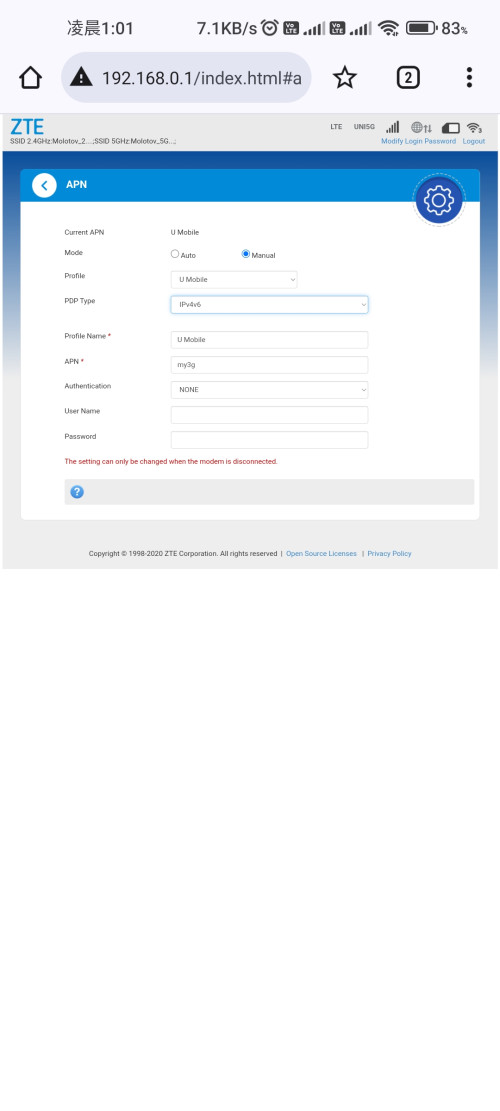
by the way, your apn setting there got choose both IPv4 & IPV6? try playing with that setting and see how it goes. (remember restart client device to refresh IPv6 address)
*
I put on ipv4/v6 last time, right now unifi #bebas sim was insert in there. Will try it when im free.

user posted image

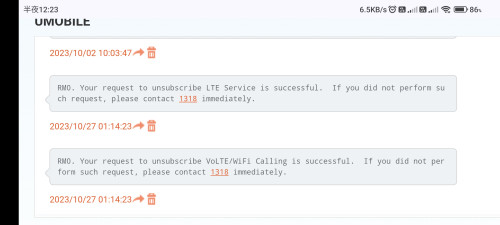
And i just shock that i suddenly get this messages because i didnt even request for it. How did this happen? Is my number a dupe number?

user posted image
Subrex
post Oct 30 2023, 12:43 PM

New Member
*
Newbie
13 posts

Joined: Feb 2013


QUOTE(w00t @ Oct 30 2023, 10:18 AM)
It happened to my Uhome 5G SIM too in my Zyxel NR5103e modem router, received those SMS messages which I never initiated on my end. Also noticed intermittent and unstable 5G connection lately happened since could be a coincidence or could be their system having issues or messed up? hmm.gif
*
I just call the customer service and she said that my sim still function like normal, they're just performing some service shut down for things that mention in the sms. So when you put the sim card in your phone, you will not able to do voLTE/wifi calling anymore. I didn't pay
much attention to what she says after know that my network are fine.
Subrex
post Oct 30 2023, 05:02 PM

New Member
*
Newbie
13 posts

Joined: Feb 2013


QUOTE(lurkingaround @ Oct 30 2023, 01:35 PM)
.
The problem could be your device or OS firewall  or router settings (eg for ports). .......

https://www.quora.com/Why-cant-I-connect-to...se-the-internet - Why can't I connect to online games, but I can use the internet? - 4y ago - eg, .......
Marius Malmstrøm
Former Furniture Fitter (2005–2005) 5y

Probably has something to do with either your router or your firewall,
one of those are probably blocking the ports necessary for playing online games.

1. Try turning off your firewall and see if that helps,
if that is indeed the problem, either try allowing the game throught the firewall or try using another firewall.

2. If that doesn’t help, check out your router settings to see if it blocks certain ports, this page might help you view/change settings: How to Configure a Router
PS. Depending on what game you’re trying to play,
different ports needs to be opened,
if you’re trying to play World of Warcraft,
these ports needs to be open:
Configuring Router and Firewall Ports

.
*
The weird thing is that it was working like normal for 2 months. I bought it during July and plug in to huawei b593 and it's working fine, then the problem starts after tower been fixed because of network down due to tower problem at 23 sept.

Thanks for helping me finding some guides to fix the problem though, i will try it out tonight. If its still the same, i will bring it to my friend place at other town to see if it's the same or not during my off day.

UPDATE: Checked my firewall setting and all of the port filtering, port fowarding, URL filtering, UPnP, DMZ are disable. Also tried the changing ipv4 v6 and it didn't work.

This post has been edited by Subrex: Oct 31 2023, 06:38 AM
Subrex
post Nov 6 2023, 05:40 PM

New Member
*
Newbie
13 posts

Joined: Feb 2013


Damn I just wasted a whole month frustrated about how to solve my router connection problem. In the end, all I have to do was bring my router to other city to debug the simcard. Today when to other town and bring the router to my friend's shop to test see if it's also have to same problem. There was no problem after tested, laptop able to connect smoothly, all the apps able to connect and the frequency at the area also band 3+8. Gone back home to test it agian, see if the problem still occur. And magically "walla~" , all the problem have been solve.
Subrex
post Nov 7 2023, 12:37 AM

New Member
*
Newbie
13 posts

Joined: Feb 2013


QUOTE(Gold_Moderator @ Nov 6 2023, 07:41 PM)
Mind to share which is the lucky town ?
*
Just go to any city far from your own town to test it out. I live in a small town that it's nearest city is locate about 59km away from my place at Sarawak. And I think this "bug/error" was due to subcontractor that mess up the cell tower setting when repair.

I also had this problem for unifi #bebas few years ago. The simcard that I put in huawei b593 will sometimes get no signal after sudden blackout or cell tower problem had been fixed. But for this, i only need to insert the simcard to my phone to debug it agian.

This post has been edited by Subrex: Nov 7 2023, 12:40 AM
Subrex
post Nov 7 2023, 05:36 AM

New Member
*
Newbie
13 posts

Joined: Feb 2013


QUOTE(Gold_Moderator @ Nov 7 2023, 02:57 AM)
u try reset modem ?
*
Nope, didn't reset the modem/router at all.Because my connection problem wasn't coming from the router.

I am abit confuse right now that why did you asking me bout that. My problem that been bother me for a month had been resolved. You can check on my previous comment. @BOTAK_WAI & @lurkingaround was helping to provide some guides to help me at that time. Eventhough it doesn't work, but I able to learn something for future use. Hehe..


Change to:
| Lo-Fi Version
0.1187sec    0.64    7 queries    GZIP Disabled
Time is now: 12th December 2025 - 04:07 AM