Welcome Guest ( Log In | Register )

Outline · [ Standard ] · Linear+

 U Home 5G

views
     
Dothan
post Aug 10 2023, 10:00 AM

Dingle Berries
******
Senior Member
1,053 posts

Joined: Jan 2003


QUOTE(petpenyubobo @ Aug 9 2023, 08:01 PM)
Due to DNB's bad taste and selection to choose Ericsson, avoid China branded chipsets such as Unisoc, Balong(Huawei) and ZTE if possible.

The most compatible 5G modem chipsets you should lookout for phones and fixed modems are Mediatek or Qualcomm's Snapdragon based ones.

This is until ZTE and Huawei is given the chance to build the 2nd wholesale 5G network in future. Until then avoid modems/phones which uses China branded ones.

They never learned even after TM's failed HSBB network which until today tries to monopolize the entire nation's fixed fibre network. See how our national wholesale pricing for fibre broadband lines unable to progress forward and lower significantly in pricing due to bad monopolistic prices. PH is moving forward by allowing TNB Allo and TIME now to service landed homes instead.

DNB was the same thing dog biting back its own tail move.
*
Sorry to say I disagree about your opinion.

Bad decision in chosing Ericsson? Based on what? Based on your choice of phones?

Dothan
post Aug 11 2023, 08:37 AM

Dingle Berries
******
Senior Member
1,053 posts

Joined: Jan 2003


I just sign up for this package. On 5G full bar, I can achieve 450Mbps on iphone 12 on fast.com. 4G 3 bars also pretty good experience in my hilly area.
Dothan
post Aug 13 2023, 04:31 PM

Dingle Berries
******
Senior Member
1,053 posts

Joined: Jan 2003


QUOTE(Pip_X @ Aug 13 2023, 03:43 PM)
Ok new setup:
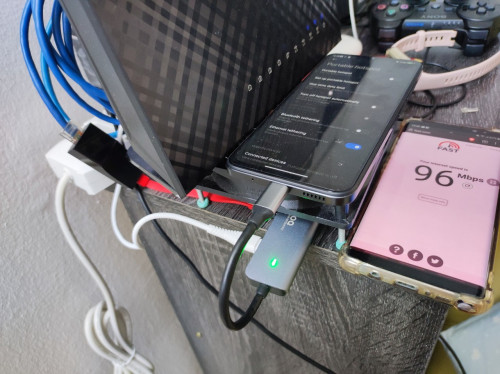
Phone cucuk usb hub cucuk lan adapter connect to router WAN

user posted image

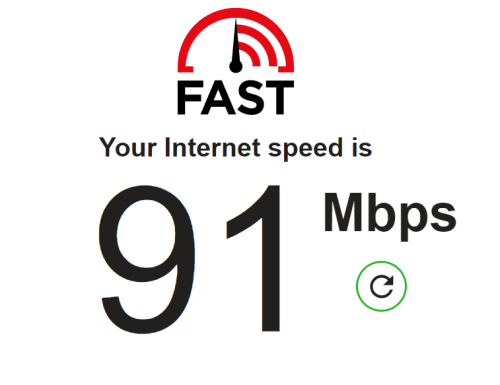
Averaging 100mbps.
96mbps is lowest out of like 10 tests.
Try a week see how while survey a cpe.
So far either that 3 logo cpe or tp link x50 5g.
*
Just pre-order TP Link x50 5G on lazada, only 1 seller. It is packed, should be arriving in 2 days.
The reason I try to avoid those UK telco CPEs because you hardly see firmware version upgrade.

TP Link is more reliable in my opinion.
Dothan
post Aug 14 2023, 05:56 AM

Dingle Berries
******
Senior Member
1,053 posts

Joined: Jan 2003


QUOTE(brandonkl @ Aug 13 2023, 11:07 PM)
Can you share the link in Lazada? I can't seem to find it.
*
Here you are: TP Link x50 Deco 5G

QUOTE(wanttobuylaptop @ Aug 14 2023, 12:46 AM)
I am using x50-4g for two years, 0 firmware update.
They dont really update their mobile internet line up. Check tplink forum you will see some complain too.
Perhaps they will change for 5g?
*
Oh really? My experience based one their wifi router. First time buying their 5G CPE.
Dothan
post Aug 14 2023, 01:33 PM

Dingle Berries
******
Senior Member
1,053 posts

Joined: Jan 2003


[quote=brandonkl,Aug 14 2023, 11:04 AM]
[quote=Dothan,Aug 14 2023, 05:56 AM]
Here you are: TP Link x50 Deco 5G
Thanks. Update us when you receive it. Hope it is not a "pre-order" as I see the seller hasn't sold any units and this device is officially not available in Malaysia yet.
*

[/quote]

eh... already 2 unit sold (supposedly 1 of them is mine).
Anyway, I will feedback the usage after unboxing.
Dothan
post Aug 15 2023, 03:15 PM

Dingle Berries
******
Senior Member
1,053 posts

Joined: Jan 2003


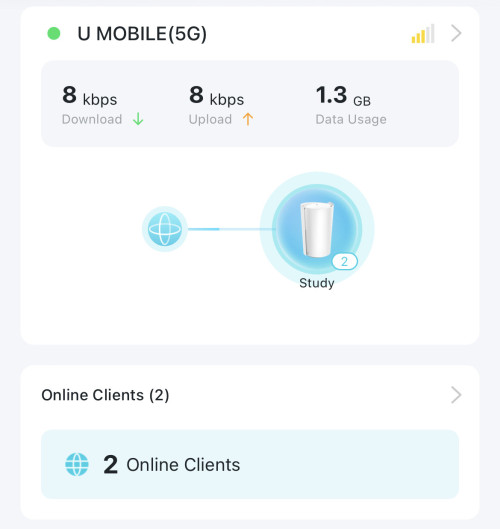
Alright guys, my TP link x50-5G just arrived and immediately I setup with the U Mobile Home 5G sim.

It takes nano sim and just insert at the bottom.

As my apartment is at hilly area, facing the hill. The best 5G reception is at my living room near balcony.
user posted image

You can see I got 3 bars of 5G reception.

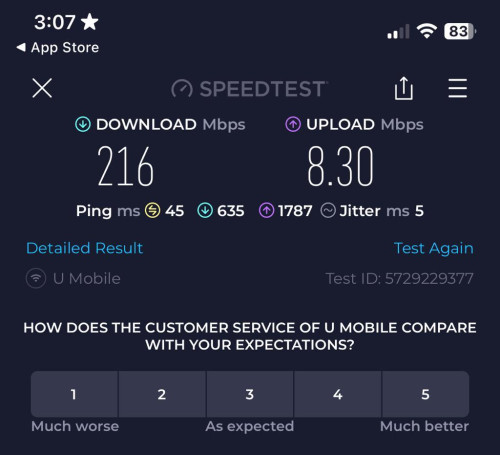
The speed test speed was around download 200 Mbps and upload 10 Mbps.
user posted image

Very quiet, no fan whining. I got the firmware update notice after I just completed setting up using the Deco app.

This post has been edited by Dothan: Aug 15 2023, 03:18 PM
Dothan
post Aug 15 2023, 03:19 PM

Dingle Berries
******
Senior Member
1,053 posts

Joined: Jan 2003


QUOTE(BOTAK_WAI @ Aug 15 2023, 03:17 PM)
try if lock to 4G B28 only without 5G and see if the upload speed is still so miserable?
*
I will try... but I don't give great hope as my balcony is facing hills and not facing the 5G tower.
Dothan
post Aug 16 2023, 08:33 AM

Dingle Berries
******
Senior Member
1,053 posts

Joined: Jan 2003


QUOTE(blacktubi @ Aug 15 2023, 09:06 PM)
That's quite a decent speed for that signal.

I wish TP-Link will let us to boost the fan speed as I find the default fan curve is too conservative.

When the device is just powered on, the fan will run at max RPM for a few seconds before the silent fan profile kicks in.

Anyways, may I know what's the speed you got on your 5G phone? For my case, the Deco X50-5G performs better than my iPhone 12 Pro.

I suppose newer phones with better Qualcomm 5G modem should perform better.

PSA: The Deco X50-5G comes with Snapdragon X62. I have a short review here if anyone is interested.
*
On my iPhone 12 (not pro), I got around 450 Mbps during 5G full bars. But in my apartment, only 4G (not even 4G+).
Definitely the x50 5G has better reception since it can do 5G 3 bars comparing to my phone at same location.

Ya, the fan profile is very quiet and the router itself does not get hot either. Maximum I can say is like little warm after whole day usage.

QUOTE(Gold_Moderator @ Aug 16 2023, 07:36 AM)
Got photo shown all the ports it’s has ? What type of charger given in the box or they follow google, Apple and samsung, did not provide charger ?
*
It is a full fledge router with 5G capability, the power adaptor is 12V 2A round shape plug. Port wise, it was 2.5Gbps WAN port for typical PPPoE. Another two 1 Gbps LAN ports. It has 2 Reverse Polarity SMA Female socket for better 4G/5G reception, antennas are not included though. It does not have battery built-in. Not 5G Mifi modem.
Dothan
post Aug 16 2023, 01:45 PM

Dingle Berries
******
Senior Member
1,053 posts

Joined: Jan 2003


QUOTE(blacktubi @ Aug 16 2023, 10:47 AM)
Nope, it will always be routed through Deco.

However, it can function as a Unifi router and use 5G as backup.
*
Actually it can be configured as AP router mode to let main router to do all the NAT, DHCP, routing and etc.
In fact the TP Link support page for this router has shown the options in youtube video.


For this video, it is using Starlink router as example. We can do the same for Unifi/Time/Maxis/Digi and etc router.
Dothan
post Aug 17 2023, 09:51 AM

Dingle Berries
******
Senior Member
1,053 posts

Joined: Jan 2003


QUOTE(asusx @ Aug 17 2023, 08:31 AM)
please rate my setup

zyxel nr5101
asus RT-AX56U

i purchased the umobile rm38 first..to test...and got almost 600mbps..and purchased the modem....nr5101....and suddenly no 5g....wadapuk...hahahhaha..and now i just continue using my i100s ....LOL
but after change from b618 to nr5101... my speed increase even still stick on 4g+
[attachmentid=11476388]
[attachmentid=11476393]

[attachmentid=11476395]
is there any method to make it moded?
[attachmentid=11476396]
*
If you have intention to use Asus router as Wifi AP, then turn off the NR5101's wifi.
Dothan
post Dec 4 2023, 01:32 PM

Dingle Berries
******
Senior Member
1,053 posts

Joined: Jan 2003


QUOTE(Keehj @ Dec 2 2023, 05:47 PM)
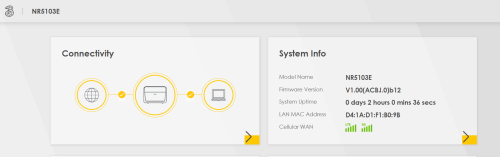
Hi, have a question here. I am using yes5g RM58 + Zyxel 3UK NR5103E (bought at Shopee).
I check my 5g bar always full, but the internet speed always caps around 80-100mbps.
What's the issue?
The seller asked me to buy an antenna, and said it would help, but my 5g bar is already full, so will it help?

*I have done lock band B28 and N78.

Thanks

user posted image

user posted image
*
It could be your area's 5G tower is faulty due to misconfig or overloaded.
I found the same issue at my office area where 5G full bar but UMobile speedtest sucks.

Dothan
post Jan 19 2024, 11:12 AM

Dingle Berries
******
Senior Member
1,053 posts

Joined: Jan 2003


QUOTE(frykko @ Jan 18 2024, 08:23 PM)
I'm following your post as I'm in the same shoes as you. Is your problem solved? Mine,family line 38 also cannot hotspot from a 5g router.
*
Typical telco method to prevent hotspot sharing is to count the default hop limit in your traffic packets.
For windows, you may reduce the default hop limits by adding 1, then you may bypass the limitation.

Impossible to change default packet hop limit on iOS unless you jailbreak, same for Android phones requiring rooting.

This post has been edited by Dothan: Jan 19 2024, 11:12 AM
Dothan
post Mar 15 2024, 06:51 PM

Dingle Berries
******
Senior Member
1,053 posts

Joined: Jan 2003


QUOTE(FusionXY @ Mar 15 2024, 06:03 PM)
Should I get U Mobile with Router Plan?  hmm.gif  hmm.gif
Currently using U Mobile U38 Plan.
So far everywhere good with 5G in Penang.

Does living high floor will have better speeds?
Since my sister's house at higher floor.
*
depends on how high your floor is. Example, I stayed in an airbnb unit which is at level 58 (Lucentia Lalaport). Guess what, the 5G signal is not strong unless putting the router at balcony rolleyes.gif
Dothan
post Mar 15 2024, 07:14 PM

Dingle Berries
******
Senior Member
1,053 posts

Joined: Jan 2003


QUOTE(FusionXY @ Mar 15 2024, 06:56 PM)
What about 45th Floor? Does the AIRBNB unit within the 5G Coverage aka the Orange Area?
If 5G don't have then auto switch to 4G?
*
The location is in the prime spot of Bukit Bintang where there are multiple 5G towers.
If I am not putting at balcony, it will fall back to 4G/4G+ and U Mobile 4G speed is pretty slow, around 30Mbps-ish max.
Dothan
post May 14 2024, 02:38 PM

Dingle Berries
******
Senior Member
1,053 posts

Joined: Jan 2003


QUOTE(kishinzeo @ Apr 29 2024, 02:00 AM)
Hi sifus. Super lurker here.
So after researching around for weeks, I'm kinda leaning for the Zyxel NR5103e at this point of time (at least for the sub RM 1000 price range).

Feel free to inform if you encountered any of these/solved the issues/have daily annoyance with any of the routers mentioned.

My concerns here are mostly on day to day stability since that's a common factor that anyone can relate with while speed is practically YMMV.

So I start my findings with possible issues first:

TP Link NX510V
May auto reboot itself - https://old.reddit.com/r/TpLink/comments/18...booting_itself/
Corroborated by threads in here. Can be very disruptive if working remotely and in meetings

TP Link Deco X50 5G
Disconnection issues with red light displayed, possibly due to carrier setting being set to "auto": https://community.tp-link.com/en/home/forum...replyId=1327572
Purported fix is to just set the carrier yourself.

Arcadyan AW1000 - Custom OpenWRT is still very WIP
I scanned thru the main forum with latest discussion - https://forum.openwrt.org/t/arcadyan-aw1000...-ipq807x/122307
Might be some key things to look out for - https://forum.openwrt.org/t/arcadyan-aw1000...q807x/122307/75

Nokia Fastmile (v1)
May need to lock-in these settings: https://forum.lowyat.net/index.php?showtopi...ost&p=109104026
I remember seeing a post where the modem may switch to 4G haphazardly. Since it has no band locking, this may be a major issue.
Second factor: Heat management, especially for those who'll use it as sole 5G + Access Point
Have internal fan:
Zyxel NR5103E - Disassembly: https://www.ispreview.co.uk/talk/threads/zy...assembly.38870/
TP Link Deco X50 - Disassembly: https://www.blacktubi.com/review/deco-x50-5g/
TP Link NX510V - Disassembly: https://www.blacktubi.com/review/tp-link-nx510v/

No fan inside:
Telstra 5G Arcadyan AW1000 - Disassembly: https://www.youtube.com/watch?v=zdhK0ypTaOM

Hard to find any info on, except those in here:
GTENIQ IQ02X55
I'm still researching more on the Zyxel NR5103e but so far, it seems like it has the least red flags (and risks) out of the choices being thrown in the forum.
Feel free to correct me or update if there's anything better. Thank you very much!
*
TP Link x50 5G user here... has been travelling with me between KL and Penang. Pretty solid performance, the only I set is daily scheduled reboot at 6:30am to refresh itself. So far no issue.

Dothan
post May 31 2024, 07:07 AM

Dingle Berries
******
Senior Member
1,053 posts

Joined: Jan 2003


the latest x50-5g firmware allows freq locking now.
Dothan
post Aug 12 2024, 01:59 PM

Dingle Berries
******
Senior Member
1,053 posts

Joined: Jan 2003


In my new house, I am glad that I get full 5 bars 5G connection. The speedtest speed can reach 600Mbps download and upload 150Mbps.

I guess 5G speed depends on how congested/how many users are connected concurrently.
Dothan
post Jun 25 2025, 10:55 AM

Dingle Berries
******
Senior Member
1,053 posts

Joined: Jan 2003


I found out the deco x50 5G connected to U mobile 5G only on B28 band in my area. Anyway to force to get B28, N78?
Dothan
post Jun 25 2025, 12:48 PM

Dingle Berries
******
Senior Member
1,053 posts

Joined: Jan 2003


QUOTE(cloudwan @ Jun 25 2025, 12:35 PM)
Is your 5G connection spotty in your area? It could be the modem hard to lock on the N78 band  hmm.gif
*
During lunch hour till evening, the speed will crawl like turtle
Dothan
post Jun 25 2025, 01:37 PM

Dingle Berries
******
Senior Member
1,053 posts

Joined: Jan 2003


QUOTE(cloudwan @ Jun 25 2025, 01:11 PM)
Can't do much then, i think your place is oversaturated with users during peak hours, need to wait and see if by UM building for the 2nd 5G network would lessen the load then.  hmm.gif
When more users going to 5G network u can really see the speed drop, i used to get around 600mbps dload even at peak hour at my place, but nowadays speed would be around 200-300mbps daily.  sweat.gif  sweat.gif
*
still ok if down to 200mbps... here is just crawling... 20mbps max, sometimes 3mbps.

Not speed throttling by UM.

2 Pages  1 2 >Top
 

Change to:
| Lo-Fi Version
0.0802sec    0.53    7 queries    GZIP Disabled
Time is now: 4th December 2025 - 03:38 PM