Outline ·
[ Standard ] ·
Linear+
My 1st macOS device and short review & impression
|
TSAndrewtst
|
 Jun 17 2023, 02:07 PM, updated 2y ago Jun 17 2023, 02:07 PM, updated 2y ago
|

|
MacBook Pro 14" 2023 - My 1st macOS device and short review & impression.  My short review of macOS from an all-time Windows user My short review of macOS from an all-time Windows user. Pros- The macOS interface is very nice, this one Microsoft Windows still behind even on Windows 11. They are no inconsistency design issue at all. The animation also damn nice and smooth. Just why they are no reopen and close animation.
- The sound quality is much better especially the equalizer on Apple Music app and Apple Music app is damn stable, not like in Windows. Apple is usual cannot make apps good at others platform.
- The way Apple implemented HDR is damn cool and different (on their internal MacBook Pro screen only) where they are no switching of screen and it looks stunning, Apple call it XDR. This is not the case when you connected to 3rd party monitor, it will use back standard way HDR that need to switch not XDR. XDR is the display implemented by Apple device only, they is no 3rd party monitor or TV support XDR.
- Scaling at macOS is different, it looks clear and sharp in not native resolution on games. This is not the case at all in Windows, Windows will look blur when not in native resolution. Apple use a different way of approach resolution scale, they are no resolution switch appear on display, I think Apple using algorithm to downscale the resolution instead of changing the resolution. This is the method why it still looks damn sharp in not native resolution.
- Scaling at macOS for desktop is also sharp and clear but with performance impact, the minimize animation looks obvious lagging. As for scaling in native resolution in windows will make older apps blur but no impact on performance. No OS did perfect on scaling but macOS slightly better as no apps will blur.
- For MacBook Pro, it was great Apple design to included HDMI 2.1 as Thunderbolt 4 is no longer enough bandwidth for current higher refresh rate monitor in market now. The Thunderbolt 4 only can support 4K in 60hz but by using HDMI 2.1, you can get up to 4K in 240hz.
- The search in macOS is much better even on Safari browser, you get instant recommendation by typing few keywords only and the recommendation on the 1st is always the one I want to access.
- The M2 Pro chipset do can gaming, finally Apple is look into AAA gaming, but I feel it was port by 3rd party not the game maker as they are a weird ugly design with different logo appear before entering the games - Shadow of the Tomb Raider. In High setting I get average 35fps in 1440p and 61fps in 1080p, the 2160p wise is not playable in around 20fps only.
Cons- macOS is troublesome! Probably due to I too use to Windows. 😅
- Bluetooth implementation is big suck! This is also the case on Apple TV 4K. It takes a little few seconds to connect back your mouse and keyboard if you are using Bluetooth connectivity once you shut down or restart the macOS. Bluetooth speaker or headset wise is forever don’t know auto reconnect and you need manual connect it on every restart.
- Certain shortcut key is more key combination than Windows.
- The so call natural scroll is not natural at all, I reverse it.
- Smooth scrolling need 3rd party apps! Seriously? I use MOS to make mouse wheel to scroll smoothly same as mac touchpad. Basically, Apple don’t have any mouse using mouse wheel but all scroll using touch method but implemented a smooth scrolling using mouse wheel aren’t difficult, this function should be default included instead needs to use 3rd party apps.
- Install not verified apps is tricky! If you double click the apps then it won’t install and said cannot verified to install. You need to right click and choose open, then can install. WTH!
- Whoever design the spacing of Launchpad is brain stuck! The spacing in between is too much for default setting of 7x4 grid, you need to use command line to change to better look 9x6 grid.
- I still cannot find a shortcut key to truly minimize all apps, the F11 is un-expose every apps but they is a stupid border to let everyone know you hide all the apps. This is silly, why cannot Apple did hide is totally hide without telling people you are hiding all apps.
- The apps menu bar always on top the screen is not a good thing for big screen, Windows did the apps menu bar on top the apps is better than always on top the screen.
- Due to Apple want make thing pretty! I love this idea also, but due to this many common parts is missing! A USB Hub is necessary if you are using MacBook Pro as a standard USB A also don’t have, as well no Ethernet port.
- Due to lousy implementation of Bluetooth and Wi-Fi, I need to buy a KVM switch also to let my same accessories use in both Windows and macOS, but after buy KVM switch, I no regret la, now only a single button switch to used same set of the accessories like mouse, keyboard and speaker.
That it my 1st impression on macOS. 😅 Finally the Launchpad look much better now with grid 9x5 instead of default 7x4.  MOS for smooth scrolling using 3rd party mouse wheel. 😅  Finally Steam is supported in macOS. 🥰 Not many games support, but at least it is a good start now.  Shadow of the Tomb Raider Benchmark result.   Connect to my Asus Rog Swift PG42UQ OLED monitor. 😊  Connect to my Samsung Odyssey Neo G9 monitor. 😊  This post has been edited by Andrewtst: Jun 19 2023, 12:32 AM This post has been edited by Andrewtst: Jun 19 2023, 12:32 AM |
|
|
|
|
|
kyLL
|
Jun 24 2023, 07:03 AM
|
|
|
as a old school user of mac. i hate launchpad. lol.
also minimise all windows not a big deal cause i prefer to use spaces. different desktop for different tasks, also hot corners are super awesome.
|
|
|
|
|
|
andrewtho
|
Jul 5 2023, 02:05 PM
|
|
|
first and foremost, welcome to the MacOS family and this is a well written review / impression from a first time user.
i guess some of your concerns are validated, i feel you and i trust that it is just a transition thing, it should get better for you over time (experience).
for the Bluetooth pairing troubles that you are going through, i believe this is quite common for Bluetooth devices to only connect one device while paired, and requires unpairing if that particular device does not have multi-pairing support?
for instance, i have a Logitech MX Master 3 and i am able to pair 3 devices without needing to pair and unpair - so i can switch devices without requiring to pair and unpair on MacOS. also, for the scrolling, i totally agree with you. even with the 'smooth scrolling feature' enabled on my mouse's setting, it is slightly smoother but still not as smooth as the trackpad's scrolling.
MacOS is a closed walled garden hence there's alot of verification and 'unlocking' to do in order to run certain apps / softwares. this is one of the reason why Mac devices are one of the safest in the market and for power users like yourself, might be a little tricky to navigate around.
but one thing for sure, Mac devices are amazing especially if you have an Apple ecosystem built around you - the integration is amazing. this is the one thing Windows cannot provide - the ecosystem. i am referring to the usage of an iPhone, iPad, Watch, HomePod and Apple TV 4K - it just works.
|
|
|
|
|
|
TSAndrewtst
|
Jul 5 2023, 07:06 PM
|
|
|
QUOTE(andrewtho @ Jul 5 2023, 02:05 PM) first and foremost, welcome to the MacOS family and this is a well written review / impression from a first time user. i guess some of your concerns are validated, i feel you and i trust that it is just a transition thing, it should get better for you over time (experience). for the Bluetooth pairing troubles that you are going through, i believe this is quite common for Bluetooth devices to only connect one device while paired, and requires unpairing if that particular device does not have multi-pairing support? for instance, i have a Logitech MX Master 3 and i am able to pair 3 devices without needing to pair and unpair - so i can switch devices without requiring to pair and unpair on MacOS. also, for the scrolling, i totally agree with you. even with the 'smooth scrolling feature' enabled on my mouse's setting, it is slightly smoother but still not as smooth as the trackpad's scrolling. MacOS is a closed walled garden hence there's alot of verification and 'unlocking' to do in order to run certain apps / softwares. this is one of the reason why Mac devices are one of the safest in the market and for power users like yourself, might be a little tricky to navigate around. but one thing for sure, Mac devices are amazing especially if you have an Apple ecosystem built around you - the integration is amazing. this is the one thing Windows cannot provide - the ecosystem. i am referring to the usage of an iPhone, iPad, Watch, HomePod and Apple TV 4K - it just works. Thanks.  For bluetooth, not paired more than one device, it is single device only, what I mean is it is slow to paired back or totally don't auto repaired back and need manually click connect. So now I buy KVM switch and using dongle instead of bluetooth. |
|
|
|
|
|
SUSxiaojohn
|
Aug 11 2023, 10:55 PM
|
Getting Started

|
Try use the trackpad…and try to discover macOS without using windowsOS idea
|
|
|
|
|
|
TSAndrewtst
|
Aug 12 2023, 04:12 PM
|
|
|
QUOTE(xiaojohn @ Aug 11 2023, 10:55 PM) Try use the trackpad…and try to discover macOS without using windowsOS idea I don't like touchpad even though it is cool but still I prefer mouse. When compared off course compare with others system to know the good and the bad. Not die die follow what the company given. This is same as when I use mobile, I will compare iPhone with android phone or android phone with iPhone. This post has been edited by Andrewtst: Aug 12 2023, 04:13 PM |
|
|
|
|
|
SUSxiaojohn
|
Aug 12 2023, 04:37 PM
|
Getting Started
|
QUOTE(Andrewtst @ Aug 12 2023, 04:12 PM) I don't like touchpad even though it is cool but still I prefer mouse. When compared off course compare with others system to know the good and the bad. Not die die follow what the company given. This is same as when I use mobile, I will compare iPhone with android phone or android phone with iPhone. eerrrrrrrrr....okay |
|
|
|
|
|
soonwai
|
Aug 15 2023, 04:56 AM
|
|
|
QUOTE(Andrewtst @ Aug 12 2023, 04:12 PM) I don't like touchpad even though it is cool but still I prefer mouse. When compared off course compare with others system to know the good and the bad. Not die die follow what the company given. This is same as when I use mobile, I will compare iPhone with android phone or android phone with iPhone. Welcome to the club. When I'm on my Mac mini, I use both. Mouse right hand. Trackpad left but used less often. On my MacBook, only trackpad. This post has been edited by soonwai: Aug 15 2023, 04:58 AM |
|
|
|
|
|
soitsuagain
|
Aug 15 2023, 09:32 PM
|
|
|
QUOTE(Andrewtst @ Aug 12 2023, 04:12 PM) I don't like touchpad even though it is cool but still I prefer mouse. When compared off course compare with others system to know the good and the bad. Not die die follow what the company given. This is same as when I use mobile, I will compare iPhone with android phone or android phone with iPhone. For a gamer, mouse is unsurpassable. Or just about anything else that requires high precision work. Current Windows laptop trackpad follows Mac a lot but it still left much to be desired. Probably the OS is not as polished. Still prefer a mouse on a Windows system to get any work done. This post has been edited by soitsuagain: Aug 15 2023, 09:33 PM |
|
|
|
|
|
TSAndrewtst
|
Aug 16 2023, 12:48 AM
|
|
|
QUOTE(soonwai @ Aug 15 2023, 04:56 AM) Welcome to the club. When I'm on my Mac mini, I use both. Mouse right hand. Trackpad left but used less often. On my MacBook, only trackpad. QUOTE(soitsuagain @ Aug 15 2023, 09:32 PM) For a gamer, mouse is unsurpassable. Or just about anything else that requires high precision work. Current Windows laptop trackpad follows Mac a lot but it still left much to be desired. Probably the OS is not as polished. Still prefer a mouse on a Windows system to get any work done. I am connected my MacBook Pro 99.99% to my monitor and I don't have the external trackpad yet. So I can only used the mouse instead of the laptop trackpad. |
|
|
|
|
|
TSAndrewtst
|
Aug 20 2023, 10:44 AM
|
|
|
I start learning TrackPad and I think I had finally remember it basic functions and I like it, you all is correct the TrackPad is functions much better than mouse, maybe I should buy the standalone TrackPad as most the time I am connected to external monitor.😅
xiaojohn soonwai soitsuagain Is the standalone TrackPad as good as the MacBook Pro one? Should I buy?
This post has been edited by Andrewtst: Aug 20 2023, 05:13 PM
|
|
|
|
|
|
quadcube
|
Aug 21 2023, 11:49 AM
|
|
|
QUOTE(Andrewtst @ Aug 20 2023, 10:44 AM) I start learning TrackPad and I think I had finally remember it basic functions and I like it, you all is correct the TrackPad is functions much better than mouse, maybe I should buy the standalone TrackPad as most the time I am connected to external monitor.😅 xiaojohn soonwai soitsuagain Is the standalone TrackPad as good as the MacBook Pro one? Should I buy? ah, enlightment  yes, the standalone trackpad is as good as the one on the MBP. I'm using it for both macOS and windows, replaced my MX master 3 with it. |
|
|
|
|
|
TSAndrewtst
|
Aug 21 2023, 02:56 PM
|
|
|
QUOTE(quadcube @ Aug 21 2023, 11:49 AM) ah, enlightment yes, the standalone trackpad is as good as the one on the MBP. I'm using it for both macOS and windows, replaced my MX master 3 with it. Thank you, I will go buy it. 😊 |
|
|
|
|
|
TSAndrewtst
|
Aug 21 2023, 10:40 PM
|
|
|
QUOTE(quadcube @ Aug 21 2023, 11:49 AM) ah, enlightment yes, the standalone trackpad is as good as the one on the MBP. I'm using it for both macOS and windows, replaced my MX master 3 with it. Thank you, I finally purchased it and replace my mouse. 🥰 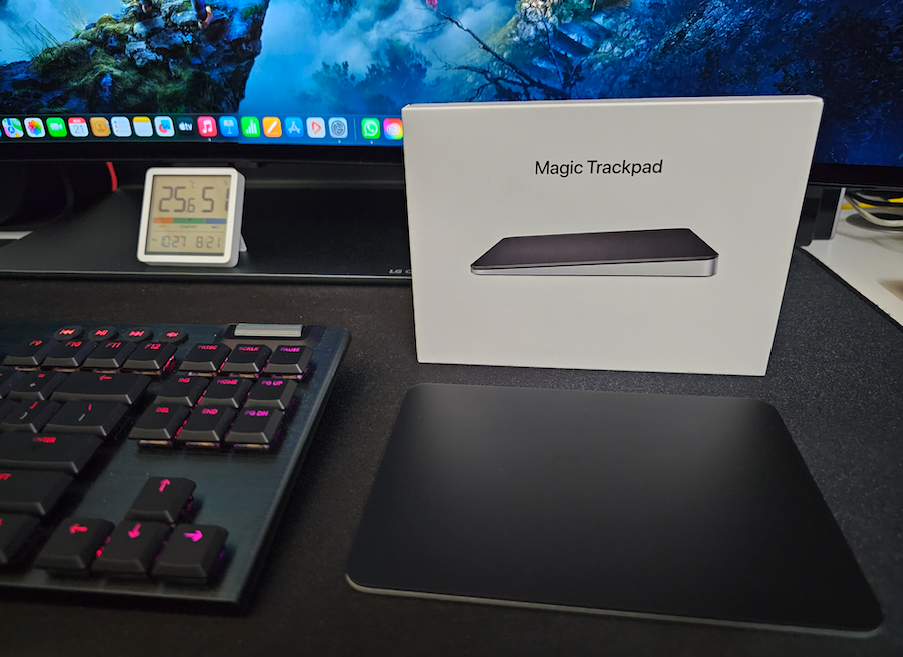 This post has been edited by Andrewtst: Aug 21 2023, 10:41 PM This post has been edited by Andrewtst: Aug 21 2023, 10:41 PM |
|
|
|
|
|
quadcube
|
Aug 21 2023, 11:08 PM
|
|
|
QUOTE(Andrewtst @ Aug 21 2023, 10:40 PM) Thank you, I finally purchased it and replace my mouse. 🥰 that was fast! how's it? same layout as mine, keyboard on the left, trackpad on the right This post has been edited by quadcube: Aug 21 2023, 11:09 PM |
|
|
|
|
|
TSAndrewtst
|
Aug 21 2023, 11:11 PM
|
|
|
QUOTE(quadcube @ Aug 21 2023, 11:08 PM) that was fast! how's it? same layout as mine, keyboard on the left, trackpad on the right I love it, I feel it is even better than MacBook Pro itself one, probably due to it is much bigger, also the press is more gentle to activate the key press than the MacBook Pro one. |
|
|
|
|
|
TSAndrewtst
|
Aug 21 2023, 11:28 PM
|
|
|
quadcube The coolest thing is somebody make this Magic Trackpad also support Windows. 😊
This post has been edited by Andrewtst: Aug 21 2023, 11:38 PM
|
|
|
|
|
|
quadcube
|
Aug 21 2023, 11:58 PM
|
|
|
QUOTE(Andrewtst @ Aug 21 2023, 11:11 PM) I love it, I feel it is even better than MacBook Pro itself one, probably due to it is much bigger, also the press is more gentle to activate the key press than the MacBook Pro one. Usually I don’t like to actually press it, I prefer touch to tap and 3 finger drag also (enabled thru accessibility) QUOTE(Andrewtst @ Aug 21 2023, 11:28 PM) quadcube The coolest thing is somebody make this Magic Trackpad also support Windows. 😊 Ah, the trackpad can’t be detected natively? I didn’t try to tbh because my windows machine is work laptop, can’t install much on it so I wrote my own macOS keyboard and pointer relay app. This way as long my lil GUI application stays front and active, it will capture all the keystrokes and pointer event and send it via BLE to the windows machine (wins laptop sees it as a generic BLE keyboard) Way faster than any KVM stuff for switching between mac and windows |
|
|
|
|
|
TSAndrewtst
|
Aug 22 2023, 12:02 AM
|
|
|
QUOTE(quadcube @ Aug 21 2023, 11:58 PM) Usually I don’t like to actually press it, I prefer touch to tap and 3 finger drag also (enabled thru accessibility) Ah, the trackpad can’t be detected natively? I didn’t try to tbh because my windows machine is work laptop, can’t install much on it so I wrote my own macOS keyboard and pointer relay app. This way as long my lil GUI application stays front and active, it will capture all the keystrokes and pointer event and send it via BLE to the windows machine (wins laptop sees it as a generic BLE keyboard) Way faster than any KVM stuff for switching between mac and windows I thought you had try before 😅 it cannot be detect before you install the driver make by 3rd party. I just try for fun, it act 99% functions same gestures like in MacOS. I used this - https://github.com/imbushuo/mac-precision-t...s/tag/2105-3979This post has been edited by Andrewtst: Aug 22 2023, 12:04 AM |
|
|
|
|
|
JusticeLeagueMY
|
Oct 22 2023, 07:29 PM
|
New Member
|
I used a combo of external trackpad and a mouse. Trackpad to the left, mouse to the right. Trackpad is used mainly for gesture - Mission Control, swap among spaces, Expose, scrolling. Mouse for fast click and drag and drop.
|
|
|
|
|




 Quote
Quote


 0.0203sec
 0.83
0.83
 5 queries
 GZIP Disabled