

If you wax it, washing becomes completely useless..a waxed surface repels water and detergent..
AMDŽ Socket-AM2/AM2+ Overclocking thread (V3), Phenom... Here AMD goes
AMDŽ Socket-AM2/AM2+ Overclocking thread (V3), Phenom... Here AMD goes
|
|
 Dec 13 2007, 02:59 AM Dec 13 2007, 02:59 AM
Return to original view | Post
#41
|
 
Senior Member
971 posts Joined: Aug 2006 From: Penang  
|
If you wax it, washing becomes completely useless..a waxed surface repels water and detergent..
|
|
|
|
|
|
Dec 13 2007, 08:35 AM
Return to original view | Post
#42
|
|
Senior Member
971 posts Joined: Aug 2006 From: Penang
|
QUOTE(dblooi @ Dec 13 2007, 06:00 AM) better wait for B3 stepping. Yeah, due to the bug AMD implemented a workaround which degrades performance. A upcoming AMD Overdrive version will allow the workaround to be turned off for maximum performance, but when turned off the system may sometimes crash on full load. currently B2 stepping proc having TLB Errata bug   |
|
|
Dec 14 2007, 06:30 AM
Return to original view | Post
#43
|
|
Senior Member
971 posts Joined: Aug 2006 From: Penang
|
QUOTE(noobianz @ Dec 13 2007, 10:21 PM) guys,i got a question here...does tlb errata infect only 2.4ghz and above for phenom series?how about 9500 and so on?and if i oc'ed the 9500 to 2.4ghz,will it have the same problem as other phenom(9700 and so on) No the errata will not cause problems. Actually its been fixed, but using a long workaround that sacrifices performance. With the next upcoming version of AMD Overdrive (or is it out already) it will allow you to turn off this workaround for full performance, but will result in occasional random hangs when at full load. The real reason why AMD did not want to release the 2.4Ghz proc is because its supposed to be a relatively high end proc, but because of the performance penalty of the workaround, it will not give the expected performance, plus if you turn off the workaround, QUOTE(dblooi @ Dec 13 2007, 10:37 PM) AFAIK, when u oc >2.4G, the problem will come It affects all Agena/Barcelona processors revision B2 and earlier regardless of speed. It will be fixed in revision B3. Thing should get interesting after that, since the main impact of the workaround is that it slows down cache. Cache speed, and to a smaller extent size, is the main reason why the Stars arcitecture is losing out to C2D.if u wanna oc , must change ur mobo bios to those patched version 1 but then u will suffer performance lost in that case QUOTE(ocz @ Dec 13 2007, 10:52 PM) Wow,nice.But does all mobos can do vmod? Any mobo can be voltmodded, its just a matter of understanding and manipulating the voltage regulation circuit. Google up the datasheet of the voltage regulator IC for a start. Btw, make sure you know what you're doing, most voltmods will void warranty, and a small mistake can fry a lot of stuff. Always check with a digital multimeter and take things one tiny step at a time.Ive never experienced Vmod before. Any links to share?  QUOTE(cyberloner @ Dec 14 2007, 05:18 AM) your pwm not hot ar using that vcore... 1.5xx u on water? Dunno why you're PWM so hot..even at 1.5v and full load mine is only roughly the processor's temp, which is around 60-65C.mine will auto shut down =( bad cooling i guess .. |
|
|
Dec 14 2007, 08:26 AM
Return to original view | Post
#44
|
|
Senior Member
971 posts Joined: Aug 2006 From: Penang
|
Here's the rest of my OC log. For those who haven't read the first part, its here -> Link
I actually did something interesting first before I started OCing the F3..those of you who COD our F3s together would know quite well what..frankly, I had more fun doing this than actually OCing the F3.. http://forum.lowyat.net/index.php?showtopi...post&p=14653750 To be honest, there's not much to say this time, just a couple of screenies only. My initial OC with the F3 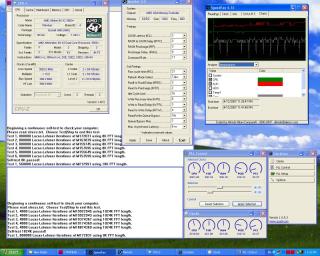
And for my OC record, which I did not have any time to optimise settings (I was in a hurry), » Click to show Spoiler - click again to hide... « At long last, add me into the list of AM2 overclockers 3800+ X2 Windsor F3 | lohwenli | Abit NF-M2 nview | Crucial 10th Anniversary | Thermalright XP-120 Superpi 32m screenshot in spoiler above This post has been edited by lohwenli: Dec 14 2007, 08:35 AM |
|
|
Dec 14 2007, 04:13 PM
Return to original view | Post
#45
|
|
Senior Member
971 posts Joined: Aug 2006 From: Penang
|
QUOTE(jeromeccm @ Dec 14 2007, 02:50 PM) ic... got it... then might as well buy a cheaper processor then clock the fella kaw kaw... save more.. ke ke ke Yup, thats the main reason most people OC-get high end power for cheap. Only hardcore OCers go further than that, spending money and even sacrificing hardware if they have to to get nothing less than the best performance that money alone cannot buy.noob conclusion....  Added on December 14, 2007, 2:52 pm bro dblooi told me TF7050 cannot use ClockGen.... sob sob...  really regret buy this board.... really regret buy this board....should have bought a TF690 Wait for a new version of clockgen, eventually your board will be supported. Another way would be to use nTune (download from nvidia's website) but its only limited to 250HTT for most boards. |
|
|
Dec 14 2007, 06:44 PM
Return to original view | Post
#46
|
|
Senior Member
971 posts Joined: Aug 2006 From: Penang
|
Its ok, your temp is fine. Only if it goes beyond 65C then its worrying. Using valueram to OC is fine, it will still hold you back, but only at high OC. For example, you're using 667 valueram-if you set the ram speed manually to 400 while mantaining the timings used at 667, and perform a 50% overclock resulting in a processor speed of 3Ghz, then the ram will also be overclocked 50% from 400, resulting in 600, which mean you still haven't overclocked the ram. Keep in mind though that this is just in theory, while the numbers are correct, you may not be able to reach 3Ghz or will find it difficult, depending o luck and experience. You're using a Brisbane core, revision G1, which typically overclocks to 2.7-3.0Ghz with minimal voltage increases.
|
|
|
|
|
|
Dec 14 2007, 08:26 PM
Return to original view | Post
#47
|
|
Senior Member
971 posts Joined: Aug 2006 From: Penang
|
QUOTE(naz @ Dec 14 2007, 06:52 PM) The 65C is for a single core or for total of the 2 cores? means,my Core1 is 34C and Core2 is 37C,the total is 71C. Like that? Just remembered that you're using a Brisbane, the temp sensor does not work properly, there is no sure way of knowing the exaxt temp of the proc. Best way remaining is to feel the base of the heatsink, if it feels warm but not hot then its still ok. For other processors where the temp sensor works properly, make sure temp of either core does not go above 65 (don't add up the temp). If it does reach that high for a short while (like a few hours), no problem, but running for weeks at that temp is risky. 70C is about the limit before the processor lifespan get shortened noticably, though it will not affect the proc if its just for a while, but it recommended that you stop immediately. Processors in general don't die that easily from overheating anymore because there are safety trip-offs, its usually voltage that kills processors nowadays. Always be careful when playing with voltage, take advantage of others' experience. Voltage tweaking is particularly tempting to use despite the risk because its the one of the most sure ways to allow for higher overclocking.I OCed through BIOS. For my mobo, in the BIOS,there's "RAM speed" setting if im not mistaken. So,is that setting used to set the RAM speed or the RAM timing? Im still confuse with the RAM setting. huhu.. Errmm,if can reach 2.5Ghz also will be nice because this is my 1st time OC. If I wanna OC further, which increment is recommended? Either the FSB or multiplier? btw,thanks bro lohwenli for ur explanation.. For a start keep the multiplier high while increasing the HTT, don't touch the voltage yet. Spend time tweaking around other settings, none of them are particularly dangerous. Anything wrong, just reset the BIOS. AM2 is particularly sensitive to memory settings, keep that in mind. |
|
|
Dec 15 2007, 03:21 PM
Return to original view | Post
#48
|
|
Senior Member
971 posts Joined: Aug 2006 From: Penang
|
QUOTE(naz @ Dec 14 2007, 10:20 PM) first of all,thanks for the info. very happy to know that. The temp sensor built into the processor is messed up..what to do..even AMD can only admit they screwed it up..will get back to my house ASAP and try it. now still in office,many works not finish yet about the temperature,other 3rd party software also cant detect the exact temp? or even update to the latest BIOS also still cant detect the exact temp? huhuhu... for the HTT, i saw at my BIOS there, the highest is 1000mhz. so, can i set it to 1000mhz? after that value,cant go further? thanks again for the help... About HTT, for the time being, keep it to 1000 or below, its calculated as the base clock x HTT multiplier. HTT overclocks vary widely from system to system, so you can never be sure. Its always the last thing to be overclocked because it doesn't give much difference in most applications. Only recently have I heard that it can improve gaming performance, but ONLY if everything else is already overclocked. QUOTE(naz @ Dec 15 2007, 04:14 AM) bro dblooi, im using biostar TA690G. The changing multiplier is because of AMD's Cool n Quiet function, where it drops the multiplier and voltage when the PC is not at full load to save power consumption and reduce heat. Turn it off when overclocking (look in BIOS), as the voltage it sets when it drops the multiplier during idle will no longer be sufficient to keep the system stable. If you still want the system to drop voltage & underclock to save power, you'll need to use CrystalCPUID, but how to use that I'll save for another time; its a bit long to explain. Or you can just go read though the guide on the website lohwenli, exactly like u said, "AM2 is particularly sensitive to memory settings". when i came back from office just now,i turn on my pc,it on-off-on-off...didnt even enter the BIOS. after i checked,its the memory settings is the one that give prob. i clear CMOS, then only it can switch on. BUT,im having other problem now. yesterday,before i update BIOS,from cpuz,my multiplier & core voltage is unstable. multiplier keep on changing from x5 to x9 to x10 then came back to x5 then x9 and goes on. even after i set the multiplier & voltage at BIOS,its still like that. then i update the BIOS. it became stable. no more changing multiplier. i set the multiplier at BIOS,cpuz shows exactly like what i set at BIOS at its stable. Now,after i clear the CMOS,the cpuz start the problem again,keep on changing the multiplier & volt. i revert back to the old BIOS,still the same.update the latest BIOS,still the same,multiplier keep on changing. so now,I would like to ask anyone,what im suppose to do now? even i set everything at BIOS,the cpuz still shows the same problem. help~~ btw, thanks again to lohwenli,dblooi,allenultra and everyone who give me ur opinion. appreciate that  ...and hope will get more from u all. ...and hope will get more from u all.  EDIT: Problem SOLVED!  thanks to everyone for reading my boring story... thanks to everyone for reading my boring story... |
|
|
Dec 15 2007, 05:57 PM
Return to original view | Post
#49
|
|
Senior Member
971 posts Joined: Aug 2006 From: Penang
|
QUOTE(tapirus @ Dec 15 2007, 05:10 PM) the most thing i want learn.. Here's how..but must be rajin..go download the datasheets for the ICs near the voltage regulator modules and read though them..from there you need to find the line where the IC reads the voltage of the component in question (vCore, vDimm, vNB, ect) then start making small adjustments to the resistors on that line (and I mean small, like less than 10 ohm at a time-digital multimeter is compulsory). Then check and see if there's any difference to the voltage. The whole idea is to fool the regulator IC to think the voltage is lower than it really is, so it will push up the actual voltage to compensate. how to vmod ????Be warned-voltmodding is not for the faint hearted or those with shaky hands. Messing around with solder, pencil mods or even just measuring voltages on tiny board components with a multimeter takes a steady hand. I've already messed up a few times myself, I'll post my story on the POC thread when I can. |
|
|
Dec 16 2007, 12:17 PM
Return to original view | Post
#50
|
|
Senior Member
971 posts Joined: Aug 2006 From: Penang
|
QUOTE(cyberloner @ Dec 16 2007, 06:39 AM) dun let me claim and return your board with human damage ler.. =P Tapirus, you've been warned..do hard-modding at your own risk..any hard modding project, you better consider first if you can accept accidentally frying something..  QUOTE(mod99 @ Dec 16 2007, 07:01 AM) Hello guys. Overclocking won't kill your HDD directly, but possible for it to kill it indirectly. If your PSU can't handle the overclocking and blows up, it can also take out some of your hardware. Theoretically, its impossible to kill a hard disk via the data lines as long as the power is stable, but I had a similar experience to yours which left me confounded-I was using a reliable PSU (which rules out the PSU blowing up scenario) and I was trying to find my max overclock when I forgot to turn down the HT multiplier, after that windows got corrupted and then the hard disk would experience errors every now and then, enough to make windows crash consistently at boot after about a week or 2 or usage. I checked the hard disk and it turned out to be suffering from read errors, fortunately almost all of my data could still be copied out. Sent the HDD directly back to seagate for RMA and got back a replacement unit a few days later, by then I bought another HDD and sold the Seagate to verz84.im noob here and i need your help guys. cud sumbody help me here? I just learnt how to overclock. i managed to overclock my amd 4200+ till 2.6Ghz. and use this speed daily.But eventually my hard disc tetiba kong. Is this bcoz of overclocking? I post how to lock sata port here but nobody really answered that question. Please help guys. I'm completely at a loss to describe how that HDD failed, it was never allowed to overheat and until the overclocking incident it had passed all HDD tests with no problems. The only explaination that I found reasonable is that is happened by sheer coincidence, after all hard disks fail eventually, some earlier and some later. |
|
|
Dec 16 2007, 07:51 PM
Return to original view | Post
#51
|
|
Senior Member
971 posts Joined: Aug 2006 From: Penang
|
QUOTE(kellefe @ Dec 16 2007, 07:32 PM) in term of performances ? brisbane only win in term of heating right ? Windsor F3 is easier to OC, but takes up far more power and puts out more heat than Brisbane G2. Both will reach 3.2-3.3Ghz at least on good aircooling without too much trouble, with extreme cooling 3.5-3.7 is possible. At the same clockspeed, Brisbane G2 loses out to Windsor F3 by roughly 0.1Ghz, meaning Brisbane must clock an extra 0.1Ghz to be even with a Windsor.brisbane is using G2 stepping~~ and windsor is using F3 steeping~~ any opinion on this ? Brisbane pro : 65nm SOl, higher speed cons : L2 @512 X2 , G2 Stepping Windsor Pro : L2@1024 X 2 , F3 Stepping cons : 90nm SOL |
|
|
Dec 16 2007, 11:03 PM
Return to original view | Post
#52
|
|
Senior Member
971 posts Joined: Aug 2006 From: Penang
|
QUOTE(dj.eRicZzz @ Dec 16 2007, 10:21 PM) try increase A BIT ram voltage... Wat kind of hard disks?omg...i really want to change to 690 already...who wana buy hard disks????? |
|
|
Dec 17 2007, 06:22 AM
Return to original view | Post
#53
|
|
Senior Member
971 posts Joined: Aug 2006 From: Penang
|
QUOTE(kellefe @ Dec 16 2007, 11:23 PM) ooh that mean both proc is the same lo izzit ?? I haven't seen proper performance comparisions of the Brisbane G2 against 512x2 L2 Windsor, only against the 1024x2 windsor. However, when considering the benchmarks, benchmarks which are not really affected by cache also show brisbane at a 0.1GHz disadvantage vs winsdor. Those which are affected by cache, the results really but the L2 ---> windsor is much bigger than brisbane~~ will this effect ?? And i see some review that AMD 5000+ with 2.6Ghz brisbane 512X2 L2 , its cache is in high latency ... Is this happen to 5200+ brisbane also ?  QUOTE(kellefe @ Dec 16 2007, 11:26 PM) oooh~~ comparing windsor n brisbane , its L2 is much bigger~~ will the effect the performances ? Not necessaarily, Windsor comes in 3 varieties, 256x2, 512x2 and 1024x2. The smallest cache is only for the lowest end processor, and the 1024x2 is only present on some of the highest end processors.so which one is more better ?? currently using 2.7Ghz brisbane~~ i was hope to get 2.6ghz windsor ~~ coz there will be no additional charge if im goin to change~~ is this worth to make the changes ?? QUOTE(-pWs- @ Dec 16 2007, 11:39 PM) Larger cache better but only small difference in performance. Not really. In gaming and multimedia, cache can make a 10% difference or more when comparing at the same clockspeed. This is why C2D is murdering AMD when it comes to benchmarks. In every other area, it doesn't look so bad.-pWs- |
|
Topic ClosedOptions
|
| Change to: |  0.0490sec 0.0490sec
 0.50 0.50
 7 queries 7 queries
 GZIP Disabled GZIP Disabled
Time is now: 10th December 2025 - 11:45 PM |
 Quote
Quote

