Welcome Guest ( Log In | Register )

Outline · [ Standard ] · Linear+

 ATX power supply fan

views
     
TSccschua
post May 1 2023, 09:56 AM, updated 3y ago

Regular
******
Senior Member
1,630 posts

Joined: Jun 2006
My faithful ATX power supply gigabyte Odin Pro 800W has noisy fan. noisier when even hotter/loaded.

this fan come with blue led, can I know where to get a replacement ?

is there a shop where i can bring the power supply there and "replace" the fan on the spot ?
IccyAsd
post May 1 2023, 10:07 AM

Enthusiast
Group Icon
Staff
846 posts

Joined: Apr 2005
QUOTE(ccschua @ May 1 2023, 09:56 AM)
My faithful ATX power supply gigabyte Odin Pro 800W has noisy fan. noisier when even hotter/loaded.

this fan come with blue led, can I know where to get a replacement ?

is there a shop where i can bring the power supply there and "replace" the fan on the spot ?
*
still under warranty? possible to sent in for RMA?
1024kbps
post May 1 2023, 12:57 PM

李素裳
*******
Senior Member
6,015 posts

Joined: Feb 2007


If you check the review https://www.techpowerup.com/review/gigabyte...-gt-800w/3.html
it use 12v 14cm fans, which common for pc, replacement should be piece of cake

k41AA
post May 1 2023, 01:07 PM

New Member
*
Junior Member
40 posts

Joined: May 2022
if you're confident, remove the fan then lube the bearing
might be a temporary fix though
else get another 14cm 3 pin 12V fan
TSccschua
post May 1 2023, 03:24 PM

Regular
******
Senior Member
1,630 posts

Joined: Jun 2006
14cm fan, is the height matters ? or standard height ?
1024kbps
post May 1 2023, 03:39 PM

李素裳
*******
Senior Member
6,015 posts

Joined: Feb 2007


QUOTE(ccschua @ May 1 2023, 03:24 PM)
14cm fan, is the height matters ? or standard height ?
*
should be standard
take out the fan and use rule measure.
acbc
post May 1 2023, 03:43 PM

Look at all my stars!!
*******
Senior Member
9,050 posts

Joined: Jan 2003
Easy DIY job.
OlgaC4
post May 1 2023, 07:07 PM

Look at all my stars!!
*******
Senior Member
5,296 posts

Joined: Nov 2006
QUOTE(acbc @ May 1 2023, 03:43 PM)
Easy DIY job.
*
Be careful when install. Power supply can kill you even when you unplug.
acbc
post May 1 2023, 07:17 PM

Look at all my stars!!
*******
Senior Member
9,050 posts

Joined: Jan 2003
QUOTE(OlgaC4 @ May 1 2023, 07:07 PM)
Be careful when install. Power supply can kill you even when you unplug.
*
Wear rubber gloves and slippers first.
babylon52281
post May 1 2023, 07:42 PM

Look at all my stars!!
*******
Senior Member
2,706 posts

Joined: Apr 2017
QUOTE(ccschua @ May 1 2023, 03:24 PM)
14cm fan, is the height matters ? or standard height ?
*
D14BH-12 standard 14cm fan. Easy to get from Ali if you want back the same model but these are without the LED bling
https://www.aliexpress.com/w/wholesale-D14B...etail.1000002.0

Cheaper to just go to Sri Computer and get those 14cm case fans for replacement. You will need soldering tools & skillset to do that if the fan wires are soldered to the PSU board.

Still, this quite an old PSU model, so perhaps its just telling you it is time to replace?
TSccschua
post May 2 2023, 01:32 PM

Regular
******
Senior Member
1,630 posts

Joined: Jun 2006
its soldered to the board, but should be easy to unsolder as I have DIY skill with the solder station.

is this fan a standard speed, can I buy slower speed ? shud I buy the Arctic brand for longer lasting and where in KL sells this?

is there an electronic shop that keeps stock of the DC Fan ?

the problem with shopee seller is they dont entertain walk in. jalan pasar is very limited

This post has been edited by ccschua: May 2 2023, 01:50 PM
PRSXFENG
post May 2 2023, 06:44 PM

Look at all my stars!!
*******
Senior Member
2,614 posts

Joined: Nov 2020


QUOTE(ccschua @ May 2 2023, 01:32 PM)
its soldered to the board, but should be easy to unsolder as I have DIY skill with the solder station.

is this fan a standard speed, can I buy slower speed ? shud I buy the Arctic brand for longer lasting and where in KL sells this?

is there an electronic shop that keeps stock of the DC Fan ?

the problem with shopee seller is they dont entertain walk in. jalan pasar is very limited
*
speed/airflow... best to not change specs too much to prevent overheating of the psu
should look for a fan with similar specs to the original one
babylon52281
post May 3 2023, 08:39 AM

Look at all my stars!!
*******
Senior Member
2,706 posts

Joined: Apr 2017
QUOTE(ccschua @ May 2 2023, 01:32 PM)
its soldered to the board, but should be easy to unsolder as I have DIY skill with the solder station.

is this fan a standard speed, can I buy slower speed ? shud I buy the Arctic brand for longer lasting and where in KL sells this?

is there an electronic shop that keeps stock of the DC Fan ?

the problem with shopee seller is they dont entertain walk in. jalan pasar is very limited
*
Using Arctic fan for something this old model PSU is kinda wasted. The fan will easily outlast the PSU itself. Just use standard 14cm case fan that you can get from typical computer stores (not Jln Pasar) and this should last for the next few years. Imho its time to change the PSU anyhow.
Imbi Plaza Lot 1.28
post Jun 9 2023, 04:47 PM

Getting Started
**
Junior Member
191 posts

Joined: Dec 2017
QUOTE(OlgaC4 @ May 1 2023, 07:07 PM)
Be careful when install. Power supply can kill you even when you unplug.
*
Do not touch any components inside especially the capacitors!
kingkingyyk
post Jun 10 2023, 10:36 PM

10k Club
Group Icon
Elite
15,694 posts

Joined: Mar 2008
QUOTE(ccschua @ May 2 2023, 01:32 PM)
its soldered to the board, but should be easy to unsolder as I have DIY skill with the solder station.

is this fan a standard speed, can I buy slower speed ? shud I buy the Arctic brand for longer lasting and where in KL sells this?

is there an electronic shop that keeps stock of the DC Fan ?

the problem with shopee seller is they dont entertain walk in. jalan pasar is very limited
*
Fan speed alone is not the only factor that a fan can bring how many airflow.
Just go any lowyat shop and ask for options. I won't be too concerned on speed though, anything with 1200rpm should be ok from safe side.

Also check whether your old fan is with 2 cables or 3 cables. 2 cables is either unregulated or voltage regulated, which 3 cables is PWM regulated. Better if you buy the matching variant (2/3 cables) since PWM fan doesn't work well under low voltage.

You can just connect the wires and wrap them around with wiring tape if you don't want to solder. It reduces the risk of getting electrocuted during soldering. Wear a rubber slipper when you work on it.

This post has been edited by kingkingyyk: Jun 10 2023, 10:40 PM
1024kbps
post Jun 10 2023, 10:54 PM

李素裳
*******
Senior Member
6,015 posts

Joined: Feb 2007


QUOTE(kingkingyyk @ Jun 10 2023, 10:36 PM)
Fan speed alone is not the only factor that a fan can bring how many airflow.
Just go any lowyat shop and ask for options. I won't be too concerned on speed though, anything with 1200rpm should be ok from safe side.

Also check whether your old fan is with 2 cables or 3 cables. 2 cables is either unregulated or voltage regulated, which 3 cables is PWM regulated. Better if you buy the matching variant (2/3 cables) since PWM fan doesn't work well under low voltage.

You can just connect the wires and wrap them around with wiring tape if you don't want to solder. It reduces the risk of getting electrocuted during soldering. Wear a rubber slipper when you work on it.
*
2 and 3 cable = voltage regulated,
third wire is tachometer, reporting fan rpm to mobo.
you can plug 2 cable fan to nomal fan header and it will just work fine, just no rpm reading

4th cable is pwm signal receiver.
pwm fan can work even if voltage regulated by mobo, if the starting voltage is low or similar to other fans.

high rpm will have high starting voltage.

This post has been edited by 1024kbps: Jun 10 2023, 10:56 PM
kingkingyyk
post Jun 10 2023, 11:05 PM

10k Club
Group Icon
Elite
15,694 posts

Joined: Mar 2008
QUOTE(1024kbps @ Jun 10 2023, 10:54 PM)
2 and 3 cable = voltage regulated,
third wire is tachometer, reporting fan rpm to mobo.
you can plug 2 cable fan to nomal fan header and it will just work fine, just no rpm reading
*
At this point of time, I don't even know the PSU even bother to read the fan RPM or not. hmm.gif However, indeed the third cable usually is for speed reading if talking about conventional PC fan.

This post has been edited by kingkingyyk: Jun 10 2023, 11:07 PM
1024kbps
post Jun 10 2023, 11:42 PM

李素裳
*******
Senior Member
6,015 posts

Joined: Feb 2007


QUOTE(kingkingyyk @ Jun 10 2023, 11:05 PM)
At this point of time, I don't even know the PSU even bother to read the fan RPM or not. hmm.gif However, indeed the third cable usually is for speed reading if talking about conventional PC fan.
*
some PSU have extra cable for RPM reporting, Enermax old PSU series (revolution 87) does have one,
now most pc part focus on aesthetic than functions, you can consider than PSU wont bother to read rpm, it will just do voltage control.

most fans adhere to the standard so the red black are voltage, third yellow = rpm and last one is always PWM,
PWM fan are more versatile, but it really depends on the starting voltage, which is the importation part of quite fan.
montaguespirit
post Jun 16 2023, 10:35 PM

Getting Started
**
Junior Member
81 posts

Joined: Apr 2015
Really? I don't really recommend to do it by yourself.

This post has been edited by montaguespirit: Jun 16 2023, 10:36 PM
TSccschua
post Jun 17 2023, 05:07 PM

Regular
******
Senior Member
1,630 posts

Joined: Jun 2006
user posted image
user posted image
user posted image

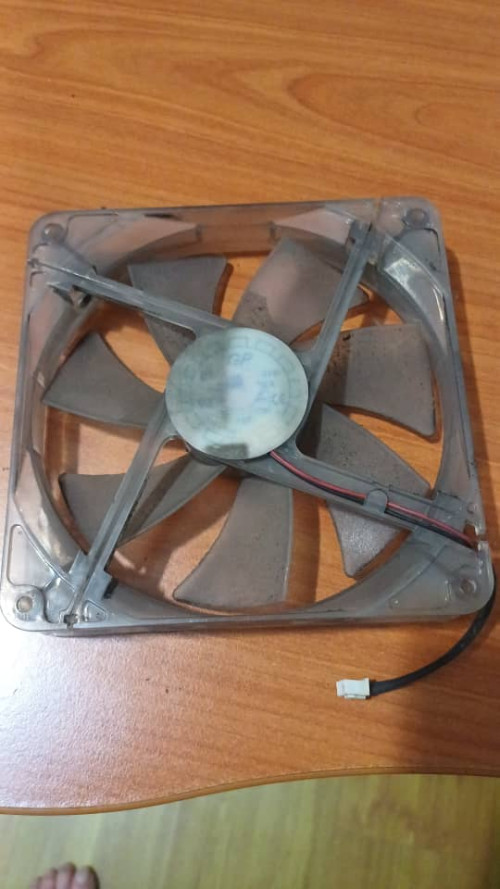
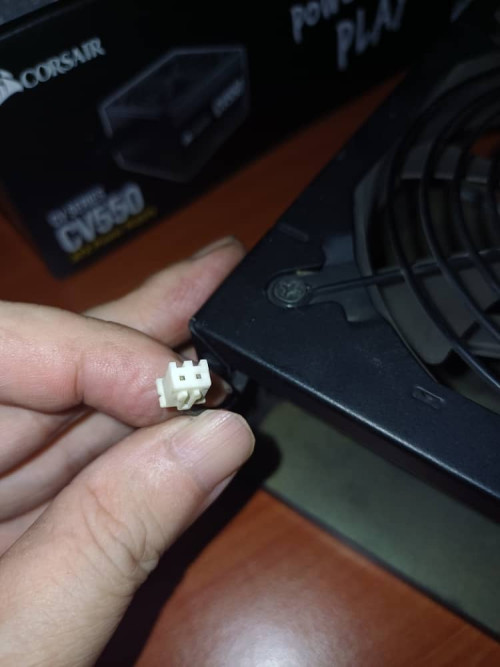
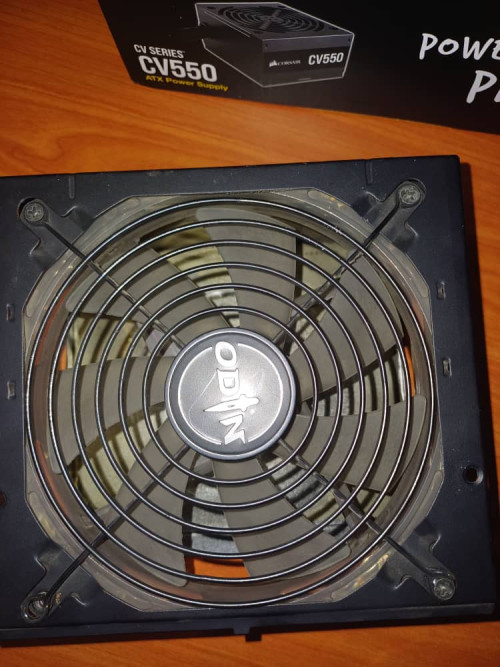
I dismantle the fan from the PSU. it is only 2 pin, surprise. this is a 14cm (25mm height) fan. will try to go lowyat to see if can get a replacement.

the brand of fan is GP while the power supply is Gigabyte Odin.

found this on Shopee. winstartech. SUNVN. oil bearing ????. is this better than double bearing ?

https://shopee.com.my/14025-14cm-2pin-2-pin...e5-778bba707344

This post has been edited by ccschua: Jun 17 2023, 05:28 PM
1024kbps
post Jun 17 2023, 05:10 PM

李素裳
*******
Senior Member
6,015 posts

Joined: Feb 2007


buy new fan but do the soldering, or ask the shoppserson help soldering,
aftermarket fan connector use standard header, but the header on the image above is different type.
TSccschua
post Jun 17 2023, 05:44 PM

Regular
******
Senior Member
1,630 posts

Joined: Jun 2006
i saw the the SUNVN fan seems to match perfectly.

k41AA
post Jun 17 2023, 08:50 PM

New Member
*
Junior Member
40 posts

Joined: May 2022
then you should be able to direct swap them
i wouldn't worry about the bearing type
new fan bearing vs much older psu
high chance the bearing will outlast the psu
1024kbps
post Jun 17 2023, 09:18 PM

李素裳
*******
Senior Member
6,015 posts

Joined: Feb 2007


QUOTE(k41AA @ Jun 17 2023, 08:50 PM)
then you should be able to direct swap them
i wouldn't worry about the bearing type
new fan bearing vs much older psu
high chance the bearing will outlast the psu
*
Cheap fan usually use sleeve bearing, very simple but wear out fast if psu or ambient temp too high, the oil vaporized and the shaft will wear out causing permanent damage
k41AA
post Jun 18 2023, 08:58 AM

New Member
*
Junior Member
40 posts

Joined: May 2022
QUOTE(1024kbps @ Jun 17 2023, 09:18 PM)
Cheap fan usually use sleeve bearing, very simple but wear out fast if psu or ambient temp too high, the oil vaporized and the shaft will wear out causing permanent damage
*
ic, but i think psu temp has no effect since the fan will be blowing towards psu and out
unlike the old design or sff psu where the fan sucks air from psu
1024kbps
post Jun 18 2023, 12:14 PM

李素裳
*******
Senior Member
6,015 posts

Joined: Feb 2007


QUOTE(k41AA @ Jun 18 2023, 08:58 AM)
ic, but i think psu temp has no effect since the fan will be blowing towards psu and out
unlike the old design or sff psu where the fan sucks air from psu
*
A lot of casing alow us to flip the PSU, so the fan suck fresh filtered air instead of hot air inside casing.
Just need to look the air vent for PSU when buy new case.

Old one or prebiuld usually can't flip

Good PSU such as seasonic use san ace which is knowns for its quality fans, ball bearing, glass fiber blade and frame
zuozi
post Jun 18 2023, 12:25 PM

Regular
******
Senior Member
1,267 posts

Joined: Oct 2009
You have few options actually
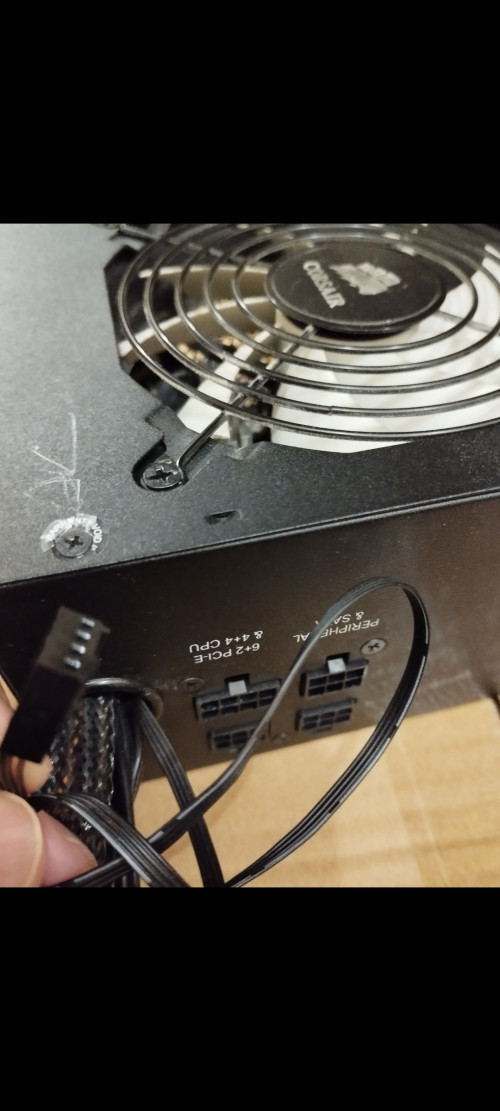
First option just install the pwm fan or 3 pin fan to your motherboard header or fan hub and the wire actually long enough exit from the original bulky wire hole then control the speed via motherboard bios or vise versa

The other options straight forward install a 2 pin fan cut off the header reused the old fan headers if needed

The other options 3 pin fan you need to loop the yellow and red together or the spinning speed just too slow, nowadays you hard to find color labeled 3 pin wire fan mostly black so you will need multi meter to test which is 5v and loop The other 2 together

2 pin red and black usually noise level quite loud

If you don't want so much hassle just do this example below
user posted image

This post has been edited by zuozi: Jun 18 2023, 12:29 PM
1024kbps
post Jun 18 2023, 12:54 PM

李素裳
*******
Senior Member
6,015 posts

Joined: Feb 2007


QUOTE(zuozi @ Jun 18 2023, 12:25 PM)
You have few options actually
First option just install the pwm fan or 3 pin fan to your motherboard header or fan hub and the wire actually long enough exit from the original bulky wire hole then control the speed via motherboard bios or vise versa

The other options straight forward install a 2 pin fan cut off the header reused the old fan headers if needed

The other options 3 pin fan you need to loop the yellow and red together or the spinning speed just too slow, nowadays you hard to find color labeled 3 pin wire fan mostly black so you will need multi meter to test which is 5v and loop The other 2 together

2 pin red and black usually noise level quite loud

If you don't want so much hassle just do this example below
user posted image
*
Why looping the yellow cable? the yellow cable is option for all fans, it's for rpm reading. all fan can be controlled via voltage.
2 pin fan is same as 3 pins, the only difference is how many amp the fan will take, higher amp = high rpm.

mobo actually control 2/3 pin fan via voltage, not by RPM.
PWM fan always quieter due to the design, you can go as low as 800rpm (aka 0% duty) the fan will still spin, just high powered fan will ramp up RPM.

third option is get fan with thermal sensor, but this one is rare and your psu might interfere with the speed control, unless connect directly to 12v.

zuozi
post Jun 18 2023, 01:06 PM

Regular
******
Senior Member
1,267 posts

Joined: Oct 2009
QUOTE(1024kbps @ Jun 18 2023, 12:54 PM)
Why looping the yellow cable? the yellow cable is option for all fans, it's for rpm reading. all fan can be controlled via voltage.
2 pin fan is same as 3 pins, the only difference is how many amp the fan will take, higher amp = high rpm.

mobo actually control 2/3 pin fan via voltage, not by RPM.
PWM fan always quieter due to the design, you can go as low as 800rpm (aka 0% duty) the fan will still spin, just high powered fan will ramp up RPM.

third option is get fan with thermal sensor, but this one is rare and your psu might interfere with the speed control, unless connect directly to 12v.
*
I'm referring some models PSU 2 pin header, if 3 pin without using yellow the fan spin below 900 RPM if i want full speed 1500 from 3 pin fan on PSU need loop the yellow to red together that what i experience long time ago like 2 decade ago , because last time some other forumers told me PSU power delivery header do increase and decrease power to control the stock fan speed that what i know, how it's possible work i have no idea but just work

Nowadays i just replace the faulty fan on old PSU pwm or 3 pin fan to motherboard header straight without need further modification needed
k41AA
post Jun 19 2023, 07:33 PM

New Member
*
Junior Member
40 posts

Joined: May 2022
QUOTE(1024kbps @ Jun 18 2023, 12:14 PM)
A lot of casing alow us to flip the PSU, so the fan suck fresh filtered air instead of hot air inside casing.
Just need to look the air vent for PSU when buy new case.

Old one or prebiuld usually can't flip

Good PSU such as seasonic use san ace which is knowns for its quality fans, ball bearing, glass fiber blade and frame
*
sorry but why introduce more hot air into the casing instead of sucking the existing air out?
i still think blowing air towards components need to be cooled down works better than sucking the heat from those components
the only drawback would be dust accumulating on the components
k41AA
post Jun 19 2023, 07:42 PM

New Member
*
Junior Member
40 posts

Joined: May 2022
QUOTE(zuozi @ Jun 18 2023, 12:25 PM)
You have few options actually
First option just install the pwm fan or 3 pin fan to your motherboard header or fan hub and the wire actually long enough exit from the original bulky wire hole then control the speed via motherboard bios or vise versa

The other options straight forward install a 2 pin fan cut off the header reused the old fan headers if needed

The other options 3 pin fan you need to loop the yellow and red together or the spinning speed just too slow, nowadays you hard to find color labeled 3 pin wire fan mostly black so you will need multi meter to test which is 5v and loop The other 2 together

2 pin red and black usually noise level quite loud

If you don't want so much hassle just do this example below
user posted image
*
option #2 is best i think since he got soldering skills and tools needed
but then again he said he found the straight replacement so no brainer not to go with that
1024kbps
post Jun 19 2023, 10:31 PM

李素裳
*******
Senior Member
6,015 posts

Joined: Feb 2007


QUOTE(k41AA @ Jun 19 2023, 07:33 PM)
sorry but why introduce more hot air into the casing instead of sucking the existing air out?
i still think blowing air towards components need to be cooled down works better than sucking the heat from those components
the only drawback would be dust accumulating on the components
*
no, the psu only draw air from outside rather than hot air inside casing.
my ancient lianli and the not so new fractal design can flip PSU.
PSU never blow air into casing unless it's those HTPC.

of course dont put your PC on the floor, dust are heavy.


k41AA
post Jun 20 2023, 07:04 PM

New Member
*
Junior Member
40 posts

Joined: May 2022
QUOTE(1024kbps @ Jun 19 2023, 10:31 PM)
no, the psu only draw air from outside rather than hot air inside casing.
my ancient lianli and the not so new fractal design can flip PSU.
PSU never blow air into casing unless it's those HTPC.

of course dont put your PC on the floor, dust are heavy.
*
sorry i misunderstood flip psu as flip psu fan
that's why found it weird as why you want to do so lol


Change to:
| Lo-Fi Version
0.0334sec    0.88    5 queries    GZIP Disabled
Time is now: 20th December 2025 - 07:11 PM