

if you're confident, remove the fan then lube the bearing
might be a temporary fix though
else get another 14cm 3 pin 12V fan
ATX power supply fan
ATX power supply fan
|
|
 May 1 2023, 01:07 PM May 1 2023, 01:07 PM
Return to original view | Post
#1
|
 
Junior Member
40 posts Joined: May 2022 
|
if you're confident, remove the fan then lube the bearing
might be a temporary fix though else get another 14cm 3 pin 12V fan |
|
|
|
|
|
Jun 17 2023, 08:50 PM
Return to original view | Post
#2
|
|
Junior Member
40 posts Joined: May 2022
|
then you should be able to direct swap them
i wouldn't worry about the bearing type new fan bearing vs much older psu high chance the bearing will outlast the psu |
|
|
Jun 18 2023, 08:58 AM
Return to original view | Post
#3
|
|
Junior Member
40 posts Joined: May 2022
|
QUOTE(1024kbps @ Jun 17 2023, 09:18 PM) Cheap fan usually use sleeve bearing, very simple but wear out fast if psu or ambient temp too high, the oil vaporized and the shaft will wear out causing permanent damage ic, but i think psu temp has no effect since the fan will be blowing towards psu and out unlike the old design or sff psu where the fan sucks air from psu |
|
|
Jun 19 2023, 07:33 PM
Return to original view | Post
#4
|
|
Junior Member
40 posts Joined: May 2022
|
QUOTE(1024kbps @ Jun 18 2023, 12:14 PM) A lot of casing alow us to flip the PSU, so the fan suck fresh filtered air instead of hot air inside casing. sorry but why introduce more hot air into the casing instead of sucking the existing air out?Just need to look the air vent for PSU when buy new case. Old one or prebiuld usually can't flip Good PSU such as seasonic use san ace which is knowns for its quality fans, ball bearing, glass fiber blade and frame i still think blowing air towards components need to be cooled down works better than sucking the heat from those components the only drawback would be dust accumulating on the components |
|
|
Jun 19 2023, 07:42 PM
Return to original view | Post
#5
|
|
Junior Member
40 posts Joined: May 2022
|
QUOTE(zuozi @ Jun 18 2023, 12:25 PM) You have few options actually option #2 is best i think since he got soldering skills and tools neededFirst option just install the pwm fan or 3 pin fan to your motherboard header or fan hub and the wire actually long enough exit from the original bulky wire hole then control the speed via motherboard bios or vise versa The other options straight forward install a 2 pin fan cut off the header reused the old fan headers if needed The other options 3 pin fan you need to loop the yellow and red together or the spinning speed just too slow, nowadays you hard to find color labeled 3 pin wire fan mostly black so you will need multi meter to test which is 5v and loop The other 2 together 2 pin red and black usually noise level quite loud If you don't want so much hassle just do this example below 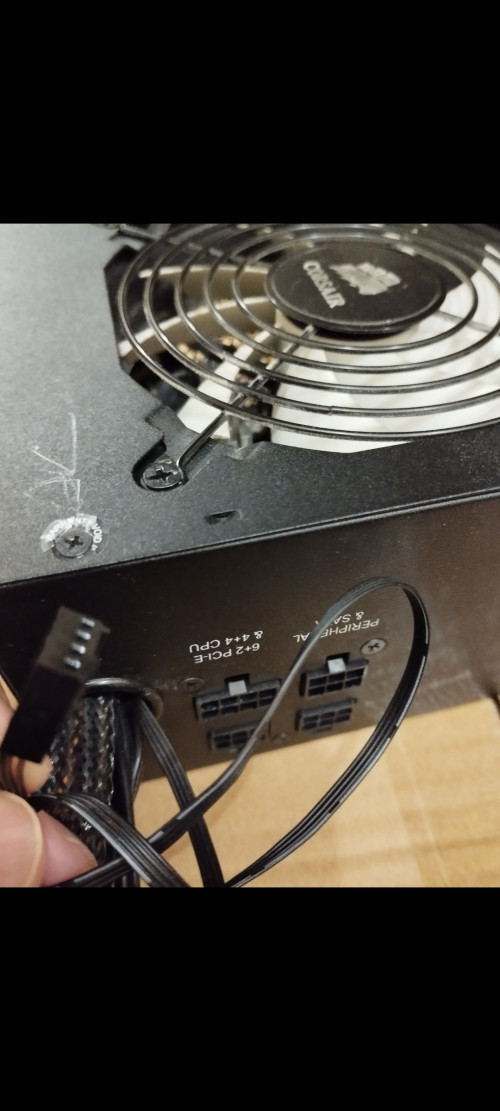 but then again he said he found the straight replacement so no brainer not to go with that |
|
|
Jun 20 2023, 07:04 PM
Return to original view | Post
#6
|
|
Junior Member
40 posts Joined: May 2022
|
QUOTE(1024kbps @ Jun 19 2023, 10:31 PM) no, the psu only draw air from outside rather than hot air inside casing. sorry i misunderstood flip psu as flip psu fanmy ancient lianli and the not so new fractal design can flip PSU. PSU never blow air into casing unless it's those HTPC. of course dont put your PC on the floor, dust are heavy. that's why found it weird as why you want to do so lol |
| Change to: |  0.0204sec 0.0204sec
 1.49 1.49
 6 queries 6 queries
 GZIP Disabled GZIP Disabled
Time is now: 19th December 2025 - 02:24 AM |
 Quote
Quote