

 Dec 23 2022, 11:42 PM


QUOTE(creed @ Dec 23 2022, 04:35 PM)
Hello all, I've a Maxis Home Fiber (with public IP) at home, as well as another Maxis Home Fiber (with public IP) at a small office.
The home router is provided by Maxis (TPLink Archer C5v1), and the office router is as well provided by Maxis (TPlink EX510)
Since both have Public IP, i'm thinking of setting an IPSec tunnel between the two location so I can share some files between the locations.
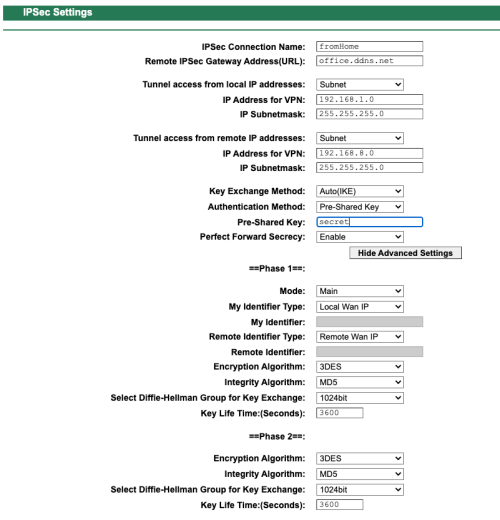
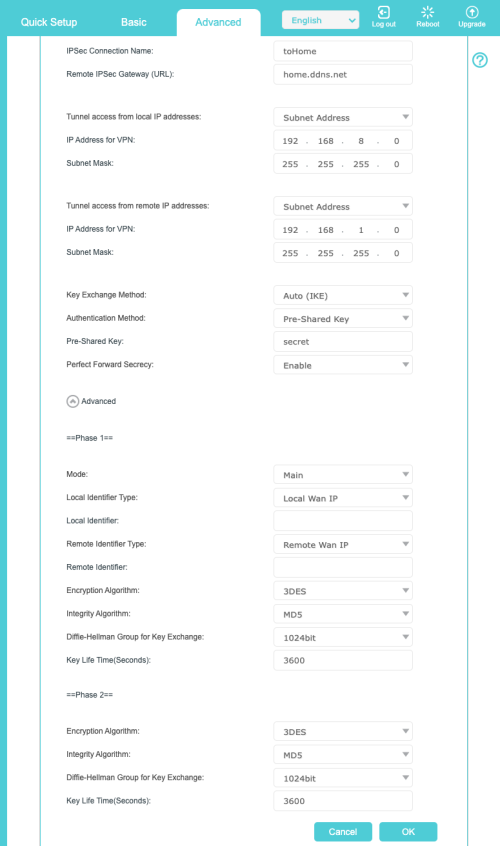
Here's the details based on the screenshot
- home.ddns.net - this is translate to my home Public IP (i've tried using actual IP as well but no luck)
- office.ddns.net - this is translate to my office Public IP (i've tried using actual IP as well but no luck)
- Home network is 192.168.1.0 255.255.255.0
- Office network is 192.168.8.0 255.255.255.0
I attached a screenshots and see if there's any guidance on how to make this work. I too tried putting a Virtual server for the Router IP for a wide range of ports covering TCP & UDP on both end but i can't seems to get the tunnel setup.
Anyone has tried this? Appreciate any feedback

Would probably be hard using just the ISP provided router. I think you would need a better router, or even an enterprise one.The home router is provided by Maxis (TPLink Archer C5v1), and the office router is as well provided by Maxis (TPlink EX510)
Since both have Public IP, i'm thinking of setting an IPSec tunnel between the two location so I can share some files between the locations.
Here's the details based on the screenshot
- home.ddns.net - this is translate to my home Public IP (i've tried using actual IP as well but no luck)
- office.ddns.net - this is translate to my office Public IP (i've tried using actual IP as well but no luck)
- Home network is 192.168.1.0 255.255.255.0
- Office network is 192.168.8.0 255.255.255.0
I attached a screenshots and see if there's any guidance on how to make this work. I too tried putting a Virtual server for the Router IP for a wide range of ports covering TCP & UDP on both end but i can't seems to get the tunnel setup.
Anyone has tried this? Appreciate any feedback
 Quote
Quote
 0.0180sec
 1.12
1.12
 6 queries
 GZIP Disabled