
Welcome Guest ( Log In | Register )

Outline · [ Standard ] · Linear+

Home Networking Seeking Advice - TPLink IPSec VPN, using Maxis Fiber

views
     
TScreed
post Dec 23 2022, 04:35 PM, updated 3y ago

Getting Started
**
Junior Member
262 posts

Joined: Jan 2003
From: Bdr Sri D'sara
Hello all, I've a Maxis Home Fiber (with public IP) at home, as well as another Maxis Home Fiber (with public IP) at a small office.

The home router is provided by Maxis (TPLink Archer C5v1), and the office router is as well provided by Maxis (TPlink EX510)

Since both have Public IP, i'm thinking of setting an IPSec tunnel between the two location so I can share some files between the locations.

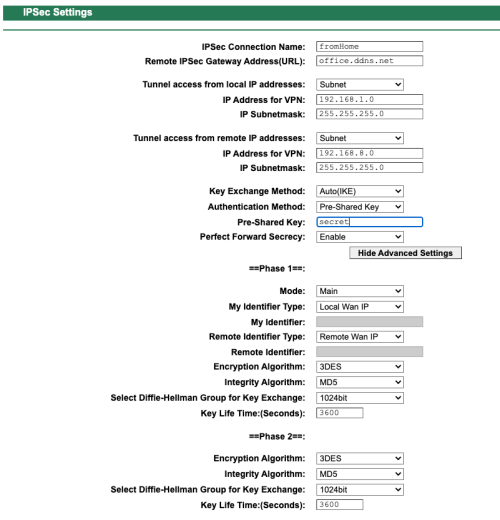
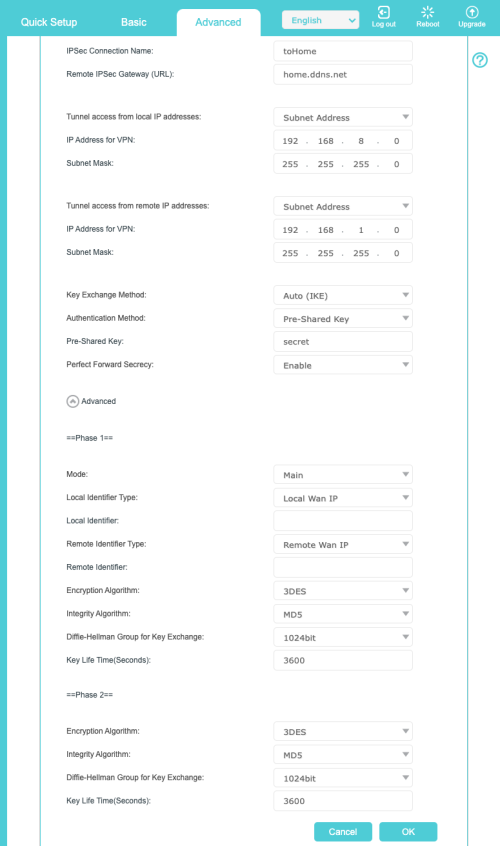
Here's the details based on the screenshot
- home.ddns.net - this is translate to my home Public IP (i've tried using actual IP as well but no luck)
- office.ddns.net - this is translate to my office Public IP (i've tried using actual IP as well but no luck)
- Home network is 192.168.1.0 255.255.255.0
- Office network is 192.168.8.0 255.255.255.0

I attached a screenshots and see if there's any guidance on how to make this work. I too tried putting a Virtual server for the Router IP for a wide range of ports covering TCP & UDP on both end but i can't seems to get the tunnel setup.

Anyone has tried this? Appreciate any feedback
user posted image
user posted image
SilentVampire
post Dec 23 2022, 11:42 PM

Networking Enthusiast
*******
Senior Member
5,714 posts

Joined: Mar 2007


QUOTE(creed @ Dec 23 2022, 04:35 PM)
Hello all, I've a Maxis Home Fiber (with public IP) at home, as well as another Maxis Home Fiber (with public IP) at a small office.

The home router is provided by Maxis (TPLink Archer C5v1), and the office router is as well provided by Maxis (TPlink EX510)

Since both have Public IP, i'm thinking of setting an IPSec tunnel between the two location so I can share some files between the locations.

Here's the details based on the screenshot
- home.ddns.net - this is translate to my home Public IP (i've tried using actual IP as well but no luck)
- office.ddns.net - this is translate to my office Public IP (i've tried using actual IP as well but no luck)
- Home network is 192.168.1.0 255.255.255.0
- Office network is 192.168.8.0 255.255.255.0

I attached a screenshots and see if there's any guidance on how to make this work. I too tried putting a Virtual server for the Router IP for a wide range of ports covering TCP & UDP on both end but i can't seems to get the tunnel setup.

Anyone has tried this? Appreciate any feedback
user posted image
user posted image
*
Would probably be hard using just the ISP provided router. I think you would need a better router, or even an enterprise one.
TScreed
post Dec 24 2022, 01:21 AM

Getting Started
**
Junior Member
262 posts

Joined: Jan 2003
From: Bdr Sri D'sara
I'd imagine if the function are there it should work, not too sure whether these ISP provided router has any specific locked down
kaysure
post Dec 24 2022, 01:46 AM

New Member
*
Junior Member
26 posts

Joined: Oct 2014
You may need to check whether the public ip is reachable first from the internet.

Normally ISP now implement CGNAT or carrier grade network address translation.

Means you cannot do a ipsec site to site vpn if either of your line is behind a ISP CGNAT.

https://maxis-fibre.blogspot.com/2016/06/ma...address-vs.html
https://soyacincau.com/2021/10/13/tm-unifi-...implementation/

Do check this first.

If you believe you have been assigned a public static ip address, this type of ISP package is normally more expensive.

You need to test it first with any of the web tools against the ports that is opened via port forwarding like
maybe https://fqdn

Then if it doesn't work. Reach out to Maxis via twitter or social media or email tech support.

All the best

TScreed
post Dec 24 2022, 08:23 AM

Getting Started
**
Junior Member
262 posts

Joined: Jan 2003
From: Bdr Sri D'sara
Thanks, indeed it was public IP assigned, and I have tried the direct access from my phone 4G into a service opened via port forwarding directly and works like a charn


Change to:
| Lo-Fi Version
0.0137sec    0.28    5 queries    GZIP Disabled
Time is now: 22nd December 2025 - 09:00 AM