Outline ·
[ Standard ] ·
Linear+
Wifi Band Steering, Anyone manage get it work smoothly?
|
TSVirlution
|
 Nov 28 2022, 09:00 AM, updated 4y ago Nov 28 2022, 09:00 AM, updated 4y ago
|

|
Previously old router, didnt get it to work seamlessly, now with a new WIFI-6 router, also didnt get it to work properly, so after trialing for 1-2 weeks decided to turn it off. 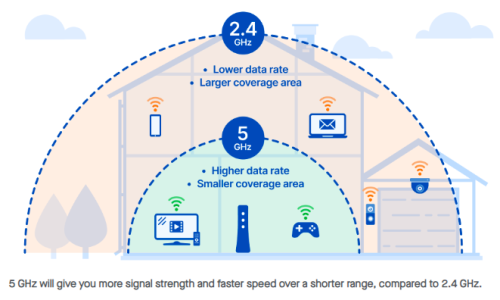 If router is place in living room, everything good, most device will link up on 5Ghz and everything working fine. Rooms at edge or toilets will get very weak signal or no signal. So cannot work. Router place back at the hallway/walkway location, everywhere getting decent coverage. Problem happens when you are at the edge or where 5Ghz signal start to drop off and you will get occasion issue where no signal and the wifi drop the 5Ghz and connect to 2.4Ghz and cant find anyway to go around this problem. So switched off band steering and manually connect to either 5Ghz signal or 2.4Ghz signal. Also did manual channel settings, find an unused channel and use that band. |
|
|
|
|
|
TSVirlution
|
Nov 28 2022, 09:37 AM
|
|
|
QUOTE(ReverseDark @ Nov 28 2022, 09:09 AM) turn off band steering, just manually connect to the band resolve the problem, why need to use extender or mesh. Anyway these devices dont work properly as well, better off using Ethernet over power and place another AP |
|
|
|
|
|
TSVirlution
|
Nov 28 2022, 01:37 PM
|
|
|
QUOTE(dyenjarin @ Nov 28 2022, 10:14 AM) Are you desperately to get the 5GHz, as long it is connected to 2.4GHz should ok that able to get the internet. But if you really want the 5GHz on your toilet, go get the mesh but you also need to understand the limitation of mesh wifi With band steering, you cannot control if you log on the 5ghz or 2.4ghz band as it automatically do it for you. So no I turn off band steering I can manually control |
|
|
|
|
|
TSVirlution
|
Nov 28 2022, 01:56 PM
|
|
|
QUOTE(niakulah @ Nov 28 2022, 01:47 PM) Enterprise products have a setting where you can say what is the acceptable signal strength before you are being 'steered' to the 2.4GHz band. I don't know if the product you are using has such a setting though. [attachmentid=11318169] That being said, I don't think it's worth hanging onto the 5GHz band if the signal is not great. there are some basic settings, I saw it but I didnt want to be bothered fine tuning it..... without band steering, I can manually go on 5Ghz SSID if need the bandwidth to do big file transfer 2.4 is good enough |
|
|
|
|
|
TSVirlution
|
Nov 28 2022, 02:08 PM
|
|
|
QUOTE(Donphatz @ Nov 28 2022, 01:57 PM) last time had this issue. Router dual band but most of the time my hp&pc only connect with the 5g band. biggest headache when many device connect at once. Line will drop or cannot find wireless. Had to restart router most of the time. Then i change to mesh deco M9. Bit expensive but i dont have the headache like before. 20 device connected at once also no lagging. I should have close to 20 device, but not all consume lot of bandwidth.... 4 hp, 4 ipads, few PC/laptop, AV sutffs, chormecast, google, 2 smart lights, 2 camera old router dont have this feature, so no problem, new router got this feature, initially using was good but start noticing intermittent issues, so now turned off... back to old 2 ssid |
|
|
|
|



 Quote
Quote

 0.0173sec
 1.06
1.06
 7 queries
 GZIP Disabled