Outline ·
[ Standard ] ·
Linear+
Win 10 BSOD help urgent
|
empstar2
|
 Oct 24 2022, 08:57 PM Oct 24 2022, 08:57 PM
|
Getting Started


|
TS
Suspect 1) When you install your windows , in bios the HDD/SSD/m.2 set to IDE or AHCI or RAID ?
make sure u use back the same setting as before coz u had updated the bios.
Suspect 2) sometime the SSD problem or K.O. then BSOD will appear
Suspect 3) RAM problem also can make windows BSOD.
|
|
|
|
|
|
empstar2
|
Oct 24 2022, 08:59 PM
|
Getting Started
|
QUOTE Then i go bios not detected ssd daam trouble with the thing u mention, i suspect is SSD dead. unplug the SSD/m.2 then use another PC to play with the SSD/m.2 run testing, copy files delete files see got problem or not. reboot and reboot. This post has been edited by empstar2: Oct 24 2022, 09:01 PM |
|
|
|
|
|
empstar2
|
Oct 24 2022, 09:19 PM
|
Getting Started
|
QUOTE(tng55 @ Oct 24 2022, 09:11 PM) Motherboard ASUS PRIME H310M-K R2.0 That mobo bios no there ACHI and IDE and RAID I already find no there setting ACHI Before bios i not yet update got bsod and not detected SSD so i try update bios still same 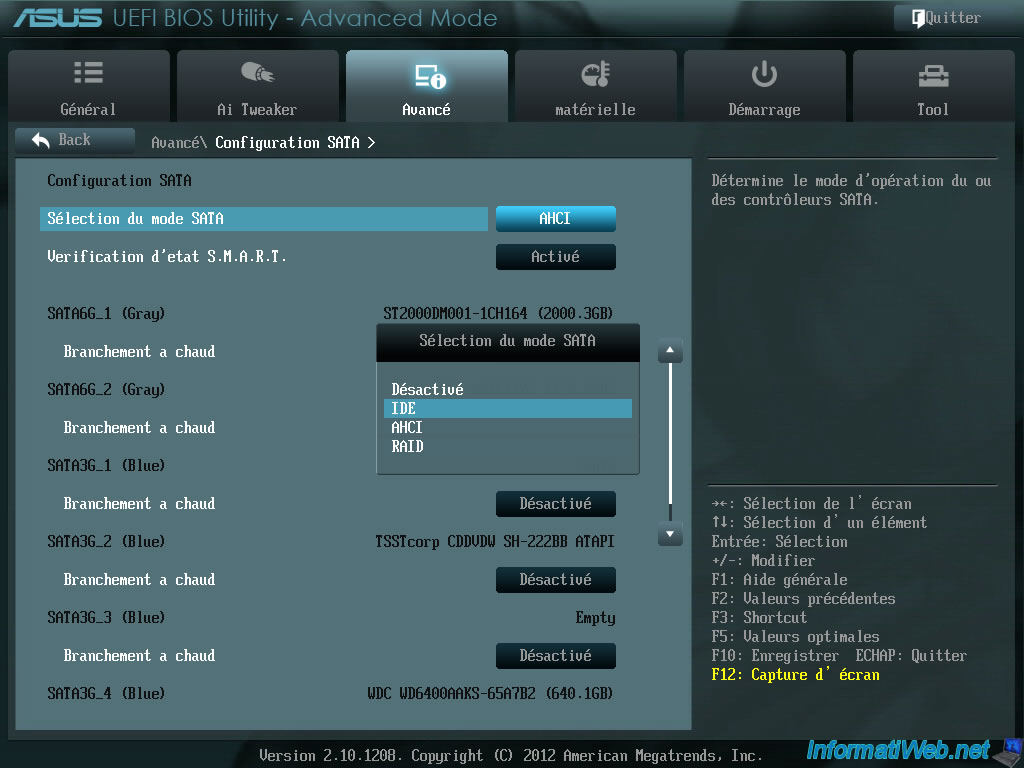 just to let u know that ALL new motherboard SURE have this setting. please switch to ADVANCE MODE. |
|
|
|
|
|
empstar2
|
Oct 24 2022, 09:40 PM
|
Getting Started
|
TS now I can only suggest.
1) this PC, plug in another SSD/HDD and try install new windows. if this ok then con lan firm your SSD K.O.
2) unplug the SSD and test in another PC (if u have one) and test it. (best)
This post has been edited by empstar2: Oct 24 2022, 09:43 PM
|
|
|
|
|
|
empstar2
|
Oct 24 2022, 09:47 PM
|
Getting Started
|
QUOTE(tng55 @ Oct 24 2022, 09:45 PM) Dont have extra SSD I already unplug ssd I will test other pc ssd sata let to see If working fine like 24+hours running Then what problem pc  this PC you use another HDD/SSD to install a new windows and see can or not , if cannot install or BSOD or HANG then motherboard problem. (please change IDE cable too.) |
|
|
|
|
|
empstar2
|
Oct 28 2022, 02:16 PM
|
Getting Started
|
SSD problem mostly. So get a new ssd.
|
|
|
|
|



 Quote
Quote

 0.0165sec
 0.22
0.22
 7 queries
 GZIP Disabled