Welcome Guest ( Log In | Register )

Outline · [ Standard ] · Linear+

 Pos Printing in Flutter, ESC POS

views
     
TSFaint
post Jul 28 2022, 10:34 AM, updated 4y ago

Moving forward :)
*******
Senior Member
2,474 posts

Joined: Dec 2006
user posted image

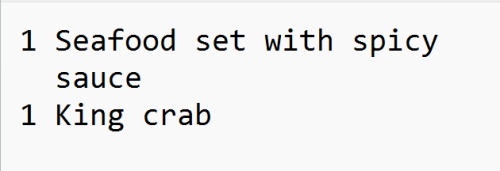
Hi, can u guys help how to print receipt like above ?

The sauce will go to next line but under the food name.

2022-08-17: If combine with chinese word, this text calculation method is not longer workable due to font size different.

Can help ?

This post has been edited by Faint: Aug 17 2022, 08:06 AM
flashang
post Jul 28 2022, 11:40 AM

Casual
***
Junior Member
355 posts

Joined: Aug 2021


It's similar to console / text mode output.

You have to manually adjust space.
Please take note if you have quantity 10++ you may have alignment issue.

use "^" to indicate space :

CODE

1 x Seafood set with spicy
^^^^sauce

1 x King crab

10 x Seafood set with spicy
^^^^^sauce


There is another display style :

CODE

Seafood set with spicy
sauce^^^^^^^^^^^^^^x 1
King crab^^^^^^^^^^x 1

Seafood set with spicy
sauce^^^^^^^^^^^^^x 10


blink.gif


FlierMate1
post Jul 28 2022, 05:02 PM

Getting Started
**
Validating
139 posts

Joined: Jun 2022
Hi there, I see you are doing ESC/P printing.

Basically @flashang is correct.

I did the same thing 2 years ago, using C# for Windows, for splitting long lines to multiple lines, and multiple columns.

How to improve this C# code? (Print multi-column multi-line bilingual)
https://forum.lowyat.net/index.php?showtopic=4911805

The thread starter is also me, but different user name.

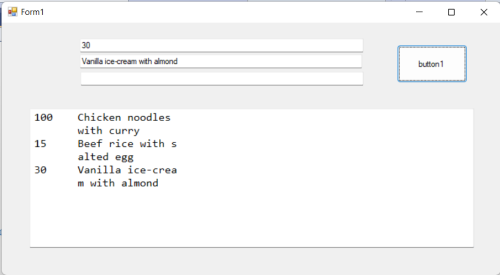
Something like this, but my code won't split word-by-word, it split char-by-char to new line: shakehead.gif
user posted image

This post has been edited by FlierMate1: Jul 28 2022, 05:40 PM
TSFaint
post Aug 17 2022, 08:07 AM

Moving forward :)
*******
Senior Member
2,474 posts

Joined: Dec 2006
QUOTE(flashang @ Jul 28 2022, 11:40 AM)
It's similar to console / text mode output.

You have to manually adjust space.
Please take note if you have quantity 10++ you may have alignment issue.

use "^" to indicate space :

CODE

1 x Seafood set with spicy
^^^^sauce

1 x King crab

10 x Seafood set with spicy
^^^^^sauce


There is another display style :

CODE

Seafood set with spicy
sauce^^^^^^^^^^^^^^x 1
King crab^^^^^^^^^^x 1

Seafood set with spicy
sauce^^^^^^^^^^^^^x 10


blink.gif
*
Thanks!


QUOTE(FlierMate1 @ Jul 28 2022, 05:02 PM)
Hi there, I see you are doing ESC/P printing.

Basically @flashang is correct.

I did the same thing 2 years ago, using C# for Windows, for splitting long lines to multiple lines, and multiple columns.

How to improve this C# code? (Print multi-column multi-line bilingual)
https://forum.lowyat.net/index.php?showtopic=4911805

The thread starter is also me, but different user name.

Something like this, but my code won't split word-by-word, it split char-by-char to new line:  shakehead.gif
user posted image
*
if combine with chinese character, this method not working.

FlierMate1
post Aug 17 2022, 02:34 PM

Getting Started
**
Validating
139 posts

Joined: Jun 2022
QUOTE(Faint @ Aug 17 2022, 08:07 AM)
if combine with chinese character, this method not working.
*
Are you using my code? Do you mean the line splitting not working properly?

The logic behind my code is to treat each CJK char as two Roman alphabets (e.g. 'ABC'), it is far from perfect.

I think with use of space padding, you have already solved your problem.
TSFaint
post Aug 18 2022, 08:54 AM

Moving forward :)
*******
Senior Member
2,474 posts

Joined: Dec 2006
QUOTE(FlierMate1 @ Aug 17 2022, 02:34 PM)
Are you using my code?  Do you mean the line splitting not working properly?

The logic behind my code is to treat each CJK char as two Roman alphabets (e.g. 'ABC'), it is far from perfect.

I think with use of space padding, you have already solved your problem.
*
When printing chi and eng together, the text counting is not accurate due to the font printing via POS printer for eng and chi are different, although same font size.

Below is my version in c#, I'm using a rectangle to wrap the text, so text will auto goes to next line.

CODE
Size size = TextRenderer.MeasureText(TextToPrint, CustomFont1, new Size(240, 16), TextFormatFlags.WordBreak);
Rectangle rectF1 = new RectangleF(50, (Offset + 20), size.Width + 20, size.Height);

graphics.DrawString(TextToPrint, CustomFont1, Brushes.Black, rectF1);



Change to:
| Lo-Fi Version
0.0166sec    0.15    5 queries    GZIP Disabled
Time is now: 25th December 2025 - 01:39 AM