Outline ·
[ Standard ] ·
Linear+
Laptop can't boot to window, I install NVME SSD n format HDD
|
TSsairay
|
 Jul 19 2022, 03:43 PM, updated 4y ago Jul 19 2022, 03:43 PM, updated 4y ago
|
Getting Started


|
I'm not sure this is the right thread for this but hopefully some kind soul can help me out here.
Recently after installing my new m2 NVME, I formatted my HDD. Thereafter I can't boot anymore. My laptop brand is HP Pavilion. I have try contacting HP support but to no avail as it's past warranty.
I think I need to do a recovery and re-install my window. Can anybody offer any advice how to go about this and what to do.
I'm not an IT guy btw so all are DIY to me.
|
|
|
|
|
|
TSsairay
|
Jul 19 2022, 04:12 PM
|
Getting Started
|
QUOTE(jimmychangas @ Jul 19 2022, 03:46 PM) Do you have a bootable USB drive that contains the Windows 10 (or Windows 11) OS installer? If yes, plug that into your laptop, turn on your laptop and repeatedly hit F2 (it could be F10 as well) on your keyboard to enter BIOS. From the BIOS boot menu, set the USB drive at the top of the boot priority so that it will boot into the USB drive and install Windows. Unfortunately no |
|
|
|
|
|
TSsairay
|
Jul 19 2022, 04:15 PM
|
Getting Started
|
QUOTE(acbc @ Jul 19 2022, 03:47 PM) More like the BIOS cannot find the boot drive. U will need to reinstall Windows again. Download from MS site and flash to a USB flash drive using Rufus. After that, boot using the USB drive and reinstall or repair. Can I download directly from MS? What is Rufus if I may ask. Sorry noon here. Here's a screenshot of the issue when I try to boot now. 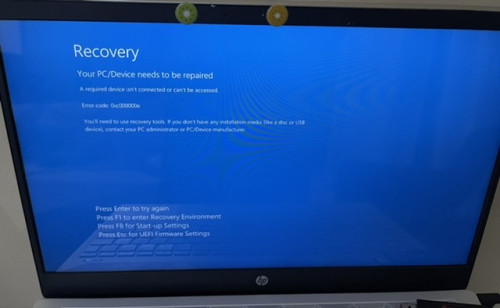 |
|
|
|
|
|
TSsairay
|
Jul 19 2022, 04:28 PM
|
Getting Started
|
QUOTE(bobkiit @ Jul 19 2022, 03:52 PM) Remove the HDD from yr laptop and try boot again from yr M.2 My OS on m2 also gone. At first I duplicate from HDD to m2 ok. Then booting have problem. So I make a mistake thinking format c will automatically divert booting to m2 but it didn't work.now I'm left with nothing to boot with. Anybody have any experience of doing recovery on HP laptop? |
|
|
|
|
|
TSsairay
|
Jul 19 2022, 04:31 PM
|
Getting Started
|
QUOTE(akhito @ Jul 19 2022, 04:19 PM) first did you clone windows from hdd to nvme ssd? If no then it is normal, cuz there is notthing to boot from just download windows iso and use rufus to create bootmedi and reinstall windows Guide but u need existing pc and usbIf yes try changing boot sequence, so that bios will priorise the nvme ssd, removing hdd and try to boot again ia also a good option Thanks I have done the window media creation on usb but didn't work either. Not sure what I had did wrong. I suspect HP lock the win os on my HDD including licensing etc. I need to do HP recovery thru them? |
|
|
|
|
|
TSsairay
|
Jul 19 2022, 04:48 PM
|
Getting Started
|
QUOTE(akhito @ Jul 19 2022, 04:40 PM) by right it should work. cuz oem licensing is mostly bind to ur laptop motherboard. try change boot sequence to prioritize usb and also try disable secure boot. Ok will give it a go. Thanks |
|
|
|
|
|
TSsairay
|
Jul 19 2022, 05:33 PM
|
Getting Started
|
Got 2 questions need help.
1. My laptop originally was win10 n got upgraded to win11. If use MS win creation media for win10 or win11?
2. When I run this win installation from usb, is it a clean install or need to re-install at original HDD instead of m2?
|
|
|
|
|
|
TSsairay
|
Jul 22 2022, 04:48 PM
|
Getting Started
|
QUOTE(jimmychangas @ Jul 20 2022, 08:58 AM) 1. You can try Win11. Usually the license is linked to the motherboard of your laptop, or if you signed in to your Microsoft account, the license will be linked to your Microsoft account. When you reformat and when you setup for the first time, just sign in to your Microsoft account and it'll automatically activate (need internet la of course) 2. You can choose to either keep your files, or perform clean install. You can also choose which hard drive to install Windows on. Just make sure you don't choose the wrong drive. Thanks just wanna update I got it sort out. I manage to install win11 on the new m2. It was the process that need to relook and remove the thumb drive after install from media creation. |
|
|
|
|



 Quote
Quote

 0.0138sec
 0.99
0.99
 6 queries
 GZIP Disabled