Welcome Guest ( Log In | Register )

Outline · [ Standard ] · Linear+

 Laptop can't boot to window, I install NVME SSD n format HDD

views
     
TSsairay
post Jul 19 2022, 03:43 PM, updated 4y ago

Getting Started
**
Junior Member
269 posts

Joined: May 2006
I'm not sure this is the right thread for this but hopefully some kind soul can help me out here.

Recently after installing my new m2 NVME, I formatted my HDD. Thereafter I can't boot anymore. My laptop brand is HP Pavilion. I have try contacting HP support but to no avail as it's past warranty.

I think I need to do a recovery and re-install my window. Can anybody offer any advice how to go about this and what to do.

I'm not an IT guy btw so all are DIY to me.
jimmychangas
post Jul 19 2022, 03:46 PM

Getting Started
**
Junior Member
149 posts

Joined: Jul 2012


Do you have a bootable USB drive that contains the Windows 10 (or Windows 11) OS installer? If yes, plug that into your laptop, turn on your laptop and repeatedly hit F2 (it could be F10 as well) on your keyboard to enter BIOS.

From the BIOS boot menu, set the USB drive at the top of the boot priority so that it will boot into the USB drive and install Windows.
acbc
post Jul 19 2022, 03:47 PM

Look at all my stars!!
*******
Senior Member
9,046 posts

Joined: Jan 2003
More like the BIOS cannot find the boot drive.

U will need to reinstall Windows again. Download from MS site and flash to a USB flash drive using Rufus. After that, boot using the USB drive and reinstall or repair.
alextan99
post Jul 19 2022, 03:50 PM

Wassup
*******
Senior Member
2,660 posts

Joined: Jan 2003
From: Somewhere in the world
if you have formatted the HDD then its not worth the time for recovery. Just install new windows on the NVME drive
kopiride
post Jul 19 2022, 03:51 PM

Enthusiast
*****
Junior Member
783 posts

Joined: Jan 2003
QUOTE(sairay @ Jul 19 2022, 03:43 PM)
I'm not sure this is the right thread for this but hopefully some kind soul can help me out here.

Recently after installing my new m2 NVME, I formatted my HDD. Thereafter I can't boot anymore. My laptop brand is HP Pavilion. I have try contacting HP support but to no avail as it's past warranty.

I think I need to do a recovery and re-install my window. Can anybody offer any advice how to go about this and what to do.

I'm not an IT guy btw so all are DIY to me.
*
When u format it means all gone thus u can't boot. Like other mentioned, u need to create a windows 10 installer.
Google that YouTube have a lot of guide. Simple to do.
If u can specify your laptop model exactly then maybe others can help better. Drivers u can get from hp website but windows usually will come with it.
The only thing is the windows 10 key. Is it behind your laptop? Else contact HP or buy a new key cheap.
bobkiit
post Jul 19 2022, 03:52 PM

Getting Started
**
Junior Member
50 posts

Joined: Nov 2017
Remove the HDD from yr laptop and try boot again from yr M.2
TSsairay
post Jul 19 2022, 04:12 PM

Getting Started
**
Junior Member
269 posts

Joined: May 2006
QUOTE(jimmychangas @ Jul 19 2022, 03:46 PM)
Do you have a bootable USB drive that contains the Windows 10 (or Windows 11) OS installer? If yes, plug that into your laptop, turn on your laptop and repeatedly hit F2 (it could be F10 as well) on your keyboard to enter BIOS.

From the BIOS boot menu, set the USB drive at the top of the boot priority so that it will boot into the USB drive and install Windows.
*
Unfortunately no
TSsairay
post Jul 19 2022, 04:15 PM

Getting Started
**
Junior Member
269 posts

Joined: May 2006
QUOTE(acbc @ Jul 19 2022, 03:47 PM)
More like the BIOS cannot find the boot drive.

U will need to reinstall Windows again. Download from MS site and flash to a USB flash drive using Rufus. After that, boot using the USB drive and reinstall or repair.
*
Can I download directly from MS? What is Rufus if I may ask. Sorry noon here.

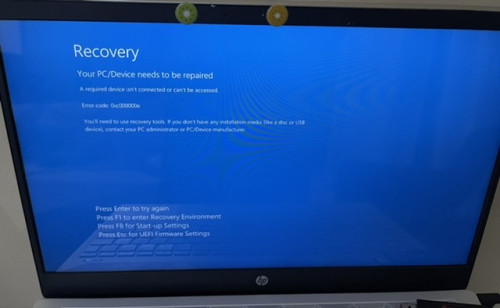
Here's a screenshot of the issue when I try to boot now.
user posted image
akhito
post Jul 19 2022, 04:19 PM

Enthusiast
*****
Junior Member
745 posts

Joined: Jul 2016


QUOTE(sairay @ Jul 19 2022, 03:43 PM)
I'm not sure this is the right thread for this but hopefully some kind soul can help me out here.

Recently after installing my new m2 NVME, I formatted my HDD. Thereafter I can't boot anymore. My laptop brand is HP Pavilion. I have try contacting HP support but to no avail as it's past warranty.

I think I need to do a recovery and re-install my window. Can anybody offer any advice how to go about this and what to do.

I'm not an IT guy btw so all are DIY to me.
*
first did you clone windows from hdd to nvme ssd?
If no then it is normal, cuz there is notthing to boot from just download windows iso and use rufus to create bootmedi and reinstall windows
Guide but u need existing pc and usb
If yes try changing boot sequence, so that bios will priorise the nvme ssd, removing hdd and try to boot again ia also a good option
TSsairay
post Jul 19 2022, 04:28 PM

Getting Started
**
Junior Member
269 posts

Joined: May 2006
QUOTE(bobkiit @ Jul 19 2022, 03:52 PM)
Remove the HDD from yr laptop and try boot again from yr M.2
*
My OS on m2 also gone. At first I duplicate from HDD to m2 ok. Then booting have problem. So I make a mistake thinking format c will automatically divert booting to m2 but it didn't work.now I'm left with nothing to boot with. Anybody have any experience of doing recovery on HP laptop?
TSsairay
post Jul 19 2022, 04:31 PM

Getting Started
**
Junior Member
269 posts

Joined: May 2006
QUOTE(akhito @ Jul 19 2022, 04:19 PM)
first did you clone windows from hdd to nvme ssd?
If no then it is normal, cuz there is notthing to boot from just download windows iso and use rufus to create bootmedi and reinstall windows
Guide but u need existing pc and usb
If yes try changing boot sequence, so that bios will priorise the nvme ssd, removing hdd and try to boot again ia also a good option
*
Thanks I have done the window media creation on usb but didn't work either. Not sure what I had did wrong. I suspect HP lock the win os on my HDD including licensing etc. I need to do HP recovery thru them?
akhito
post Jul 19 2022, 04:40 PM

Enthusiast
*****
Junior Member
745 posts

Joined: Jul 2016


QUOTE(sairay @ Jul 19 2022, 04:31 PM)
Thanks I have done the window media creation on usb but didn't work either. Not sure what I had did wrong. I suspect HP lock the win os on my HDD including licensing etc. I need to do HP recovery thru them?
*
by right it should work. cuz oem licensing is mostly bind to ur laptop motherboard. try change boot sequence to prioritize usb and also try disable secure boot.
TSsairay
post Jul 19 2022, 04:48 PM

Getting Started
**
Junior Member
269 posts

Joined: May 2006
QUOTE(akhito @ Jul 19 2022, 04:40 PM)
by right it should work. cuz oem licensing is mostly bind to ur laptop motherboard. try change boot sequence to prioritize usb and also try disable secure boot.
*
Ok will give it a go. Thanks
TSsairay
post Jul 19 2022, 05:33 PM

Getting Started
**
Junior Member
269 posts

Joined: May 2006
Got 2 questions need help.

1. My laptop originally was win10 n got upgraded to win11. If use MS win creation media for win10 or win11?
2. When I run this win installation from usb, is it a clean install or need to re-install at original HDD instead of m2?
jimmychangas
post Jul 20 2022, 08:58 AM

Getting Started
**
Junior Member
149 posts

Joined: Jul 2012


QUOTE(sairay @ Jul 19 2022, 05:33 PM)
Got 2 questions need help.

1. My laptop originally was win10 n got upgraded to win11. If use MS win creation media for win10 or win11?
2. When I run this win installation from usb, is it a clean install or need to re-install at original HDD instead of m2?
*
1. You can try Win11. Usually the license is linked to the motherboard of your laptop, or if you signed in to your Microsoft account, the license will be linked to your Microsoft account. When you reformat and when you setup for the first time, just sign in to your Microsoft account and it'll automatically activate (need internet la of course)

2. You can choose to either keep your files, or perform clean install. You can also choose which hard drive to install Windows on. Just make sure you don't choose the wrong drive.
TSsairay
post Jul 22 2022, 04:48 PM

Getting Started
**
Junior Member
269 posts

Joined: May 2006
QUOTE(jimmychangas @ Jul 20 2022, 08:58 AM)
1. You can try Win11. Usually the license is linked to the motherboard of your laptop, or if you signed in to your Microsoft account, the license will be linked to your Microsoft account. When you reformat and when you setup for the first time, just sign in to your Microsoft account and it'll automatically activate (need internet la of course)

2. You can choose to either keep your files, or perform clean install. You can also choose which hard drive to install Windows on. Just make sure you don't choose the wrong drive.
*
Thanks just wanna update I got it sort out. I manage to install win11 on the new m2. It was the process that need to relook and remove the thumb drive after install from media creation.
jimmychangas
post Jul 25 2022, 01:46 PM

Getting Started
**
Junior Member
149 posts

Joined: Jul 2012


Glad to know it's sorted now. Thanks for updating.
sixguyz_jayhan
post Jul 29 2022, 10:51 AM

Getting Started
**
Junior Member
215 posts

Joined: Sep 2019
QUOTE(sairay @ Jul 19 2022, 03:43 PM)
I'm not sure this is the right thread for this but hopefully some kind soul can help me out here.

Recently after installing my new m2 NVME, I formatted my HDD. Thereafter I can't boot anymore. My laptop brand is HP Pavilion. I have try contacting HP support but to no avail as it's past warranty.

I think I need to do a recovery and re-install my window. Can anybody offer any advice how to go about this and what to do.

I'm not an IT guy btw so all are DIY to me.
*
Don't know whether your problems being solved, but the information might help you in future.

1. OS was located in your drive (HDD/SSD). If you trying to add on/change other drive, you have to clone/reinstall the OS on that new drive first, only you can format your disk.
2. Where to download the OS, using Windows's media creation tools for genuine purposes. Or, any well known website to download.
3. OS installation file will be all in ISO format, which you may understand it as a disk file (like how you use CD to install the program many years ago) for installation purposes.
4. ISO could be burned into CD (Use Nero Burning ROM or Windows CD Burning) or make as a bootable drive in thumb drive (Use RUFUS, Power ISO, or ISO burner).
5. Nowadays people using bootable thumb drive to install OS. You may refer to internet tutorial on windows installation.

c64
post Aug 3 2022, 11:22 PM

Enthusiast
*****
Junior Member
711 posts

Joined: Sep 2021


TS. This is because your bootrec is still on the old HDD, which you have formatted. Even if you clone to the NVME first, the BIOS can't find the bootrec record, hence, can't boot. What you need to do is to recreate the bootrec record in the NVME drive from the Command prompt in the recovery environment.

It is not a straigthfoward process. Next time, before you replace the an old drive. Always make sure the bootrec is in your new drive first.
labtec
post Jan 31 2023, 10:56 PM

Regular
******
Senior Member
1,556 posts

Joined: Jan 2003
my laptop cannot boot into window recently and the computer service shop just confirm the SSD is dead

I can follow the steps here to reinstall the window once i buy new SSD right?


Change to:
| Lo-Fi Version
0.0201sec    0.59    5 queries    GZIP Disabled
Time is now: 8th December 2025 - 04:32 PM