Welcome Guest ( Log In | Register )

Outline · [ Standard ] · Linear+

 how to setup file transer on windows via wifi card, like a host, sharing big files

views
     
TShdbjhn2
post Jul 10 2022, 08:21 PM, updated 4y ago

Getting Started
**
Junior Member
267 posts

Joined: Mar 2014
From: Seremban


*Let me know if this is the right section, and if not, which section should i move it to.

Hye everyone. I'm just regular pc user and i'm using a pcie wireless card.
For now, im using it to connect to internet only.

Does anyone know or how to setup/make file transfers via wireless ?

Examples:
1. i have android tv box. For now, i can share any files via phone from my phone(Android) to the box, though this process is not fast enough.
But, i can't find any software to do the same using my pc/windows ?
Why is there a way for android devices but not for computers ?! haha.

2. I have a modem(Unifi tp link) with usb hub. So, maybe i can use the modem to send large files via wireless and than let that to shared to all other wireless devices?

I'm totally noob about this and google aint helping except something shitty posts; bluetooth la, paid subscription la(sounds stupid), and the normal windows file sharing(but that will only work with another windows pc).


So, is there anyway to make my pc to host wifi, to share large files,, or even receive files, lets say from my phones ?? Via wireless,

let me know all the ways and i will try to learn.
PJng
post Jul 10 2022, 09:13 PM

10k Club
********
All Stars
12,055 posts

Joined: Oct 2017


On my pc, i open a network sharing folder, with full permission access
Then on pc network and sharing, i turn off password
On my android phone, i connect same wifi network with same pc that connected to unifi modem
And phone install file manager app that can have smb function,
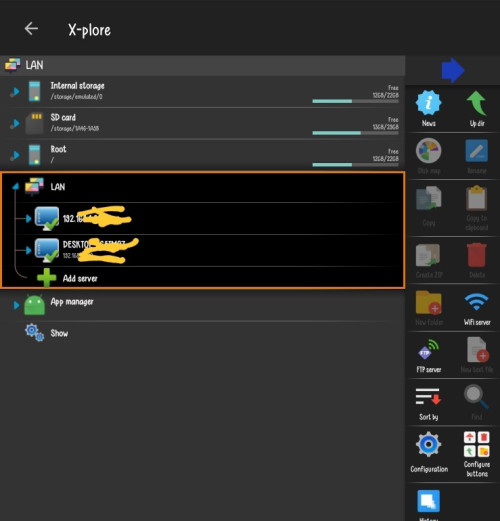
I use x-plore, but speed not very good, like you downloading on internet
metalfire
post Jul 10 2022, 09:26 PM

Regular
******
Senior Member
1,310 posts

Joined: Oct 2005


depends how large are your files...will waste a lot of time transferring via wireless and it slows down the network too.

Build a NAS if you have the budget or just plug usb media copy/paste.
TShdbjhn2
post Jul 10 2022, 11:24 PM

Getting Started
**
Junior Member
267 posts

Joined: Mar 2014
From: Seremban


QUOTE(PJng @ Jul 10 2022, 09:13 PM)
On my pc, i open a network sharing folder, with full permission access
Then on pc network and sharing, i turn off password
On my android phone, i connect same wifi network with same pc that connected to unifi modem
And phone install file manager app that can have smb function,
I use x-plore, but speed not very good, like you downloading on internet
*
erm, thanks, thats 1 suggestion.
well, can you help me, like lil guide(just throw me the terms) to create such network? I'm on windows 10, and

As for, smb function, haven't try with pc,, im using SendFileto app within androids, and speed isn't great either. Surely faster then my unifi, meaning the files aren't transfered via internet but thats it.
TShdbjhn2
post Jul 10 2022, 11:28 PM

Getting Started
**
Junior Member
267 posts

Joined: Mar 2014
From: Seremban


QUOTE(metalfire @ Jul 10 2022, 09:26 PM)
depends how large are your files...will waste a lot of time transferring via wireless and it slows down the network too.

Build a NAS if you have the budget or just plug usb media copy/paste.
*
Waste time,, its not a problem for me, just movie files. But i prefer wireless,, because, right now, for every movie/video i have,i will have to copy it to my phone and transfer it via wireless.
My android box doesn't have copying capabilty via usb drives.

Pluggin in out usb media is still bothersome, wireless is better. i don't have to move either lol.
NAS is out of question,will be overspending for me.
zemega
post Jul 10 2022, 11:31 PM

Enthusiast
*****
Junior Member
723 posts

Joined: Jul 2008
I use wi-fi FTP server on Android phone. Windows connect to the android using FTP.
TShdbjhn2
post Jul 10 2022, 11:34 PM

Getting Started
**
Junior Member
267 posts

Joined: Mar 2014
From: Seremban


QUOTE(zemega @ Jul 10 2022, 11:31 PM)
I use wi-fi FTP server on Android phone. Windows connect to the android using FTP.
*
sounds more direct. but how to? where can i learn ? -help me a bit, saves some time. haha.

Also, when windows connect to the FTP, can it send and receive file as well?
Need any apps for that ?
PJng
post Jul 10 2022, 11:36 PM

10k Club
********
All Stars
12,055 posts

Joined: Oct 2017


currently no in front of pc, but you can just try first, use a folder, on properties share tab click share, then on permission set everyone, full access,

on this screen user posted image set like this,
picture from howtogeek

then on phone i use this app

user posted image

to access pc file, because of DHCP, i set fix IP on my PC, so on this app i can save that IP 192.168.0.xxx
as long as pc on, yo can just browser pc file using that app, even playing movie file
yes may cause some CPU usage on windows pc if copying large file
speed copy less that 10MB/s
TShdbjhn2
post Jul 10 2022, 11:39 PM

Getting Started
**
Junior Member
267 posts

Joined: Mar 2014
From: Seremban


QUOTE(PJng @ Jul 10 2022, 11:36 PM)
currently no in front of pc, but you can just try first, use a folder, on properties share tab click share, then on permission set everyone, full access,

on this screen user posted image set like this,
picture from howtogeek

then on phone i use this app

user posted image

to access pc file, because of DHCP, i set fix IP on my PC, so on this app i can save that IP 192.168.0.xxx
as long as pc on, yo can just browser pc file using that app, even playing movie file
yes may cause some CPU usage on windows pc if copying large file
speed copy less that 10MB/s
*
Thanks a lot!! i will pick it up from here.
PJng
post Jul 10 2022, 11:40 PM

10k Club
********
All Stars
12,055 posts

Joined: Oct 2017


if whole HDD just movie want to be view, so just share whole HDD,
directly play movie file stream from pc, no need copy file to android phone or box
btw i don have android tv box, but should same
zemega
post Jul 12 2022, 02:20 PM

Enthusiast
*****
Junior Member
723 posts

Joined: Jul 2008
QUOTE(hdbjhn2 @ Jul 10 2022, 11:34 PM)
sounds more direct. but how to? where can i learn ? -help me a bit, saves some time. haha.

Also, when windows connect to the FTP, can it send and receive file as well?
Need any apps for that ?
*
The app on Android ia called wifi FTP server. Install it. Open it. Change the mounting location to root if you need it. Then open the address shown in the app in windows explorer. Then you can copy paste from Windows. I have been using this for so many years and still using it.
asdasd
post Jul 12 2022, 02:48 PM

Casual
***
Junior Member
337 posts

Joined: Nov 2004


TS,

the reason why windows dont have app for network file sharing is becoz the protocol is already built-in within the OS. as long as you in windows network environment you can share a folder to make it accessible to others within the same network.

windows will not differentiate whether you are using wifi or LAN. as long as connected to the same network you can share files. but you need to enable some settings as mentioned in post #9.
RT8081
post Jul 13 2022, 01:36 PM

Casual
***
Junior Member
355 posts

Joined: May 2022

You need to be within same network.

On your windows, enable network share.

On your android, search your machine via ip


This post has been edited by RT8081: Jul 13 2022, 01:37 PM
UncleTiramisu P
post Feb 3 2023, 12:33 AM

New Member
*
Probation
1 posts

Joined: Jan 2023


if you refer to file server, that one very easy with windows/ubuntu.
cheap-cheap somemore.

ubuntu VPS price you find out lor.
other users can share same cost, really bring down the cost, if you have many friends. Makes great storage serverlah tu.

Assuming you have root owner control of the VPS, then
all is very easy. Two/more Windows users can share the same
VPS, just like those using Cloud Server. Same concept.

Never mind where, as long can use IPV6, even in LA, dekat Lorong Alley.
ipv6 must be the "global" one, starts with 2.. or even 3.... if i
recalled correctly.
Mean time, use port 22 first until you are pro.

Newbie how? Use WinSCP portable, or Bitvise Client for Windows, both Windows laptop/desktop and Ubuntu server VPS (subscribe) as intermediary file storage. If you know programming, you can even write file router too on Ubuntu. But that one, lecehlah. its more like chit-chat file server, troublesome to coordinate, who is already connected.

Just copy and paste (drag and drop). That one dont know, I cant help.

Very slow learning? Use Portable GDE of Portable Apps, to
make notes and reclassify them, very easy. Note down what works.
After empatblas hari bules everyday also takboleh, means chiak lat.

Can handle Chinese characters if you struggle with English.
Translation, copy / paste from google translate service, wiki,
internet forum, chitchat server, whatever.

Arab, Japanese osocan if you love their songs. Me, only one. Sounds like chinese.
youtube video is v=tirraX_TvY0

Portable Guide (see Portable Apps) can handle yellow screen background, good for old people eyes. Also about penning thoughts, no need webpages, no need elaborate project mgmt tools, verysimple, done or not done.

Try this on RTF first, if it wont work with WordPad, then it wont work
with GDE (file extension) too. That you have to use Notepad, save as ascii text, not utf-8, rename as rtf.

{\rtf1\ansi\ansicpg1252\deff0{\fonttbl{\f0\fnil\fcharset0 Calibri;}{\f1\fnil\fcharset134 SimSun;}}
{\colortbl ;\red0\green0\blue0;}
{\*\generator Msftedit 5.41.21.2510;}\viewkind5\uc1{\*\background{\shp{\*\shpinst
{\sp{\sn fillType}{\sv 0}}
{\sp{\sn fillColor}{\sv 65535}}
{\sp{\sn fillBackColor}{\sv 0}}
{\sp{\sn fillFocus}{\sv 0}}
{\sp{\sn fillBlip}{\sv {\pict\wmetafile0\picscalex1\picscaley1
}}}}}}
\pard\cf1\lang9\f0\fs36 MULA\par
\f1\fs48\'c3\'c0\'c5\'ae\'c3\'c0\'c5\'ae\'ce\'d2\'b0\'ae\'c4\'e3\'a1\'a3\f0\fs36\par
TAMAT\par
\par
}

Old uncles are like that, learning from others, not just trial and errors.
sorry dont pm me, too busy ... normally dont bother all these, younger
ones can help. Just today ada angin saja.

So, again, dont contact me, that's all. Hope that already help.


Change to:
| Lo-Fi Version
0.0161sec    0.93    5 queries    GZIP Disabled
Time is now: 19th December 2025 - 11:06 PM