

im using TP-link AX72 router (1st floor)
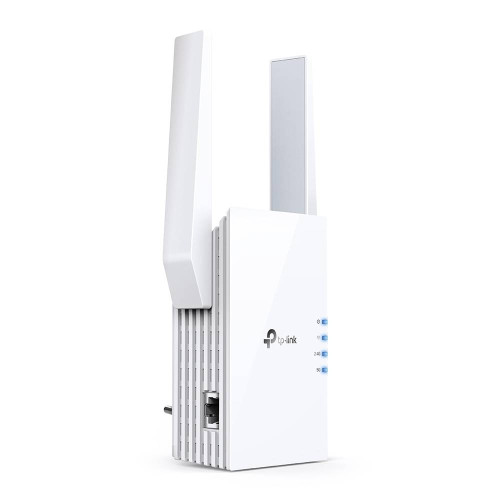
TP-link RE505x wifi extender (2nd floor)
connect both using One Mesh WiFi. Control everything using their apps.
Try it out. Believe me, it's soo worth it.

Wifi 2nd Floor Weak, Find solution
|
|
 Jul 3 2022, 09:36 PM Jul 3 2022, 09:36 PM
Return to original view | Post
#1
|
 
Junior Member
73 posts Joined: May 2007 From: Cheras  
|
i suggest spend few hundred bucks, in my case, i just budget devices but enough for everything and future proof.
im using TP-link AX72 router (1st floor) TP-link RE505x wifi extender (2nd floor) connect both using One Mesh WiFi. Control everything using their apps. Try it out. Believe me, it's soo worth it. |
|
|
Jul 7 2022, 10:28 PM
Return to original view | Post
#2
|
|
Junior Member
73 posts Joined: May 2007 From: Cheras
|
QUOTE(mrquidz @ Jul 3 2022, 09:36 PM) i suggest spend few hundred bucks, in my case, i just budget devices but enough for everything and future proof. Just to update on my internet speed with 300mbps for your future reference,im using TP-link AX72 router (1st floor) TP-link RE505x wifi extender (2nd floor) connect both using One Mesh WiFi. Control everything using their apps. Try it out. Believe me, it's soo worth it.  1st floor (main router) - full speed 300mbps using wifi 2nd floor (extender connected to main router using OneMesh wifi) - max speed 190mbps using wifi I guess to get full speed on upper floor still need the extender wired to the router as others has suggested |
| Change to: |  0.0156sec 0.0156sec
 1.73 1.73
 6 queries 6 queries
 GZIP Disabled GZIP Disabled
Time is now: 24th December 2025 - 02:04 PM |
 Quote
Quote