Welcome Guest ( Log In | Register )

Outline · [ Standard ] · Linear+

 Wifi 2nd Floor Weak, Find solution

views
     
TSaleyna58
post Jul 3 2022, 03:32 PM, updated 4y ago

Getting Started
**
Junior Member
73 posts

Joined: Jun 2010
Hi all,

please suggest best solution and please be informed that i'm really not expert in this internet thingy


Previously i subsribed to TIME and they give me Huawei HG8145V5

Now i'm moved to own house and TIME not cater my area. I have to use Maxis which they provide me LG8245X6

The issue is my second floor can only get 2 wifi bar.

FYI the developer has provide DATA switch (not sure what it is) on the 2nd floor wall. I've been informed it is connect from modem in the store.

is there any possibility to use my TIME router as maxis router on my 2nd floor using DATA switch (??) from 2nd floor wall?

if you have any link that i can follow, please help to share.

really appreciate it.
thomasyke
post Jul 3 2022, 03:46 PM

Casual
***
Junior Member
409 posts

Joined: Jun 2007
From: <20k group
QUOTE(aleyna58 @ Jul 3 2022, 03:32 PM)
Hi all,

please suggest best solution and please be informed that i'm really not expert in this internet thingy
Previously i subsribed to TIME and they give me Huawei HG8145V5

Now i'm moved to own house and TIME not cater my area. I have to use Maxis which they provide me LG8245X6

The issue is my second floor can only get 2 wifi bar.

FYI the developer has provide DATA switch (not sure what it is) on the 2nd floor wall. I've been informed it is connect from modem in the store.

is there any possibility to use my TIME router as maxis router on my 2nd floor using DATA switch (??) from 2nd floor wall?

if you have any link that i can follow, please help to share.

really appreciate it.
*
You might be able to if you're using a router that supports MESH technology.
Asus routers typically have them built in on the middle to upper range models.
You might want to read up on how to set up mesh wifi systems in house, https://www.pcmag.com/how-to/how-to-set-up-...fi-mesh-network
laksamana
post Jul 3 2022, 03:48 PM

Regular
******
Senior Member
1,356 posts

Joined: Nov 2006
From: An Illuminati organization ..


The data switch on 2nd floor is most likely a WAN-port, which means you can move the modem / router location there (you need to try the configuration yourself)

The best solution you will have is to upgrade the "free" router to a mesh solution, covering both floors of the house

For eg, I live in a 3-storey home, with mesh nodes on every floor
weakmeal69
post Jul 3 2022, 03:50 PM

Getting Started
**
Junior Member
178 posts

Joined: Jan 2009


try to google for Mercusys Halo S12.. the cheapest mesh out there so far. Ive tried it in my 2 storey house. can get full bar upstairs. If you get more budget, go for high end one like TP-Link deco.
metalfire
post Jul 3 2022, 03:52 PM

Regular
******
Senior Member
1,310 posts

Joined: Oct 2005


not sure what that data port does, you need to check it out whether working or not.

Your best bet now is to run a mesh network. It's actually very simple nowadays. Get a good mesh and put the nodes on every floor.
mrquidz
post Jul 3 2022, 09:36 PM

Getting Started
**
Junior Member
73 posts

Joined: May 2007
From: Cheras


i suggest spend few hundred bucks, in my case, i just budget devices but enough for everything and future proof.

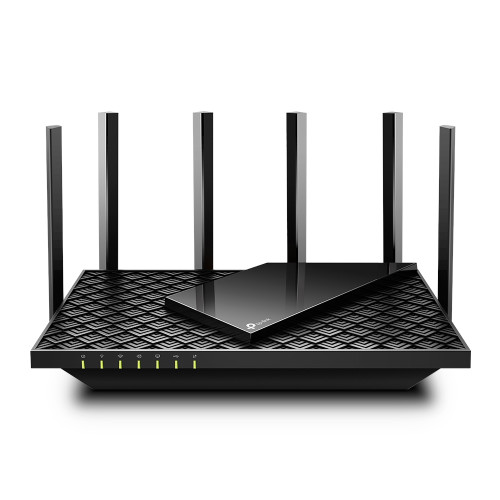
im using TP-link AX72 router (1st floor)
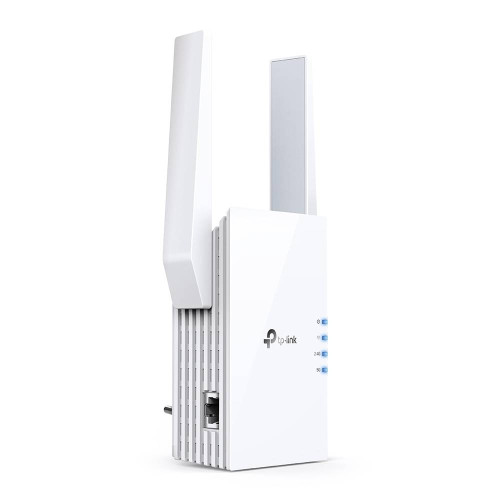
TP-link RE505x wifi extender (2nd floor)

connect both using One Mesh WiFi. Control everything using their apps.

Try it out. Believe me, it's soo worth it.

user posted image
user posted image
pl95077
post Jul 4 2022, 09:45 AM

Getting Started
**
Junior Member
245 posts

Joined: Feb 2010
QUOTE(weakmeal69 @ Jul 3 2022, 04:50 PM)
try to google for Mercusys Halo S12.. the cheapest mesh out there so far. Ive tried it in my 2 storey house. can get full bar upstairs. If you get more budget, go for high end one like TP-Link deco.
*
Ignore the AC Deco models.

If we talking entry mesh in AX segment, it will be AX1800.
Compare TP-Link and ASUS.

TP-Link Deco X20 2 pack = priced around RM689.00
ASUS RT-AX53U x 2pcs = priced around RM600.00

Will definitely go for ASUS RT-AX53U, more LAN ports, and it also support USB printer file sharing.
ASUS RT-AX53U features and price wise all better than TP-Link Deco X20
kons
post Jul 7 2022, 09:18 AM

Конс
Group Icon
Moderator
6,181 posts

Joined: Oct 2004


i have mi ax6000 broadcasting at ground floor.

whole ground floor can get full speed, including porch and backyard
2nd floor staircase area and master bedroom can get full speed.
back 1 room can get 100 mbps only (need to traverse 4 walls)
the other 2 room can get full speed.
mrquidz
post Jul 7 2022, 10:28 PM

Getting Started
**
Junior Member
73 posts

Joined: May 2007
From: Cheras


QUOTE(mrquidz @ Jul 3 2022, 09:36 PM)
i suggest spend few hundred bucks, in my case, i just budget devices but enough for everything and future proof.

im using TP-link AX72 router (1st floor)
TP-link RE505x wifi extender (2nd floor)

connect both using One Mesh WiFi. Control everything using their apps.

Try it out. Believe me, it's soo worth it.

user posted image
user posted image
*
Just to update on my internet speed with 300mbps for your future reference,

1st floor (main router) - full speed 300mbps using wifi
2nd floor (extender connected to main router using OneMesh wifi) - max speed 190mbps using wifi

I guess to get full speed on upper floor still need the extender wired to the router as others has suggested

sHawTY
post Jul 8 2022, 04:33 PM

Frequent Reporter
********
All Stars
14,909 posts

Joined: Jul 2005

QUOTE(kons @ Jul 7 2022, 09:18 AM)
i have mi ax6000 broadcasting at ground floor.

whole ground floor can get full speed, including porch and backyard
2nd floor staircase area and master bedroom can get full speed.
back 1 room can get 100 mbps only (need to traverse 4 walls)
the other 2 room can get full speed.
Global or China firmware?


Change to:
| Lo-Fi Version
0.0179sec    0.90    5 queries    GZIP Disabled
Time is now: 24th December 2025 - 12:34 AM