Outline ·
[ Standard ] ·
Linear+
Slow openvpn performance
|
GOPI56
|
 May 2 2022, 04:43 PM May 2 2022, 04:43 PM
|

|
QUOTE(yongtjunkit @ May 2 2022, 02:29 AM)  , I'm getting ERR_NAME_NOT_RESOLVED when connected to openVPN on PC but on my iPhone 12 it works fine(can load website) after flashing asuswrt merlin firmware, I've tried remotely rebooting the router, reseting the openVPN sever settings and manually reenter the settings. Are using the latest Open VPN client app on your PC, have you loaded the latest Open VPN profile from your router into the client app? Did you set any DNS settings on your PC because the error seems to be related to DNS setting. This post has been edited by GOPI56: May 2 2022, 04:58 PM |
|
|
|
|
|
TSyongtjunkit
|
May 2 2022, 05:04 PM
|
|
|
QUOTE(GOPI56 @ May 2 2022, 04:43 PM) Are using the latest Open VPN client app on your PC, have you loaded the latest Open VPN profile from your router into the client app? Did you set any DNS settings on your PC because the error seems to be related to DNS setting. Yup, using the latest OpenVPN client and loaded the latest open vpn profile into the client app Pc dns settings is set to the default value |
|
|
|
|
|
GOPI56
|
May 2 2022, 05:06 PM
|
|
|
QUOTE(yongtjunkit @ May 2 2022, 03:04 AM) Yup, using the latest OpenVPN client and loaded the latest open vpn profile into the client app Pc dns settings is set to the default value On your PC, clear the DNS cache and set the DNS manually, can use Cloudflare DNS, Google DNS. |
|
|
|
|
|
TSyongtjunkit
|
May 2 2022, 05:16 PM
|
|
|
QUOTE(GOPI56 @ May 2 2022, 05:06 PM) On your PC, clear the DNS cache and set the DNS manually, can use Cloudflare DNS, Google DNS. Just tried that, got the same result  |
|
|
|
|
|
GOPI56
|
May 2 2022, 05:29 PM
|
|
|
QUOTE(yongtjunkit @ May 2 2022, 03:16 AM) Just tried that, got the same result Was the Open VPN working fine on your PC before Asus WRT Merlin firmware? You mentioned that it was working on your iPhone after Asus WRT Merlin firmware, any improvement for the Open VPN connection? Are you able to share the advanced settings of your Open VPN on the router, like this: 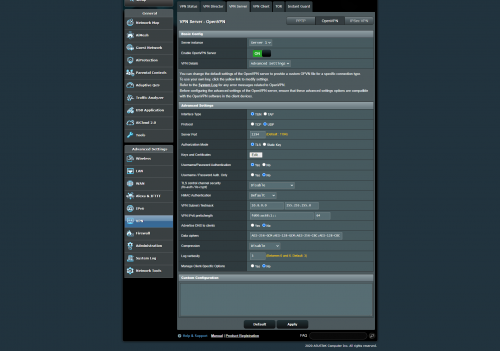 |
|
|
|
|
|
TSyongtjunkit
|
May 2 2022, 05:35 PM
|
|
|
QUOTE(GOPI56 @ May 2 2022, 05:29 PM) Was the Open VPN working fine on your PC before Asus WRT Merlin firmware? You mentioned that it was working on your iPhone after Asus WRT Merlin firmware, any improvement for the Open VPN connection? Are you able to share the advanced settings of your Open VPN on the router, like this: yup, it was working before the merlin upgrade After the merlin upgrade there were some improvements on the download speed sure, here's the screenshot of the advance settings 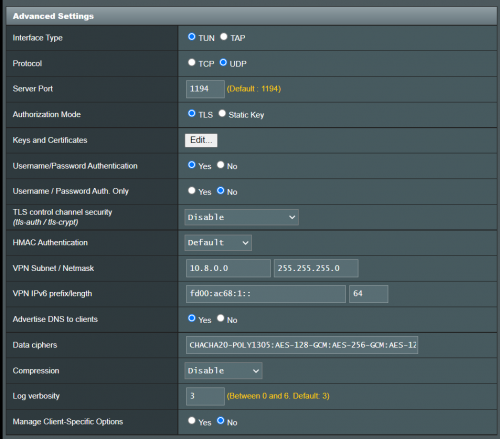 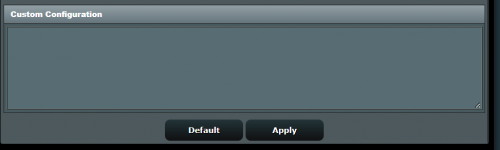 |
|
|
|
|
|
GOPI56
|
May 2 2022, 05:38 PM
|
|
|
QUOTE(yongtjunkit @ May 2 2022, 03:35 AM) yup, it was working before the merlin upgrade After the merlin upgrade there were some improvements on the download speed sure, here's the screenshot of the advance settings Try setting the interface type to "TAP" |
|
|
|
|
|
TSyongtjunkit
|
May 2 2022, 05:42 PM
|
|
|
QUOTE(GOPI56 @ May 2 2022, 05:38 PM) Try setting the interface type to "TAP" Got this error when trying to import the profile 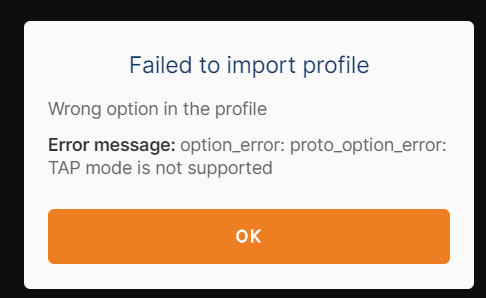 edit: looks like I'm using the wrong version it seems, I was using openvpn connect instead of openvpn This post has been edited by yongtjunkit: May 2 2022, 05:46 PM |
|
|
|
|
|
TSyongtjunkit
|
May 2 2022, 05:49 PM
|
|
|
QUOTE(GOPI56 @ May 2 2022, 05:38 PM) Try setting the interface type to "TAP" Looks like internet traffic isn't rerouting to openvpn sever after switching to the openvpn client from openvpn connect and switching the interface from TUN to TAP This post has been edited by yongtjunkit: May 2 2022, 05:49 PM |
|
|
|
|
|
GOPI56
|
May 2 2022, 05:55 PM
|
|
|
QUOTE(yongtjunkit @ May 2 2022, 03:49 AM) Looks like internet traffic isn't rerouting to openvpn sever after switching to the openvpn client from openvpn connect and switching the interface from TUN to TAP Revert back the setting to use TUN interface. Still figuring out what is wrong. |
|
|
|
|
|
GOPI56
|
May 2 2022, 06:07 PM
|
|
|
1.Remove the DNS settings that you set earlier in the PC.
2.In Asus router Open VPN advance config set "Advertise DNS to clients" to No.
|
|
|
|
|
|
TSyongtjunkit
|
May 2 2022, 06:23 PM
|
|
|
QUOTE(GOPI56 @ May 2 2022, 06:07 PM) 1.Remove the DNS settings that you set earlier in the PC. 2.In Asus router Open VPN advance config set "Advertise DNS to clients" to No. Just tried it, still doesn't reroute the traffic on my PC Edit: Looks like IPV6 traffic isn't being rerouted for some reason, disabling IPV6 shows that IPV4 traffic is being rerouted This post has been edited by yongtjunkit: May 2 2022, 06:27 PM |
|
|
|
|
|
GOPI56
|
May 2 2022, 06:31 PM
|
|
|
QUOTE(yongtjunkit @ May 2 2022, 04:23 AM) Just tried it, still doesn't reroute the traffic on my PC Edit: Looks like IPV6 traffic isn't being rerouted for some reason, disabling IPV6 shows that IPV4 traffic is being rerouted 1. Able to surf websites now after disabling the IPV6 on your PC? 2. Using OpenVPN Connect on your PC? |
|
|
|
|
|
TSyongtjunkit
|
May 2 2022, 06:33 PM
|
|
|
QUOTE(GOPI56 @ May 2 2022, 06:31 PM) 1. Able to surf websites now after disabling the IPV6 on your PC? 2. Using OpenVPN Connect on your PC? 1. Yup 2. Open VPN connect gives the dns error but OpenVPN gui works |
|
|
|
|
|
GOPI56
|
May 2 2022, 06:34 PM
|
|
|
QUOTE(yongtjunkit @ May 2 2022, 04:33 AM) 1. Yup 2. Open VPN connect gives the dns error but OpenVPN gui works Ok, how is the performance of the Open VPN connection now, better? I am also not sure why the IPV6 traffic is not being rerouted. |
|
|
|
|
|
TSyongtjunkit
|
May 2 2022, 08:17 PM
|
|
|
QUOTE(GOPI56 @ May 2 2022, 06:34 PM) Ok, how is the performance of the Open VPN connection now, better? I am also not sure why the IPV6 traffic is not being rerouted. Yup, I belive it's rougly in line with the expected speed, not too sure about the ping since I'm testing at a different location now(unifi 100mbps) |
|
|
|
|
|
teslaman
|
May 2 2022, 09:38 PM
|
|
|
QUOTE(yongtjunkit @ May 2 2022, 12:13 PM) Hmm, would prefer if it’s being run on the router instead as I don’t have any spare PC available 😅 ah, understood, but can run alongside any pc u have |
|
|
|
|



 Quote
Quote

 0.0187sec
 0.81
0.81
 5 queries
 GZIP Disabled