Welcome Guest ( Log In | Register )

Outline · [ Standard ] · Linear+

 External HDD Problem Caused Laptop to Crash?

views
     
TSryder_78
post Apr 27 2022, 08:40 AM, updated 4y ago

Look at all my stars!!
*******
Senior Member
2,070 posts

Joined: Jul 2010


Would like to ask. If the laptop crashed(requiring to restart) due to error in reading files from 2TB external HDD, is this problem due to the external HDD or something else? Will using a different brand of HDD resolve this crashing issue?

Previously I was using HP Elitebook and a restart was not required although the app crashed when reading files from the external HDD. But now using a Lenovo Thinkpad, the laptop needs to be restarted after there was an error reading files from the external HDD. I believe the problem of the laptop crashing is caused by reading music files stored on the external HDD.

Any thoughts if a different brand or better external HDD will resolve the issue? Or is it something else.

This post has been edited by ryder_78: Apr 27 2022, 08:41 AM
kuntilanak
post Apr 27 2022, 08:55 AM

Enthusiast
*****
Senior Member
978 posts

Joined: Jun 2009
well, it should not have issues, but just to isolate the problem you're having:
1. try the 'suspected' 2T HDD on other system.
2. try different USB port.
3. try different external HDD on the same port.

if same problem occur:
1. probably that 2T HDD got issue
2. / 3. USB port issue

alternatively, could be USE cable issue...

that's just my opinion. good luck.

This post has been edited by kuntilanak: Apr 27 2022, 08:55 AM
TSryder_78
post Apr 27 2022, 08:59 AM

Look at all my stars!!
*******
Senior Member
2,070 posts

Joined: Jul 2010


QUOTE(kuntilanak @ Apr 27 2022, 08:55 AM)
well, it should not have issues, but just to isolate the problem you're having:
1. try the 'suspected' 2T HDD on other system.
2. try different USB port.
3. try different external HDD on the same port.

if same problem occur:
1. probably that 2T HDD got issue
2. / 3. USB port issue

alternatively, could be USE cable issue...

that's just my opinion. good luck.
*
Thanks for the tips. So I guess it's either down to the external HDD or the USB port of the laptop. Will try a different external HDD first. Trying a different USB port on the laptop is trickier as all the USB-A ports are already occupied if I'm not mistaken. There's only 2 USB-A ports on the laptop though I need to go back home to check if it's 2 or 3 ports.

The USB cable that connects the the external HDD to the laptop is the stock cable that came with the external HDD. I will swap a different cable to see if it will resolve the issue.

Thanks.
chkwong
post Apr 27 2022, 12:48 PM

Casual
***
Junior Member
411 posts

Joined: Mar 2013
QUOTE(ryder_78 @ Apr 27 2022, 08:59 AM)
Thanks for the tips. So I guess it's either down to the external HDD or the USB port of the laptop. Will try a different external HDD first. Trying a different USB port on the laptop is trickier as all the USB-A ports are already occupied if I'm not mistaken. There's only 2 USB-A ports on the laptop though I need to go back home to check if it's 2 or 3 ports.

The USB cable that connects the the external HDD to the laptop is the stock cable that came with the external HDD. I will swap a different cable to see if it will resolve the issue.

Thanks.
*
Is your external HDD in another case? Or the 2TB HDD itself is in a HDD enclosure? Or yours is like those Seagate external 2TB HDD + enclosure?

The controller on the enclosure could be at fault. If yours is using those extended USB cable, then use those traditional micro USB cable, without the extended slot at HDD enclosure side. You will get slower speed, but to confirm the connection/controller works at compatibility mode. If this works, then either the ori cable or the controller is at fault. Either swap cable (which is known to be working with another external HDD) or swap HDD enclosure.

This post has been edited by chkwong: Apr 27 2022, 12:51 PM
TSryder_78
post Apr 27 2022, 01:08 PM

Look at all my stars!!
*******
Senior Member
2,070 posts

Joined: Jul 2010


QUOTE(chkwong @ Apr 27 2022, 12:48 PM)
Is your external HDD in another case? Or the 2TB HDD itself is in a HDD enclosure? Or yours is like those Seagate external 2TB HDD + enclosure?

The controller on the enclosure could be at fault. If yours is using those extended USB cable, then use those traditional micro USB cable, without the extended slot at HDD enclosure side. You will get slower speed, but to confirm the connection/controller works at compatibility mode. If this works, then either the ori cable or the controller is at fault. Either swap cable (which is known to be working with another external HDD) or swap HDD enclosure.
*
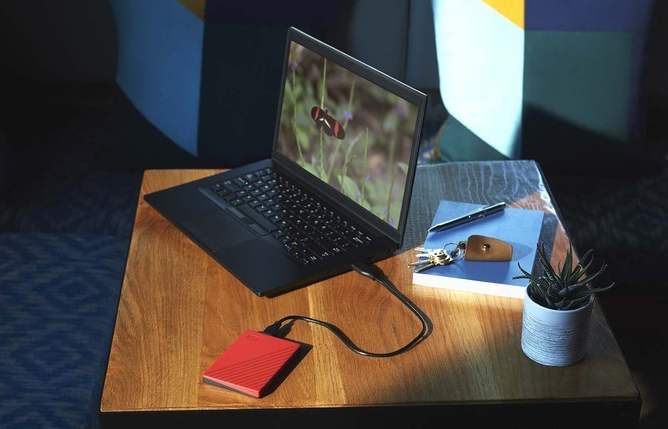
The external 2TB HDD is like the one shown in the picture below, connection to laptop exactly the same. It's a WD and I have another Seagate 2TB which I can test with the laptop later too. I guess the external HDD comes without a case?

user posted image

The cable head which connects to the external HDD is proprietary, not USB-A or USB-C.
PRSXFENG
post Apr 27 2022, 01:15 PM

Look at all my stars!!
*******
Senior Member
2,615 posts

Joined: Nov 2020


QUOTE(ryder_78 @ Apr 27 2022, 01:08 PM)
The external 2TB HDD is like the one shown in the picture below, connection to laptop exactly the same. It's a WD and I have another Seagate 2TB which I can test with the laptop later too. I guess the external HDD comes without a case?

user posted image

The cable head which connects to the external HDD is proprietary, not USB-A or USB-C.
*
First of all, where did you get the external HDDs?
There are many fakes on Lazada/Shopee with fake capacities that might cause your system to freak out when it cant read or write
A way to check is to put your ear next to it and plug it in, a real hdd would have a sound of a motor spinning up


also that cable is probably MicroUSB 3.0

This post has been edited by PRSXFENG: Apr 27 2022, 01:16 PM
TSryder_78
post Apr 27 2022, 01:27 PM

Look at all my stars!!
*******
Senior Member
2,070 posts

Joined: Jul 2010


QUOTE(PRSXFENG @ Apr 27 2022, 01:15 PM)
First of all, where did you get the external HDDs?
There are many fakes on Lazada/Shopee with fake capacities that might cause your system to freak out when it cant read or write
A way to check is to put your ear next to it and plug it in, a real hdd would have a sound of a motor spinning up
also that cable is probably MicroUSB 3.0
*
I've forgotten where I bought the external HDDs but all of them must be at least 8 years old. Most likely original as all are not bought online but from physical stores. Throughout the years they work fine but for the past 3 years, the reading of data is not perfect. I am guessing either the storage is near to full capacity with too many files in it, or the HDD is close to its life span. I'm not sure if there's a life span with these external HDD. There is as slight lag occasionally when the HDD reads the data. In my case, when playing music stored on the external HDD. The song will stop playing for say 2 to 3 seconds, ie. no sound at all, then it will start playing again.

With the old HP Elitebook laptop, the laptop does not need to be restarted as the music software will just crash. The app can be closed and opened again. But with the new Lenovo laptop, the laptop itself just crashes and reboots by itself.

Yes, there is some spinning sound from the external HDD when it's working. though not everytime, just occasional whirring sound.

The cable head that plugs into the external HDD is longish in shape, longer than USB Type C and micro-USB. It's an odd shape.

This post has been edited by ryder_78: Apr 27 2022, 01:29 PM
PRSXFENG
post Apr 27 2022, 05:37 PM

Look at all my stars!!
*******
Senior Member
2,615 posts

Joined: Nov 2020


I guess it could just be old age of the drives

With that said doesn't explain the crash and a need to restart though...
chkwong
post Apr 28 2022, 08:30 AM

Casual
***
Junior Member
411 posts

Joined: Mar 2013
QUOTE(ryder_78 @ Apr 27 2022, 01:08 PM)
The external 2TB HDD is like the one shown in the picture below, connection to laptop exactly the same. It's a WD and I have another Seagate 2TB which I can test with the laptop later too. I guess the external HDD comes without a case?

user posted image

The cable head which connects to the external HDD is proprietary, not USB-A or USB-C.
*
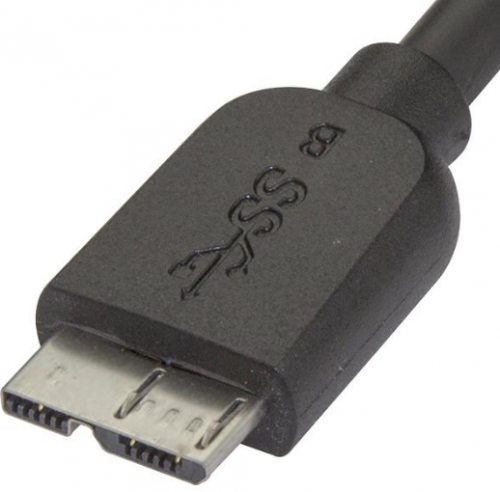
Can't tell from your picture. Take the closer picture showing the connector head. It's not likely to be proprietary.

Yours could be like this. Which is the extended version.
user posted image

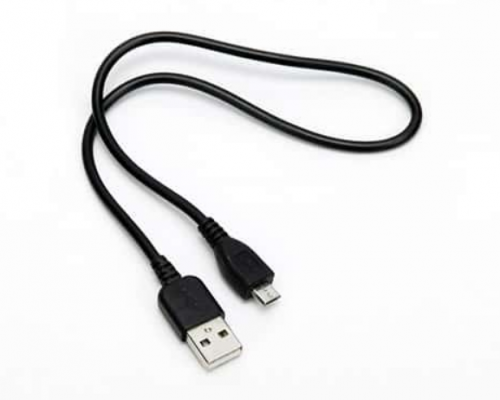
If that is the case, use the normal USB to connect to the same port. The controller should goes into compatibility mode.

user posted image

Or, you can use CrystalDiskInfo to check the state of your HDD, it should be able to tell you the state of the HDD.

I have 2 units, WD and Seagate, one of them I took out due the controller no longer works properly and put into another HDD enclosure.

This post has been edited by chkwong: Apr 28 2022, 08:32 AM
TSryder_78
post Apr 28 2022, 10:13 AM

Look at all my stars!!
*******
Senior Member
2,070 posts

Joined: Jul 2010


QUOTE(chkwong @ Apr 28 2022, 08:30 AM)
Can't tell from your picture. Take the closer picture showing the connector head. It's not likely to be proprietary.

Yours could be like this. Which is the extended version.
user posted image

If that is the case, use the normal USB to connect to the same port. The controller should goes into compatibility mode.

Or, you can use CrystalDiskInfo to check the state of your HDD, it should be able to tell you the state of the HDD.

I have 2 units, WD and Seagate, one of them I took out due the controller no longer works properly and put into another HDD enclosure.

*
Yes, the head of the connector to the external HDD drive looks exactly like the photo above. Will try using a normal USB Type A cable to plug it into the external HDD if it crashes few more times. The problem doesn't happen all the time, just occasionally. No issue with the reading of data and no crash of the laptop yesterday when I used it for about 2-3 hours.

I didn't know that a normal USB Type A cable can be used to connect to the external HDD as the shape is different. I guess the other slot at the HDD can be left empty or unplugged.

Haven't heard of CrystalDiskINfo but will check it out when I have the time.
JonathanHanYT
post Apr 29 2022, 11:03 AM

Getting Started
**
Junior Member
114 posts

Joined: Nov 2021
From: Penang, Malaysia


Sound to me like the connection between the computer and the external HDD. Try grab a new cable to test. I have similar issue and it was due to the bad contact of the USB cable and the contact on the external HDD. Those old USB cable some more very difficult to find nowadays.
kaitojas
post May 31 2022, 03:24 PM

Getting Started
**
Junior Member
57 posts

Joined: Apr 2020
QUOTE(ryder_78 @ Apr 27 2022, 08:40 AM)
Would like to ask. If the laptop crashed(requiring to restart) due to error in reading files from 2TB external HDD, is this problem due to the external HDD or something else? Will using a different brand of HDD resolve this crashing issue?

Previously I was using HP Elitebook and a restart was not required although the app crashed when reading files from the external HDD. But now using a Lenovo Thinkpad, the laptop needs to be restarted after there was an error reading files from the external HDD. I believe the problem of the laptop crashing is caused by reading music files stored on the external HDD.

Any thoughts if a different brand or better external HDD will resolve the issue? Or is it something else.
*
Is this problem happen to other laptop usb port also?


Change to:
| Lo-Fi Version
0.0195sec    1.10    5 queries    GZIP Disabled
Time is now: 22nd December 2025 - 10:14 AM