

NSFW site
» Click to show Spoiler - click again to hide... «
Cannot unblock some site using DNS
|
|
 Mar 17 2022, 05:34 PM, updated 4y ago Mar 17 2022, 05:34 PM, updated 4y ago
Show posts by this member only | Post
#1
|
 
Probation
7 posts Joined: Sep 2021  
|
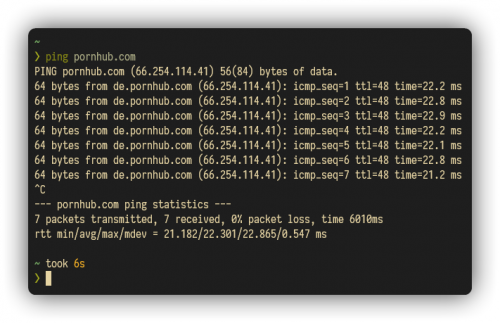
I just switch from Unifi to Maxis Fibre. After setting up my own router (ASUS AC-5300), I notice some sites are are inaccessible even though I have configured to use custom DNS (Cloudflare, Google). However, pinging via terminal show successful pings. Previously I can access the sites in Unifi. Thank you in advance~
NSFW site » Click to show Spoiler - click again to hide... « |
|
|
|
|
|
Mar 17 2022, 05:43 PM
Show posts by this member only | Post
#2
|

Senior Member
1,495 posts Joined: Dec 2012
|
Use Cloudflare 1.1.1.1 app for Windows, Android, etc.
|
|
|
Mar 17 2022, 05:47 PM
Show posts by this member only | Post
#3
|
|
Probation
7 posts Joined: Sep 2021
|
QUOTE(GOPI56 @ Mar 17 2022, 05:43 PM) Use Cloudflare 1.1.1.1 app for Windows, Android, etc. Using VPN is indeed the last resort option. But it will throttle the speed. I am more curious of what's happening here. I cannot access the site, but ping can. |
|
|
Mar 17 2022, 05:48 PM
Show posts by this member only | Post
#4
|
|
Senior Member
1,495 posts Joined: Dec 2012
|
QUOTE(ayams02 @ Mar 17 2022, 03:47 AM) Using VPN is indeed the last resort option. But it will throttle the speed. Cloudflare 1.1.1.1 is not a VPN. It is a DNS tool.I am more curious of what's happening here. I cannot access the site, but ping can. |
|
|
Mar 17 2022, 05:51 PM
Show posts by this member only | Post
#5
|
|
Probation
2 posts Joined: Oct 2020
|
Are you browsing on pc?. If yes, you could try editing the hosts file on C:\Windows\System32\drivers\etc . Open the hosts file using notepad and paste these line below.
66.254.114.40 www.pornhub.com 66.254.114.40 pornhub.com Then, disable and re-enable your network interface or restart your computer |
|
|
Mar 17 2022, 05:53 PM
Show posts by this member only | Post
#6
|

Junior Member
452 posts Joined: Jul 2019
|
I wonder if changing the DNS for IPV6 as well might help?
|
|
|
|
|
|
Mar 17 2022, 05:53 PM
Show posts by this member only | Post
#7
|
|
Probation
7 posts Joined: Sep 2021
|
Oh sorry I mistaken with their WARP service. I have tried 1.1.1.1 in my phone and it works. However, is there any other way other than using 1.1.1.1 app?
|
|
|
Mar 17 2022, 06:10 PM
Show posts by this member only | Post
#8
|
|
Senior Member
1,495 posts Joined: Dec 2012
|
QUOTE(ayams02 @ Mar 17 2022, 03:53 AM) Oh sorry I mistaken with their WARP service. I have tried 1.1.1.1 in my phone and it works. However, is there any other way other than using 1.1.1.1 app? If you using Android phone that is using Android 9 and above you can set Private DNS.1.Go to Settings > Network & internet. 2.Select Advanced > Private DNS. 3.Select the Private DNS provider hostname option. 4.Enter one.one.one.one or 1dot1dot1dot1.cloudflare-dns.com and press Save |
|
|
Mar 17 2022, 07:26 PM
Show posts by this member only | IPv6 | Post
#9
|
|
Junior Member
362 posts Joined: Jan 2011
|
Did TS set IPv6 DNS also?
Need to set IPv6 DNS as well This post has been edited by michaelkkl: Mar 17 2022, 07:29 PM |
|
|
Mar 17 2022, 08:11 PM
|
|
Senior Member
6,818 posts Joined: Oct 2008 From: Kuala Lumpur 
|
Maxis is better at blocking sites compare to Unifi. Just use the 1.1.1.1 app or VPN.
|
|
|
Mar 17 2022, 10:55 PM
|
|
Junior Member
380 posts Joined: Oct 2017
|
Me too. Using maxis fibre. Nsfw websites are blocked even with dns changed.
|
|
|
Mar 17 2022, 11:43 PM
|

Senior Member
2,096 posts Joined: Aug 2009 From: Shithole Klang
|
some isp blocks certain major sites at IP level. DNS changes could only do so much.
|
|
|
Mar 18 2022, 12:06 AM
Show posts by this member only | IPv6 | Post
#13
|

Senior Member
1,598 posts Joined: Jan 2016
|
VPN is your only option, tried all the methods mentioned on top
|
|
|
|
|
|
Mar 18 2022, 06:58 AM
|

Junior Member
749 posts Joined: Jul 2016
|
1.1.1.1 is kinda vpnish la. It is like other vpn should work. But the editting of host files should be possible also if Maxis block the IP of the website but there mirror ip that it did't block. But u can just type the alternative IP directly to address and test if it work before editting the host file. Even better u just bookmark the alternative IP
|
|
|
Mar 18 2022, 11:08 AM
|
|
Probation
7 posts Joined: Sep 2021
|
QUOTE(michaelkkl @ Mar 17 2022, 07:26 PM) Did TS set IPv6 DNS also? I have disabled IPv6 as my friend said Maxis got slow or something if using IPv6.Need to set IPv6 DNS as well QUOTE If you using Android phone that is using Android 9 and above you can set Private DNS. I have tried this and it seems it only works if using mobile data. CMIIW.1.Go to Settings > Network & internet. 2.Select Advanced > Private DNS. 3.Select the Private DNS provider hostname option. 4.Enter one.one.one.one or 1dot1dot1dot1.cloudflare-dns.com and press Save QUOTE 1.1.1.1 is kinda vpnish la. It is like other vpn should work. But the editting of host files should be possible also if Maxis block the IP of the website but there mirror ip that it did't block. But u can just type the alternative IP directly to address and test if it work before editting the host file. Even better u just bookmark the alternative IP As with my first post, the IP address is ping-able. But if try to access its domain, it will show "ERR_CONNECTION_RESET". I guess as QuantumEdge said, VPN is the only option. At least, we know that Maxis is not as dumb as Unifi  |
|
|
Mar 18 2022, 02:51 PM
Show posts by this member only | IPv6 | Post
#16
|
|
Junior Member
214 posts Joined: May 2017
|
QUOTE(ayams02 @ Mar 17 2022, 05:34 PM) I just switch from Unifi to Maxis Fibre. After setting up my own router (ASUS AC-5300), I notice some sites are are inaccessible even though I have configured to use custom DNS (Cloudflare, Google). However, pinging via terminal show successful pings. Previously I can access the sites in Unifi. Thank you in advance~ if you can ping, try just entering the IP into the browser rather than accessing via its domainNSFW site » Click to show Spoiler - click again to hide... « |
|
|
Mar 18 2022, 09:47 PM
|

Senior Member
2,399 posts Joined: Jul 2009 From: /dev/null
|
it has Layer 7 Firewall, even with HTTPS, SSL SNI (Server Name Indication) Header are not encrypted!
Connection is terminated when blacklist SNI is found... » Click to show Spoiler - click again to hide... « with TIME » Click to show Spoiler - click again to hide... « test via HAProxy (any -> TIME -> server) » Click to show Spoiler - click again to hide... « I can confirmed ISP has Layer 7 Firewall, blocking using SSL SNI website need using E-SNI to by pass Layer 7 Firewall |
|
|
Mar 19 2022, 07:54 AM
Show posts by this member only | IPv6 | Post
#18
|
|
Junior Member
749 posts Joined: Jul 2016
|
QUOTE well too bad it din take off. ESNi need browser and the website support also. only firefox support it cuz they collaborate wtih cloudflare for this standard |
|
|
Mar 19 2022, 10:20 AM
Show posts by this member only | IPv6 | Post
#19
|
|
Junior Member
109 posts Joined: Apr 2020
|
QUOTE(ayams02 @ Mar 18 2022, 11:08 AM) I have disabled IPv6 as my friend said Maxis got slow or something if using IPv6. It is not suggested to disable IPv6 as it will cause performance issue.Kindly enable your IPv6 for better performance. |
|
|
Mar 19 2022, 10:44 AM
Show posts by this member only | IPv6 | Post
#20
|
|
Senior Member
1,598 posts Joined: Jan 2016
|
QUOTE(ayams02 @ Mar 18 2022, 11:08 AM) I have disabled IPv6 as my friend said Maxis got slow or something if using IPv6. The only ISP that's having a problem with IPV6 is Unifi, Maxis is perfectly fineI guess as QuantumEdge said, VPN is the only option. At least, we know that Maxis is not as dumb as Unifi Yeah, just kind of annoying when you are getting a bit h*rney in the night... |
| Change to: |  0.0175sec 0.0175sec
 0.27 0.27
 6 queries 6 queries
 GZIP Disabled GZIP Disabled
Time is now: 15th December 2025 - 06:40 AM |
 Quote
Quote


