Welcome Guest ( Log In | Register )

Bump Topic Topic Closed RSS Feed

Outline · [ Standard ] · Linear+

Unifi Official TM UniFi High Speed Broadband Thread V40, READ 1ST PAGE FOR RELEVANT WIFI INFO

views
     
eclectice
post Jan 6 2023, 03:24 PM

Look at all my stars!!
*******
Senior Member
2,734 posts

Joined: Mar 2008
QUOTE(xphr3ak @ Jan 5 2023, 10:48 AM)
Just get any Asus router. Got many tutorial in Youtube how to setup for Unifi.
*
If you utilize the installation wizard, it is simple. Just get your Unifi login/password ready during the PPPoE and ISP Profile setup. If you subscribe to any of the Unifi TV packages that comes with Unifi TV box, just follow the wizard's instruction step and choose the Unifi-Home (for Unifi home customers) or Unifi-Business (for Unifi business users) option. Then, the rest is just about setting up Wi-FI access, etc.

You might also refer to this guide from our forumer, Blacktubi. https://www.blacktubi.com/guide/setup-asus-router-for-unifi/

Nota bene: the Unifi TV app is now available on Google Play and supports Android TV, eliminating the need to configure the Unifi TV box (you just only need its Unifi TV pack to be able to use the Unifi TV service on Unifi domain network). If you don't want to set up the VLAN port for your Unifi TV box and already have an Android TV, you may ignore the ISP Profile and set it to none instead of Unifi-Home or Unifi-Business option, so freeing up the LAN port and saves your electricity bill. Simply download the Unifi TV app and install it on your Android TV device.

https://play.google.com/store/apps/details?...itv&hl=en&gl=US

https://unifi.com.my/tv/play-tv/unifi

If you have any Unifi TV add-ons, such as VIU, IQIYI, or Disney+Hotstar, you may install these applications on your Android TV instead of your Unifi TV box using the registered add-on login account tied to your Unifi account.

The Unifi TV app and Unifi TV box can only be used on the Unifi domain network IP address.

Non-Unifi TV subscribers (those who do not subscribe to any Unifi TV package) can use the Unifi PlayTV app; however, login into the PlayTV service requires only a mobile number or a Facebook profile. It varies from the Unifi TV app in platform support in that it does not support Android TV. But, it does not need the app to use the Unifi domain network IP address.

https://play.google.com/store/apps/details?id=com.tm.playtv

This post has been edited by eclectice: Jan 6 2023, 04:17 PM
eclectice
post Mar 28 2023, 09:38 AM

Look at all my stars!!
*******
Senior Member
2,734 posts

Joined: Mar 2008
QUOTE(PJng @ Mar 27 2023, 11:29 PM)
94mbps, open this is say 100mbps or 1.0gbps?

user posted image

look like is connect to 100mbps mode
*
According to the screenshot, your laptop/PC's Ethernet connection is also a bottleneck, with a maximum speed of 100 Mbps. That may be unchangeable on your side (PC/Laptop), or it may be defective due to the Ethernet cable used, or a remote Ethernet port (from a network switch/bridge or a router) to which it is connected is restricted to 100 Mbps.

If the remote Ethernet port is restricted to 100 Mbps but the network/bridge or router claims to have Gigabit Ethernet ports, a faulty port may exist if it is not due to the Ethernet cable used.

If your PC/laptop's Ethernet port specifications restrict it to 100Mbps, get a USB-to-Ethernet adapter that supports Gigabit speeds (but must use a USB 3.x standard interface if you have one) or use a WIFI connection.

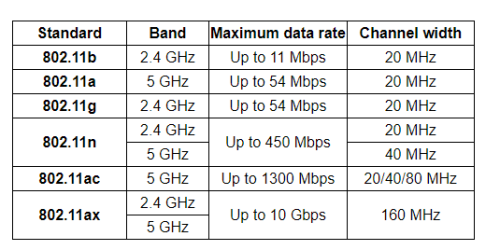
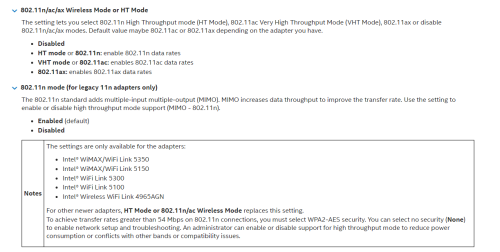
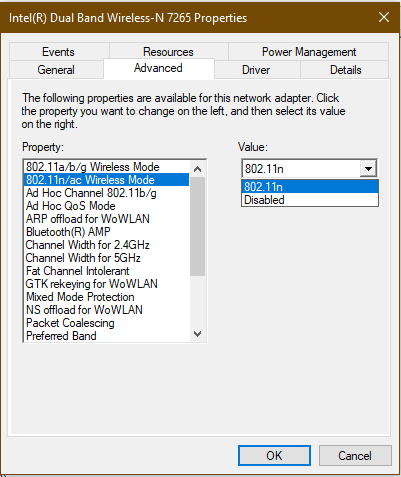
However, because you can currently only achieve WIFI rates of less than 100 Mbps, I am skeptical of the WIFI device's competence on your PC/laptop. Examine the highest WIFI standard enabled by the WIFI device.

user posted image

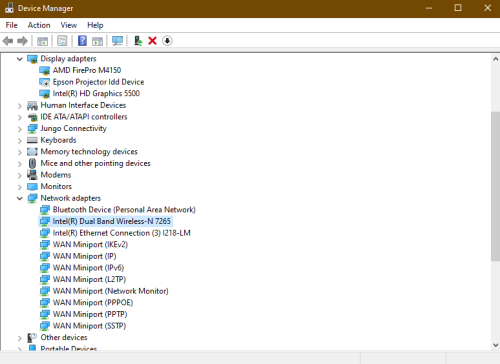
Use Device Manager for Windows OS to check...

user posted image

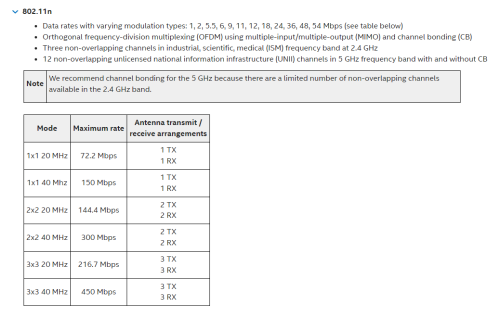
If your WIFI device appears to only support the WIFI 802.11n standard, you should verify the accessible bands in either 2.4 Ghz (20 MHz channel width) or 5 GHz (40 MHz channel width) allowed by it.

user posted image

https://www.intel.com/content/www/us/en/sup...s-products.html

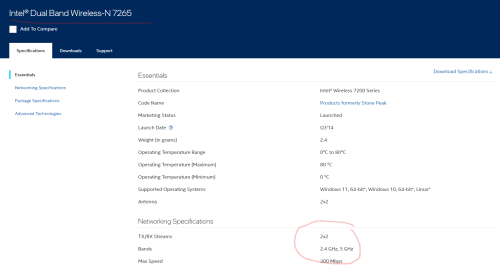
For example, when connected to a WIFI 5 GHz network, my Intel WIFI N-7265 device supports up to 300 Mbps (via 2X2 40 MHz mode), but only 144.4 Mbps (via 2X2 20 MHz mode) when connected to a WIFI 2.4 GHz network.

user posted image

https://www.intel.com/content/www/us/en/pro...ifications.html

The antenna arrangement is indicated by the 2x2 marking. N-7265 cannot take full benefit of the 2x2 MU-MIMO because it does not support 2x2 MU-MIMO.

user posted image

https://www.intel.com/content/www/us/en/sup...s-products.html

user posted image

This post has been edited by eclectice: Mar 28 2023, 10:37 AM
eclectice
post Mar 28 2023, 02:28 PM

Look at all my stars!!
*******
Senior Member
2,734 posts

Joined: Mar 2008
QUOTE(PJng @ Mar 28 2023, 02:14 PM)
Need jack234 read this, not me
I connected to a old router that have only 100mbps, that why show 100mbps
*
Ah, noted. I wasn't paying attention to the entire discussion.
eclectice
post Jun 23 2023, 04:23 PM

Look at all my stars!!
*******
Senior Member
2,734 posts

Joined: Mar 2008
QUOTE(ghyeng @ Jun 23 2023, 10:38 AM)
Anyone using DPN-FX3060V knows if guest network/isolated wifi network can be setup on this? Or connecting to a Wifi mesh and make this isolated to local devices? Cant figure out how...
*
I tried to find a manual for the D-LINK DPN-FX3060V, but it doesn't mention anything regarding guest network support in relation to the Unifi version unit.

You can, however, configure this optical router as a mesh router. However, it is unclear whether we may use any brand of mesh satellites/nodes while configuring it using the WPS button.

https://unifi.com.my/sites/default/files/ht...RK%20ROUTER.pdf

If the guest network feature is not present on Unifi's DPN-FX3060V version unit, I don't think we can create a guest network when mixing mesh satellites/nodes of the non-D-LINK brand to DPN-FX3060V since IP-sharing, and NAT will be disabled (they just become access points or repeaters) (note: I am thinking of Wi-Fi EasyMesh standard; otherwise, it is not possible)

Since I don't have experience with the DPN-FX3060V unit, I can't say that much

Update:

It appears that Unifi provides two optical network routers for 1 and 2 Gbps plans (in this example, the D-LINK DPN-FX3060V Unifi model); one that serves as a primary mesh router and another that serves as a mesh satellite/node. Just hope it supports guest network mode. Otherwise, you are out of luck. However, from the app provided, I don't see any mention of it.

user posted image

Another sour point is that you can't use third-party mesh networking solutions to expand your home mesh network as they are not compatible with the ones provided by Unifi. If your house is too big, you have to get another one from Unifi to extend the mesh network.

user posted image

https://unifi.com.my/sites/default/files/ht...1Gbps-2Gbps.pdf

Double-NAT configuration

But, If you insist on still using third-party mesh networking solutions with DPN-FX3060V (the ISP gateway), another approach is to feed the LAN port from DPN-FX3060V into the WAN port of the third-party mesh router. You are setting a double NAT solution with this approach. In this respect, your third-party mesh router will work with its own mesh nodes and you can set up guest network features from the third-party mesh router. However, some apps may not work well in double NAT configuration.


WIFI cert for DPN-FX3060V from WIFI Alliance

https://api.cert.wi-fi.org/api/certificate/...ariantId=123858

https://dongknows.com/double-nat-vs-single-nat/

Attached File  WFA125713__No_.pdf ( 77.86k ) Number of downloads: 13


Interestingly, it supports Wi-Fi EasyMesh Standard. It reveals some technical specs.

This post has been edited by eclectice: Jun 23 2023, 05:24 PM
eclectice
post Jun 28 2023, 01:03 PM

Look at all my stars!!
*******
Senior Member
2,734 posts

Joined: Mar 2008
QUOTE(derict @ Jun 27 2023, 11:55 PM)
Since 800Mbps no longer available, i am wondering if they have plan to auto upgrade those on 800Mbps @ RM200++ to 1Gbps with the same monthly payment.  biggrin.gif  #wishfulthinking
*
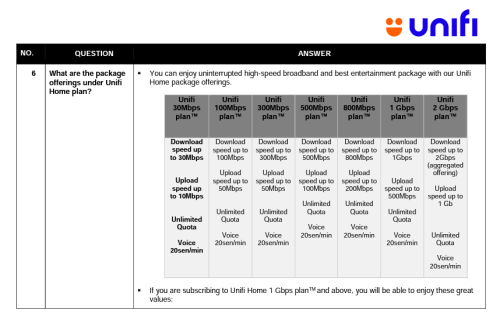
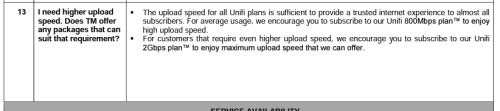
Yes, I understand the 800 Mbps plan is no longer promoted on its website. But where is the formal announcement that the plan will no longer be available?

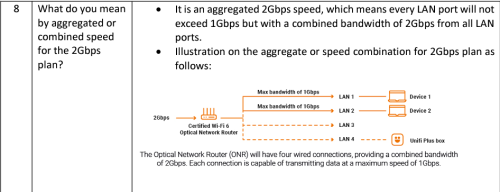
It is still featured in the FAQ PDF created on April 12, 2023, for the time being.

user posted image

user posted image

https://unifi.com.my/sites/default/files/ht...i-Home-Plan.pdf

I note that 800 Mbps is still available as an upgrade to the 500 Mbps plan under the Unifi Ngam campaign, which began on June 23, 2023.

https://unifi.com.my/sites/default/files/ht...mpaign-2023.pdf

Attached File  General_FAQ_unifi_Home_Plan.pdf ( 1.89mb ) Number of downloads: 21

Attached File  FAQ_NGAM_Campaign_2023.pdf ( 959.73k ) Number of downloads: 30


By limiting the availability of the 800 Mbps package and only offering it as an upgrade option, Unifi is encouraging existing customers to upgrade their plan and pay more for the higher speed. This can increase revenue and profitability for Unifi through upselling.

This post has been edited by eclectice: Jun 28 2023, 02:04 PM
eclectice
post Jun 28 2023, 02:04 PM

Look at all my stars!!
*******
Senior Member
2,734 posts

Joined: Mar 2008
QUOTE(Yluxion @ Jun 28 2023, 01:57 PM)
After going through this, it's more like a "Speed Boost" campaign. 6 months boost for new-user, 12 months boost for existing-user while being contracted for 24 months.

Which is why there is no such offer for 800Mbps & 2Gbps as there is no room to boost speed further with their respective setting & equipment.
*
By limiting the availability of the 800 Mbps package and only offering it as an upgrade option, Unifi is encouraging existing customers to upgrade their plan and pay more for the higher speed 1 and 2 Gbps plan. This can increase revenue and profitability for Unifi through upselling.

This is price anchoring: the 2 Gbps connection is still readily available but it is not part of the new campaign it is not upgradeable anymore (the highest plan!). This is done to boost interest in the 1 and 2 Gbps plan.

This post has been edited by eclectice: Jun 28 2023, 02:21 PM
eclectice
post Jun 28 2023, 02:34 PM

Look at all my stars!!
*******
Senior Member
2,734 posts

Joined: Mar 2008
QUOTE(derict @ Jun 28 2023, 02:20 PM)
yes, it just depends on whether we want to fall into their plan of increasing their revenue but it will be increase commitment from customer. Will wait further and see what they offer to existing 800Mbps subscriber.
*
Based on the marketing push, I believe the 800 Mbps plan will not be discontinued. Let's just wait until the campaign is over, shall we?

This post has been edited by eclectice: Jun 28 2023, 02:34 PM
eclectice
post Jun 28 2023, 02:39 PM

Look at all my stars!!
*******
Senior Member
2,734 posts

Joined: Mar 2008
QUOTE(aniq8676 @ Jun 28 2023, 02:35 PM)
Coming soon, 800Mbps customers will be upgraded to 2Gbps
*
Thanks for the update! Do you know if the upgrade to 2Gbps will be free or if there will be an additional cost? I haven't seen any official information about it yet. Do you have any unofficial information to share with us?
eclectice
post Jun 28 2023, 04:00 PM

Look at all my stars!!
*******
Senior Member
2,734 posts

Joined: Mar 2008
QUOTE(aniq8676 @ Jun 28 2023, 03:26 PM)
No additional cost, for now there is no official announcement regarding this upgrade.

The free upgrade is still in trial for some 800Mbps customers.

SNIPPED
I got all unofficial information from him, including the introduction of 1 and 2gbps plans
*
Hmm, it seems unnecessary to reveal your informant. Anyone who has quoted, please remove the personal info

This post has been edited by eclectice: Jun 28 2023, 04:00 PM
eclectice
post Jul 5 2023, 10:33 AM

Look at all my stars!!
*******
Senior Member
2,734 posts

Joined: Mar 2008
QUOTE(tng55 @ Jul 4 2023, 10:47 PM)
12month only look not 24month due if after 12 month will back original speed bad so bad
*
I get what you're saying about the 2 Gbps plan package - you only get 12 months free if you upgrade, but then the speed might slow back down, which is bad news considering the 24-month contract.

Can anyone confirm if this actually happens?
eclectice
post Jul 5 2023, 03:06 PM

Look at all my stars!!
*******
Senior Member
2,734 posts

Joined: Mar 2008
I would greatly appreciate a free speed upgrade without any additional charges, similar to the one we experienced in 2018 during Gobind's tenure. The current free 6/12-month upgrade idea seems incomplete, as it will revert back to a higher price than the previous speed plan. A free speed upgrade would be more beneficial and greatly appreciated. Thank you.

This post has been edited by eclectice: Jul 5 2023, 03:27 PM
eclectice
post Jul 5 2023, 03:20 PM

Look at all my stars!!
*******
Senior Member
2,734 posts

Joined: Mar 2008
QUOTE(soonwai @ Jul 4 2023, 05:54 PM)
If free, definitely want. Plenty of solutions for the 1+1 Gbps problem. Ideally, for me anyway, is that TM eventually gives a modem with 2.5Gbps port.
Not yet but last Thursday, got a missed call from TM telemarketing.
*
Maybe we can overcome the 1 Gbps limit on each ONR's LAN port and mesh backhaul bandwidth by hooking up a switch that supports link aggregation between the TM Unifi ONR router (which may or may not support link aggregation) and a third-party mesh router (which supports it). This would allow us to distribute up to 2 Gbps of bandwidth evenly across multiple devices and interfaces.

This post has been edited by eclectice: Jul 5 2023, 03:21 PM
eclectice
post Jul 5 2023, 03:44 PM

Look at all my stars!!
*******
Senior Member
2,734 posts

Joined: Mar 2008
QUOTE(Oltromen Ripot @ Jul 5 2023, 03:39 PM)
The ONR does not have link aggregation mentioned anywhere in configuration pages. The nearest to (dis)enable network loop detection.

With or without the network loop detection, I did not notice any remarkable differences in speed to my 1Gbps/500Mbps link direct to RT-AX86U.
There are only differences when I configure differently on the RT-AX86U side. (1WAN port, round-robin 2WAN ports to same ONR, or aggregate 2WAN to same ONT).
*
I mean LAN link aggregation, not WAN link aggregation, just to avoid confusion.
eclectice
post Jul 5 2023, 04:17 PM

Look at all my stars!!
*******
Senior Member
2,734 posts

Joined: Mar 2008
QUOTE(Oltromen Ripot @ Jul 5 2023, 03:54 PM)
yes, yes, the WAN-side of the ONR is only 1 fibre maaaa, of course when you mentioned aggregation on ONR, immediately only applicable to the 4 LAN ports.....

.... which I connect to the 2WAN of RT-AX86U.

Anyway, again, there is no mention of the word "aggregation" or its variant anywhere in the ONR configuration pages. The closest is to (dis)enable loop detection (default:enabled).

I did also test aggregation by putting TP-Link TL-SG108E between ONR and RT-AX86U; but this child is only capable of static LAG, not LACP. No noticeable difference. More so that my link is 1Gbps, so provably I'm losing some numbers, shaved due to non-lab condition and to ethernet headers.

RT-AX86U supports LACP.
ONR is definitely a question mark, but most probably does not regardless LAG or LACP.
*
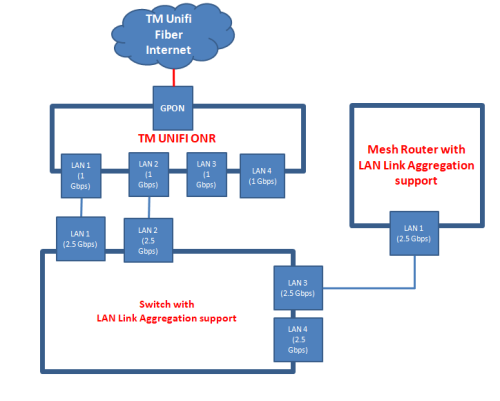
I am proposing this configuration:

user posted image

In the setup, it is not necessary for our third-party mesh router to have LAN aggregation support since we just need to attain aggregated 2 Gbps Internet coming from the 2.5G LAN3 port of the switch

This post has been edited by eclectice: Jul 5 2023, 04:19 PM
eclectice
post Jul 5 2023, 04:41 PM

Look at all my stars!!
*******
Senior Member
2,734 posts

Joined: Mar 2008
QUOTE(Oltromen Ripot @ Jul 5 2023, 04:23 PM)
and that, a switch that is able to turn off its own loop detection as well!

i did not test the MAC addresses of each of the ONR's LAN port, but I would assume a switch with STP or loop detection might notice it is connected to the same ONR on 2 paths, and decide to disable either one.
*
While STP and loop detection are not directly related to the 802.3ad standard, they are complementary mechanisms that are commonly used in conjunction with link aggregation to prevent loops in Ethernet networks.

Instead of setting up the above configuration using LACP, we can use LAG to create a static link aggregation.

Yes, normally we use link aggregation between switches and devices that support link aggregation.

But, this is just a proposal to test LAN aggregation between the switch and Internet router which happens to have aggregated speed capability on different LAN ports due to their 1 Gbps speed limit.

user posted image

LACP is just part of the IEEE specification 802.3ad link aggregation standard that covers LAGs. With LACP, it becomes a dynamic link aggregation extension over LAGs.

Maybe, this proposal won't work since it may still need 802.3ad support on the ONR side.

This post has been edited by eclectice: Jul 5 2023, 06:06 PM
eclectice
post Jul 5 2023, 05:55 PM

Look at all my stars!!
*******
Senior Member
2,734 posts

Joined: Mar 2008
QUOTE(Oltromen Ripot @ Jul 5 2023, 03:54 PM)
yes, yes, the WAN-side of the ONR is only 1 fibre maaaa, of course when you mentioned aggregation on ONR, immediately only applicable to the 4 LAN ports.....

.... which I connect to the 2WAN of RT-AX86U.

Anyway, again, there is no mention of the word "aggregation" or its variant anywhere in the ONR configuration pages. The closest is to (dis)enable loop detection (default:enabled).

I did also test aggregation by putting TP-Link TL-SG108E between ONR and RT-AX86U; but this child is only capable of static LAG, not LACP. No noticeable difference. More so that my link is 1Gbps, so provably I'm losing some numbers, shaved due to non-lab condition and to ethernet headers.

RT-AX86U supports LACP.
ONR is definitely a question mark, but most probably does not regardless LAG or LACP.
*
I miss your remarks on this. Perhaps this proposal may not work after all. Just because you only have a 1 Gbps plan?

Dealing with this Optical Network Router (ONR) has been a real hassle, especially since we don't have access to full documentation or technical specifications. Instead, we're forced to rely on a lousy app that doesn't provide all the information we need. It's been frustrating trying to configure the ONR properly without the necessary resources to guide us.

This post has been edited by eclectice: Jul 5 2023, 05:57 PM
eclectice
post Jul 6 2023, 07:06 PM

Look at all my stars!!
*******
Senior Member
2,734 posts

Joined: Mar 2008
QUOTE(aniq8676 @ Jul 6 2023, 06:43 PM)
Unifi updated their internet plans. (For existing users only)

» Click to show Spoiler - click again to hide... «

*
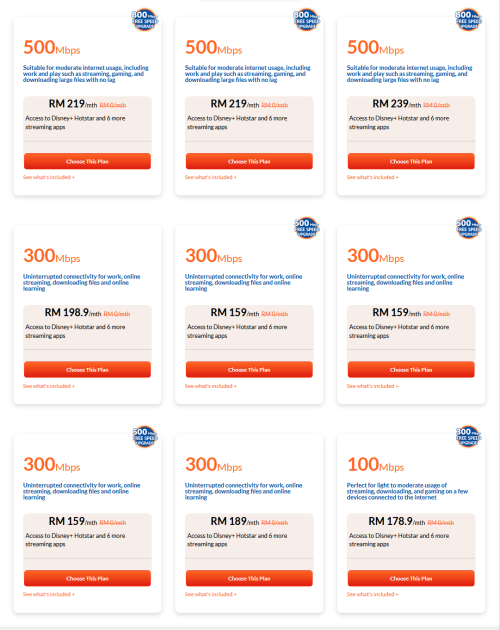
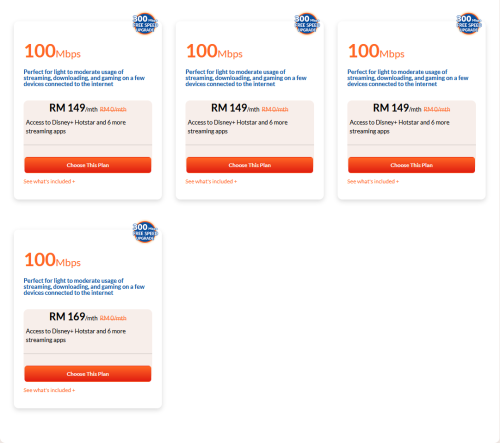
What is the link? This is not visible on their website beside the new free 800 Mbps upgrade icon for a select plans.

This post has been edited by eclectice: Jul 6 2023, 07:07 PM
eclectice
post Jul 7 2023, 11:07 AM

Look at all my stars!!
*******
Senior Member
2,734 posts

Joined: Mar 2008
Is UFB really necessary to access streaming services like Netflix, Disney+Hotstar, and other apps supported by Unifi? In my opinion, it's not essential. In my case, I just install those apps on my Sony Android TV, phones, and tablets and link my registered email/phone number to my Unifi account. I never use the UFB.

This post has been edited by eclectice: Jul 7 2023, 11:10 AM
eclectice
post Jul 7 2023, 11:26 AM

Look at all my stars!!
*******
Senior Member
2,734 posts

Joined: Mar 2008
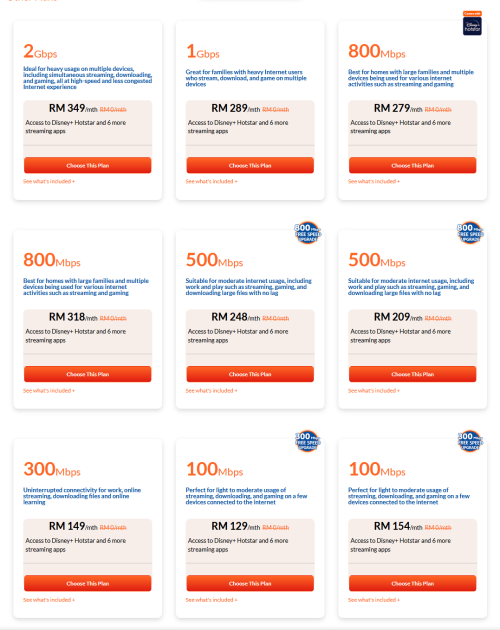
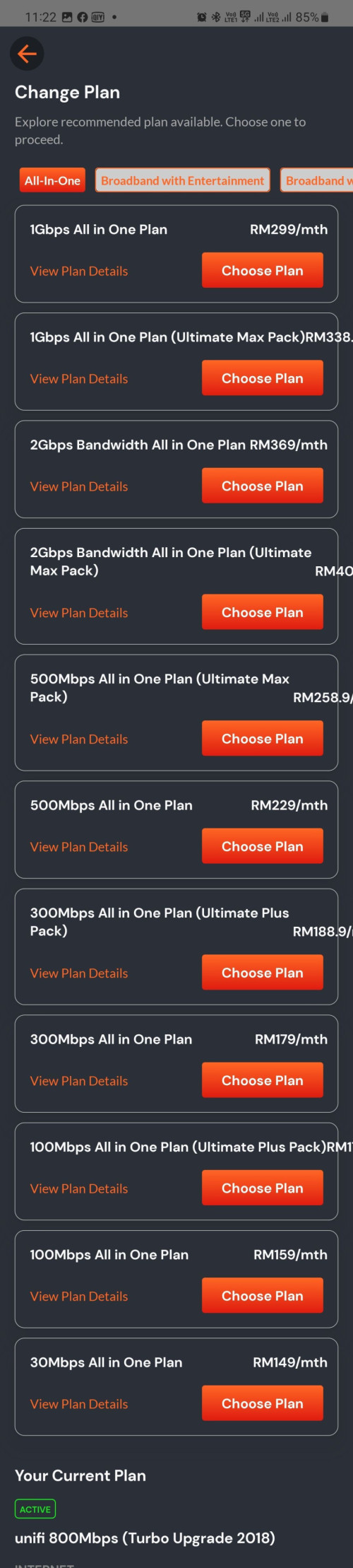
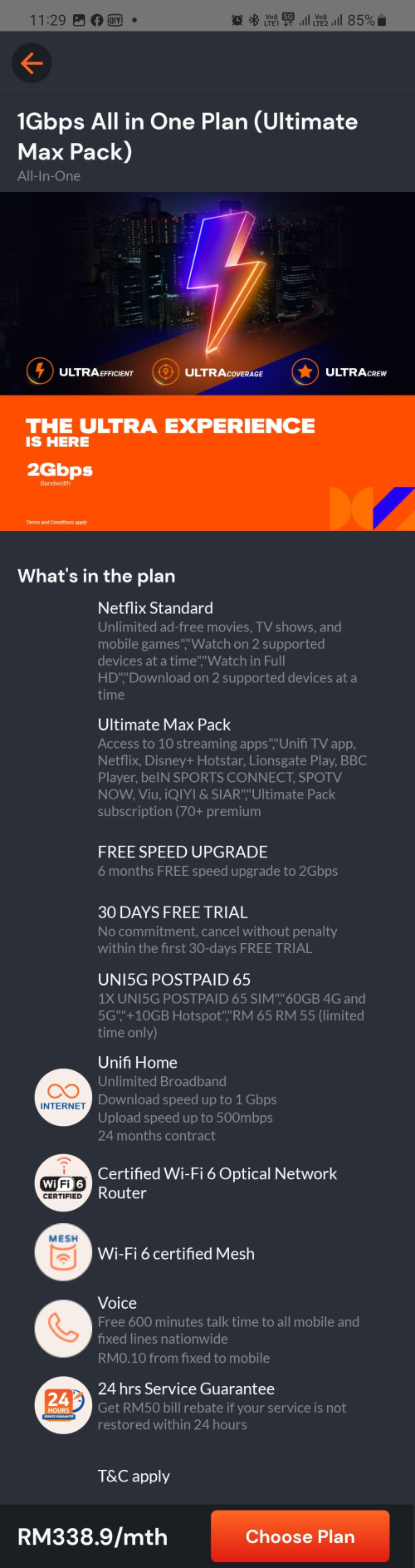
The 1 Gbps plans shared by Aniq differ from what I saw on the MyUnifi app. The 1 Gbps All In One plan I'm interested in is priced at RM299/month.

user posted image


However, there seems to be an error in the orange box/bar that states '2 Gbps' for the selected 1 Gbps All In One plan details above.


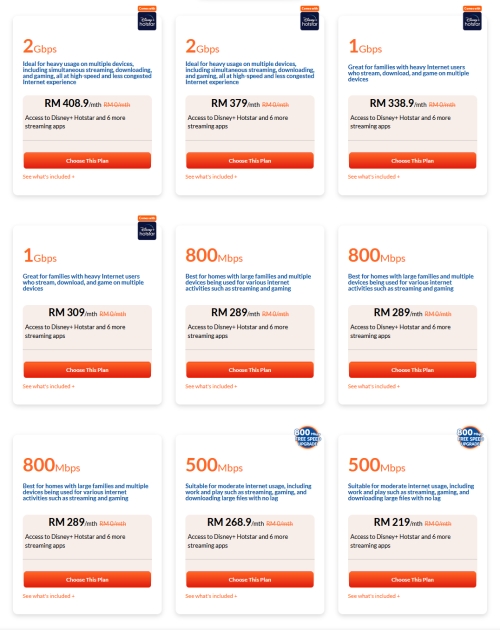
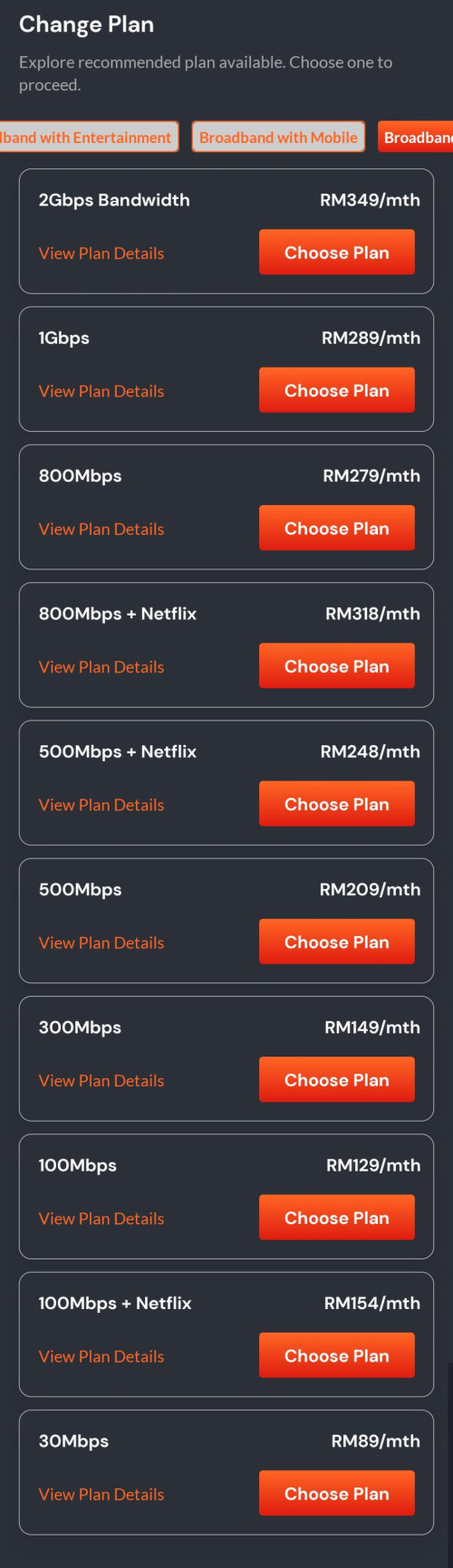
The rest of the plans are shown on the MyUnifi app...

All-In-One
» Click to show Spoiler - click again to hide... «

Broadband+Entertainment
» Click to show Spoiler - click again to hide... «

Broadband+Mobile
» Click to show Spoiler - click again to hide... «

Broadband only
» Click to show Spoiler - click again to hide... «


user posted image


This post has been edited by eclectice: Jul 7 2023, 12:02 PM
eclectice
post Jul 7 2023, 12:04 PM

Look at all my stars!!
*******
Senior Member
2,734 posts

Joined: Mar 2008
QUOTE(Oltromen Ripot @ Jul 7 2023, 12:03 PM)
static banner image.
all of them shows the same.

last-minute brainwash you to second guess your decision
*
Hahah, maybe nod.gif

2 Pages  1 2 >Top
Topic ClosedOptions
 

Change to:
| Lo-Fi Version
0.2884sec    1.74    7 queries    GZIP Disabled
Time is now: 24th December 2025 - 03:46 PM