


Unifi Official TM UniFi High Speed Broadband Thread V40, READ 1ST PAGE FOR RELEVANT WIFI INFO
Unifi Official TM UniFi High Speed Broadband Thread V40, READ 1ST PAGE FOR RELEVANT WIFI INFO
|
|
 Jun 2 2022, 11:06 PM Jun 2 2022, 11:06 PM
Return to original view | IPv6 | Post
#1
|
 
Junior Member
211 posts Joined: Oct 2014 
|
Anyone else having issues with download speed today?
|
|
|
|
|
|
Nov 23 2022, 02:06 AM
Return to original view | IPv6 | Post
#2
|
|
Junior Member
211 posts Joined: Oct 2014
|
QUOTE(afif92 @ Nov 23 2022, 02:03 AM) Is there any Unifi users got PPPoE disconnect for today and yesterday? me @ 1am-2am today |
|
|
Jan 2 2023, 09:41 PM
Return to original view | IPv6 | Post
#3
|
|
Junior Member
211 posts Joined: Oct 2014
|
QUOTE(Gaara92 @ Jan 2 2023, 09:33 PM) Anyone experience slowness today? I ping google got timed out several packets. Loading also slow. Already rebooted router, still persist. How to check if it not the fiber cable problem? Or routing problem? yeah me too. everything is slow  |
|
|
Jan 2 2023, 10:05 PM
Return to original view | Post
#4
|
|
Junior Member
211 posts Joined: Oct 2014
|
It's getting worse now
|
|
|
Feb 2 2023, 07:31 PM
Return to original view | IPv6 | Post
#5
|
|
Junior Member
211 posts Joined: Oct 2014
|
QUOTE(akhito @ Feb 2 2023, 06:05 PM) 30mbps 89> 69 I wonder if this plan has a FUP quota. so total RM73.15 per month for basic internet. I though yhis price can get 50mbps but no well Let's wait and see Kelvynlim liked this post
|
|
|
Feb 21 2023, 10:49 PM
Return to original view | IPv6 | Post
#6
|
|
Junior Member
211 posts Joined: Oct 2014
|
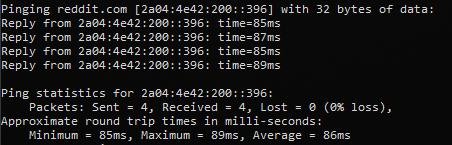 Has anyone else noticed a high ping when pinging Reddit lately? |
|
|
|
|
|
Feb 21 2023, 11:23 PM
Return to original view | Post
#7
|
|
Junior Member
211 posts Joined: Oct 2014
|
QUOTE(failed.hashcheck @ Feb 21 2023, 11:11 PM) how about ipv4 ping? 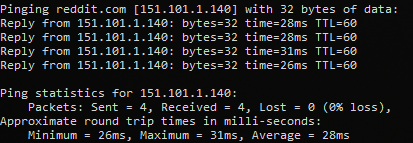 ipv4 is normal |
|
|
Feb 21 2023, 11:35 PM
Return to original view | IPv6 | Post
#8
|
|
Junior Member
211 posts Joined: Oct 2014
|
QUOTE(failed.hashcheck @ Feb 21 2023, 11:29 PM) Probably just the usual TM being TM. 28ms is definitely not normal tho Reddit uses fastly which has presence in KL. You should be getting less than 8ms. yeah, 28ms kinda slow I just realized. |
|
|
Feb 22 2023, 12:10 AM
Return to original view | IPv6 | Post
#9
|
|
Junior Member
211 posts Joined: Oct 2014
|
QUOTE(go626201 @ Feb 21 2023, 11:53 PM) Not seeing problem on my end. maybe just in my area. ping to google also 20ms ±IPv4 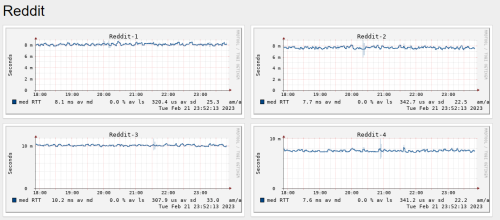 |
|
|
Feb 24 2023, 09:08 PM
Return to original view | IPv6 | Post
#10
|
|
Junior Member
211 posts Joined: Oct 2014
|
QUOTE(PJng @ Feb 24 2023, 05:53 PM) Why change name? That explains a lot, with everything going on recently. 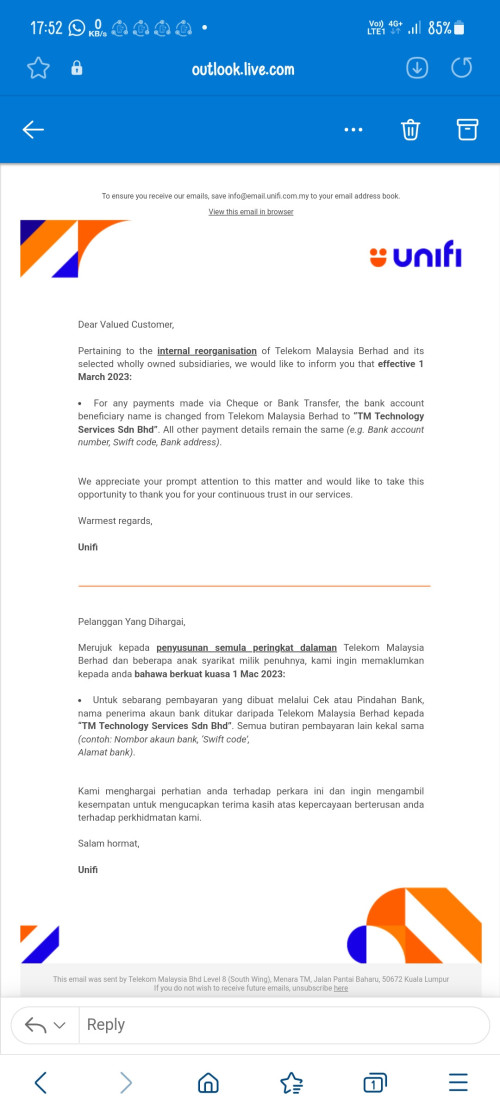  |
|
|
Mar 7 2023, 12:32 PM
Return to original view | IPv6 | Post
#11
|
|
Junior Member
211 posts Joined: Oct 2014
|
QUOTE(ericpires @ Mar 7 2023, 10:59 AM) Would like to ask why does my Wifi have some weird lag few seconds every once in a while, this end up the page loading to be blank? use this app for troubleshooting wifi https://play.google.com/store/apps/details?...om.ubnt.usurvey https://apps.apple.com/us/app/ubiquiti-wifiman/id1385561119 This post has been edited by Azims: Mar 7 2023, 12:35 PM |
|
|
Mar 10 2023, 08:59 PM
Return to original view | IPv6 | Post
#12
|
|
Junior Member
211 posts Joined: Oct 2014
|
QUOTE(Maxieos @ Mar 10 2023, 08:24 PM) Want to flash dlink router to dd-wrt , normally how many years warranty does unifi provide ? You mean Dlink DIR-842?btw anyone using Dlink832 router ? |
|
|
Mar 14 2023, 07:00 PM
Return to original view | IPv6 | Post
#13
|
|
Junior Member
211 posts Joined: Oct 2014
|
QUOTE(Maxieos @ Mar 11 2023, 07:35 PM) yeh ,sorry press wrongly the number. DD-WRT is not available for this model, but it may be in the future. You can get up to 600Mbps with OpenWrt by turning on software offloading. testing hereSomeone suggest me to do so for more function. Sorry , not familiar with ddwrt , I though flashing with wrt will improve connectivity ? no ? The reason i wanted to flash was to test whether it'll improve wifi connection and i wanted an extra function like power down the router at admin setting. Stock tm firmware only have reboot but no power down.Did I miss something ? I plug my external HDD 2.5 but there is no power down button or safely remove.What should I do ? forcefully remove the HDD that is running ? One of the most significant advantages of OpenWrt is its SQM (Smart Queue Management) feature. With SQM activated, you can enjoy a smooth gaming experience, even when your network is congested or experiencing heavy traffic. Unfortunately, the 5GHz signal of this router is weak compared to more expensive models currently available in the market. Also, someone already mentioned that the CPU is on the slower side. This post has been edited by Azims: Mar 14 2023, 07:08 PM |
|
|
|
|
|
Apr 12 2023, 10:29 PM
Return to original view | IPv6 | Post
#14
|
|
Junior Member
211 posts Joined: Oct 2014
|
QUOTE(totally_skint @ Apr 12 2023, 10:19 PM) lol same  |
|
|
Apr 15 2023, 06:33 PM
Return to original view | IPv6 | Post
#15
|
|
Junior Member
211 posts Joined: Oct 2014
|
QUOTE(petpenyubobo @ Apr 15 2023, 06:16 PM) The customized router just looks lame. Don't even have a 2.5Gbps or 10Gbps Ethernet port? Why bother. yeah, something like this much better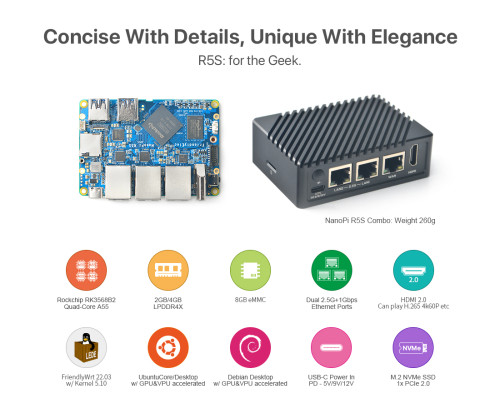 This post has been edited by Azims: Apr 15 2023, 06:33 PM |
|
|
Apr 15 2023, 06:43 PM
Return to original view | IPv6 | Post
#16
|
|
Junior Member
211 posts Joined: Oct 2014
|
QUOTE(petpenyubobo @ Apr 15 2023, 06:38 PM) If it's truly 10Gbps capable using XG/XGS-PON it MUST have a 10Gbps Ethernet Port At LEAST for future proof. Any upgrades in subscription plan, just swap the router no need for change the ONT modem at all. I see I highly doubt it's using XG-PON port.  |
|
|
Apr 20 2023, 08:59 PM
Return to original view | IPv6 | Post
#17
|
|
Junior Member
211 posts Joined: Oct 2014
|
QUOTE(Oltromen Ripot @ Apr 20 2023, 08:50 PM) it's flat network where my TV and conferencing equipment sits on same LAN segment. measure bufferbloat here https://www.waveform.com/tools/bufferbloatstar topology with gigabit vlan switch in middle. RT-AX86U on ethernet. TV on ethernet. Deco M9 Plus on ethernet. no QoS prioritisation. i can't remember why, but i purposely enabled but afterward reasonably had it disabled. conferencing through wireless. by bandwidth usage and throughput, shouldn't have effect. but it happens. This post has been edited by Azims: Apr 20 2023, 09:00 PM |
|
|
Apr 20 2023, 09:26 PM
Return to original view | IPv6 | Post
#18
|
|
Junior Member
211 posts Joined: Oct 2014
|
QUOTE(Oltromen Ripot @ Apr 20 2023, 09:09 PM) errrr educate me, please? If your grade is B or worse, it means you have bufferbloat. If your router supports SQM, turn it on. It should fix it.(i have TV treaming while this result was obtained.) 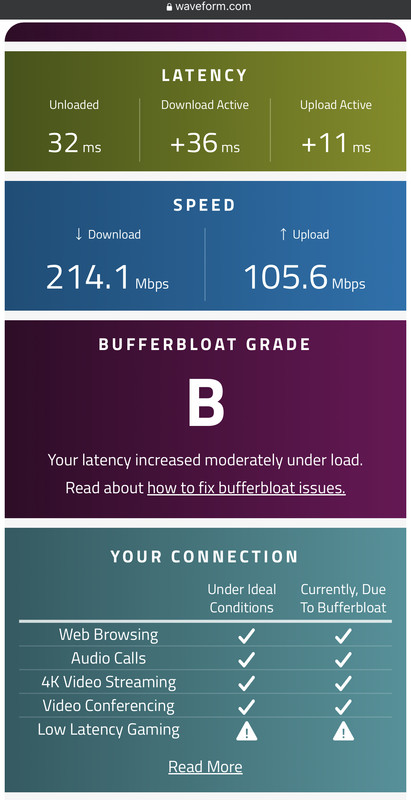 bufferbloat demo: technical explaination (bad audio): This post has been edited by Azims: Apr 20 2023, 09:33 PM |
|
|
Apr 20 2023, 09:55 PM
Return to original view | IPv6 | Post
#19
|
|
Junior Member
211 posts Joined: Oct 2014
|
QUOTE(go626201 @ Apr 20 2023, 09:42 PM) He maybe using wifi to test the waveform bufferbloat? yea, that could be it. You should test bufferbloat on wireI using ethernet,the unloaded ping only below 15ms. This post has been edited by Azims: Apr 20 2023, 09:56 PM |
|
|
Apr 20 2023, 10:17 PM
Return to original view | IPv6 | Post
#20
|
|
Junior Member
211 posts Joined: Oct 2014
|
QUOTE(Oltromen Ripot @ Apr 20 2023, 10:06 PM) end-user is on wifi. you can try pinging your router to see if the ping is unstable.so my test should be reflective of that condition. example from my wifi  |
|
Topic ClosedOptions
|
| Change to: |  0.2617sec 0.2617sec
 1.21 1.21
 7 queries 7 queries
 GZIP Disabled GZIP Disabled
Time is now: 18th December 2025 - 10:12 AM |
 Quote
Quote