Welcome Guest ( Log In | Register )

Bump Topic Topic Closed RSS Feed
30 Pages < 1 2 3 4 5 > » Bottom

Outline · [ Standard ] · Linear+

Unifi Official TM UniFi High Speed Broadband Thread V40, READ 1ST PAGE FOR RELEVANT WIFI INFO

views
     
Oltromen Ripot
post Jul 7 2022, 09:53 PM

πŸ‘ 999999 person Likes this member
*******
Senior Member
4,034 posts

Joined: Dec 2019
QUOTE(jerry123939 @ Jul 7 2022, 09:48 PM)
I found this unifi agent from facebook, 30mbps RM89+6 to 100mbps, RM89+22 to 300mbps, for contract ended customer only. This is even cheaper than staywithunifi promo. FB page: Queenstore Page.
*
"everything on the internet is the truth".

does it apply to TM packages? agents?
Oltromen Ripot
post Jul 8 2022, 10:48 AM

πŸ‘ 999999 person Likes this member
*******
Senior Member
4,034 posts

Joined: Dec 2019
QUOTE(Xefron @ Jul 8 2022, 09:57 AM)
QUOTE(josh5671 @ Jul 8 2022, 09:54 AM)

QUOTE(Xefron @ Jul 8 2022, 09:41 AM)

[url=removed for safety]Free Router Upgrade With T&C[/url]
*
Ini no head no tail sila kolos (/k style)

Giving a link and ask user to key in last nric, you sure not some sort of phishing?
*
Hahahaha i got it from WA. Dunno legit or not. But the SSL looks legit.
*
but what are the T&C?
I'm not interested with the alleged router upgrade, but this shouldn't be left out without further explanation. What if a curious person entered detail and ended up that form is for termination? contract for 50years? sell soul to whatever price TM quote for eternity?

dangerous lerrr.

This post has been edited by Oltromen Ripot: Jul 8 2022, 10:49 AM
Oltromen Ripot
post Jul 8 2022, 01:08 PM

πŸ‘ 999999 person Likes this member
*******
Senior Member
4,034 posts

Joined: Dec 2019
QUOTE(p1p @ Jul 8 2022, 12:45 PM)
Contractor says external TM poles needed. And they will charge Rm900/pole for 4th pole onwards. Looks like I have to pay 4 poles x rm900/each total RM3600.

Anyone can help escalate to TM for me?

Philip 0175914776
*
any other neighbour needing to install same poles?
Oltromen Ripot
post Jul 8 2022, 05:45 PM

πŸ‘ 999999 person Likes this member
*******
Senior Member
4,034 posts

Joined: Dec 2019
QUOTE(aniq8676 @ Jul 8 2022, 02:31 PM)
QUOTE(p1p @ Jul 8 2022, 01:42 PM)

It's about 150 metre distance and two corners to navigate.
Each pole is needed for every 30 metre.

I live in a kampung house and the land is situated behind the main unit.

Now I'm at the mercy of the tm technical team. Whether or not they wanna invest in poles to my house sad.gif
*
Additional poles will be provided FOC for Unifi users (but only limit for the first 3-4 poles only), the rest will be subject to additional charges.
*
i suggest .... get your neighbours in-between the 2 endpoints to get in on the action.
if they are interested and the poles can be installed to service their houses first, then you can ride it later.
Oltromen Ripot
post Jul 17 2022, 10:28 PM

πŸ‘ 999999 person Likes this member
*******
Senior Member
4,034 posts

Joined: Dec 2019
QUOTE(blacktubi @ Jul 17 2022, 09:54 PM)
The support for EasyMesh is very limited currently. I believe most vendor will refuse to support it to keep people locked into their own ecosystem.

It's also not as good as proprietary mesh standards developed by most OEMs.
*
just had Huawei "EasyMesh" delivered by Maxis as part of upgrade.

what was initially thought Easy - like Deco easy - to mesh with existing sibling Easymesh-cum-router unit, turn out to be "kena configure this", "kena press-hold that", and seeing the technician setting it up like it's some kind of kungfu not meant for home user.

For now, I am convinced to not fall into Easymesh hype.

.... probably ride out the bundled units as-is first, later change mesh when i really need pedal-to-the-metal.
Oltromen Ripot
post Jul 18 2022, 12:25 PM

πŸ‘ 999999 person Likes this member
*******
Senior Member
4,034 posts

Joined: Dec 2019
QUOTE(westlife @ Jul 17 2022, 10:33 PM)
actually not very difficult based on the guide given.
pretty much the concept is like how you pair a wireless device to ur wireless router via WPS.

what 'upgrade' is that besides? so good that maxis just provides free upgrade? so ur house is having more than one unit of the huawei easy mesh wifi router? how is the performance?

Maxis EasyMesh
*
Huawei LG8245x6-10

The router + 2 mesh units. All same model.

QUOTE(blacktubi @ Jul 17 2022, 11:07 PM)
Yes, good luck getting every vendor to implement it properly. Some brands can't even mesh properly within their own ecosystem.

The biggest different of WiFi 6 is the speed when the signal is weak. Let's say after 2 walls WiFi 5 will only give you 100Mbps. WiFi 6 could be around 250Mbps in best case scenario.

WiFi 6 is more efficient so it can transport more data even on poor signal conditions.
EasyMesh is nothing more than refined WDS repeater mode.

AP steering, band steering and roaming will still depends on how each OEM configure them.
*
Apparently for EasyMesh, the selling point is, each joining node is required to fall under a "leader" in the group. Probably the root router.

Specification/review of LG8245X6 is lacking on the net.
Do you suppose this is 2-band or 3-band mesh? there is mention of 2.4GHz, lower 5GHz, and upper 5GHz in the document.

Attached File  WFA114155__LG8245X610_.pdf ( 76.46k ) Number of downloads: 27

Oltromen Ripot
post Jul 18 2022, 03:14 PM

πŸ‘ 999999 person Likes this member
*******
Senior Member
4,034 posts

Joined: Dec 2019
QUOTE(westlife @ Jul 18 2022, 02:50 PM)
how is the performance of the huawei mesh wifi? do u get full speed near to the child nodes?
*
didn't test it.
i removed everything right after install as it's unlocked house under renovation.
Oltromen Ripot
post Jul 20 2022, 11:25 AM

πŸ‘ 999999 person Likes this member
*******
Senior Member
4,034 posts

Joined: Dec 2019
QUOTE(borneoman1 @ Jul 20 2022, 11:20 AM)
The 100Mbps package seems the same price as Digi Infinite 150.
The 300Mbps seems nice too, but already have Disney+.

Are downgrades possible? Like getting the 300Mbps but then decide on the 100Mbps package?
*
Nope. Everytime you modify your Unifi fibre subscription, the contracts resets to be 2 years again. And when you are on contract, you cannot downgrade without suffering penalty.

This post has been edited by Oltromen Ripot: Jul 20 2022, 11:26 AM
Oltromen Ripot
post Jul 20 2022, 08:44 PM

πŸ‘ 999999 person Likes this member
*******
Senior Member
4,034 posts

Joined: Dec 2019
QUOTE(westlife @ Jul 20 2022, 06:26 PM)
Hi guys, are the contract details reflected under the myunifi app support option as below accurate?
*
My contract dates is correct.
Oltromen Ripot
post Jul 28 2022, 02:08 AM

πŸ‘ 999999 person Likes this member
*******
Senior Member
4,034 posts

Joined: Dec 2019
QUOTE(fookhing @ Jul 27 2022, 08:29 PM)
If my 2nd, 3rd, 4th hop is 10.55.X.X then am I on Public or Private IP?
*
If hop n is still inside your network, and hop n+1 outside your home/office network is within 10.0.0.0/8, 172.16.0.0/12, or 192.168.0.0/16, then you are getting private IP from ISP.

If hop 1 is inside your home/office network, and your hop 2 is already outside and using 10.0.0.0/8, then your router is getting private IP from ISP.

hint: take a look at the IP range immediately outside and after your router, the one outside the control of your local network.

This post has been edited by Oltromen Ripot: Jul 28 2022, 02:10 AM
Oltromen Ripot
post Jul 28 2022, 02:26 PM

πŸ‘ 999999 person Likes this member
*******
Senior Member
4,034 posts

Joined: Dec 2019
QUOTE(soonwai @ Jul 28 2022, 12:03 PM)
Looks like u r on public IP. Can't you just post the whole traceroute?
*
i wonder if such ttacerpute is performed inside the router itself.
Oltromen Ripot
post Jul 29 2022, 02:56 PM

πŸ‘ 999999 person Likes this member
*******
Senior Member
4,034 posts

Joined: Dec 2019
QUOTE(soonwai @ Jul 29 2022, 02:30 PM)
QUOTE(prokiller1199 @ Jul 29 2022, 02:22 PM)

I can ping 8.8.8.8.
Traceroute from router can.
CODE
traceroute to 8.8.8.8 (8.8.8.8), 30 hops max, 60 byte packets
1 Β 10.233.97.34 (10.233.97.34) Β 1.929 ms Β 1.899 ms Β 1.885 ms
2 Β 10.55.48.84 (10.55.48.84) Β 7.720 ms Β 7.711 ms Β 7.630 ms
3 Β 72.14.214.220 (72.14.214.220) Β 8.761 ms Β 8.772 ms 72.14.214.196 (72.14.214.196) Β 10.165 ms
4 Β * * *
5 Β dns.google (8.8.8.8) Β 8.447 ms Β 8.385 ms Β 8.426 ms

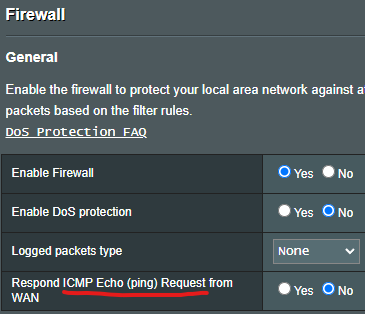
Is it this one?

user posted image
*
That above setting set to NO will allow only your router to traceroute and ping. Could be another setting in your firewall that is blocking ICMP forwarding to your LAN.

Not so sure about Asus but on Mikrotik, if I want to block ICMP, I will have one rule to block ICMP to the router (input chain) and one more rule to block ICMP to my LAN (forward chain.)

If you can ping then you should be able to traceroute also.
*
What THAT setting do is; block your router from responding to ICMP ping requests that is INITIATED FROM THE INTERNET SIDE.

THAT setting alone does not interfere with ICMP packets initated from LAN-side and related responses coming back from the Internet.

If you execute from inside LAN going outside to Internet and not getting expected response, check elsewhere, NOT THAT.
Oltromen Ripot
post Jul 29 2022, 03:02 PM

πŸ‘ 999999 person Likes this member
*******
Senior Member
4,034 posts

Joined: Dec 2019
QUOTE(soonwai @ Jul 29 2022, 02:30 PM)
If you can ping then you should be able to traceroute also.
*
No.

ping and response involves ICMP Type 0 (echo reply) and Type 8 (echo).

traceroute uses ICMP Type 11 (time exceeded).

able to ping-pong does not necessarily mean you can traceroute, and vice-versa. a firewall can selectively block exact ICMP Type, or block altogether.

This post has been edited by Oltromen Ripot: Jul 29 2022, 03:04 PM
Oltromen Ripot
post Jul 29 2022, 05:17 PM

πŸ‘ 999999 person Likes this member
*******
Senior Member
4,034 posts

Joined: Dec 2019
QUOTE(pyhoi @ Jul 29 2022, 03:44 PM)
Anyone can help? TM point staff call me ask to migrate my unifi lite to unifi and offer 30Mbps EXclusive Promo RM69 PERPETUAL. But in "my order" there write "Promo Discount 12 Months". I had check with live agent and they told me it is entitle 12 month promo only, but the TM point staff who offer and create the order keep telling me that my package is RM69 perpetual.
<a href='https://pictr.com/images/2022/07/29/B2fpgu.jpg' target='_blank'>https://pictr.com/images/2022/07/29/B2fpgu.jpg </a>
*
You have paperwork from TMpoint?

(eh, i see "TMpoint staff call me", so probably no paperwork, BUT, "this call will be recorded" and searchable if you cause enough fuss.)
Oltromen Ripot
post Aug 3 2022, 11:30 AM

πŸ‘ 999999 person Likes this member
*******
Senior Member
4,034 posts

Joined: Dec 2019
QUOTE(josh5671 @ Aug 3 2022, 09:42 AM)
Wanna to ask.

All unifi fiber package upload speed follow unifi website.
or Half of Download Speed, or 100mbps fixed.

because my area fiber coming soon and visited 2 agent (they set up moving store roadside) one claim half of download speed, one claim 800-500-300-100 all same 100mbps upload.
*
why use roadside agent? if problematic, can you find them again?
Oltromen Ripot
post Aug 7 2022, 04:15 PM

πŸ‘ 999999 person Likes this member
*******
Senior Member
4,034 posts

Joined: Dec 2019
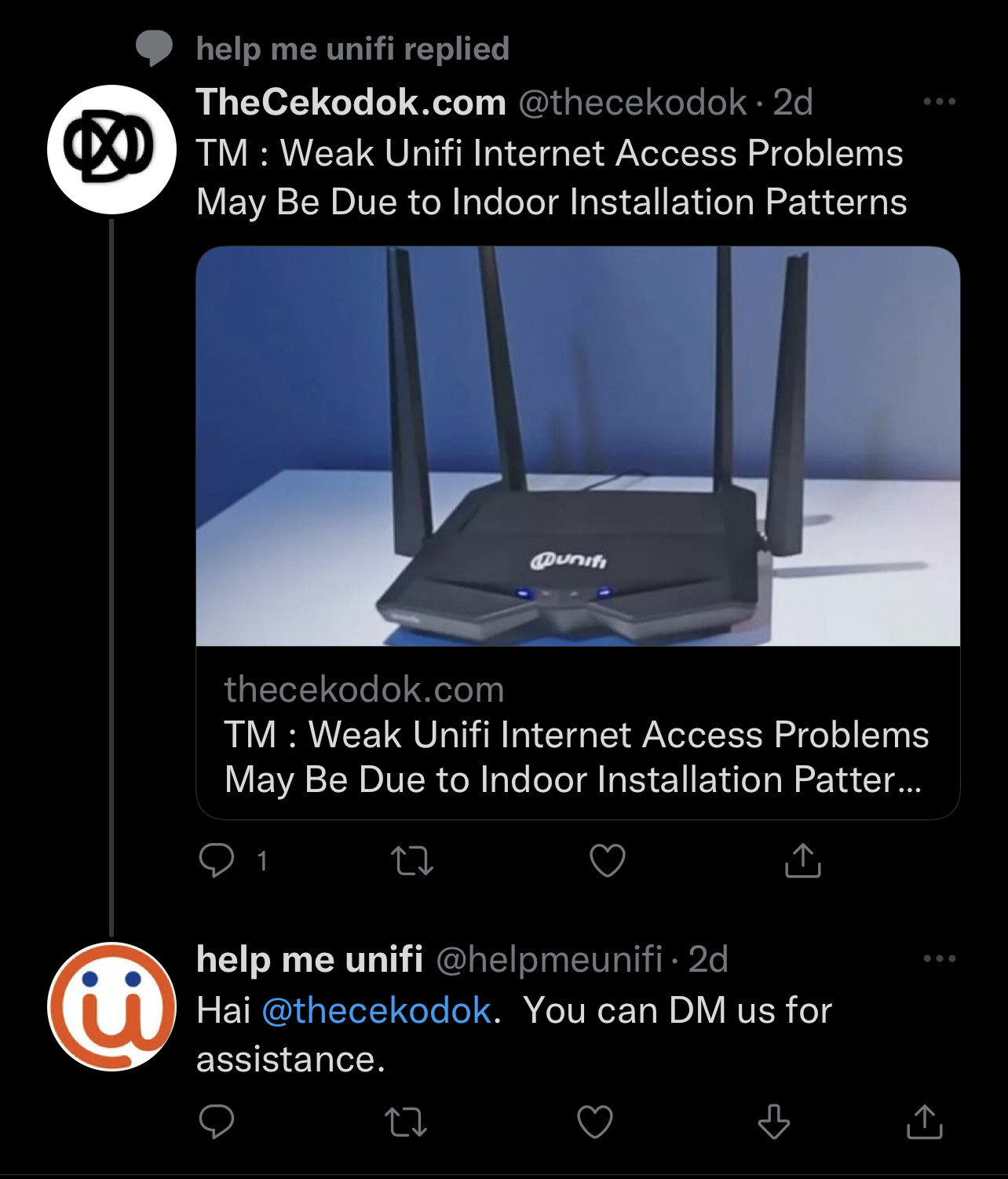
user posted image

@helpmeunifi tak reti membezakan mereka yang alami masalah dan mereka yang menulis artikel
Oltromen Ripot
post Aug 9 2022, 03:36 PM

πŸ‘ 999999 person Likes this member
*******
Senior Member
4,034 posts

Joined: Dec 2019
Aiyaaaa, just use speedtest lah.

Like me living in Penang, I speedtest unifi line against TM Seberang Jaya, Maxis against Maxis Shah Alam.

What I need to know is my subscribed line is capable of achieving my subscribed speed, between my own router and it's next hops, inside ISP's own internal network. If inside ISP itself also cannot achieve satisfactory speed, something is already wrong.

Traffic from far away servers are always at the mercy of internet weather anyway. Why worry about that far? Check closer within own ISP first.

Like today, my 500Mbps Maxis can only achieve 300Mbps against Shah Alam. Within ISP's own network. You think I should worry about fast.com etc when inside already not performing?

This post has been edited by Oltromen Ripot: Aug 9 2022, 03:39 PM
Oltromen Ripot
post Aug 9 2022, 03:52 PM

πŸ‘ 999999 person Likes this member
*******
Senior Member
4,034 posts

Joined: Dec 2019
QUOTE(westlife @ Aug 9 2022, 03:43 PM)
Wow. Green telco fibre broadband is so bad?

I am on 300Mbps Unifi and I can get full speed at 300Mbps so I am not complaining.
*
I think link faulty. When upgraded to 100Mbps to 500Mbps few weeks ago, the guy who delivered mesh units told me something about the fibre link reading is "high" and outside range. Don't know what number that is, he refused to let me screenshot it on his handheld tester. But he said to expect frequent drops and reduced quality.

inb4 it's green, but still on TM-managed HSBB cable whistling.gif

This post has been edited by Oltromen Ripot: Aug 9 2022, 03:54 PM
Oltromen Ripot
post Aug 9 2022, 05:03 PM

πŸ‘ 999999 person Likes this member
*******
Senior Member
4,034 posts

Joined: Dec 2019
QUOTE(PRSXFENG @ Aug 9 2022, 04:59 PM)
was it around -28 or higher
*
he showed me a 2-digit number with 2 in front, IIRC.

i can't remeber with certainty of "negative".
Oltromen Ripot
post Aug 10 2022, 03:16 PM

πŸ‘ 999999 person Likes this member
*******
Senior Member
4,034 posts

Joined: Dec 2019
@neekun, his task prior to today was only to add mesh units into existing installation. that fibre signal check was ... extra or habitual, i guess?

the same maxis technician came today (install, add mesh, and today t/shoot). somehow, Maxis 123 CS lodged "red LOS" and TM technician also came.
today's reading, which way lower than previous (was it "28" when he tested before?).
he said as long as "below 25", it is okay.
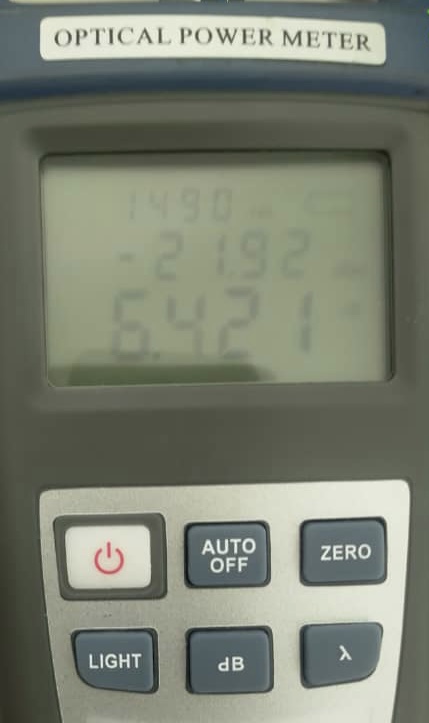
user posted image

QUOTE(PRSXFENG @ Aug 9 2022, 04:59 PM)
was it around -28 or higher
*
QUOTE(neekun @ Aug 10 2022, 07:59 AM)
My installer told me the installation should not be considered as successful if the reading is below/exceed certain number. I also cannot recall what number is that. Your installer won’t allow you to take photo of the reading, does this mean you reading is not within the acceptable range but he proceed also with installation ? Perhaps you can check with Telekom hotline on this.
*
QUOTE(akhito @ Aug 10 2022, 08:13 AM)
IRRC if reading is around -30 ish, u may had some problem ald. some users reported be4 getting -18, -21 etc quite good reading. If want to know ur reading just plugged lan into BTU and go to 192.168.1.1. for fiberhome btu, passwordΒ  is usr@last4macid
*
QUOTE(YoungMan @ Aug 10 2022, 08:39 AM)
The next best thing to do is lodge a report. I check mine and it is 18. When the reading cross 20+ then you will either have frequent DC or cannot achieve subscribed speed.

*
This post has been edited by Oltromen Ripot: Aug 10 2022, 03:21 PM

30 Pages < 1 2 3 4 5 > » Top
Topic ClosedOptions
 

Change to:
| Lo-Fi Version
0.0373sec    0.59    7 queries    GZIP Disabled
Time is now: 13th December 2025 - 10:34 AM