Welcome Guest ( Log In | Register )

Bump Topic Topic Closed RSS Feed
30 Pages < 1 2 3 4 > » Bottom

Outline · [ Standard ] · Linear+

Unifi Official TM UniFi High Speed Broadband Thread V40, READ 1ST PAGE FOR RELEVANT WIFI INFO

views
     
Oltromen Ripot
post Jun 10 2022, 03:51 PM

👍 999999 person Likes this member
*******
Senior Member
4,034 posts

Joined: Dec 2019
QUOTE(akib_mullen @ Jun 10 2022, 01:20 PM)
TMpoint open on weekend? My unifi using my wife name so hard to do it by myself need to bring her to tmpoint
*
nope. tried that sometime during bulan puasa. none on saturdays and sundays. all TMpoints in penang no longer have correct operating hours published online and on google maps.
Oltromen Ripot
post Jun 24 2022, 12:18 PM

👍 999999 person Likes this member
*******
Senior Member
4,034 posts

Joined: Dec 2019
QUOTE(sHawTY @ Jun 24 2022, 11:20 AM)
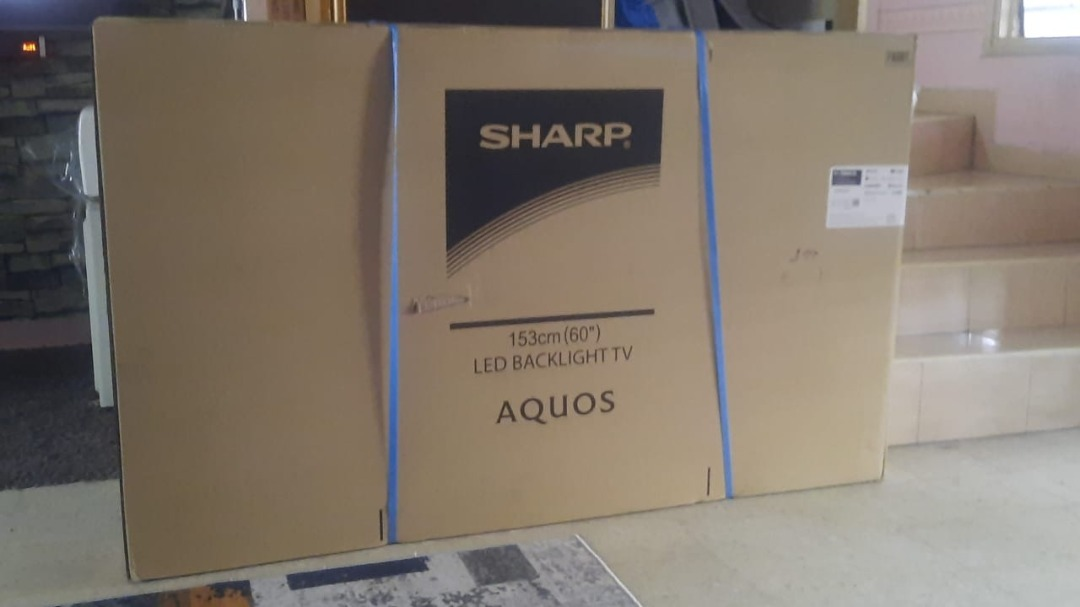
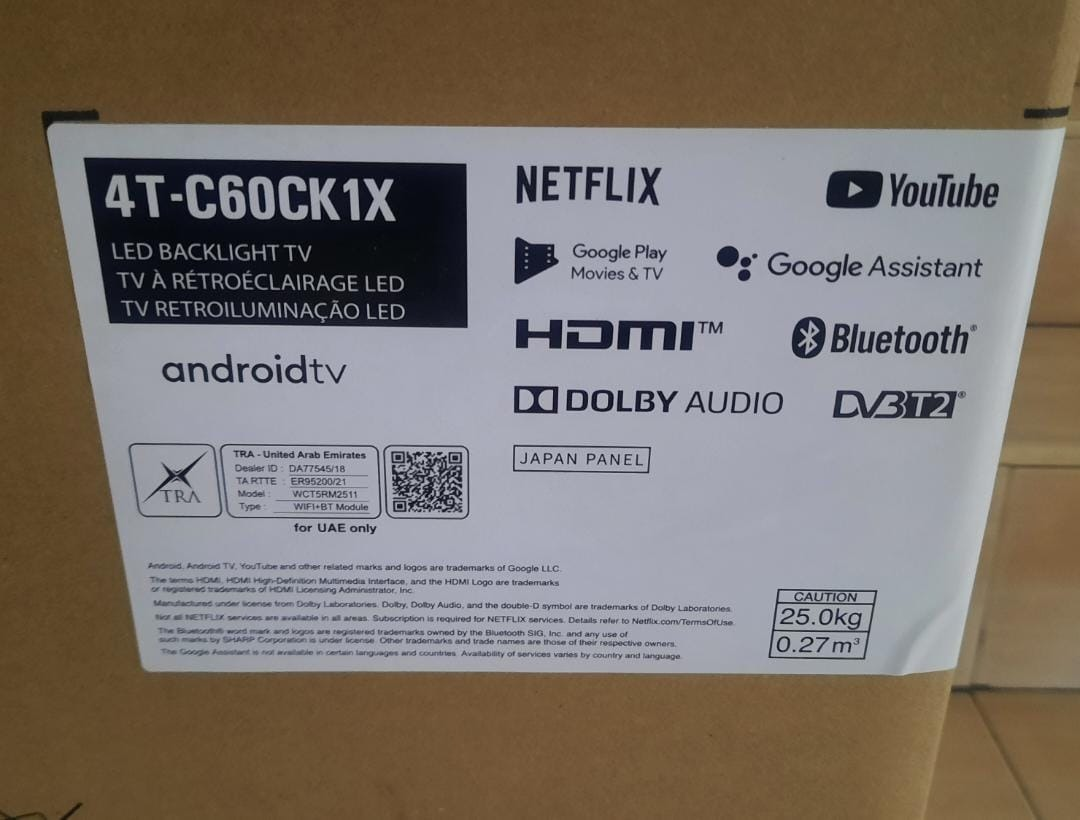
Just got it
Can't wait to install it in my bedroom wub.gif

user posted image
user posted image
*
whoah nice.

now i'm divided whether to get Sharp 75" through maxis fibre or get this Sharp 60" through unifi fibre.

if maxis leceh have to walk-in check zerolution eligibility. if unifi i don't expect TM to banyak soal, straight away stack into bill and contract.
Oltromen Ripot
post Jun 26 2022, 06:59 PM

👍 999999 person Likes this member
*******
Senior Member
4,034 posts

Joined: Dec 2019
QUOTE(sHawTY @ Jun 24 2022, 02:58 PM)
Just installed it on my bedroom wall
But since I only upgrade from 58" to 60", I can't really see the difference in size

The biggest downside of this TV is that it only comes with 8GB of internal storage with 4.6GB left even before I install any apps. Had to use a flash drive to expand the storage doh.gif
*
unifi:
already RM249(500Mbps). installment RM119(price for fibre+unifitv-only tier) for 24mth = RM2856.
monthly hit +RM119 * 24mth

maxis:
need upgrade from RM129(100Mbps) to RM219(500Mbps) is +RM90. installment RM21 for 36 mths = RM756.
monthly hit +RM111 * 36mth

I ended upgrading Maxis line. waiting to confirm stock before committing to upgrade.
Since both offer Sharp, I share your concern of only having restrictive 4GB free. hopefully it can fit my family's current regiment of Disney+Netflix+UnifiTV+VIU+Youtube

Oltromen Ripot
post Jun 27 2022, 09:33 AM

👍 999999 person Likes this member
*******
Senior Member
4,034 posts

Joined: Dec 2019
QUOTE(silvaco22 @ Jun 26 2022, 07:42 PM)
ahhh that's a bummer. means that both persons need to be physically present during the change ownership process?
*
Yes. For you who haven't kena, it's a hassle.
For those who already kena SIM swap over the counter, identity theft over the counter, then you will be glad they now require this e.g. physical presence of all interested parties.
Oltromen Ripot
post Jun 29 2022, 09:43 AM

👍 999999 person Likes this member
*******
Senior Member
4,034 posts

Joined: Dec 2019
QUOTE(westlife @ Jun 29 2022, 08:19 AM)
Is there anyway to check if unifi is on public or private ip without going thru the wifi router to check?

Such as using traceroute etc. kind of commands.
*
I use Windows for this test.
500Mbps link, so supposedly on public IP.

How to interpret:
Gateway connects at least 2 disjointed network, so there are at least 2 interfaces, one facing you (inside), another facing away from you. But, for 2 gateways to talk to each other on IPv4 network, the interfaces facing each other need to be on same subnet.

Traceroute returns ping from the inside-facing interface of each gateway hop.
In my case, I only have 1 layer of router inside my home network, thus the very next hop is the inside-facing interface of a router that is no longer inside my home network.
Since the inside interface of that 2nd router is on public IP, I can assume that the external interface on my router is also public IP on the same subnet.

Logically, if you see many more responses from private IP before you get response from the first public IP, and you do not recognise those private IP as being part of your own network, then it can already be assumed that your router is assigned private IP.


CODE
C:\> tracert 8.8.8.8
Tracing route to dns.google [8.8.8.8]
over a maximum of 30 hops:

 1     3ms     7ms     3ms   192.168.###.1
 2     8ms    14ms    13ms   60.49.128.###
....

Oltromen Ripot
post Jun 30 2022, 02:02 AM

👍 999999 person Likes this member
*******
Senior Member
4,034 posts

Joined: Dec 2019
Both traceroute and ping uses ICMP, but their working differs.

PING sends ICMP Type 8 ("echo") and the destination responds with ICMP Type 0 ("echo reply").

TRACEROUTE manipulates TTL value of IP packets, and as a packet passes through each gateway, its TTL value is decreased. Remote gateway that the packet ends up with TTL=0 returns ICMP Type 11 ("time exceeded").

So if you can't use PING, then use TRACEROUTE.

If you just want to determine whether your router is assigned public IP or private IP, then using TRACEROUTE is sufficient. Just one step, and you should learn to be able to interpret it. And command is similar and repeatable on any operating system.

No need to query remote whatsmyip, no need to check inside router's info page, no need to ping here and there, no need to cross fingers in hoping to (not) hit open port on router's external interface.
Oltromen Ripot
post Jun 30 2022, 09:57 AM

👍 999999 person Likes this member
*******
Senior Member
4,034 posts

Joined: Dec 2019
Home network is usually flat with only 1 router.
But companies can have multiple layer of routers. It might not be 1st in the traceroute result.
One needs to determine where is the network border; which IP is internal-facing interface IP of the edge-most router.

The required "skill" is in interpreting what comes right after your edge-most router.
Because in IP network, adjacent gateways facing each other need to be in same subnet in order to be able to talk to each other.

If the 1st gateway outside of your network is public IP, then your edge-most external-facing WAN interface have public IP.

If the 1st gateway outside of your network is private IP, then your edge-most external-facing WAN interface have private IP.

And it is almost certain that ISPs will not block/prohibit ICMP Type 11 ("time exceeded") response coming from the gateway that is assigned as your router's gateway.
It will be crazy if their own technician cannot perform troubleshooting with a key tool.

Also note; 10.0.0.0/8 was previously used for internal routing of those internet providers. As seen in the Unifi example, some of those network interconnections are still using it in their internal networks.
So if you see a pattern like public-private-private-private-public IP sequences, ignore them.
Since the intent is to determine whether your WAN interface is on public IP or private IP, interpreting what's next to your network border is sufficient for the scope.

QUOTE(soonwai @ Jun 30 2022, 04:47 AM)
Oltromen Ripot has posted twice already with very good explanations. Perhaps examples will help westlife. Do a traceroute and see which of the below is closest to yours.

This is private IP. (Digi mobile data) whatismyip: 115.164.213.14
CODE
% traceroute 8.8.8.8 | column -t
traceroute to 8.8.8.8 (8.8.8.8), 64 hops max, 52 byte packets
1                172.20.10.1        (internal interface of my edge-most router)
2                10.138.138.118     (private IP outside my network)
3                *                  (ICMP blocked/prohibited)
4                10.132.47.46       (private IP outside my network)
5                172.21.20.207      (private IP outside my network)
6                *                  (ICMP blocked/prohibited)
7                172.21.2.250       (private IP outside my network)
8                72.14.221.20       (public IP outside my network)
9                108.170.250.1      (irrelevant for purpose)
108.170.249.225  (irrelevant for purpose)
108.170.250.1    (irrelevant for purpose)
10               72.14.234.85       (irrelevant for purpose)
142.250.62.57    (irrelevant for purpose)
72.14.234.85     (irrelevant for purpose)
11               dns.google         (8.8.8.8)


This is public IP. (Unifi 800) whatismyip: 175.142.125.212 (see how this IP corresponds to #2 below)
CODE
% traceroute 8.8.8.8 | column -t
traceroute to 8.8.8.8 (8.8.8.8), 64 hops max, 52 byte packets
1              router.local      (internal interface of my edge-most router)
2              175.142.125.254   (public IP outside my network)
3              10.55.49.3        (irrelevant for purpose)
10.55.49.1     (irrelevant for purpose)
4              10.55.48.14       (irrelevant for purpose)
10.55.48.200   (irrelevant for purpose)
10.55.48.18    (irrelevant for purpose)
5              72.14.214.196     (irrelevant for purpose)
72.14.214.220  (irrelevant for purpose)
72.14.204.208  (irrelevant for purpose)
6              *                 (ICMP blocked/prohibited)
7              dns.google        (8.8.8.8)


* anything beginning with a 10 and 172.16 to 172.31 are private IPs.

*
Oltromen Ripot
post Jun 30 2022, 06:54 PM

👍 999999 person Likes this member
*******
Senior Member
4,034 posts

Joined: Dec 2019
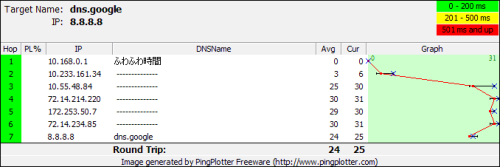
QUOTE(asellus @ Jun 30 2022, 06:06 PM)
It isn't necessarily that the first hop after router must be public IP for users with public IP enabled.

user posted image

The one above is Unifi 500Mb.
*
Yes, it is not necessarily true. network design is an art by itself.

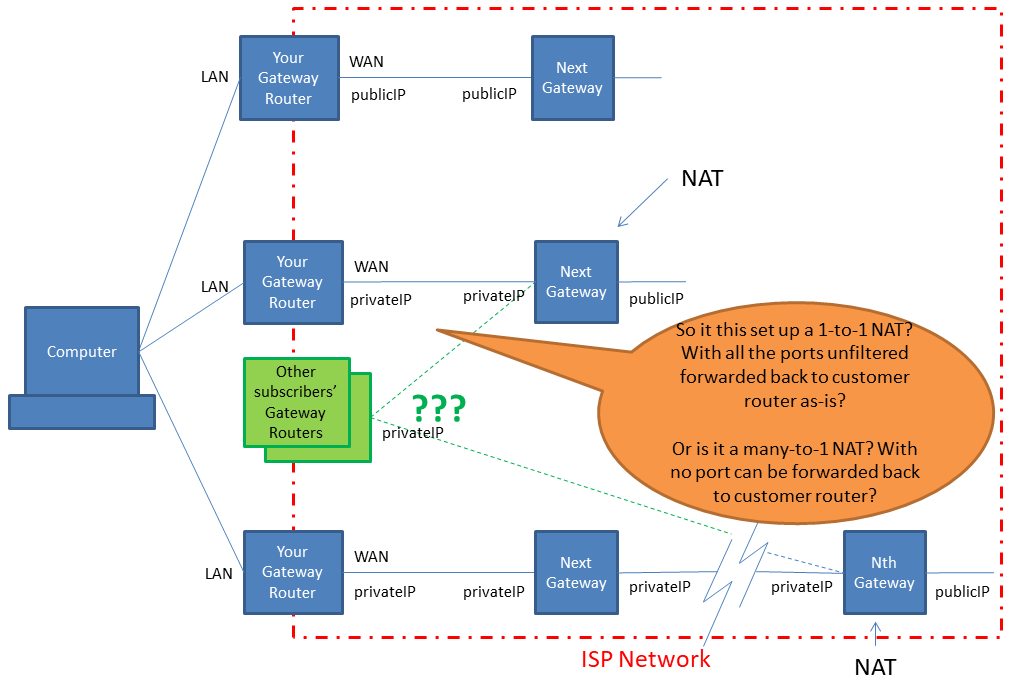
You either get
  • public IP attached directly to the external-facing WAN interface of own router (1-to-1)
  • private IP attached directly to the external-facing WAN interface of own router, routes through a few layer of routers before eventually gets NAT-ted to a public IP somewhere deeper inside ISP.

both cases above can argue that you are getting public IP.
but in the 2nd case, is the public IP exclusive or shared? (is this what the ISP callling CGNAT?)

but in such case, do you get a 1-to-1 exclusive use of that public IP (for the PPPoE session)?
can publish port on the internet for public access?
(AWS EC2 instances all have private IP; optionally can be assigned exclusive public IP, but the public IP itself is not visibly attached directly to the server but applied externally by network device. similar concept.)

or do you get a ∞-to-1 inexclusive use of that public IP (for the PPPoE session)?
i doubt can publish port on the internet for public access. (isn't this CGNAT?)

Oltromen Ripot
post Jun 30 2022, 09:05 PM

👍 999999 person Likes this member
*******
Senior Member
4,034 posts

Joined: Dec 2019
QUOTE(XeactorZ @ Jun 30 2022, 07:46 PM)
Just tried using tracert, but seems like private IP???

user posted image
*
(1) Traceroute responses (almost always) will come from the network interfaces facing you.

(2) In your case of flat network with only 1 router, that row 1 in your result is the internal interface (facing you) of your router.

(3) Thus row 2 is the next-hop response coming from the interface (facing you) of the next-hop gateway.

(4) In IPv4 network, for 2 interfaces to talk to each other, they need to be in same subnet.
So is that IP of the next-hop gateway right after your edge-most router a public IP or a private IP?
Your router's external-facing WAN interface need to have the same type, be it public IP or private IP.

The initial question was, "how to determine whether Unifi is on public or private IP?"
That is tricky to determine. Because all end up having public IP.

Actually, where is the public IP assigned to you is "located" at?
As someone pointed out few posts back, their supposedly ADMINISTRATIVELY public IP 500Mbps login is actually assigned private IP and gone through several more layers of gateways before their session's public IP is NAT-ted to his traffic. Then I would need to determine whether that public IP "located" several hop away, is it exclusively paired to his router only? Or is it shared with other subscribers? If he publish a random port to the internet on his router, will his router be able to accept connection initiated from the internet? Are all traffic from internet forwarded exclusively to his router?

So, lets alter the question a bit:
CAN I USE TRACEROUTE TO DETERMINE WHETHER MY PPPOE DIALER'S WAN INTERFACE IS ASSIGNED PUBLIC IP OR PRIVATE IP?

If I my router is not immediately assigned a public IP, then it is almost certain that I am NAT-ted somewhere deeper inside ISP network.


QUOTE(westlife @ Jun 29 2022, 08:19 AM)
Is there anyway to check if unifi is on public or private ip without going thru the wifi router to check?

Such as using traceroute etc. kind of commands.
*
user posted image
Oltromen Ripot
post Jun 30 2022, 09:16 PM

👍 999999 person Likes this member
*******
Senior Member
4,034 posts

Joined: Dec 2019
QUOTE(XeactorZ @ Jun 30 2022, 08:00 PM)
That good, but any advantage on using public IP?
*
Their concern is, "which device" is hosting their public IP?

If your WAN interface gets assigned private IP, that is akin to you living deep in the ISP's jungle, not directly accessible from the superhighway. You want to exit to town also need to pass through several checkpoints and bumpers, adding to travel delay. You want to do business in your porch? Sorry, nobody can get to your house; fog-of-war by the ISP's jungle.

If your WAN interface host a public IP, that is similar to you having your home directly connected on the shoulder of superhighway. You nak berniaga restoran? Jual air balang? Check CCTV from kampung? Or enable alarm from office? Just want to take midnight drive to relieve tension? Quicker response time as well as opposed to having to pass through several checkpoints going out.
Oltromen Ripot
post Jul 2 2022, 08:40 AM

👍 999999 person Likes this member
*******
Senior Member
4,034 posts

Joined: Dec 2019
QUOTE(westlife @ Jul 1 2022, 09:26 PM)
QUOTE(coolguy_0925 @ Jul 1 2022, 06:20 PM)

Just so that you won't waste your time & petrol going over, I would like to remind you that TMpoints don't usually open on Sundays

Unless you're sure that particular branch operates on Sundays

Otherwise, you will have to find a way to go on a weekday
*
Jaybee Sunday is working day 😜
*
I can confirm last I went hunting during recent Ramadhan, all TMpoint in Penang is 5-weekdays only.
Oltromen Ripot
post Jul 2 2022, 09:27 PM

👍 999999 person Likes this member
*******
Senior Member
4,034 posts

Joined: Dec 2019
QUOTE(Bonjitettei @ Jul 2 2022, 12:51 PM)
Hi,

I am using Unifi 300Mbps for many years now, which comes with HyppTV package (additional RM30 per month).

Can I cancel the HyppTV only?
*
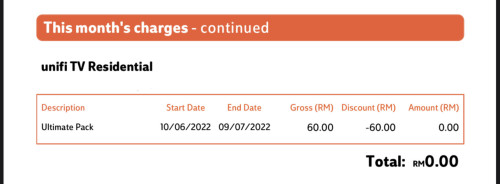
Can I suggest you check your cost structure first?

As I have it below, you can see that if I (can?) cancel the tvpack, it won't make a difference to my bill. TM did creative accounting, already absorb the RM60 into the base RM249; I consider the bill item is just a lying justification as if it's discounted.

user posted image
Oltromen Ripot
post Jul 4 2022, 12:19 PM

👍 999999 person Likes this member
*******
Senior Member
4,034 posts

Joined: Dec 2019
QUOTE(shahruls @ Jul 4 2022, 12:15 PM)
Hi, need advise between unifi 100mbps rm129 and celcom unifi 300mbps  rm119 because I have Celcom mega account. Any problem with celcom unifi, they will use infra from tm right? So performance should be same with tm unifi?
*
Infra is HSBB, funded by gomen, managed by TM.

ktards say that although HSBB infra is shared, the routing "up there" will be by your own ISP.
Oltromen Ripot
post Jul 5 2022, 10:19 AM

👍 999999 person Likes this member
*******
Senior Member
4,034 posts

Joined: Dec 2019
QUOTE(josh5671 @ Jul 5 2022, 09:56 AM)
ahh....yesterday i notice the tm fiber optical cable (black + yellow strip cable) already on back alley pole. under construction, no box on the pole yet.

how long you guy think the fiber will able to install?
*
FYI; i jumped the moment the black db box appeared on pole behind house. but it didn't have wires going into it.

when it have fibre wires going in - now i would say it was within a month - i religiously keep refreshing maxis page for my address to appear inside.

i did not use unifi lookup because it is integrated with "i'm interested"; i don't want unifi to play dirty by locking my address exclusive as if i only want unifi. i was still deliberating to go with which back then.

» Click to show Spoiler - click again to hide... «


TM TECHNICIAN OPENED THE DB AND TOLD ME THERE ARE ONLY 10 PORTS INSIDE, and from his experience, TM won't install more db.
I'm already 2nd connected to it. that db was supposed to link 30-odd houses on 2 rows.

add:
this is TM thread; i'm not selling maxis. i'm just relating my experience with regard to black-db-box-on-a-TM-pole-behind-my-new-house. i now have unifi and maxis in 2 different premises.

This post has been edited by Oltromen Ripot: Jul 5 2022, 10:25 AM
Oltromen Ripot
post Jul 5 2022, 04:48 PM

👍 999999 person Likes this member
*******
Senior Member
4,034 posts

Joined: Dec 2019
maxis will flip table for it is being used excessively to get unifi offer.

» Click to show Spoiler - click again to hide... «

Oltromen Ripot
post Jul 5 2022, 05:24 PM

👍 999999 person Likes this member
*******
Senior Member
4,034 posts

Joined: Dec 2019
QUOTE(westlife @ Jul 5 2022, 05:20 PM)
besides, may i know how to get the 6 months free for existing unifi user? (i am asking for before promo end) via what channel? online sign up - i never see this promo before for existing unifi user even... or must sign up via agent to get it?

the current promo for signing up online is 1 month free for 300Mbps plan and above plus optional mid year deals...
*
i think the one online is for fresh meat and for existing subscriber to switch plan, not transfer.
Oltromen Ripot
post Jul 5 2022, 05:43 PM

👍 999999 person Likes this member
*******
Senior Member
4,034 posts

Joined: Dec 2019
QUOTE(westlife @ Jul 5 2022, 05:32 PM)
then how to 'transfer'? via agent????

online also can do the 'transfer', this is what i did, once u are redicted to their whatsapp, they will check ur address, and they will know if u are existing unifi user, if yes, transfer request required also.
*
for these kind of things, i walk-in to maxis centre.
initially i wasn't there for fibre, but damned, first time i'm impressed with maxis although i've been using its mobile for long.
staff are friendly, and they kept track of progress and status of rebates for 2mths+.
- check premise inside database (supposedly more up-to-date than the web)
- sign-up
- wireless 4G in the meantime
- chase TM to add address into HSBB premise database
- install and configure fibre
- reverse charges for wireless 4G
- chase to reinstate rebates that were promised during sign-up

This post has been edited by Oltromen Ripot: Jul 5 2022, 05:44 PM
Oltromen Ripot
post Jul 5 2022, 05:49 PM

👍 999999 person Likes this member
*******
Senior Member
4,034 posts

Joined: Dec 2019
QUOTE(westlife @ Jul 5 2022, 05:35 PM)
user posted image

user posted image
*
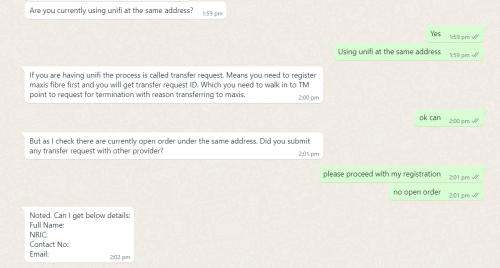
Y-you managed to whatsapp-chat with maxis!!!?

This particular "customer service front" is the worst right now. Even Astro's whatsapp cannot compare to maxis's.

Maxis's whatsapp is all about sales, sales, sales. When call 123 for non-sales enquiry, they SMS-ed a link back to whatsapp then it terminate call.
Oltromen Ripot
post Jul 5 2022, 06:00 PM

👍 999999 person Likes this member
*******
Senior Member
4,034 posts

Joined: Dec 2019
QUOTE(westlife @ Jul 5 2022, 05:57 PM)
I can sign up using WhatsApp as u can see.

Even digi I sign up via WhatsApp also.
*
For sales yes yes.
For others, stuck between rock and hard place.
Oltromen Ripot
post Jul 7 2022, 08:51 PM

👍 999999 person Likes this member
*******
Senior Member
4,034 posts

Joined: Dec 2019
QUOTE(westlife @ Jul 7 2022, 06:40 PM)
user posted image
*
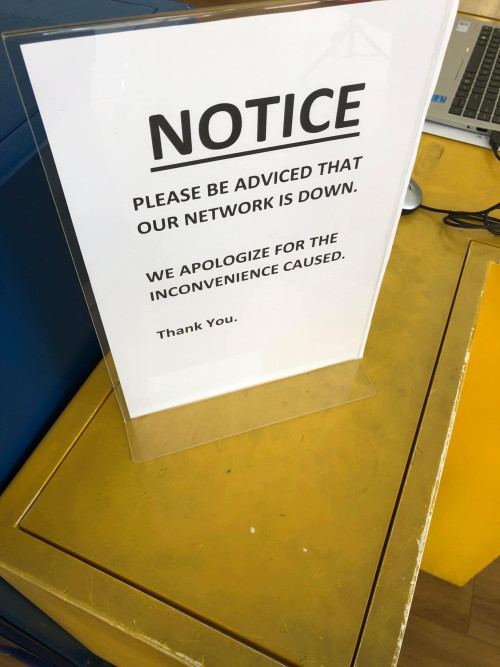
(facepalm)

advice - noun
advise - verb

advisor gives advice.

"please be adviced advised"

30 Pages < 1 2 3 4 > » Top
Topic ClosedOptions
 

Change to:
| Lo-Fi Version
0.2662sec    1.01    7 queries    GZIP Disabled
Time is now: 11th December 2025 - 06:06 PM