Welcome Guest ( Log In | Register )

Outline · [ Standard ] · Linear+

 ROUTERS LAN PORTS CAPPED AT 100Mbps, Need some inputs

views
     
TSharvin6
post Nov 17 2021, 09:35 PM, updated 5y ago

On my way
****
Junior Member
516 posts

Joined: May 2006


Hey guys i got this unique issue:

Running on unifibiz 800mbps

1. I got a new ax73 tp link to replace old router.

2. This ax73 is connected :
- 16 port gigabit switch
- 4 + 2 poe gigabit switch
- 5 port gigabit switch

All above is connected to lan port 1 2 3.


When i first tested ax73 connected to internet (connected via lan cat6 cable) on my network setting i could pair 1.0gb connection.everything was n perfect.

After i connected all those switches, now all my lan ports from is 100mbps no more 1.0gb/1000mbps

Things i did to double check :
1. Change cat 6 cables
2. Direct connect to lanport without switches connected to ax73 router.
3. Factory reset and reconfigured to connected to Internet.
4. Factory reset and skip all configuration just to check connection via lan cable still get 100mbps only (all ports on ax73).
5. Set evrything is setting laptop n router to 1000mbps full duplex.

All failed to get same results as first test.


Ok now anyone of you have encountered this. I think somehow something burnt of and capped my ax73 router lan port to 100mb.

Please id anyone got any solution or what did i do wrong.
buraqdunia
post Nov 17 2021, 10:13 PM

On my way
****
Junior Member
617 posts

Joined: Jul 2006


all i think yr equipment/s survive the lightning barrage, but have some h/w degradation.
ihavenoidea
post Nov 17 2021, 10:39 PM

Regular
******
Senior Member
1,300 posts

Joined: Sep 2012
Did it auto update firmware or something?
TSharvin6
post Nov 18 2021, 09:55 AM

On my way
****
Junior Member
516 posts

Joined: May 2006


QUOTE(ihavenoidea @ Nov 17 2021, 11:39 PM)
Did it auto update firmware or something?
*
Yes after I setup i did update firmware.
TSharvin6
post Nov 18 2021, 09:55 AM

On my way
****
Junior Member
516 posts

Joined: May 2006


QUOTE(buraqdunia @ Nov 17 2021, 11:13 PM)
all i think yr equipment/s survive the lightning barrage, but have some h/w degradation.
*
highdoubt if kena lighting surely modem kaput right or all ports down...this is the port only can communicate in 100mbps.

Seriously puzzled.
ihavenoidea
post Nov 18 2021, 10:13 AM

Regular
******
Senior Member
1,300 posts

Joined: Sep 2012
QUOTE(harvin6 @ Nov 18 2021, 09:55 AM)
Yes after I setup i did update firmware.
*
So after update you sure the connection was still 1Gbps?

This post has been edited by ihavenoidea: Nov 18 2021, 10:15 AM
TSharvin6
post Nov 18 2021, 10:27 AM

On my way
****
Junior Member
516 posts

Joined: May 2006


QUOTE(ihavenoidea @ Nov 18 2021, 11:13 AM)
So after update you sure the connection was still 1Gbps?
*
Yes I've updated first before i setup to connect to the internet. So i don't think firmware issues.
JonathanHanYT
post Nov 18 2021, 10:51 AM

Getting Started
**
Junior Member
114 posts

Joined: Nov 2021
From: Penang, Malaysia


Using branded factory-terminated CAT6 or self-clamp CAT6?

Check your router settings whether that port is set to auto or 100 mbps. If auto or 100 mbps, try change it to 1000 mbps. If router's port setting is correct and you still have the issue of 100 mbps connection. Try to check your NIC for your desktop or laptop, set it manually to 1000 mbps. It should immediately take effect of your changes. If not, try reboot your laptop/desktop. If still got problem, change the cable with new CAT6 cable and see.

Sometime after upgrade router/switch firmware, it will auto downgrade the speed to 100 mbps. You need to set it back to auto or 1000 mbps.

ihavenoidea
post Nov 18 2021, 10:55 AM

Regular
******
Senior Member
1,300 posts

Joined: Sep 2012
QUOTE(harvin6 @ Nov 18 2021, 10:27 AM)
Yes I've updated first before i setup to connect to the internet. So i don't think firmware issues.
*
Try a 30/30/30 reset on the router.
Have you check inside the router advance setting if you can disable auto 100/1000 negotiation and force to 1000 mbps only?
kezsz
post Nov 18 2021, 10:59 AM

Getting Started
**
Junior Member
168 posts

Joined: May 2006


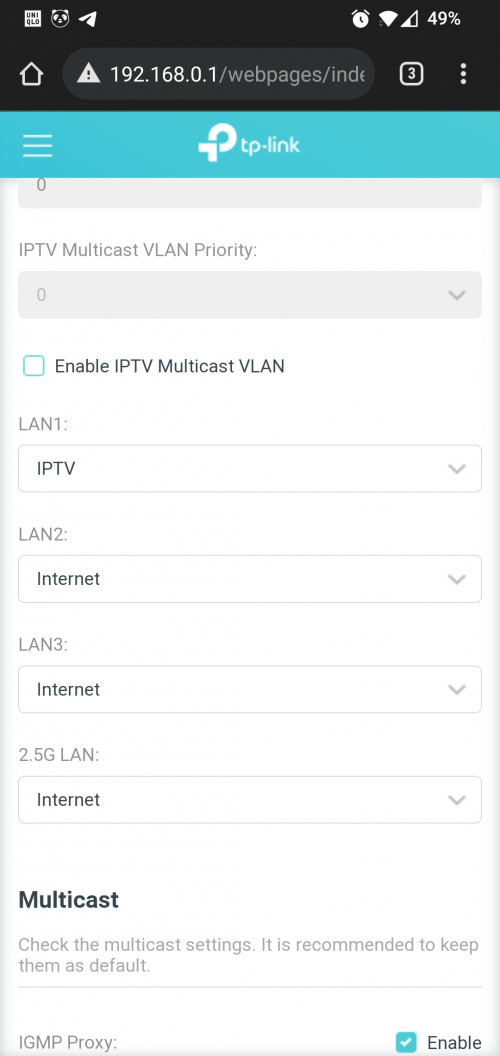
Pai, I'm using AX 6600 had the same issue as I use the 2.5 & 1 Gbps port ... Head to network and lan settings and change the setup... After I did mine , it gave me the speed I needed ... 500+ on unifi 500

user posted image

This post has been edited by kezsz: Nov 18 2021, 10:59 AM
TSharvin6
post Nov 18 2021, 12:25 PM

On my way
****
Junior Member
516 posts

Joined: May 2006


QUOTE(JonathanHanYT @ Nov 18 2021, 11:51 AM)
Using branded factory-terminated CAT6 or self-clamp CAT6?


Check your router settings whether that port is set to auto or 100 mbps. If auto or 100 mbps, try change it to 1000 mbps. If router's port setting is correct and you still have the issue of 100 mbps connection. Try to check your NIC for your desktop or laptop, set it manually to 1000 mbps. It should immediately take effect of your changes. If not, try reboot your laptop/desktop. If still got problem, change the cable with new CAT6 cable and see.

Sometime after upgrade router/switch firmware, it will auto downgrade the speed to 100 mbps. You need to set it back to auto or 1000 mbps.
*
factory terminated --and I even tried with the cable that comes with the router it self -- not cable problem. And I also tried manually setting to 1000mbps in router and multiple PC/laptop still the same.


QUOTE(ihavenoidea @ Nov 18 2021, 11:55 AM)
Try a 30/30/30 reset on the router.
Have you check inside the router advance setting if you can disable auto 100/1000 negotiation and force to 1000 mbps only?
*
Yes I've tried changing setting but still the same. How to do a 30/30/30 reset?

QUOTE(kezsz @ Nov 18 2021, 11:59 AM)
Pai, I'm using AX 6600 had the same issue as I use the 2.5 & 1 Gbps port ... Head to network and lan settings and change the setup... After I did mine , it gave me the speed I needed ... 500+ on unifi 500

user posted image
*
what did you change? mine all 4 ports is internet.
ihavenoidea
post Nov 18 2021, 12:36 PM

Regular
******
Senior Member
1,300 posts

Joined: Sep 2012
QUOTE(harvin6 @ Nov 18 2021, 12:25 PM)

Yes I've tried  changing setting but still the same. How to do a 30/30/30 reset?

*
Press reset button for 30 seconds. While holding, unplug router for 30 seconds, power on, hold 30 seconds.
TSharvin6
post Nov 18 2021, 03:00 PM

On my way
****
Junior Member
516 posts

Joined: May 2006


QUOTE(ihavenoidea @ Nov 18 2021, 01:36 PM)
Press reset button for 30 seconds. While holding, unplug router for 30 seconds, power on, hold 30 seconds.
*
ok ill try this and see. Thanks
Skylinestar
post Nov 18 2021, 07:27 PM

Mega Duck
********
All Stars
10,477 posts

Joined: Jan 2003
From: Sarawak
QUOTE(harvin6 @ Nov 17 2021, 09:35 PM)
1. I got a new ax73 tp link to replace old router.
2. Direct connect to lanport without switches connected to ax73 router.

*
PC direct to AX73 and you get 100Mbps?
TSharvin6
post Nov 19 2021, 10:45 AM

On my way
****
Junior Member
516 posts

Joined: May 2006


QUOTE(Skylinestar @ Nov 18 2021, 08:27 PM)
PC direct to AX73 and you get 100Mbps?
*
Yes even PC direct to ax73 connection paired at 100mbps only.
Skylinestar
post Nov 19 2021, 11:13 AM

Mega Duck
********
All Stars
10,477 posts

Joined: Jan 2003
From: Sarawak
QUOTE(harvin6 @ Nov 19 2021, 10:45 AM)
Yes even PC direct to ax73 connection paired at 100mbps only.
*
And your PC 1Gbps port is working fine on other network? Just want to make sure the problem is not on the PC side.
TSharvin6
post Nov 19 2021, 11:40 AM

On my way
****
Junior Member
516 posts

Joined: May 2006


QUOTE(Skylinestar @ Nov 19 2021, 12:13 PM)
And your PC 1Gbps port is working fine on other network? Just want to make sure the problem is not on the PC side.
*
yes working fine with other network 1.0 gb diff location. All fine.
trix
post Nov 19 2021, 08:30 PM

Enthusiast
*****
Senior Member
848 posts

Joined: Feb 2005
From: everywhere, yet nowhere.


how many computers you tested, only one?
have you tried manually setting the speed to 1gbps?
JonathanHanYT
post Nov 20 2021, 09:42 AM

Getting Started
**
Junior Member
114 posts

Joined: Nov 2021
From: Penang, Malaysia


Suspect the router settings. Try reset it and reconfigure it step by step.
ihavenoidea
post Nov 20 2021, 11:22 AM

Regular
******
Senior Member
1,300 posts

Joined: Sep 2012
QUOTE(harvin6 @ Nov 19 2021, 11:40 AM)
yes working fine with other network 1.0 gb diff location. All fine.
*
https://community.tp-link.com/en/home/forum/topic/270754
After looking thought tplink forum, alot of user have this issue on different devices.

This post has been edited by ihavenoidea: Nov 20 2021, 11:23 AM
TSharvin6
post Nov 22 2021, 10:08 AM

On my way
****
Junior Member
516 posts

Joined: May 2006


QUOTE(trix @ Nov 19 2021, 09:30 PM)
how many computers you tested, only one?
have you tried manually setting the speed to 1gbps?
*
Did on multiple laptop and pcs.

QUOTE(JonathanHanYT @ Nov 20 2021, 10:42 AM)
Suspect the router settings. Try reset it and reconfigure it step by step.
*
I did full reset same results.


JonathanHanYT
post Nov 23 2021, 07:46 AM

Getting Started
**
Junior Member
114 posts

Joined: Nov 2021
From: Penang, Malaysia


QUOTE(harvin6 @ Nov 22 2021, 10:08 AM)
Did on multiple laptop and pcs.
I did full reset same results.
*
Still under warranty? If yes, send it for warranty claims.
TSharvin6
post Nov 23 2021, 01:41 PM

On my way
****
Junior Member
516 posts

Joined: May 2006


QUOTE(JonathanHanYT @ Nov 23 2021, 08:46 AM)
Still under warranty? If yes, send it for warranty claims.
*
Hi Yes call and made appointment with service center ade. thanks


will update if anything.
VeeJay
post Nov 23 2021, 01:51 PM

Look at all my stars!!
*******
Senior Member
3,853 posts

Joined: Aug 2005


QUOTE(harvin6 @ Nov 17 2021, 09:35 PM)
Hey guys i got this unique issue:
» Click to show Spoiler - click again to hide... «

*
You can check it out here as well, for assistance

https://forum.lowyat.net/topic/4301282/+3920

Interesting scenario! keep us posted


Change to:
| Lo-Fi Version
0.0251sec    1.53    5 queries    GZIP Disabled
Time is now: 16th December 2025 - 12:45 AM