Welcome Guest ( Log In | Register )

Outline · [ Standard ] · Linear+

 Let's share how to git push repo to GitHub

views
     
TSFlierMate
post Oct 17 2021, 07:00 PM, updated 5y ago

On my way
****
Validating
543 posts

Joined: Nov 2020
Personally I am new to Git command except maybe "git clone". This also serves as note for beginners like me.

For newbie, you may already be experiencing uploading files to GitHub repo using folder where the commit message is "Add files via upload". sweat.gif

If you are noob like me using Git command, please see below. If you are experienced user, please share more commands.

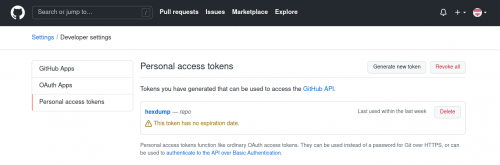
GitHub has announced since August 2021, they would no longer allow password authentication. They adopt PAT (personal access token) approach which you can generate through profile's Setting --> Developers Settings --> Personal Access Tokens:

Screenshot :
user posted image

Before you begin, make sure you have Git utility installed in your system.

So this is normally what I do,
1. Create a new subfolder
2. Copy all source files into the subfolder
3. Initialize it by typing:

CODE
git init

(This will create hidden ".git" subfolder)

4. Set the repo owner's handle or email address:

CODE

git config --global user.email "your_email_address"

git config --global user.name "your_user_name"

(I am not sure if both are required or just any one of them)

5. Create README.md if you want to do so.

6. Now add all the files to be uploaded
CODE
git add .

(Note a "." dot is added after "git add", which mean "current directory")

7. Commit changes (addition or deletion will be detected automatically) with commit message:
CODE
git commit -m "Initial commit"

(You can change "Initial commit" to any sentence)

8.
CODE
git branch -M main

(I think this is optional as the default is already "master"?)

9.
CODE
git remote add origin https://github.com/user_name/repo_name.git

(Replace user_name and repo_name with your own)

10.

CODE
git push https://personal_access_token@github.com/user_name/repo_name.git

(Replace personal_access_token with the one you have generated through GitHub settings page. Replace user_name and repo_name with your own.)

Before I forgot, I think we need to actually create a blank code repository on GitHub first, before we can "git push" using command-line. (Correct me if I am wrong)

So the above is counted as 1 commit.

To make changes to files , instead of everything, please repeat step 6, 7 and then straight to step 10. (Can skip step 8, 9)
Remember to change commit message (e.g. "Fixed bug xxxx") if you are modifying file(s) in step 7.

Please share your experience using Git command....... Thank you.
angch
post Oct 17 2021, 07:38 PM

On my way
****
Junior Member
636 posts

Joined: Jul 2006
Note: git is not github. github uses git, but git does not use github. Ok, ok, not trying to be a smartass, but hosted alternatives to github (If you're not Linus Torvalds and just prefer to work over email), include: bitbucket.org, gitlab.com (just got IPO'ed!), gitea.io (which you can self-host).

Also: Using ssh keys tends to be less painful than using personal access token and https. https://docs.github.com/en/authentication/c...-github-account

tl/dr:
ssh-keygen -trsa
cat .ssh/id_rsa.pub

And copy it to github. See https://github.com/settings/keys Use git instead of https to clone.

e.g. Use git@github.com:angch/adventofcode.git instead of https://github.com/angch/adventofcode.git (available after you logged into github, on your repos you have access to)

Github preferred naming the main branch as "main", rather than "master". It's a PC thing. https://github.com/github/renaming

This post has been edited by angch: Oct 17 2021, 08:12 PM
TSFlierMate
post Oct 17 2021, 10:16 PM

On my way
****
Validating
543 posts

Joined: Nov 2020
QUOTE(angch @ Oct 17 2021, 07:38 PM)
Note: git is not github. github uses git, but git does not use github. Ok, ok, not trying to be a smartass, but hosted alternatives to github (If you're not Linus Torvalds and just prefer to work over email), include: bitbucket.org, gitlab.com (just got IPO'ed!), gitea.io (which you can self-host).

Also: Using ssh keys tends to be less painful than using personal access token and https. https://docs.github.com/en/authentication/c...-github-account

tl/dr:
ssh-keygen -trsa
cat .ssh/id_rsa.pub

And copy it to github. See https://github.com/settings/keys Use git instead of https to clone.

e.g. Use git@github.com:angch/adventofcode.git instead of https://github.com/angch/adventofcode.git (available after you logged into github, on your repos you have access to)

Github preferred naming the main branch as "main", rather than "master". It's a PC thing. https://github.com/github/renaming
*
It takes time for me to digest these useful information. Hopefully it could be of help to anyone like me who want to learn how to git (Yep, git is not exclusive to GitHub only, but to several others like GitLab that you have mentioned , which is a nice additional info ;-)

I am not familiar with SSH but certainly will look into it soon. The renaming from "master" to "main".... thanks for letting me know about it.
silverhawk
post Oct 18 2021, 01:18 AM

Eyes on Target
Group Icon
Elite
4,956 posts

Joined: Jan 2003


QUOTE(FlierMate @ Oct 17 2021, 10:16 PM)
It takes time for me to digest these useful information. Hopefully it could be of help to anyone like me who want to learn how to git (Yep, git is not exclusive to GitHub only, but to several others like GitLab that you have mentioned , which is a nice additional info ;-)

I am not familiar with SSH but certainly will look into it soon. The renaming from "master" to "main".... thanks for letting me know about it.
*
Get used to SSH, it makes your life so much easier. Look into configs that let you create hostname aliases. It lets you tie in your user & pubkey (and any other ssh setting) to a host and you can name it whatever you like. For example:

CODE

Host web1
HostName some.super.long.internal.hostname.address
User fliermate
IdentitiesOnly yes
IdentityFile ~/.ssh/fliermate


Then whenever you want to ssh into that server, you just do "ssh web1". There are ProxyJump options too, so you can use jumpboxes to access gated servers in one command (or "host"). Very useful in DB clients where access is often gated and you don't normally have the ability to enter multiple hosts to jump through in the UI.

Back to git

Some other useful commands that you might use

CODE

git unstage
git stash
git clean
git diff
git revert


These commands are also useful and you will be forced to use it at some point, but be careful when using them
CODE

git reset --hard
git rebase
git puish -f


angch
post Oct 18 2021, 09:30 AM

On my way
****
Junior Member
636 posts

Joined: Jul 2006
TBH, my workflow these days just makes use of vscode for most of the day to day usage of git. Easier to check the diff changes before I add and commit. And "Undo last commit" is much easier when (not if) you screw up before a git push.
angch
post Oct 18 2021, 09:33 AM

On my way
****
Junior Member
636 posts

Joined: Jul 2006
QUOTE(FlierMate @ Oct 17 2021, 10:16 PM)
It takes time for me to digest these useful information.

*
This forum is not a tutorial for git. Too many out there, pick one. I'll just drop enough keywords and pointers for you to pick it up. I do acknowledge we onboard most of our devs to out git workflow via vscode though. Just faster and less likely to be messed up by beginners.

QUOTE(FlierMate @ Oct 17 2021, 10:16 PM)
I am not familiar with SSH but certainly will look into it soon. The renaming from "master" to "main".... thanks for letting me know about it.

*
You're on Linux. Get familiar with ssh, don't get sidetracked by shiny Linux commands until you are.

This post has been edited by angch: Oct 18 2021, 09:34 AM
Mat Quasar
post Nov 21 2024, 12:13 PM

Getting Started
**
Validating
64 posts

Joined: Nov 2024
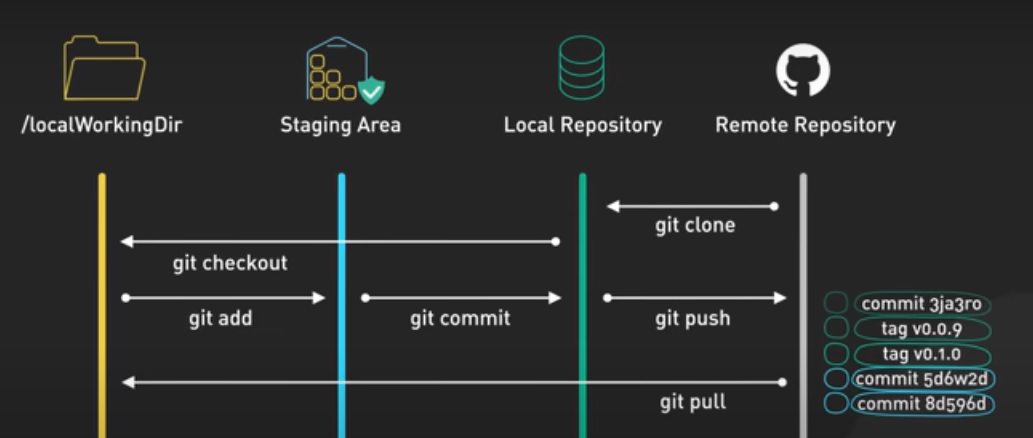
How Git Works: Explained in 4 Minutes

user posted image

https :// youtu.be/e9lnsKot_SQ?si=rfF3VqHzP0yKaFNo
FingernailClipper P
post Nov 24 2024, 01:11 PM

New Member
*
Probation
1 posts

Joined: Oct 2021


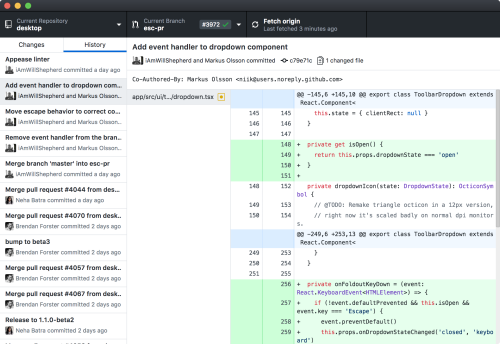
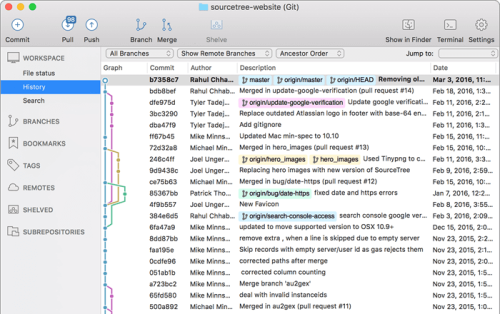
There are plenty of Git GUI for those who don't want to use the git commands or want better control over their commit chunks and branches also. My personal favourites are GitHub Desktop and SourceTree, quite helpful if beginner

user posted image

user posted image


Change to:
| Lo-Fi Version
0.0163sec    0.43    5 queries    GZIP Disabled
Time is now: 24th December 2025 - 10:42 AM