Welcome Guest ( Log In | Register )

Outline · [ Standard ] · Linear+

 Failed at unscrewing Lenovo laptop, to add a HDD

views
     
TSduhduh1234
post Sep 11 2021, 07:30 PM, updated 5y ago

Getting Started
**
Junior Member
99 posts

Joined: Sep 2017
as title
i managed to unscrew all but one on my newly bought lenovo laptop (bought it on early July).
I am fcked because the constant trying for unscrewing has wear down the shape of the screwhead, the shape/hole is almost circular now.
What should i do to solve this?
Pls help me sifu.

Btw, my screws are blueish-green in color, is that rust?
mujinkun
post Sep 11 2021, 07:34 PM

Enthusiast
*****
Junior Member
845 posts

Joined: Nov 2007
From: 3°05′N 101°39′E plus α
Got any photos?
laksamana
post Sep 11 2021, 07:34 PM

Regular
******
Senior Member
1,356 posts

Joined: Nov 2006
From: An Illuminati organization ..


Some laptops (i.e. such as my Dell) have 1 screw that can be loosened, but not removed from the back / chassis cover

Should this be the case, you can proceed to pry open the cover to access the internals
mujinkun
post Sep 11 2021, 07:38 PM

Enthusiast
*****
Junior Member
845 posts

Joined: Nov 2007
From: 3°05′N 101°39′E plus α
QUOTE(laksamana @ Sep 11 2021, 07:34 PM)
Some laptops (i.e. such as my Dell) have 1 screw that can be loosened, but not removed from the back / chassis cover

Should this be the case, you can proceed to pry open the cover to access the internals
*
My HP Envy have a similar problem too. The plastic that hold the gold nuts have totally detached from the chassis, and the screw keep loosened but cant take out.
Mostly happened at the Display foot metal that hold onto the chassis.
I pry its opened, and using heat gun glue to attached back the gold nuts onto the chassis.

This post has been edited by mujinkun: Sep 11 2021, 07:39 PM
TSduhduh1234
post Sep 11 2021, 07:54 PM

Getting Started
**
Junior Member
99 posts

Joined: Sep 2017
thank you sifu, i try to ignore that screw and pry open the case
but i am shit, the screw is at the corner where i should insert HDD with
fck me
TSduhduh1234
post Sep 11 2021, 08:18 PM

Getting Started
**
Junior Member
99 posts

Joined: Sep 2017
can i claim warranty for this?
sorry if i appear rushing because i am desperate, i already bought the hdd and i want to use it ASAP
miyeonevermioff
post Sep 11 2021, 08:41 PM

Getting Started
**
Junior Member
295 posts

Joined: Oct 2020
QUOTE(duhduh1234 @ Sep 11 2021, 08:18 PM)
can i claim warranty for this?
sorry if i appear rushing because i am desperate, i already bought the hdd and i want to use it ASAP
*
dont think so, damage done by customer
but aiya just remove screw wont charge u gua

but ur duno ur warranty void le mou doh.gif
TSduhduh1234
post Sep 11 2021, 09:36 PM

Getting Started
**
Junior Member
99 posts

Joined: Sep 2017
QUOTE(miyeonevermioff @ Sep 11 2021, 08:41 PM)
dont think so, damage done by customer
but aiya just remove screw wont charge u gua

but ur duno ur warranty void le mou  doh.gif
*
thanks for replying
i use brute force to break away the "stick" that hold the stuck screw.
The lesson i learnt is Malaysia is a humid country, screw will get rusty and use the better precision screwdriver.

Now, can someone help to add HDD?
I managed to add it physically and device manager can detect and enable it.
But, the HDD does not appear in My Computer as Drive D, what should i do?

EDIT: i solve it by referring internet, it was disk management

Thanks for helping me sifu-sifu

This post has been edited by duhduh1234: Sep 11 2021, 09:41 PM
SnoWFisH
post Sep 11 2021, 09:40 PM

Look at all my stars!!
*******
Senior Member
2,250 posts

Joined: Jan 2003
From: Penang / Bentong, Pahang / Genting


QUOTE(duhduh1234 @ Sep 11 2021, 09:36 PM)
thanks for replying
i use brute force to break away the "stick" that hold the stuck screw.
The lesson i learnt is Malaysia is a humid country, screw will get rusty and use the better precision screwdriver.

Now, can someone help to add HDD?
I managed to add it physically and device manager can detect and enable it.
But, the HDD does not appear in My Computer as Drive D, what should i do?
*
Erm.... Need to at least use Disk Manager to initialize and format it, right? doh.gif
Go Start and look for Disk Management...
TSduhduh1234
post Sep 11 2021, 09:43 PM

Getting Started
**
Junior Member
99 posts

Joined: Sep 2017
QUOTE(SnoWFisH @ Sep 11 2021, 09:40 PM)
Erm.... Need to at least use Disk Manager to initialize and format it, right? doh.gif
Go Start and look for Disk Management...
*
yeah, i google it and solve the issue.
Thanks for helping me.
Dhang
post Oct 21 2021, 09:38 PM

Getting Started
**
Junior Member
131 posts

Joined: Nov 2008
QUOTE(duhduh1234 @ Sep 11 2021, 09:36 PM)
thanks for replying
i use brute force to break away the "stick" that hold the stuck screw.
The lesson i learnt is Malaysia is a humid country, screw will get rusty and use the better precision screwdriver.

Now, can someone help to add HDD?
I managed to add it physically and device manager can detect and enable it.
But, the HDD does not appear in My Computer as Drive D, what should i do?

EDIT: i solve it by referring internet, it was disk management

Thanks for helping me sifu-sifu
*
Hmm, was the screw rusty? Didn't you just get a new laptop? 🤔
msacras
post Oct 22 2021, 12:50 AM

Regular
******
Senior Member
1,767 posts

Joined: Jan 2019
QUOTE(Dhang @ Oct 21 2021, 09:38 PM)
Hmm, was the screw rusty? Didn't you just get a new laptop? 🤔
*
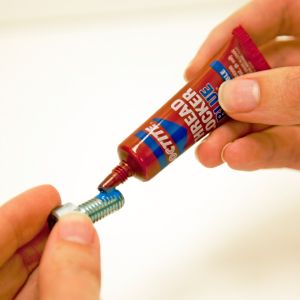
Those are not rust, but Loctite

user posted image

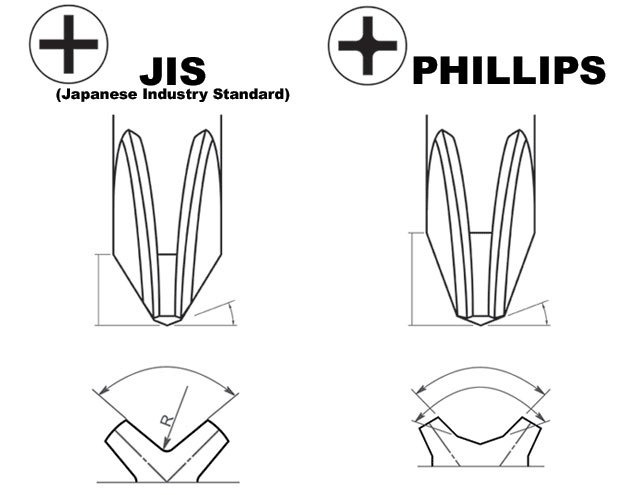
As for the screw, try to buy few kits of screwdrivers with different fitting, as you never know when you may encounter tight screws which have issue to be unscrewed with less than perfect screwdriver fitting. From experience, a philips with close to 45 degree angle tip generally have better grip on laptop screws. I heard bout a theory before that these laptop screws are actually using JIS standard instead of Philips, hence often you get imperfect fitting using Philips screwdrivers.
user posted image

The easiest way to unscrew worn laptop screws are using a dremel to cut a "-" flathead mark then unscrew using flat-head screwdriver. Though if the screws are deeply embedded, then it's more problematic.


This post has been edited by msacras: Oct 22 2021, 12:58 AM
Murrowping
post Oct 23 2021, 12:49 PM

Getting Started
**
Junior Member
51 posts

Joined: Oct 2021
U will void the warranty, always go for extended warranty
PRSXFENG
post Oct 23 2021, 01:45 PM

Look at all my stars!!
*******
Senior Member
2,614 posts

Joined: Nov 2020


QUOTE(duhduh1234 @ Sep 11 2021, 07:30 PM)
as title
i managed to unscrew all but one on my newly bought lenovo laptop (bought it on early July).
I am fcked because the constant trying for unscrewing has wear down the shape of the screwhead, the shape/hole is almost circular now.
What should i do to solve this?
Pls help me sifu.

Btw, my screws are blueish-green in color, is that rust?
*
The bluegreen stuff is probably some lubricant/threadlocker, not rust

also next time, search for the "Hardware Maintanace Manual" for your lenovo laptop, got offical guide


Change to:
| Lo-Fi Version
0.0163sec    0.67    5 queries    GZIP Disabled
Time is now: 20th December 2025 - 04:53 PM