Welcome Guest ( Log In | Register )

Outline · [ Standard ] · Linear+

Maxis Changing Maxis Router To 3rd party, Installing a TP Link Archer AX20

views
     
TShanspinacheo2017
post Aug 31 2021, 01:59 PM, updated 5y ago

New Member
*
Newbie
11 posts

Joined: Jul 2017


Hi all..been a while since im here
I have trouble to change my original maxis router to tp link router
Reset router, restart TM modem, unfortunately still to no avail..its only working with the original maxis router provided..even trying connecting directly from LAN 2 port from TM modem to laptop i cant obtain any internet connection..cant get the internet led at tp link archer ax20 to turn green except only on one condition, connceting orginal maxis router to tm modem then connect from LAN port on original Maxis router to WAN port on TP Link then only i managed to get internet connection from TP Link as another point.. i would like to connect the tp link router directly to TM modem without the original Maxis router..need help pleaseee
crimv
post Aug 31 2021, 02:11 PM

Getting Started
**
Junior Member
242 posts

Joined: Jun 2009
can you list out all your router and modem model that given by maxis? normally you just plug in ur own router and setup PPP0E then settle

This post has been edited by crimv: Aug 31 2021, 02:15 PM
cdspins
post Aug 31 2021, 02:12 PM

Look at all my stars!!
*******
Senior Member
2,714 posts

Joined: May 2008


Have you setup your user Name and password in the account settings for TP Link, the original Maxis router already saved this information in its settings.
acbc
post Aug 31 2021, 02:16 PM

Look at all my stars!!
*******
Senior Member
9,049 posts

Joined: Jan 2003
Was using the AX20 on Maxis before.

Easy set up.

1. LAN2 from BTU to AX20 WAN port.
2. Power up the AX20 and connect via WiFi.
3. Perform a Quick Setup and select the Maxis profile.
4. Enter the username and password from Maxis.
6. Save and reboot.

Done.

This post has been edited by acbc: Aug 31 2021, 02:17 PM
TShanspinacheo2017
post Aug 31 2021, 02:47 PM

New Member
*
Newbie
11 posts

Joined: Jul 2017


QUOTE(crimv @ Aug 31 2021, 02:11 PM)
can you list out all your router and modem model that given by maxis? normally you just plug in ur own router and setup PPP0E then settle
*
TM modem : Huawei Echolife HG8240H
MAXIS Router : aminia DL4480V1
TShanspinacheo2017
post Aug 31 2021, 02:48 PM

New Member
*
Newbie
11 posts

Joined: Jul 2017


QUOTE(cdspins @ Aug 31 2021, 02:12 PM)
Have you setup your user Name and password in the account settings for TP Link, the original Maxis router already saved this information in its settings.
*
Yes
TShanspinacheo2017
post Aug 31 2021, 02:49 PM

New Member
*
Newbie
11 posts

Joined: Jul 2017


QUOTE(acbc @ Aug 31 2021, 02:16 PM)
Was using the AX20 on Maxis before.

Easy set up.

1. LAN2 from BTU to AX20 WAN port.
2. Power up the AX20 and connect via WiFi.
3. Perform a Quick Setup and select the Maxis profile.
4. Enter the username and password from Maxis.
6. Save and reboot.

Done.
*
Not for me
Everytime i do that despite turn on/off modem/router, resetting the router cant get led on tplink turn green, means i cant get internet connection directly from modem
YoungMan
post Aug 31 2021, 04:15 PM

Look at all my stars!!
*******
Senior Member
6,823 posts

Joined: Oct 2008
From: Kuala Lumpur


Go into your old router and check the VLAN. Make sure the vlan is set correctly on the TP-Link router. Maxis have different VLAN for TM's infra and maxis own infra.
cybpsych
post Aug 31 2021, 04:56 PM

---------------------
*********
All Stars
65,348 posts

Joined: Jan 2003
QUOTE(hanspinacheo2017 @ Aug 31 2021, 01:59 PM)
Hi all..been a while since im here
I have trouble to change my original maxis router to tp link router
Reset router, restart TM modem, unfortunately still to no avail..its only working with the original maxis router provided..even trying connecting directly from LAN 2 port from TM modem to laptop i cant obtain any internet connection..cant get the internet led at tp link archer ax20 to turn green except only on one condition, connceting orginal maxis router to tm modem then connect from LAN port on original Maxis router to WAN port on TP Link then only i managed to get internet connection from TP Link as another point.. i would like to connect the tp link router directly to TM modem without the original Maxis router..need help pleaseee
*
ax20 change to BRIDGE MODE
PRSXFENG
post Aug 31 2021, 05:17 PM

Look at all my stars!!
*******
Senior Member
2,611 posts

Joined: Nov 2020


TS wants to remove stock router so no bridge mode here.

1st of all, make sure you're connecting to the same port as the stock router used, if it used LAN 1, reuse LAN 1, if it used LAN 2, reuse LAN 2

On the setup page enter your PPPoE credentials correctly.

If you're on public IP, try adding a 1 to the end of the password.

Then if you're on LAN 2 your VLAN ID should be for the Maxis - Unifi profile which uses VLAN 621

If you're using LAN 1 on Maxis infrastructure it should be VLAN 11
TShanspinacheo2017
post Aug 31 2021, 07:02 PM

New Member
*
Newbie
11 posts

Joined: Jul 2017


QUOTE(PRSXFENG @ Aug 31 2021, 05:17 PM)
TS wants to remove stock router so no bridge mode here.

1st of all, make sure you're connecting to the same port as the stock router used, if it used LAN 1, reuse LAN 1, if it used LAN 2, reuse LAN 2

On the setup page enter your PPPoE credentials correctly.

If you're on public IP, try adding a 1 to the end of the password.

Then if you're on LAN 2 your VLAN ID should be for the Maxis - Unifi profile which uses VLAN 621

If you're using LAN 1 on Maxis infrastructure it should be VLAN 11
*
Tq..will try setting up the vlan on ax20, noted as 621 in original router..anyhow im currently using ax20 as an wifi extender maybe at the moment by hooking it to LAN port on the original to the WAN port on my ax20 and somehow just now got notice in pubg mobile connection terminated due to a data error with ur client, never happen before..im not doing something consider illegal right? I mean by using my ax20 as some sort of wifi extender/secondary access point?
crimv
post Sep 1 2021, 09:33 AM

Getting Started
**
Junior Member
242 posts

Joined: Jun 2009
QUOTE(hanspinacheo2017 @ Aug 31 2021, 02:47 PM)
TM modem : Huawei Echolife HG8240H
MAXIS Router : aminia DL4480V1
*
could be your vlan tagging wrong .


##For Maxis Fibre on TM (HSBB) Infrastructure
VLAN VID `621` #for internet (PPPoE)
`822` #for VoIP/SIP
`821` #for TM management network (Maxis Fibre using TM infrastucture)
`823` #for Broadband TV/IPTV service

##For Maxis Fibre on Maxis Infrastructure
VLAN VID `11` #for internet (PPPoE)
`14` #for VoIP/SIP
`6` #for Maxis management network (Maxis's own fibre infrascructure)
`17` #for Broadband TV/IPTV service

This post has been edited by crimv: Sep 1 2021, 09:38 AM
tatmeng
post Sep 4 2021, 12:36 PM

Getting Started
**
Junior Member
191 posts

Joined: Mar 2007


QUOTE(acbc @ Aug 31 2021, 02:16 PM)
Was using the AX20 on Maxis before.

Easy set up.

1. LAN2 from BTU to AX20 WAN port.
2. Power up the AX20 and connect via WiFi.
3. Perform a Quick Setup and select the Maxis profile.
4. Enter the username and password from Maxis.
6. Save and reboot.

Done.
*
Sorry sifu, need to ask ah, the username and password are from Maxis call centre?
PRSXFENG
post Sep 4 2021, 12:40 PM

Look at all my stars!!
*******
Senior Member
2,611 posts

Joined: Nov 2020


QUOTE(tatmeng @ Sep 4 2021, 12:36 PM)
Sorry sifu, need to ask ah, the username and password are from Maxis call centre?
*
Yeah you could ask Customer Service for

Alternatively dig around the stock router, see if you can find anything like "XXXXXX@home.maxis.com.my, which is your username, the password would be what the X are


acbc
post Sep 4 2021, 01:05 PM

Look at all my stars!!
*******
Senior Member
9,049 posts

Joined: Jan 2003
QUOTE(tatmeng @ Sep 4 2021, 12:36 PM)
Sorry sifu, need to ask ah, the username and password are from Maxis call centre?
*
After the installation for the first time, u should have a piece of paper. Inside has the username and password. If not, u have to contact Maxis and do a verification to obtain the username and password.
tatmeng
post Sep 4 2021, 01:36 PM

Getting Started
**
Junior Member
191 posts

Joined: Mar 2007


QUOTE(acbc @ Sep 4 2021, 01:05 PM)
After the installation for the first time, u should have a piece of paper. Inside has the username and password. If not, u have to contact Maxis and do a verification to obtain the username and password.
*
Thanks bro.
Sorry one more question, my room is at the back of the house and the speed is not strong.
The modem and router are in living room. Speed is about 49Mbps
But in the room, the speed drop to 13Mbps.
If I use this third party router, will it increase the speed in the room?
acbc
post Sep 4 2021, 02:35 PM

Look at all my stars!!
*******
Senior Member
9,049 posts

Joined: Jan 2003
QUOTE(tatmeng @ Sep 4 2021, 01:36 PM)
Thanks bro.
Sorry one more question, my room is at the back of the house and the speed is not strong.
The modem and router are in living room. Speed is about 49Mbps
But in the room, the speed drop to 13Mbps.
If I use this third party router, will it increase the speed in the room?
*
U will need a mesh router. Look for TP-Link Deco M4 or M9. Can start with a 3 pack first.
tatmeng
post Sep 4 2021, 03:25 PM

Getting Started
**
Junior Member
191 posts

Joined: Mar 2007


QUOTE(acbc @ Sep 4 2021, 02:35 PM)
U will need a mesh router. Look for TP-Link Deco M4 or M9. Can start with a 3 pack first.
*
Thanks bro. Appreciate your help
TShanspinacheo2017
post Sep 5 2021, 07:48 PM

New Member
*
Newbie
11 posts

Joined: Jul 2017


QUOTE(crimv @ Sep 1 2021, 09:33 AM)
could be your vlan tagging wrong .
##For Maxis Fibre on TM (HSBB) Infrastructure
VLAN VID `621` #for internet (PPPoE)
        `822` #for VoIP/SIP
        `821` #for TM management network (Maxis Fibre using TM infrastucture)
        `823` #for Broadband TV/IPTV service

##For Maxis Fibre on Maxis Infrastructure
VLAN VID `11` #for internet (PPPoE)
        `14` #for VoIP/SIP
        `6`  #for Maxis management network (Maxis's own fibre infrascructure)
        `17` #for Broadband TV/IPTV service
*
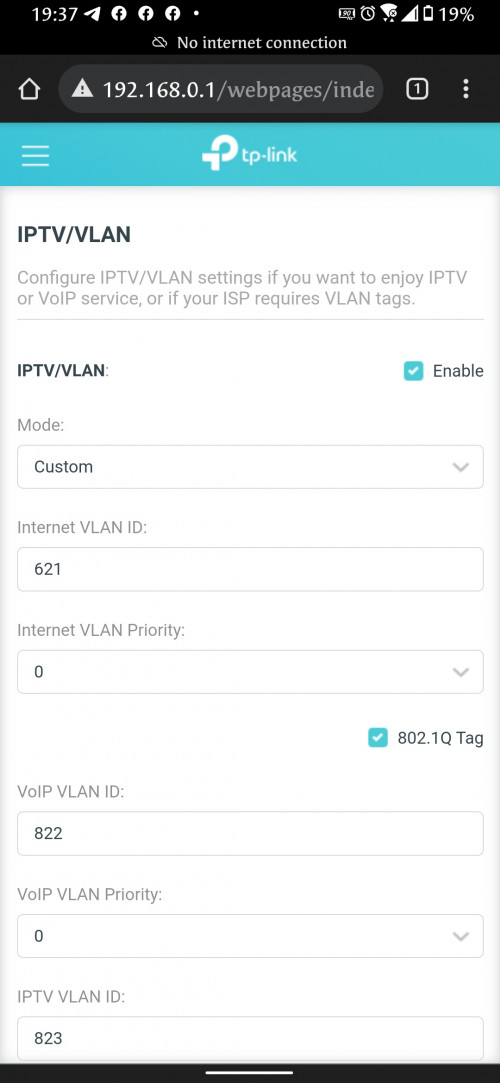
user posted image

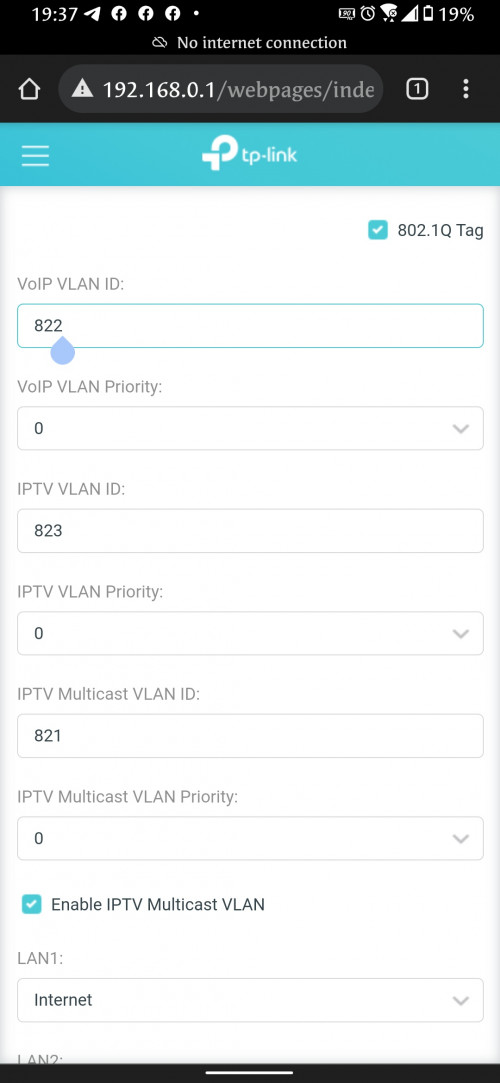
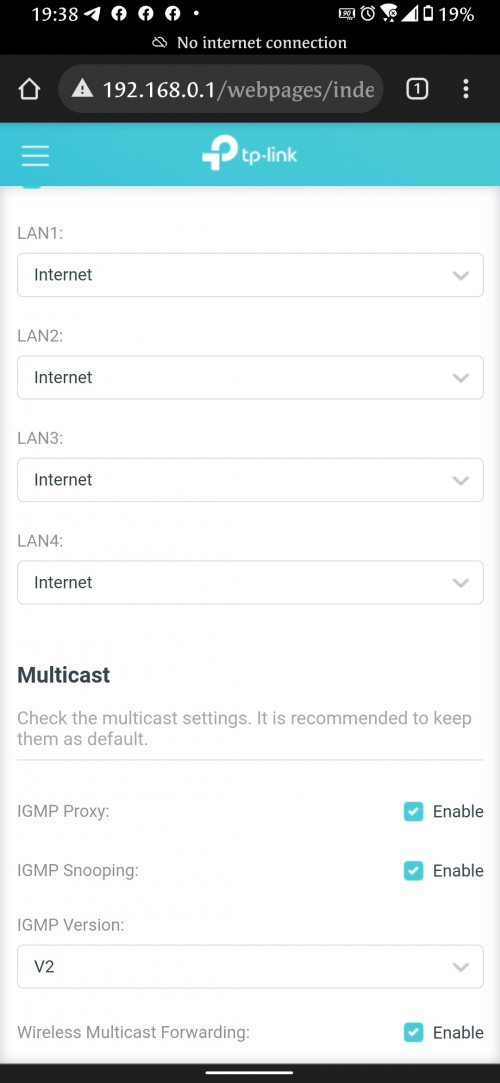
Tried as above but still cant use ax20 as primary modem
user posted image
user posted image
crimv
post Sep 5 2021, 08:02 PM

Getting Started
**
Junior Member
242 posts

Joined: Jun 2009
QUOTE(hanspinacheo2017 @ Sep 5 2021, 07:48 PM)
user posted image

Tried as above but still cant use ax20 as primary modem
user posted image
user posted image
*
may i know where you plugged in from modem BTU to which port of router

2 Pages  1 2 >Top
 

Change to:
| Lo-Fi Version
0.0263sec    0.79    5 queries    GZIP Disabled
Time is now: 16th December 2025 - 07:29 PM