Outline ·
[ Standard ] ·
Linear+
Samsung Galaxy Note 10 Discussion Thread V5, The 10th Series Note
|
skylinelover
|
 Jun 8 2023, 03:35 PM Jun 8 2023, 03:35 PM
|

|
QUOTE(PJng @ Jun 8 2023, 02:52 PM) Mine 2 device, note 10 lite and tab a7 lite Yesterday restart still same, stuck on boot screen, optimizing app, ... 100% Maybe its signs of end of life  |
|
|
|
|
|
PJng
|
Jun 23 2023, 09:48 PM
|
|
|
Note 10 lite... 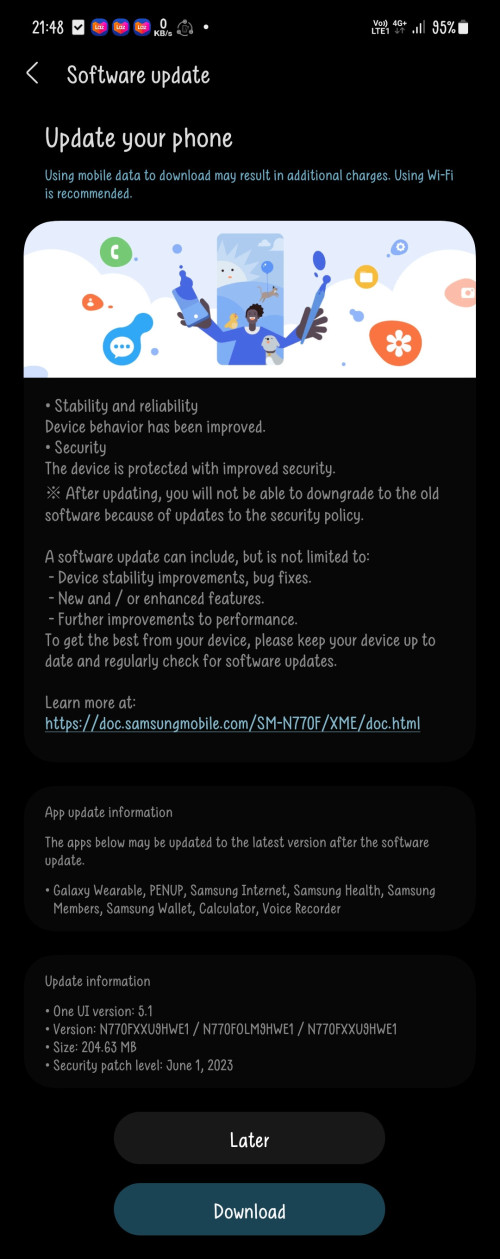 |
|
|
|
|
|
SUSMyProLife
|
Jun 24 2023, 12:57 AM
|
|
|
QUOTE(PJng @ Jun 23 2023, 09:48 PM) Note 10 lite... Advantage of exynos? (possible) S10 lite still stuck at april 2023 for XME region |
|
|
|
|
|
PJng
|
Jun 24 2023, 01:07 AM
|
|
|
Just read on samsung members, someone notice now cannor disable emergency SOS, Before this got button off, tablet still on april patch 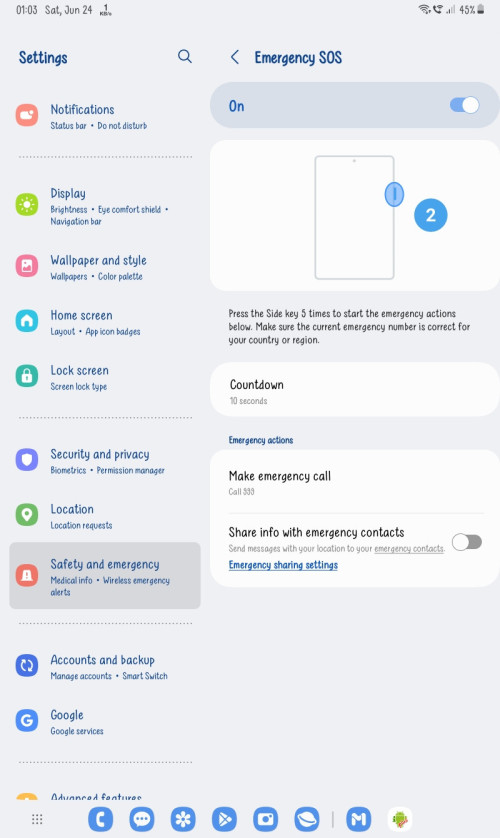 Now no button after june patch 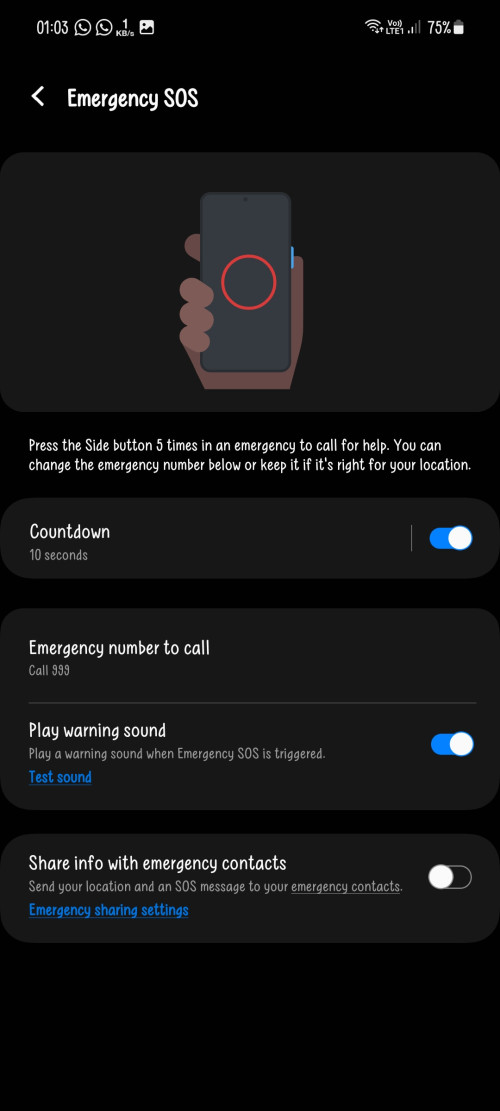 So cannot suka2 press power button 5 times This post has been edited by PJng: Jun 24 2023, 01:08 AM |
|
|
|
|
|
skylinelover
|
Jun 24 2023, 08:57 AM
|
|
|
QUOTE(PJng @ Jun 23 2023, 09:48 PM) Note 10 lite... Haha no 2000mb update like the s23 counterpart |
|
|
|
|
|
PJng
|
Jul 1 2023, 02:24 PM
|
|
|
I rarely takeout pen, when samsung support hand writing with spen to typing? Sudden keyboard no pop up when spen takeout, just know can writing to screen using spen
|
|
|
|
|
|
chan01
|
Jul 19 2023, 09:15 PM
|
Getting Started

|
My Samsung note 10+ battery start to die on me. I check using Samsung member support and the battery status is weak. Should i go Samsung service center to replace or 3rd party repair shop? Any recommendation and normally how much it cost to change the battery + labor cost? Thanks!
|
|
|
|
|
|
PJng
|
Jul 19 2023, 11:48 PM
|
|
|
QUOTE(chan01 @ Jul 19 2023, 09:15 PM) My Samsung note 10+ battery start to die on me. I check using Samsung member support and the battery status is weak. Should i go Samsung service center to replace or 3rd party repair shop? Any recommendation and normally how much it cost to change the battery + labor cost? Thanks! normally is about 250 |
|
|
|
|
|
chan01
|
Jul 19 2023, 11:59 PM
|
Getting Started
|
QUOTE(PJng @ Jul 19 2023, 11:48 PM) Noted. Will they change the battery face to face and get it back within the same day as my bank / card info inside my phone. Thanks for answering  |
|
|
|
|
|
PJng
|
Jul 20 2023, 12:15 AM
|
|
|
QUOTE(chan01 @ Jul 19 2023, 11:59 PM) Noted. Will they change the battery face to face and get it back within the same day as my bank / card info inside my phone. Thanks for answering my pass experience is before covid era, i ask center to get stock ready, then the next week i call before go second time confirm stock, and yes get back same day yes is not note 10, but A7 2016 so you can try ask center |
|
|
|
|
|
Mike3
|
Jul 20 2023, 08:39 AM
|
|
|
QUOTE(chan01 @ Jul 19 2023, 11:59 PM) Noted. Will they change the battery face to face and get it back within the same day as my bank / card info inside my phone. Thanks for answering i replace my mb n battery on the same day. took around 3 hrs provided u book and there is spare parts available |
|
|
|
|
|
skylinelover
|
Jul 21 2023, 10:46 PM
|
|
|
QUOTE(Mike3 @ Jul 20 2023, 08:39 AM) i replace my mb n battery on the same day. took around 3 hrs provided u book and there is spare parts available Same here for old note 9 haha |
|
|
|
|
|
PJng
|
Jul 22 2023, 12:52 AM
|
|
|
how to change this annoying excel date format?  on pc is easy, DD MM YYYY 20/12/2020, or DD MM YY 20/12/20 but once i open on android excel it auto M D YY 12/20/20, or D Mmm YY 12-Dec-20 cannot see can change on app if i use fill up function...  i no idea what the format |
|
|
|
|
|
andrekua2
|
Jul 22 2023, 01:47 PM
|
|
|
QUOTE(PJng @ Jul 22 2023, 12:52 AM) » Click to show Spoiler - click again to hide... « how to change this annoying excel date format? on pc is easy, DD MM YYYY 20/12/2020, or DD MM YY 20/12/20 but once i open on android excel it auto M D YY 12/20/20, or D Mmm YY 12-Dec-20 cannot see can change on app if i use fill up function... i no idea what the format Change language to UK then the date automatically change to dd/mm/yy. However from what I tried, it only accept 2 types of dates, ddmm which show up as ddMMM or ddmmyyyy. Since right click is basically exit command in android, it seem impossible to change the date format. This post has been edited by andrekua2: Jul 22 2023, 01:48 PM |
|
|
|
|
|
PJng
|
Jul 22 2023, 03:46 PM
|
|
|
QUOTE(andrekua2 @ Jul 22 2023, 01:47 PM) Change language to UK then the date automatically change to dd/mm/yy. However from what I tried, it only accept 2 types of dates, ddmm which show up as ddMMM or ddmmyyyy. Since right click is basically exit command in android, it seem impossible to change the date format. I google search all say right click, which is not possible on android Look like only can do on pc, and other thing is also not possible use keyboard to switch sheet on android, i press same shortcut key as pc, nothing happen on app |
|
|
|
|
|
andrekua2
|
Jul 22 2023, 04:03 PM
|
|
|
QUOTE(PJng @ Jul 22 2023, 03:46 PM) I google search all say right click, which is not possible on android Look like only can do on pc, and other thing is also not possible use keyboard to switch sheet on android, i press same shortcut key as pc, nothing happen on app If you press the folder like icon on the bottom left, you can switch sheet. |
|
|
|
|
|
skylinelover
|
Jul 23 2023, 09:28 AM
|
|
|
QUOTE(PJng @ Jul 22 2023, 03:46 PM) I google search all say right click, which is not possible on android Look like only can do on pc, and other thing is also not possible use keyboard to switch sheet on android, i press same shortcut key as pc, nothing happen on app QUOTE(andrekua2 @ Jul 22 2023, 04:03 PM) If you press the folder like icon on the bottom left, you can switch sheet. Haha i hardly use the phone yet alone freaking Android for productivity back in corporate years Now i enter solo venture no need 2 do these productivity works anymore |
|
|
|
|
|
PJng
|
Jul 23 2023, 05:29 PM
|
|
|
I don understand how this measure, battery life very bad now 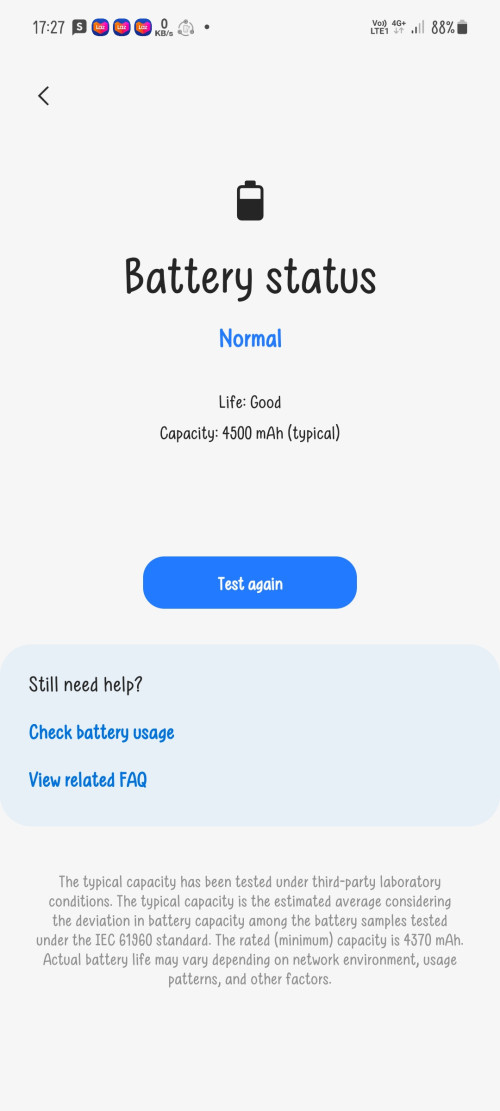 Overnight can drain over 10%, SOT only about 3hrs |
|
|
|
|
|
PJng
|
Jul 24 2023, 10:46 PM
|
|
|
QUOTE(andrekua2 @ Jul 22 2023, 01:47 PM) Change language to UK then the date automatically change to dd/mm/yy. However from what I tried, it only accept 2 types of dates, ddmm which show up as ddMMM or ddmmyyyy. Since right click is basically exit command in android, it seem impossible to change the date format. 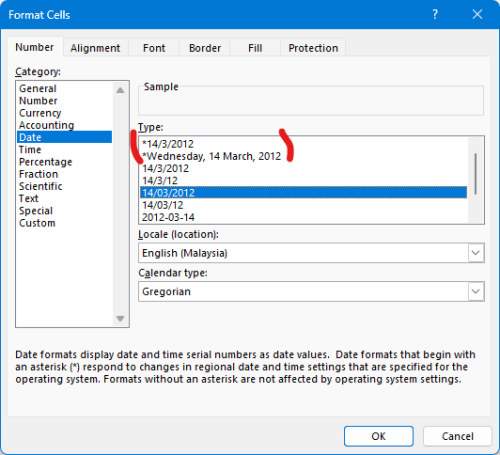 now i try this, set non * on pc, later see what happen on android app as below say * is follow OS format |
|
|
|
|




 Quote
Quote


 0.0318sec
 0.71
0.71
 6 queries
 GZIP Disabled