Outline ·
[ Standard ] ·
Linear+
Windows 11, To be announce on 24 June 2021
|
shaniandras2787
|
 Apr 25 2023, 09:46 AM Apr 25 2023, 09:46 AM
|

|
does anyone knows how to ungroup the taskbar icons in Win11?
got forced to update over the weekend and at the moment, my WinOS experience is shiet.
really surprised how Microsoft can successfully eff up the subsequent versions further than its predecessors.
|
|
|
|
|
|
shaniandras2787
|
Apr 25 2023, 11:28 AM
|
|
|
QUOTE(cikelempadey @ Apr 25 2023, 10:04 AM) there's no way to ungroup taskbar icons unless use 3rd party software QUOTE(kitman @ Apr 25 2023, 11:01 AM) if you ok to use 3rd party mod, can try "explorer pathcher". search youtube and see if it is what you want. are these 3rd party mods legit? am asking because this is on my company's laptop so plenty of P&C stuffs here - don't want to risk it. at the moment, not having the opened applications displayed in the taskbar is really hampering productivity. how can Microsoft's design team be so retarded. |
|
|
|
|
|
shaniandras2787
|
Apr 25 2023, 03:13 PM
|
|
|
QUOTE(kitman @ Apr 25 2023, 02:53 PM) mod like explorer patch - not sure how safe it is but with so many users - so far no complain it is unsafe. i am not familiar with other start replacement software like open shell, stardock start11, startallback etc. Since it is company laptop - best to check with your IT which the standard answer is likely "no, you cannot install". I guess you are stuck with grouped taskbar. I also hate this grouping and using icons, should have left this to users choice. the thing is, i failed to see how "grouping" tabs together is an improvement to quality of life especially in work place where individual tends (some need) to have multiple tabs open simultaneously and need to keep them opened. their retarded design team probably do it to declutter the home page but most PC users now have a relatively large monitors now so real estate isn't an issue - why is there a freaking need to do so. I cannot brain. does the Windows design team still uses a 15" monitor?  This post has been edited by shaniandras2787: Apr 25 2023, 03:13 PM This post has been edited by shaniandras2787: Apr 25 2023, 03:13 PM |
|
|
|
|
|
shaniandras2787
|
Apr 28 2023, 09:22 AM
|
|
|
QUOTE(Xploit Machine @ Apr 28 2023, 12:45 AM) have u tried .. 1. goto RUN or press WIN+R (make sure to run as administrator) 2. type / copy paste shell:::{05d7b0f4-2121-4eff-bf6b-ed3f69b894d9}That will bring a dialog to activate tray icons, in this section you can make changes to system. Else; try use registry tweak (download below) to bring the classic personalisation menu, do restart after applying the registry .. "menu removal" code also attached there; Download tweak here - https://download.gg/file-15089713_415691a83b87dd6e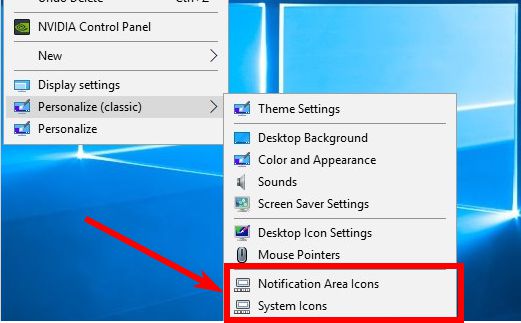 will this essentially* eff up anything about the computer? asking because this is my workplace PC so don't want to put at risk anything else, i cannot explain to the IT department later. This post has been edited by shaniandras2787: Apr 28 2023, 09:23 AM |
|
|
|
|
|
shaniandras2787
|
Jul 13 2023, 10:35 AM
|
|
|
after so many donkey months the article was published, why does MS still take so long to push out this feature to users? Windows 11 'never combine taskbar' buttons modeQUOTE "We're excited to bring you an early version of one of our most requested features for Windows 11, never combined mode," Microsoft's Amanda Langowski and Brandon LeBlanc said.
"In never combined mode, you'll be able to see each window of your applications on the taskbar individually, as well as their corresponding labels."
Redmond says the feature is still in early development, but it will allow users to set the taskbar to display labeled app icons individually. ... i wonder how can the developers be "excited" in re-implementing a feature that has been with Windows for eons which they stupidly removed OR just happen to forgot to include it back into Windows 11. the absence of this feature is so annoying as it seriously hinders the ability to multitask efficiently in my workplace and yet, MS has the audacity to force my PC into Windows 11. |
|
|
|
|



 Quote
Quote

 0.0588sec
 0.41
0.41
 7 queries
 GZIP Disabled