

en-us_windows_11_iot_enterprise_ltsc_2024_x64_dvd_f6b14814 ; any comments?
Windows 11, To be announce on 24 June 2021
Windows 11, To be announce on 24 June 2021
|
|
 Nov 14 2024, 08:23 AM Nov 14 2024, 08:23 AM
Return to original view | IPv6 | Post
#1
|
 
Junior Member
239 posts Joined: Jan 2003 
|
en-us_windows_11_iot_enterprise_ltsc_2024_x64_dvd_f6b14814 ; any comments? sardan91 liked this post
|
|
|
|
|
|
Nov 14 2024, 10:50 AM
Return to original view | IPv6 | Post
#2
|
|
Junior Member
239 posts Joined: Jan 2003
|
QUOTE(Xploit Machine @ Nov 14 2024, 10:16 AM) comment about? Windows 11 IoT Enterprise LTSC (Long-Term Servicing Channel) 2024 is a specialized version of Windows 11 designed for devices in industrial, medical, retail, and other specialized environments that require consistent and reliable performance over extended periods. The LTSC model is optimized for stability and security, which is particularly important in IoT and embedded device applications. Here are the main advantages of using Windows 11 IoT Enterprise LTSC 2024:File: en-us_windows_11_iot_enterprise_ltsc_2024_x64_dvd_f6b14814.iso Alternative file names: X23-81951_26100.1742.240906-0331.ge_release_svc_refresh_CLIENT_ENTERPRISES_OEM_x64FRE_en-us.iso Family: Operating Systems Version: Windows 11, version 24H2 [26100.1742] (Updated September 2024) Language: English - (EN) CRC-32: 482a5898 MD5: 66608a96a4f2d73b4a1d054e76e6eae4 SHA-1: d5dd0a493b6a9c92f7f2a54bb2fb2544587a15fd SHA-256: 4f59662a96fc1da48c1b415d6c369d08af55ddd64e8f1c84e0166d9e50405d7a SHA-512: b3b8ab225537518a9baa3a85124947a1e4dfbb639ea277d9355b17165f195490ad21f44e9b72778ac2a41bc6561a18ed599bb72f6f3648e0cb110b9e1a35bdb9 SHA3-256: 7752f2155526ed6f62579c344a8a8dac3bfe10f718d5b42d42016979269c09e1 SHA3-512: 92877c3eb5b2fdceb5d6c3dedee37516829d4bf409c2fb0be16825eb69b5510b60bdb828ff11b10bf93c383027ce71c8cdb413765eb6fabd50db2009b12ffeec Size: 4.791 GB (5144817664 bytes)  ### 1. **Long-Term Support and Stability** - The LTSC version offers a 10-year support lifecycle, with 5 years of mainstream support and 5 years of extended support. This is ideal for devices that are deployed in the field for long periods and require stability without frequent feature updates. - This version minimizes disruptive updates, as it only receives security and quality updates, not feature updates, ensuring that the system remains stable over time. ### 2. **Reduced Update Frequency** - Unlike standard Windows versions, which receive frequent feature updates, LTSC versions are updated only with essential security and quality patches. This reduces the risk of compatibility issues and disruptions in devices critical for specific tasks, which is a common need in IoT and industrial settings. ### 3. **Optimized Performance and Minimal Bloatware** - Windows 11 IoT Enterprise LTSC is streamlined for performance, with unnecessary apps and features excluded by default. This reduces overhead and allows the operating system to operate more efficiently, especially on devices with limited resources. - Common consumer apps and services that come preinstalled in standard Windows versions are excluded, which allows for a cleaner environment that doesn’t consume resources unnecessarily. ### 4. **Enhanced Security and Compliance** - This version provides advanced security features, such as Secure Boot, BitLocker encryption, and Windows Defender Application Control, which are essential for IoT devices often deployed in critical infrastructure. - It’s suitable for industries with strict compliance requirements where devices must meet specific security and privacy standards, such as healthcare and finance. ### 5. **Full Win32 App Compatibility and Customization** - Windows 11 IoT Enterprise LTSC 2024 supports full Win32 application compatibility, allowing legacy applications to run seamlessly. - It supports custom lock-down features (e.g., Shell Launcher and Assigned Access), which can transform devices into dedicated terminals or kiosks by restricting access to specific apps. ### 6. **Support for Modern Hardware and IoT Features** - The LTSC 2024 version is compatible with modern hardware, ensuring performance improvements, especially in hardware-accelerated tasks. - Windows 11 IoT includes support for various IoT-focused features, such as the Windows Subsystem for Linux (WSL), which allows for more flexible and advanced IoT applications that might rely on cross-platform capabilities. ### 7. **Ideal for Fixed-Function Scenarios** - The LTSC version is highly suitable for devices used in "fixed-function" scenarios, such as ATMs, kiosks, and digital signage, where consistency and minimal user intervention are priorities. - Because the interface and functionality remain stable, businesses can deploy these devices without worrying about disruptive changes or retraining staff due to feature alterations. ### 8. **Support for Containerization and Virtualization** - For IoT applications that might involve containerization, Windows 11 IoT Enterprise LTSC supports Windows Containers, enabling developers to use container-based deployment methods on IoT devices. - Virtualization support also makes it possible to run other OSes or virtual environments if needed for complex IoT applications. In summary, **Windows 11 IoT Enterprise LTSC 2024 is a robust option for businesses that prioritize stability, long-term support, security, and minimal feature disruption**—all of which are critical for IoT and embedded systems operating in specialized environments. - This post has been edited by eauyong: Nov 14 2024, 10:53 AM |
|
|
Nov 14 2024, 11:01 AM
Return to original view | IPv6 | Post
#3
|
|
Junior Member
239 posts Joined: Jan 2003
|
Means for 10 years MS would not "kacau" old hardwares such as those 3 - 4 GEN Intel but offer upgrades still.
 |
|
|
Dec 7 2024, 11:01 AM
Return to original view | IPv6 | Post
#4
|
|
Junior Member
239 posts Joined: Jan 2003
|
A super mini by HP, old Elitedesk or Prodesk business cpu install W11 to 1TB or 512GB M.2 2280 NVME SSD as boot drive would be much better. Can almost fly with a 24" or 27" mon display & it's cheap.
This post has been edited by eauyong: Dec 7 2024, 11:02 AM |
|
|
Dec 7 2024, 05:28 PM
Return to original view | IPv6 | Post
#5
|
|
Junior Member
239 posts Joined: Jan 2003
|
QUOTE(vkashin @ Dec 7 2024, 02:57 PM) 24H2 broke the audio on my HP Elitedesk 800 G4 DM - no audio output on internal speakers nor the 3.5mm headphone jacks; had to uninstall Synaptics HD Audio and reboot for temporary fix, but after the next reboot the audio would disappear again Try backup your drivers when it's working. Reinstall the backup drivers after the 24H2 update.Had to rollback the update because of that |
|
|
Dec 8 2024, 08:00 PM
Return to original view | IPv6 | Post
#6
|
|
Junior Member
239 posts Joined: Jan 2003
|
QUOTE(vkashin @ Dec 8 2024, 09:02 AM) thanks. will keep that in mind if I had to reinstall the 24H2 again later. for now the rollback is working well enough for me Your G4 DM comes with 8th or 9th Gen Intel?Im still using an old G1 DM with 4th Gen Intel i5-4590T. |
|
|
|
|
|
Dec 8 2024, 08:10 PM
Return to original view | IPv6 | Post
#7
|
|
Junior Member
239 posts Joined: Jan 2003
|
QUOTE(sardan91 @ Dec 8 2024, 06:59 PM) 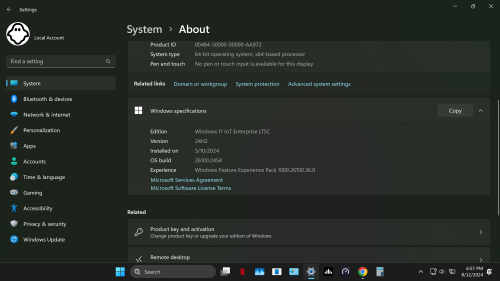 yes im using it now very good no ai no ads very stable... 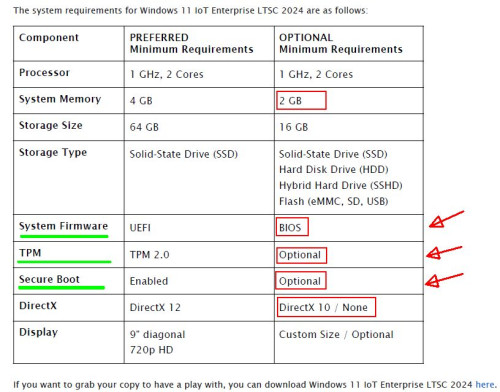 |
|
|
Dec 10 2024, 08:41 PM
Return to original view | IPv6 | Post
#8
|
|
Junior Member
239 posts Joined: Jan 2003
|
From ChatGPT:-
Windows 11 IoT Enterprise LTSC 2024 includes UWF (Unified Write Filter) as part of its feature set. UWF is a specialized tool for embedded and IoT devices that helps protect the storage (e.g., disk or partitions) by redirecting write operations to a temporary overlay, leaving the underlying storage unchanged. When the system reboots, the changes made during the session are discarded unless explicitly committed. Key Features of UWF: Write Protection: Prevents unauthorized changes to the disk. Improved Device Stability: Ensures that the system always boots to a known-good state. Overlay Support: Temporarily stores changes in memory or a dedicated disk overlay. Exclusions: Allows specific files, folders, or registry keys to be written directly, bypassing protection. UWF is especially useful for kiosk systems, digital signage, or other environments where you need a locked-down configuration. --------  |
|
|
May 24 2025, 12:41 AM
Return to original view | IPv6 | Post
#9
|
|
Junior Member
239 posts Joined: Jan 2003
|
QUOTE(UbuntuClient @ May 23 2025, 08:47 PM) I notice windows 11 Enterprise perform much better that Pro version. Yes. Windows 11 IoT Enterprise LTSC 2021 also OK. |
|
|
Jul 9 2025, 09:54 AM
Return to original view | IPv6 | Post
#10
|
|
Junior Member
239 posts Joined: Jan 2003
|
Updating NOW!!!! OLD PC.
  |
|
|
Jul 9 2025, 09:47 PM
Return to original view | IPv6 | Post
#11
|
|
Junior Member
239 posts Joined: Jan 2003
|
 07-09-2025_01.jpg)  |
|
|
Jul 9 2025, 10:13 PM
Return to original view | IPv6 | Post
#12
|
|
Junior Member
239 posts Joined: Jan 2003
|
Happening NOW, on the PC ... NP leh
 |
|
|
Jul 9 2025, 10:18 PM
Return to original view | IPv6 | Post
#13
|
|
Junior Member
239 posts Joined: Jan 2003
|
Yeah, it is OK, working fine.
This post has been edited by eauyong: Jul 9 2025, 10:31 PM |
|
|
Aug 14 2025, 11:30 AM
Return to original view | IPv6 | Post
#14
|
|
Junior Member
239 posts Joined: Jan 2003
|
QUOTE(netmatrix @ Aug 13 2025, 02:26 PM) Same 23H2 user here. On 4th gen Core i5 non TPM compliant hardware. Just add in one of those free antivirus and you are good to go. I have tried 360 total security, avast & KAV cloud free on it the last few years. No issue. It will catch crack files, web based trojan in jack sparrow apps. So no problem. Just upgraded my 2013 ACER XC600 Intel Core i5-3470 3.2GHz 16GB ram pc with W11 24H2. It's running just as good as the old W10 Enterprise.Want a little more security, pay shopee prices for internet security of any brand. RM10-20 for single pc instead of RM50-100 per year for retail internet security. Office has some Win 10 PC that is using such method to prolong life. Save crazy amount of money with this method instead of buying new PC just to pass W11 compliancy.  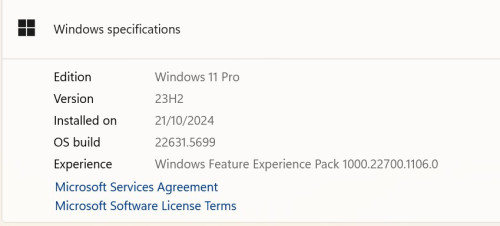 |
| Change to: |  0.0634sec 0.0634sec
 0.77 0.77
 7 queries 7 queries
 GZIP Disabled GZIP Disabled
Time is now: 4th December 2025 - 08:10 PM |
 Quote
Quote