Welcome Guest ( Log In | Register )

11 Pages  1 2 3 > » Bottom

Outline · [ Standard ] · Linear+

 Windows 11, To be announce on 24 June 2021

views
     
Xploit Machine
post Apr 28 2023, 12:45 AM

❤️ 孤独な旅行者 ❤️​
*******
Senior Member
7,272 posts

Joined: Nov 2008
From: SINGAPORE💃

QUOTE(shaniandras2787 @ Apr 25 2023, 09:46 AM)
does anyone knows how to ungroup the taskbar icons in Win11?

got forced to update over the weekend and at the moment, my WinOS experience is shiet.

really surprised how Microsoft can successfully eff up the subsequent versions further than its predecessors.
*
have u tried ..

1. goto RUN or press WIN+R (make sure to run as administrator)
2. type / copy paste shell:::{05d7b0f4-2121-4eff-bf6b-ed3f69b894d9}

That will bring a dialog to activate tray icons, in this section you can make changes to system. Else;

try use registry tweak (download below) to bring the classic personalisation menu, do restart after applying the registry .. "menu removal" code also attached there;

Download tweak here - https://download.gg/file-15089713_415691a83b87dd6e
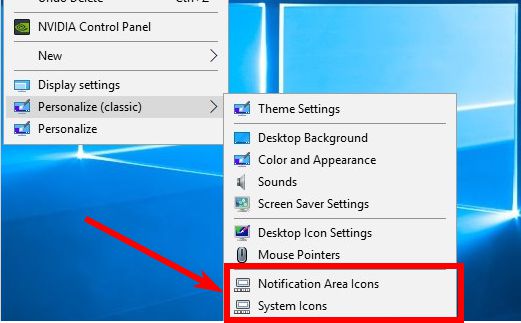
user posted image
Xploit Machine
post Apr 28 2023, 01:28 AM

❤️ 孤独な旅行者 ❤️​
*******
Senior Member
7,272 posts

Joined: Nov 2008
From: SINGAPORE💃

Good day to all W11 enthusiasts, old here but new to W11 biggrin.gif .. below is my system and operating system configuration.

- Lenovo® Edge™ Corporation
- Intel® Core™ i3 CPU M 380 @ 2.53GHz
- 4.00GB (3.80 GB usable)
- Intel® HD Graphics (OnBoard)
- Realtek® HD Audio (OnBoard)
- Seagate® STL500
- Windows® Defender™ System Security (Disabled)
- Microsoft® Edge™
- Windows 11 Professional (Activated)
- Microsoft Office LTSC (Activated)
- Version 22H2
- OS build 22623.1485 (Fully Updated)
- Update last checked 20 April 2023 @0010hrs

I'm also a member to some other W11 and technology forums out there (where I do not want to disclose) and even though I'm new t0 W11 (previously running W7Pro), I have done few personal research and maximum tweaked the system (tweak files as per screenshot below) and customised SERVICES.MSC itself to present W11 at its peak level. The system is old, actually doesn't support W11 and I had to tweak to bypass TPM verification and get W11 to run. The W11 is original ISO from Microsoft website and digitally activated.

Hope we all can share ideas on pros and cons of the OS, I also have some personal videos in my YouTube channel of my W11 which shall I share later and please don't ask me any "Illegal" stuffs although I won't give wink.gif

user posted image

user posted image


This post has been edited by Xploit Machine: Apr 28 2023, 02:36 AM
Xploit Machine
post Apr 28 2023, 10:00 AM

❤️ 孤独な旅行者 ❤️​
*******
Senior Member
7,272 posts

Joined: Nov 2008
From: SINGAPORE💃

QUOTE(shaniandras2787 @ Apr 28 2023, 09:22 AM)
will this essentially* eff up anything about the computer?
asking because this is my workplace PC so don't want to put at risk anything else, i cannot explain to the IT department later.
*


no, the tweaks I share and I will be sharing here only meant for personal use computers, if ure computer was given by office better dont do any modifications, bcos later they will question u .. that will be a big trouble ..

moreover office supplied computers will be administrator locked by the IT dept, and we cannot alter or make changes of the system, tampering the system will make the computer vulnerable for office documents to be stolen.

smile.gif
Xploit Machine
post Apr 28 2023, 04:41 PM

❤️ 孤独な旅行者 ❤️​
*******
Senior Member
7,272 posts

Joined: Nov 2008
From: SINGAPORE💃

some of my videos .. (Personal Use Only ..)

https://www.youtube.com/channel/UC2zar7ObAJRxfJnB8MtnwOQ

This post has been edited by Xploit Machine: May 8 2023, 04:40 PM
Xploit Machine
post May 4 2023, 02:26 PM

❤️ 孤独な旅行者 ❤️​
*******
Senior Member
7,272 posts

Joined: Nov 2008
From: SINGAPORE💃

QUOTE(PJng @ May 3 2023, 11:20 PM)
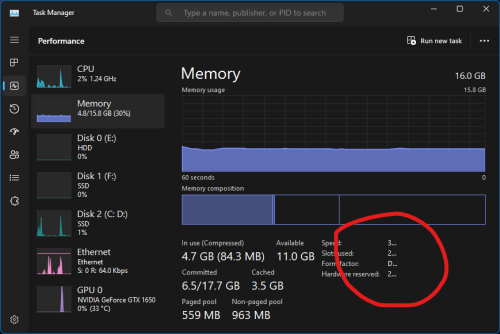
after new UI of task manager, this part always not show full
user posted image
either drag to resize 1 pixel, or maximize, restore back window without resize
and is only happen on memory, network and GPU tab
no ppl report to microsoft?
*


what is your OS build version?

user posted image
Xploit Machine
post May 4 2023, 02:29 PM

❤️ 孤独な旅行者 ❤️​
*******
Senior Member
7,272 posts

Joined: Nov 2008
From: SINGAPORE💃

QUOTE(PJng @ May 4 2023, 02:28 PM)
Don maximize it, open when not in maximize state
Regardless of current window size, even there is big enough space
*


like this? hmm.gif

user posted image
Xploit Machine
post May 4 2023, 02:45 PM

❤️ 孤独な旅行者 ❤️​
*******
Senior Member
7,272 posts

Joined: Nov 2008
From: SINGAPORE💃

QUOTE(PJng @ May 4 2023, 02:35 PM)
Yes, close slidebar menu, then close task manager reopen it
Memory, network and GPU screen will not show in full
Yes not 100% happen
*
same .. after close side menu, close Task Manager .. an reopen by press CTRL+SHIFT+ESC .. comes out like this hmm.gif

user posted image
Xploit Machine
post May 4 2023, 02:51 PM

❤️ 孤独な旅行者 ❤️​
*******
Senior Member
7,272 posts

Joined: Nov 2008
From: SINGAPORE💃

QUOTE(PJng @ May 4 2023, 02:46 PM)
Please read, Memory, network and GPU screen only, cpu and hdd no problem
And why you low spec pc? Vm is it?
*
u mean like this? .. my laptop is very low-end, doesn't meet W11 requirements and no TPM supported, I had to modify the ISO installation to install into my system, Im running Lenovo Esge i3 M380 ..

explained before maybe u overlooked biggrin.gif

user posted image
Xploit Machine
post May 4 2023, 08:12 PM

❤️ 孤独な旅行者 ❤️​
*******
Senior Member
7,272 posts

Joined: Nov 2008
From: SINGAPORE💃

user posted image

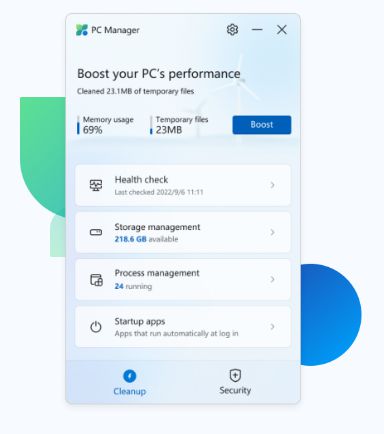
Another tips from Microsoft itself the tool Microsoft PC Manager, rather than running CCleaner or watsoever use this, to run Health Check, Storage Management (just to note if u clear Edge's temporary file just refresh the tab to reload properly), Windows Update check, Process termination and many more .. after download and install goto the gear icon up there and update the app smile.gif

Download here https://pcmanager-en.microsoft.com/
Xploit Machine
post May 5 2023, 01:53 PM

❤️ 孤独な旅行者 ❤️​
*******
Senior Member
7,272 posts

Joined: Nov 2008
From: SINGAPORE💃

user posted image

Microsoft.NET SDK Updates

.NET 7.0 SDK (v7.0.203) - Windows x64 Installer
- https://download.visualstudio.microsoft.com...203-win-x64.exe

.NET 6.0 SDK (v6.0.408) - Windows Arm64 Installer
https://download.visualstudio.microsoft.com...8-win-arm64.exe

Source https://dotnet.microsoft.com/en-us/download
Xploit Machine
post May 7 2023, 11:25 PM

❤️ 孤独な旅行者 ❤️​
*******
Senior Member
7,272 posts

Joined: Nov 2008
From: SINGAPORE💃

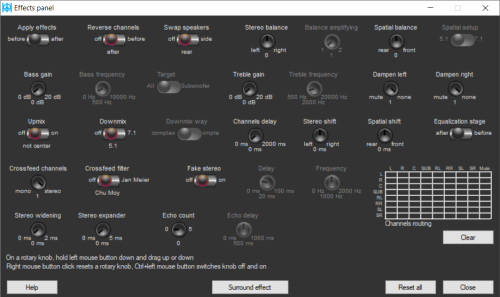
W11 doesnt have Bass / Treble settings in-built, its now software based, only customisable eg. Windows Media Player, VLC Player or the software from vendor itself eg. Realtek HD (use custom profile and can adjust from there)

smile.gif

This post has been edited by Xploit Machine: May 7 2023, 11:26 PM
Xploit Machine
post May 8 2023, 12:49 AM

❤️ 孤独な旅行者 ❤️​
*******
Senior Member
7,272 posts

Joined: Nov 2008
From: SINGAPORE💃

QUOTE(tik @ May 8 2023, 12:19 AM)
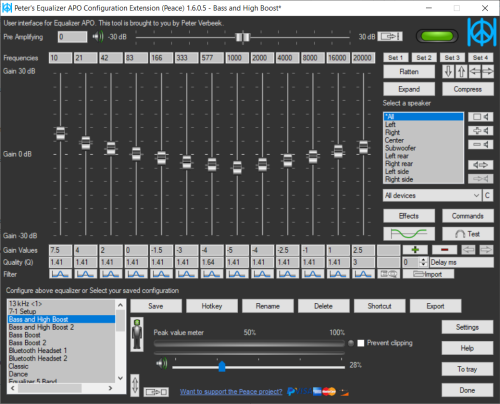
Just install these opensource solutions....

1. Equalizer APO A system-wide equalizer for Windows 7 / 8 / 8.1 / 10 / 11
2. Peace Equalizer, interface Equalizer APO

user posted image
user posted image
*
good for those having quality speakers, mine is just simple speaker .. smile.gif
Xploit Machine
post May 8 2023, 02:21 AM

❤️ 孤独な旅行者 ❤️​
*******
Senior Member
7,272 posts

Joined: Nov 2008
From: SINGAPORE💃

QUOTE(soonwai @ May 8 2023, 02:07 AM)
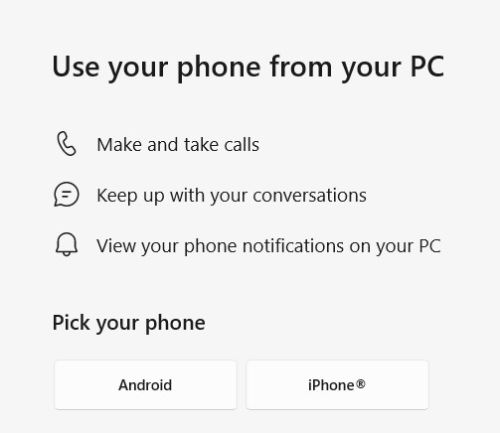
Windows 11 Phone Link now got iPhone support. Just saw it a few mins ago. Yesterday still coming soon.
user posted image
For those who had it earlier, how is it? How does it compare to Intel Unison?
*


android so far ok, iphone not yet test .. even the latest phonelink from Microsoft Store still have no iphone feature yet ..
Xploit Machine
post May 8 2023, 04:41 PM

❤️ 孤独な旅行者 ❤️​
*******
Senior Member
7,272 posts

Joined: Nov 2008
From: SINGAPORE💃

Microsoft Edge Version 113.0.1774.35 (Official build) (64-bit) released ..

- Improved AI
Xploit Machine
post May 14 2023, 01:25 PM

❤️ 孤独な旅行者 ❤️​
*******
Senior Member
7,272 posts

Joined: Nov 2008
From: SINGAPORE💃

QUOTE(soonwai @ May 8 2023, 05:30 PM)
Yah, my Phone Link was last updated 25 April. I kept checking but only showed "iPhone support Coming Soon". Then suddenly it was enabled yesterday.
*


Yes, it's now activated for iPhone, the workaround and functionality is similar to Android smile.gif

user posted image
Xploit Machine
post May 14 2023, 07:57 PM

❤️ 孤独な旅行者 ❤️​
*******
Senior Member
7,272 posts

Joined: Nov 2008
From: SINGAPORE💃

Another tips on gaining extra spaces from junk files is by removing installed foreign languages from SYSTEM32 and SYSWOW64 folder, for example I only use English so I get rid of other languages except en, en-GB and en-US folders .. by removing the foregin language folders, I managed to save about 4GB space. However in deleting the contents inside both these folders you have to use Take Ownership permission, and careful that not touching other folders which may cause W11 to not boot-up correctly. Use it wisely icon_rolleyes.gif

user posted image
Xploit Machine
post May 22 2023, 01:13 PM

❤️ 孤独な旅行者 ❤️​
*******
Senior Member
7,272 posts

Joined: Nov 2008
From: SINGAPORE💃

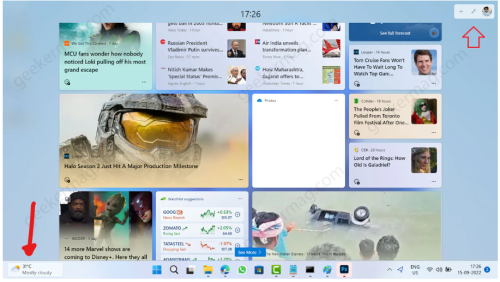
^^ what type of widgets, I dont have any widgets .. mind a screenshot?
Xploit Machine
post May 22 2023, 07:47 PM

❤️ 孤独な旅行者 ❤️​
*******
Senior Member
7,272 posts

Joined: Nov 2008
From: SINGAPORE💃

QUOTE(The.Lucas.DaY @ May 22 2023, 02:55 PM)
Like this
user posted image
*


yah, its nice and fast too .. just when I start the laptop every morning it lags about 3 - 5 seconds finding location by GPS .. after that seems fine, not much resources taken ..

im on i3 (1st Gen) CPU M380 @ 2.53GHz - 4GB RAM

user posted image
Xploit Machine
post May 24 2023, 09:19 PM

❤️ 孤独な旅行者 ❤️​
*******
Senior Member
7,272 posts

Joined: Nov 2008
From: SINGAPORE💃

Microsoft & Intel Collaborate On AI For Windows 11 PCs

Intel and Microsoft have joined forces to drive the development of artificial intelligence (AI) on Windows 11 PCs. The companies aim to bring new AI-enabled features and capabilities to PC users, revolutionizing how we interact with technology. At Microsoft's Build 2023 conference, Intel showcased the upcoming Meteor Lake PC processors, highlighting their architecture and the powerful AI capabilities they offer. This collaboration sets a significant milestone in the evolution of personal computing and opens up new possibilities for innovation across industries.

Intel's latest PC platform introduces a revolutionary "chiplet" SoC design. This design allows for optimizing segment-relevant performance while reducing power consumption. Intel said Meteor Lake's AI accelerators on the CPU and GPU provide improved performance for running AI models efficiently, enabling a wide range of AI applications on PCs.

One of the key features of Meteor Lake is its built-in neural VPU (Vision Processing Unit), a dedicated AI engine integrated directly into the SoC. This neural VPU enables the efficient execution of AI models and empowers the PC with enhanced multimedia capabilities and more effective machine learning.

One notable example is the integration of AI capabilities into Adobe Premiere Pro. With Meteor Lake's AI capabilities, features like auto reframe and scene edit detection become accessible, allowing users to automate tasks and enhance their multimedia editing experience. Integrating AI capabilities into PC platforms enhances the user experience and opens up new opportunities for the broader PC industry partner ecosystem. As Intel and Microsoft work together to bring these new AI-enabled features to millions of PC users, they aim to assist their partners in delivering cutting-edge experiences that leverage the power of AI.

user posted image
Xploit Machine
post May 24 2023, 09:21 PM

❤️ 孤独な旅行者 ❤️​
*******
Senior Member
7,272 posts

Joined: Nov 2008
From: SINGAPORE💃

After Bing Search, Microsoft Now Bringing Edge Sidebar To Desktop

It is probably not unfair to say that Microsoft really wants people to use its Edge web browser. The company has often adopted somewhat desperate means to coax more users into trying Edge and choosing it as their default browser, or at least just getting more people to use it, as well as Bing. Just considering the Windows 11 era, the company first came under fire due to the way it set up the default app options as it was seemingly quite tedious to go through the process. There have been aggressive ads and promotions as well, like the time Microsoft called Google Chrome "so 2008" and suggested that Edge was more secure than Chrome.

And of course, from time to time Edge also wants you to choose it as the default browser. More recently, via Patch Tuesday, Microsoft made a weird change that was bringing up the Default Settings page every time a user opened Google Chrome. Aside from those, Microsoft is also simultaneously adding more and more Edge elements to Windows desktop gradually. The company added a desktop search, first in the Windows 11 Dev Channel; and then just a couple of months ago in March, an Edge update brought the desktop search to Windows 10 as well via an option in the Settings.

Soon, Microsoft Edge will also gain the ability to attach the sidebar to the Windows desktop. There will be a "popout" icon at the base of the sidebar which will allow for this. The feature is already present in one of the recent Edge Canary builds. A new entry on the Microsoft 365 roadmap under feature ID 124911 provides more details on it and reveals Microsoft's intentions behind the change;

user posted image

Microsoft Edge: Option to attach the Edge sidebar to the Windows desktop
Users of the Microsoft Edge sidebar will soon have the option to access their apps and sites directly from their Windows desktop. As an opt-in experience, users can attach the sidebar to their Windows desktop by clicking a "popout" icon near the base of the sidebar in the browser. This enables a side-by-side experience that works with any Windows app—including Microsoft Edge itself. Users enjoy streamlined access to the same set of powerful AI tools and web-based services, including Bing Chat, without launching a browser window, enhancing productivity regardless of where they are in Windows. Administrators can control the availability using the StandaloneHubsSidebarEnabled.​

As per the roadmap, Microsoft is expecting the feature to be generally available (GA) from next month, i.e., June 2023.

11 Pages  1 2 3 > » Top
 

Change to:
| Lo-Fi Version
0.0707sec    1.30    7 queries    GZIP Disabled
Time is now: 24th December 2025 - 01:34 PM