

I read on Twitter that Windows 11 will be running on Apple M1 chip.
Windows 11, To be announce on 24 June 2021
Windows 11, To be announce on 24 June 2021
|
|
 Jun 7 2022, 10:43 PM Jun 7 2022, 10:43 PM
Return to original view | IPv6 | Post
#1
|
 
Validating
139 posts Joined: Jun 2022 
|
I read on Twitter that Windows 11 will be running on Apple M1 chip.
|
|
|
|
|
|
Jun 18 2022, 07:42 PM
Return to original view | IPv6 | Post
#2
|
|
Validating
139 posts Joined: Jun 2022
|
QUOTE(Andrewtst @ Jun 14 2022, 12:41 PM) ....File Explorer with Tabs is now rolling out for Beta Channel build.... Why Microsoft always change their names, see in Task Manager, it is still called Windows Explorer 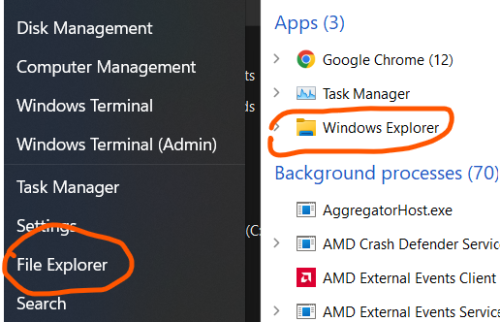 Even Windows Defender has been renamed to Microsoft Defender Antivirus.... Pening  Also confuse last time , MS Word / Excel, or Office Word / Excel. |
|
|
Jul 8 2022, 01:28 AM
Return to original view | IPv6 | Post
#3
|
|
Validating
139 posts Joined: Jun 2022
|
QUOTE(xXjinXx @ Jul 7 2022, 12:15 PM) is it even worth it to upgrade to windows 11 from windows 10 ? If you perform only web browsing, surfing online, Windows 10 or 11 makes no difference. You can even use Chromium OS for the same purpose and find no difference. I use Windows 11 because it comes with new laptop. Or else I would have still stuck with Windows 10. |
|
|
Jul 13 2022, 06:04 PM
Return to original view | IPv6 | Post
#4
|
|
Validating
139 posts Joined: Jun 2022
|
In Windows 11, to set what "closing lid" and "pressing power button" do, is no longer available in Settings.
I googled it and found must access the settings through old-fashioned Control Panel. 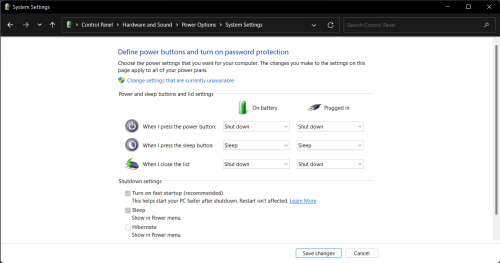 |
|
|
Jul 29 2022, 05:45 PM
Return to original view | IPv6 | Post
#5
|
|
Validating
139 posts Joined: Jun 2022
|
QUOTE(KopiChia @ Jul 28 2022, 05:18 PM) KB5015882 can be install after I disable all .Net in features & malwarebytes. It took maybe 4~5hrs to install that update. Stuck at 35% and 6x% for sometime.  No issue with KB5015882, I also have Visual Studio 2022 and .NET Core 6.0 installed. Might be due to your Malwarebytes anti-malware software? However, I am glad now all have happy ending.  |
|
|
Jul 29 2022, 05:55 PM
Return to original view | IPv6 | Post
#6
|
|
Validating
139 posts Joined: Jun 2022
|
My Windows 11 boots very fast, but after entering desktop, the notification area at the right corner of taskbar always delay in appearing, sometimes I need to wait 3~4 seconds after entering desktop to see the remaining battery level. (The start button is fast loading though, only the notification area)
Is it only me having this lagging issue? This post has been edited by FlierMate1: Jul 29 2022, 05:56 PM |
| Change to: |  0.0640sec 0.0640sec
 0.41 0.41
 7 queries 7 queries
 GZIP Disabled GZIP Disabled
Time is now: 1st December 2025 - 09:52 AM |
 Quote
Quote