Welcome Guest ( Log In | Register )

Outline · [ Standard ] · Linear+

 Windows 11, To be announce on 24 June 2021

views
     
FlierMate
post May 18 2022, 05:58 PM

On my way
****
Validating
543 posts

Joined: Nov 2020

Just got my Windows 11 Home Single Language today with new laptop!

I adjust the taskbar icon to the left, not feeling easy with centered taskbar. biggrin.gif

I set up my PIN for Windows, but after a security patch a short while later, it says I need to set up my PIN again -- not a friendly experience for me.

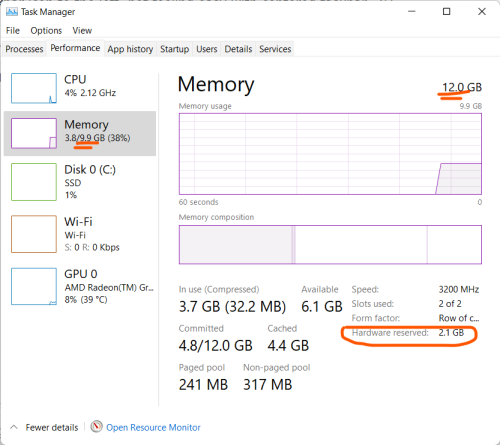
Anyway, my laptop is 12GB, but it says 2.1GB RAM is reserved, only 9.9GB usable. ranting.gif
Does anyone know why?

user posted image

This post has been edited by FlierMate: May 18 2022, 05:58 PM
FlierMate
post May 18 2022, 06:25 PM

On my way
****
Validating
543 posts

Joined: Nov 2020
QUOTE(PJng @ May 18 2022, 06:21 PM)
Internal GPU using it?
*
Yes. I just found it in BIOS setting can set UMA buffer size (factory default 2GB), after also asking a computer shop friend.

I might want to set it to 1GB only.
FlierMate
post May 18 2022, 06:38 PM

On my way
****
Validating
543 posts

Joined: Nov 2020
QUOTE(PJng @ May 18 2022, 06:35 PM)
Form factor, row of c... what? Never seen it
*
I expand the window, the full sentence is "Form factor, row of chips", no idea what it is.
FlierMate
post May 22 2022, 03:03 PM

On my way
****
Validating
543 posts

Joined: Nov 2020
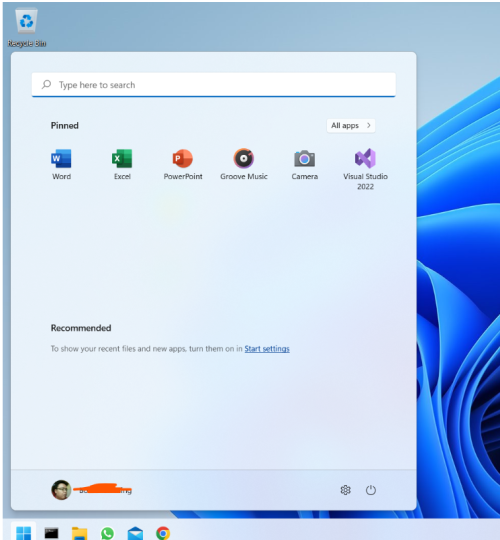
I don't like the taskbar and start menu style in Win11. Windows 10 is better, I like the old tiles.

How to hide the Recommended section in start menu, it is completely a waste (after I turn off recent files, it is still there).

user posted image
FlierMate
post Jun 4 2023, 02:32 PM

On my way
****
Validating
543 posts

Joined: Nov 2020
QUOTE(PJng @ Jun 3 2023, 02:06 PM)
i not sure where to post, so just post here
not sure how youtube auto quality work
on phone it keep playing 480p, so i set higher quality over wifi only it play 720 or 1080
on old pc most of time 720p, sometime 1080
on new pc most auto 1440p, even not full screen

yes on same unifi 100mbps, all screen is 1080p
*
Interesting findings....
FlierMate
post Jun 8 2023, 06:13 PM

On my way
****
Validating
543 posts

Joined: Nov 2020
I heard that Windows 11 console now support UTF-8 in certain code page, is this rumor or fact?

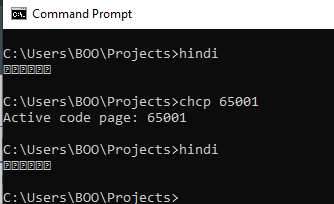
I tried it on Windows 10 on code page 65001, but no luck of seeing Hindi characters "हिन्दी"
user posted image

Does anyone want to test in your Windows 11? I have this hindi.zip (containing hindi.asm and 32-bit hindi.exe).
You can try run "chcp 65001" first before executing "hindi.exe".
Attached File  hindi.zip ( 925bytes ) Number of downloads: 6


EDIT: Looks like it has something to do with the monospace font. Hmm.....

This post has been edited by FlierMate: Jun 8 2023, 08:16 PM
FlierMate
post Jun 10 2023, 01:36 PM

On my way
****
Validating
543 posts

Joined: Nov 2020
QUOTE(PJng @ Jun 9 2023, 11:37 PM)
windows blocked download

Trojan:Win32/Wacatac.B!ml
*
Thanks for trying to download. It is false positive, as it is common for Assembly programmers community for their programs to be falsely detected as trojan (exactly this Wacatac.B!ml), maybe because of small EXE file size, 2048 bytes only.

QUOTE(1024kbps @ Jun 10 2023, 12:13 AM)
did you saved your source code in UTF?
probably other libs were required to display hindi

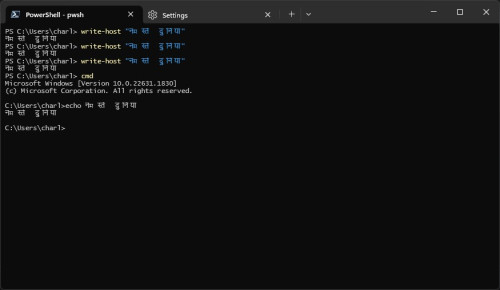
works fine with Windows termincal, fonts cascadia mono, lucida console
user posted image
*
I think it only works well in Windows 11, for older version of Windows, have to choose the appropriate fixed pitch font to display certain language correctly.

Yes, my source code is in UTF-8, I either use WriteConsoleA with "db" byte string, or WriteConsoleW with "du" Unicode string, but both cannot show Hindi characters in my Windows 10. (If I output Chinese characters, must also choose Chinese font for Command prompt window, or else it is just appearing as ??? string)

Thanks for your screenshot.

 

Change to:
| Lo-Fi Version
0.0614sec    0.19    7 queries    GZIP Disabled
Time is now: 8th December 2025 - 07:31 PM