Outline ·
[ Standard ] ·
Linear+
SONY TV 2021 available for order
|
skzzi
|
 Jan 18 2022, 10:54 PM Jan 18 2022, 10:54 PM
|
New Member


|
QUOTE(Oltromen Ripot @ Jan 18 2022, 02:09 AM) Writing my observation. Sony KD-50X75 HDMI 1 - Astro Ultrabox (satellite-mode) HDMI 2 - free HDMI 3 - Sony HT-S20R 5.1 soundbar Inside TV's HDMI CEC Settings CEC: on Device auto power off: on TV auto power on: on Observation 1: Switching off the TV will cause the soundbar to enter Standby. Observation 2: If Astro Ultrabox is state:off before TV is switched on again, the soundbar will awaken almost immediately and TV will autoswitch from using internal speaker to using the soundbar. Observation 3: If Astro is state:on before the TV is switched on again, the soundbar will awakan after a longer period of time. TV will never be able to use the soundbar even if TV manually selected to use it; won't output a sound. Observation 3. TV is confused with the soundbar and astro hdmi. Happens on my Sony bravia too. You need to disable the astro hdmi pin 13. Find a smallest pin you have n poke it, it should disconnect pin 13. Refer to the picture for pin 13. Somehow this only happen with sony, never happen on my old panasonic. 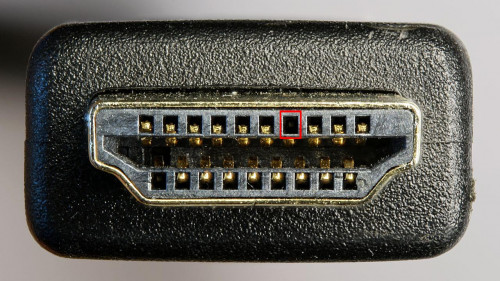 |
|
|
|
|
|
skzzi
|
Jan 28 2022, 04:30 PM
|
New Member
|
QUOTE(drbone @ Jan 28 2022, 10:44 AM) I have a Sony x85j connected via earc hdmi cable to HTS 350 soundbar . Sadly, after a few seconds, the sound keeps getting disconnected . All necessary troubleshooting done, to no avail. Even connected the sound via bluetooth between the 2 devices, same issue. Any tips? Do you have any other device connected to the tv with hdmi? |
|
|
|
|
|
skzzi
|
Jun 18 2022, 06:28 PM
|
New Member
|
QUOTE(cazorla81 @ Jun 15 2022, 03:58 PM) Hi, wanna ask Sifu Sifu sekalian. I am getting a new TV to replace my old Samsung 48inch J series which dies last week. Earlier on was eyeing on 55inch X90J, and slowly kena poisoned to 65inch A80J. Is in my moderately lit living hall, couch is 7 to 8 feet away. Main user is my 70+ mum. Is it worth to get A80J? As most of the content I watch are unifiTV, iqiyi, YouTube (include some low quality content) etc. Or should I save that 3k to 4k and just go with 65inch X90J? I was observing the promo videos in the showroom a few times, and really the X90J just not as pop as the OLED (especially there's one night Ariel city view, I was basically stunned...) But I am not sure will the different be that big when viewing those content I mentioned above... Will be a big disappointment if I fork out a fortune for that OLED bandwagon and later find out that I am better off settled with the good mid range FALD TV.....(this 65inch A80J is about 3x the price of paid for my Samsung...nvr buy such expensive TV in my life....very sakit if making the wrong purchase) Please help, thx! My exp with A80J, really need a dim/dark room to truly enjoy it. If in living room, bright or semi bright, it hurts the overall picture. I have the Panasonic fz950 55” (oled also), it looks better in my living room compare to a80j, but i make peace with it for now. I was lucky to get a80j 65” frm desa home during the 12.12 promo, really good price, so not gonna complain. So if you gonna put it in ur living room, better stay off oled. But in dark room or dim, the OLED colour is truly amazing (after the run-in hours). This post has been edited by skzzi: Jun 18 2022, 06:29 PM |
|
|
|
|
|
skzzi
|
Jul 6 2022, 10:04 PM
|
New Member
|
QUOTE(wong_86 @ Jul 6 2022, 12:05 PM) Hi sifu, My Sony TV 2019 setup, Astro Ultra Box ----> HDMI 1 Sony E6100 Home theather ------ARC ----> HDMI 3 Nvidia Shield Pro -----> HDMI 2 The issue is when i watching Astro , switch to other input, the E6100 no sound on every input , TV speaker got sound, it seem Astro Ultra box still play after switch to other input, causing the audio input conflict, i need to restart the everything to make it normal. Right now i have to turn Astro Box to standby mode before i switch to other input, then the audio no issue. Any solution of this ? Typical hdmi CEC issue on sony TV. Take your astro hdmi and disable the cec pin, it should solve it, it did on mine and i replied a same problem in this thread before this, seems solve as well. You can try use some cheap hdmi cable and try first. I just use the cable that came with astro. Disable one side will do. Attached thumbnail(s)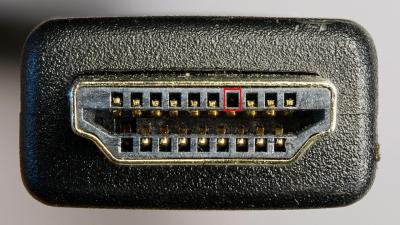
|
|
|
|
|
|
skzzi
|
Dec 3 2022, 11:01 AM
|
New Member
|
QUOTE(fruitie @ Dec 1 2022, 09:19 PM) Does anyone else experience this issue? I’m not a technical person but I will try to explain as much as I can. I am using Astro Ultrabox and plugged it to HDMI 1 port. Every time after I turn off the Ultrabox and TV (put to sleep only, didn’t unplug the adapter), I turn on back both TV and Astro, the TV seems not able to detect my Astro box on HDMI 1. It is showing black screen, I will need to restart my TV and only it will reappear. I don’t think it’s Astro box issue? I just started using Astro recently so I cannot validate the root cause yet. HDMI CEC issue on sony tv. Find my previous post in this thread. I post it before. |
|
|
|
|
|
skzzi
|
Sep 11 2023, 10:33 AM
|
New Member
|
QUOTE(Squirtle @ Sep 8 2023, 08:53 PM) Currently i am using lg oled c2 48... Planning to switch to 65 inch but budget only enough for 65 x90l or x85l... Is it advisable switch from oled to flad? I had a80j 65, it broke. Contemplate to go for bigger sony X series. Watch it side by side oled n led, really hard to move away from oled. End up with a 77lgC3  |
|
|
|
|
|
skzzi
|
Sep 11 2023, 10:09 PM
|
New Member
|
QUOTE(celciuz @ Sep 11 2023, 02:19 PM)  out of warranty liao? I have 65 A80J too still kicking... hopefully if break down, please do it within the 5 years  Yea out of warranty. It broke bcoz my kids. Accidentally swing a plastic toy over and ding the screen. Jst like a few mm ding enuff to destroy the panel 😖 the quote to replace/repair not worth it. Now all toys or whatever is banned in front of the tv 😤 This post has been edited by skzzi: Sep 11 2023, 10:10 PM |
|
|
|
|
|
skzzi
|
Sep 17 2023, 10:27 PM
|
New Member
|
QUOTE(westlife @ Sep 17 2023, 09:51 PM) Yes, I encountered movies not playable on my A80J also. Got try to use vlc instead? |
|
|
|
|
|
skzzi
|
Sep 27 2023, 09:22 AM
|
New Member
|
Going from A80J to LG C3, i definitely missed google tv. WebOS pointer thing from the control can be annoying 😅. Simple thing like able to check the time/clock in a80j, miss that hahah
|
|
|
|
|
|
skzzi
|
Sep 27 2023, 09:30 PM
|
New Member
|
QUOTE(-oc-gassa @ Sep 27 2023, 12:51 PM) apart from OS? anything u miss? for sure will not miss the SONY picture quality Miss that it can control my sony a7000 soundbar. Dont miss it that the pic can be quite dark. Quality wise, not really fair if i to compare it with the C3 now since they different gen and year. Only comment is c3 out of the box i didnt have to adjust the pic much compare to a80j. QUOTE(ZeneticX @ Sep 27 2023, 02:40 PM) I actually like the magic remote from LG, once you get used to it you will get to the stuff you want pretty quick Anyhow its better than Tizen (although I also get used to that now and I dont have any complaints about the usability) My kids actually likes the magic remote. 😅 |
|
|
|
|
|
skzzi
|
Sep 26 2024, 12:00 AM
|
New Member
|
QUOTE(fruitie @ Sep 25 2024, 12:10 AM) I cannot believe that I’m still struggling with this issue for two years. Changing a HDMI cable is not a solution for me because my cables are hidden behind the wall and it’s going to be difficult for me. It’s annoying to be honest. I don’t know what else I can do. I think reply before as well. Cant remember. Have u try disable hdmi cec pin? Is known that sony tv have this cec issue with some decoder or soundbars. I used to have this issue with my a80j n astro as well. |
|
|
|
|
|
skzzi
|
Sep 26 2024, 12:10 AM
|
New Member
|
QUOTE(fruitie @ Sep 26 2024, 12:05 AM) I only have one HDMI cable and I cannot afford to lose the access to watch my TV. So I just remove the pin, what tool did you use to remove it? I suggest you find a spare cheap hdmi cable n give it a try first. I did that. I did my astro side, but it really doesnt matter which. As long as it is pinned, the cec is diabled. This post has been edited by skzzi: Sep 26 2024, 12:12 AM |
|
|
|
|
|
skzzi
|
Sep 30 2024, 10:02 PM
|
New Member
|
QUOTE(fruitie @ Sep 28 2024, 02:42 AM) I waited for 2 days to update you about this. I took the risk and used a pin to “spoil” the CEC. I didn’t manage to remove it but I guess I did spoil it in a way. I think I nearly spoilt the one next to it as well but luckily it wasn’t damaged entirely and the cable is still working well. OK, after two days no such issue anymore with the Ultra Box. I shall monitor for a longer period but thanks for suggesting again despite you suggested two years ago but I was too afraid to take the risk that time.  👍👍 if it works the first time, shouldn’t be an issue anymore. |
|
|
|
|



 Quote
Quote
 0.0475sec
 0.42
0.42
 7 queries
 GZIP Disabled