Welcome Guest ( Log In | Register )

Bump Topic Topic Closed RSS Feed

Outline · [ Standard ] · Linear+

 0xc000000F - NLS data is missing. Can't boot., After connecting new casing fan? O_O

views
     
TSskindred
post Mar 23 2021, 02:58 PM, updated 5y ago

Getting Started
**
Junior Member
283 posts

Joined: Jul 2007
Bros, I screwed up.... sweat.gif I was ending my night yesterday after hard day's work. Turned off the pc and thought to try out my new arrived casing fan (something to relax with).. Connected it, boot up. The fan's LED flicked, and then looked like it was going to die. And suddenly saw a very brief BSOD blue screen before entering windows, and then pc auto-restarted.

Tried booting into safe mode, and brief BSOD again, and restarted. Happened twice. Then suddenly can't load anymore.

Now, no matter whichever option I choose in Safe Mode, it goes to this screen....
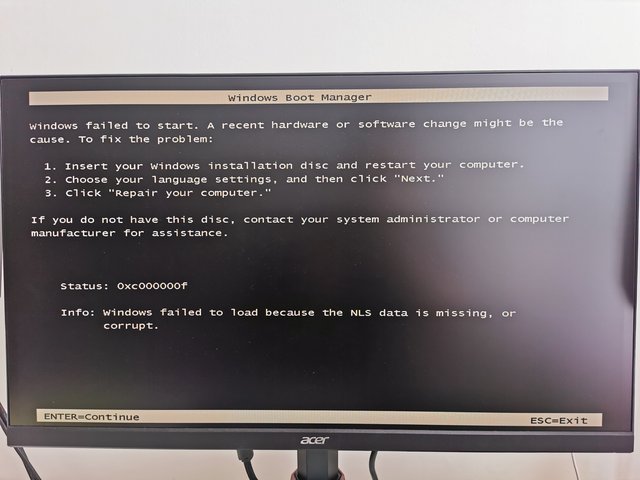

user posted image


So so tired. Sigh. Last week already beed a bad week, and this happens. Really tired. mega_shok.gif

It can't be that the new casing fan did this , right? rclxub.gif shocking.gif


... Anyway,

1) I tried booting from Windows USB to "Recover/Repair", but it says cannot be repaired.

2) I swapped SATA cables with my secondary hdd, but same thing.

3) This morning, I tried putting my Main windows HDD into a external HDD enclosure. And managed to load it and access it in my laptop. I quickly backup my work files first into my laptop.


- Question is now........ Is there any way I can repair/reinsert those missing files , using my laptop here ?
With what I have now, is there any way to repair/recover my hdd's issue?
Or is the only option to Reformat?

🙏 🙏 🙏
RectangleX
post Mar 23 2021, 04:05 PM

On my way
****
Junior Member
642 posts

Joined: Mar 2017

TSskindred
post Mar 23 2021, 04:12 PM

Getting Started
**
Junior Member
283 posts

Joined: Jul 2007
QUOTE(RectangleX @ Mar 23 2021, 04:05 PM)

*
Thank you for sharing this! Somehow didn't find this on YouTube.

I am also reading up about using Command Prompt to do some things (haven't fully read all yet), and you posted this. wub.gif

Hope it works. Because mine is Windows 7 , not Windows 10. Will try and feedback here again
RectangleX
post Mar 23 2021, 04:17 PM

On my way
****
Junior Member
642 posts

Joined: Mar 2017

RectangleX
post Mar 23 2021, 04:25 PM

On my way
****
Junior Member
642 posts

Joined: Mar 2017
QUOTE(skindred @ Mar 23 2021, 04:12 PM)
Thank you for sharing this! Somehow didn't find this on YouTube.

I am also reading up about using Command Prompt to do some things (haven't fully read all yet), and you posted this.  wub.gif

Hope it works. Because mine is Windows 7 , not Windows 10. Will try and feedback here again
*
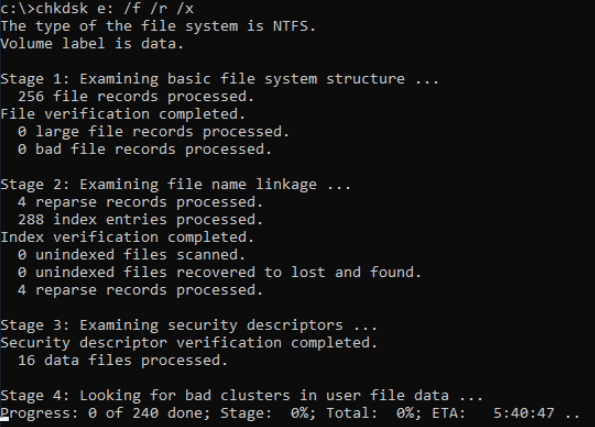
If you're able to boot up properly after doing those steps above, check your HDD for bad sectors.

CHKDSK C: /F /R /X

user posted image
TSskindred
post Mar 23 2021, 05:05 PM

Getting Started
**
Junior Member
283 posts

Joined: Jul 2007
Tried the bootrec . Didn't work ..

Now it comes to the same screen, same error number , but with different info:

Ïnfo: The boot selection failed because a required device is inaccessible.


Tried some other recovery/repair options in the Windows USB, like "Scandisk" .. But doesn't work.

rclxub.gif rclxub.gif
sHawTY
post Mar 23 2021, 05:25 PM

Frequent Reporter
********
All Stars
14,909 posts

Joined: Jul 2005

QUOTE(skindred @ Mar 23 2021, 02:58 PM)
It can't be that the new casing fan did this
Yes it can, from a few possibilities
1. You plugged a fan that requires higher AMP than what the motherboard can supply. For example, you plugged a fan that requires 1A but the motherboard can only supply 0.5A, which will fry something on the motherboard
2. You plugged the fan into the wrong header on the motherboard. I.E. you plugged it into the audio or USB header on the motherboard
3. You plugged the fan to the correct fan header, but the wrong orientation
TSskindred
post Mar 23 2021, 07:34 PM

Getting Started
**
Junior Member
283 posts

Joined: Jul 2007
QUOTE(sHawTY @ Mar 23 2021, 05:25 PM)
Yes it can, from a few possibilities
1. You plugged a fan that requires higher AMP than what the motherboard can supply. For example, you plugged a fan that requires 1A but the motherboard can only supply 0.5A, which will fry something on the motherboard
2. You plugged the fan into the wrong header on the motherboard. I.E. you plugged it into the audio or USB header on the motherboard
3. You plugged the fan to the correct fan header, but the wrong orientation
*
I plugged it exactly as my previous fan.. They are the same models. Even now, both fans work properly, when turning on the PC.

Just that there are these errors now..

Is there any way I can find out if i did fry anything? (i will Google after this too), but it would be nice to hear your opinion too. 🙌 Thank you!
RectangleX
post Mar 29 2021, 03:17 PM

On my way
****
Junior Member
642 posts

Joined: Mar 2017
TestDisk is powerful free data recovery software! It was primarily designed to help recover lost partitions and/or make non-booting disks bootable again when these symptoms are caused by faulty software: certain types of viruses or human error (such as accidentally deleting a Partition Table). Partition table recovery using TestDisk is really easy.

TestDisk can

Fix partition table, recover deleted partition
Recover FAT32 boot sector from its backup
Rebuild FAT12/FAT16/FAT32 boot sector
Fix FAT tables
Rebuild NTFS boot sector
Recover NTFS boot sector from its backup
Fix MFT using MFT mirror
Locate ext2/ext3/ext4 Backup SuperBlock
Undelete files from FAT, exFAT, NTFS and ext2 filesystem
Copy files from deleted FAT, exFAT, NTFS and ext2/ext3/ext4 partitions.
TestDisk has features for both novices and experts. For those who know little or nothing about data recovery techniques, TestDisk can be used to collect detailed information about a non-booting drive which can then be sent to a tech for further analysis. Those more familiar with such procedures should find TestDisk a handy tool in performing onsite recovery.
TSskindred
post Mar 29 2021, 08:26 PM

Getting Started
**
Junior Member
283 posts

Joined: Jul 2007
I ended up formatting my pc . :/ Too much stress, decided to just backup and format. Thank you again guys, you helped alot !

Topic ClosedOptions
 

Change to:
| Lo-Fi Version
0.0187sec    0.60    5 queries    GZIP Disabled
Time is now: 14th December 2025 - 04:41 AM