

0xc000000F - NLS data is missing. Can't boot., After connecting new casing fan? O_O
|
|
 Mar 23 2021, 04:05 PM Mar 23 2021, 04:05 PM
Return to original view | Post
#1
|
 
Junior Member
642 posts Joined: Mar 2017 
|
skindred liked this post
|
 Quote
Quote|
|
|
|
|
Mar 23 2021, 04:17 PM
Return to original view | Post
#2
|
|
Junior Member
642 posts Joined: Mar 2017
|
|
|
|
Mar 23 2021, 04:25 PM
Return to original view | Post
#3
|
|
Junior Member
642 posts Joined: Mar 2017
|
QUOTE(skindred @ Mar 23 2021, 04:12 PM) Thank you for sharing this! Somehow didn't find this on YouTube. If you're able to boot up properly after doing those steps above, check your HDD for bad sectors. I am also reading up about using Command Prompt to do some things (haven't fully read all yet), and you posted this.  Hope it works. Because mine is Windows 7 , not Windows 10. Will try and feedback here again  CHKDSK C: /F /R /X 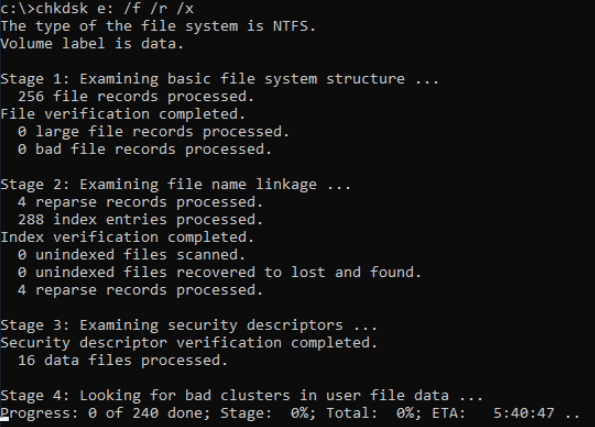 |
|
|
Mar 29 2021, 03:17 PM
Return to original view | Post
#4
|
|
Junior Member
642 posts Joined: Mar 2017
|
TestDisk is powerful free data recovery software! It was primarily designed to help recover lost partitions and/or make non-booting disks bootable again when these symptoms are caused by faulty software: certain types of viruses or human error (such as accidentally deleting a Partition Table). Partition table recovery using TestDisk is really easy.
TestDisk can Fix partition table, recover deleted partition Recover FAT32 boot sector from its backup Rebuild FAT12/FAT16/FAT32 boot sector Fix FAT tables Rebuild NTFS boot sector Recover NTFS boot sector from its backup Fix MFT using MFT mirror Locate ext2/ext3/ext4 Backup SuperBlock Undelete files from FAT, exFAT, NTFS and ext2 filesystem Copy files from deleted FAT, exFAT, NTFS and ext2/ext3/ext4 partitions. TestDisk has features for both novices and experts. For those who know little or nothing about data recovery techniques, TestDisk can be used to collect detailed information about a non-booting drive which can then be sent to a tech for further analysis. Those more familiar with such procedures should find TestDisk a handy tool in performing onsite recovery. |
|
Topic ClosedOptions
|

| Change to: |  0.0163sec 0.0163sec
 0.52 0.52
 6 queries 6 queries
 GZIP Disabled GZIP Disabled
Time is now: 14th December 2025 - 07:37 AM |
All Rights Reserved © 2002- 2025 Vijandren Ramadass (~unite against racism~)
Powered by Invision Power Board © 2025 IPS, Inc.