Outline ·
[ Standard ] ·
Linear+
Xiaomi Redmi K40/POCO F3 Discussion
|
SwarmTroll
|
 Apr 14 2021, 09:36 AM Apr 14 2021, 09:36 AM
|

|
QUOTE(Rudd @ Apr 14 2021, 01:09 AM) will you complaint to xiaomi/poco and resort to warranty claim? mine i noticed only the upper part got slight visible. my worry is, will this get more serious/deteriorate as time goes by. When I looked at Google Play store in dark mode and below <20% brightness it looks as tho it's just the top. Then when I tried the same with Google Chrome in tabs area it became more apparent it's more than that lol. It seems a number of users are reporting it in some forums and in Facebook groups, I'm monitoring the situation to see if their tint issue can really be fixed if they send in for replacement of screen. The phone is still so new so the stock for screen replacement might not by readily available. I also want to see what is Xiaomi/ Poco's official response to this. To circumvent this, I just make sure brightness is atleast above 20% so it's not longer noticeable. But yeah in a dark room, auto brightness will fall below 20%. |
|
|
|
|
|
SwarmTroll
|
Apr 14 2021, 09:38 AM
|
|
|
QUOTE(layzieboy @ Apr 14 2021, 09:04 AM) How bad is it though? Appreciate if you can take some pics. My old school amoled s7 edge is even all the way. Feels like a recent issue with samsung panels..sigh. I'll try to take a pic of it when I have the proper time and in pitch blackness, but it was a bit difficult to capture it on camera lol |
|
|
|
|
|
SwarmTroll
|
Apr 15 2021, 09:28 AM
|
|
|
Anyone debloated their F3 by disabling/ uninstalling certain apps?
|
|
|
|
|
|
SwarmTroll
|
Apr 15 2021, 12:44 PM
|
|
|
Any YouTube vanced users here? Any issues on your F3?
|
|
|
|
|
|
SwarmTroll
|
Apr 15 2021, 12:55 PM
|
|
|
QUOTE(soulseeker6187 @ Apr 15 2021, 12:48 PM) Where did you download it yea? Is this the official link to download?: https://vancedapp.com/ |
|
|
|
|
|
SwarmTroll
|
Apr 15 2021, 01:48 PM
|
|
|
QUOTE(Skeuomorphic @ Apr 15 2021, 01:39 PM) Yes that is the official vanced website, you have to download vanced manager first then install it like a normal apk. After that you have to go to the settings > developer options and scroll until bottom then turn off miui optimization (this will allow YouTube vanced & microG to be installed from the manager app). If miui optimization doesn't appear, you have to click "Reset to default values" a couple of time then it will appear. After that you can just go back to the manager app & install youtube vanced *after turning off miui optimization you also need to set all of the permissions for all your apps again (location/gallery/camera/contacts) But if need to update to another version of Vance? Need to go through the process again? |
|
|
|
|
|
SwarmTroll
|
Apr 15 2021, 02:11 PM
|
|
|
Is there anything else you guys download through apks as well? I'm assuming gcam when it is ready. Do you guys use any adblockers? Like blokada?
|
|
|
|
|
|
SwarmTroll
|
Apr 15 2021, 02:53 PM
|
|
|
QUOTE(tshin810 @ Apr 15 2021, 02:34 PM) i already installed gcam and it works flawlessly Oh wow that was quick, how's the quality over the stock camera? |
|
|
|
|
|
SwarmTroll
|
Apr 15 2021, 02:54 PM
|
|
|
QUOTE(blibala @ Apr 15 2021, 02:22 PM) I use blockada temporary. Waiting to root for adaway Adaway much better ke? Need to root tho... Hmmmm |
|
|
|
|
|
SwarmTroll
|
Apr 15 2021, 04:31 PM
|
|
|
Anybody uses private DNS? Effective for blocking ads?
|
|
|
|
|
|
SwarmTroll
|
Apr 15 2021, 09:11 PM
|
|
|
QUOTE(Skeuomorphic @ Apr 15 2021, 01:39 PM) Yes that is the official vanced website, you have to download vanced manager first then install it like a normal apk. After that you have to go to the settings > developer options and scroll until bottom then turn off miui optimization (this will allow YouTube vanced & microG to be installed from the manager app). If miui optimization doesn't appear, you have to click "Reset to default values" a couple of time then it will appear. After that you can just go back to the manager app & install youtube vanced *after turning off miui optimization you also need to set all of the permissions for all your apps again (location/gallery/camera/contacts) Noice, installed YouTube Vance and turned MiUi optimisation back on. Do I need to turn off developer options? |
|
|
|
|
|
SwarmTroll
|
Apr 15 2021, 09:46 PM
|
|
|
QUOTE(tshin810 @ Apr 15 2021, 09:14 PM) i also installed Vanced. I usually let the developer option ON. If you running the Mi Security APP optimization, it will turn off the dev option How do you set Vance as the default YouTube app to go to by links? I've set Vance as the default in manage apps, but it doesn't direct to it if I click a link in Chrome where it just goes to YouTube |
|
|
|
|
|
SwarmTroll
|
Apr 16 2021, 10:33 AM
|
|
|
Tried Private DNS for ad-blocking on chrome, seems to work  |
|
|
|
|
|
SwarmTroll
|
Apr 16 2021, 10:37 AM
|
|
|
QUOTE(Skeuomorphic @ Apr 16 2021, 10:34 AM) What private dns did you use? dns.adguard.com |
|
|
|
|
|
SwarmTroll
|
Apr 19 2021, 02:38 PM
|
|
|
Overall really happy with my Poco F3 based on my use (coming from Poco F1), the battery issue seems to be alright now, no massive overnight drain occuring anymore.
Only real issue to me now is the green tint, not sure what an update can really do tho lol
|
|
|
|
|
|
SwarmTroll
|
Apr 19 2021, 10:20 PM
|
|
|
QUOTE(sadaniel @ Apr 19 2021, 05:20 PM) My proximity sensor confirm ko already. Any suggestions? 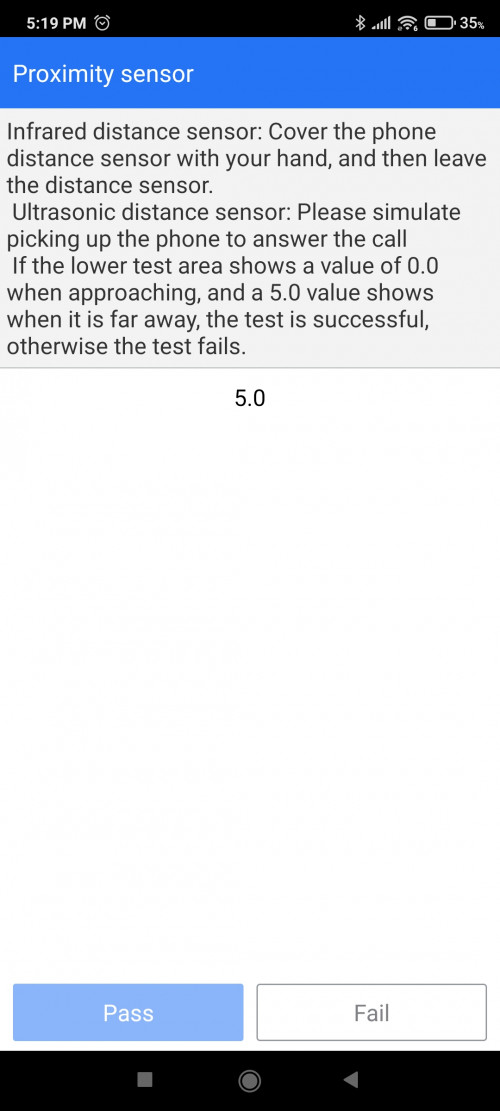 Try testing while holding the phone, doesn't work when it's laid flat on a surface. |
|
|
|
|
|
SwarmTroll
|
Apr 19 2021, 10:37 PM
|
|
|
QUOTE(sadaniel @ Apr 19 2021, 10:27 PM) I tried all possible way i can imagine, still doesn't work. And yes, I've reset the phone once. When first got the phone the sensor already showing some instability during call but doesn't happen often but gradually failed. I already called mi support, they asked to me to bring phone to service center, so I'm going to Lowyat tomorrow. Will update here on the progress. Hmmm I see, does your phone have the green tint issue as well? Did you also test the sensor with a phone case on? This post has been edited by SwarmTroll: Apr 19 2021, 10:39 PM |
|
|
|
|
|
SwarmTroll
|
Apr 21 2021, 11:38 AM
|
|
|
QUOTE(vignaroli @ Apr 21 2021, 10:10 AM) Installed the ibywind temper glass on Poco F3, the temper glass not bad improved a lot the touching feel on the screen as compared to the original film screen protector attached. hope ibywind can make the temper glass coverage bigger abit (now just ngam ngam cover the screen area) and the camera punch whole instead of u-shape ....then would be perfect They made the TP to ngam ngam cover the screen area so the phone can fit all the cases out there. It fits nicely with my Ringke without the possibility of the TP being lifted.  |
|
|
|
|
|
SwarmTroll
|
Apr 21 2021, 12:24 PM
|
|
|
QUOTE(lazyman@home @ Apr 21 2021, 11:46 AM) I haven't got my phone, only the ringke fusion x. Looking at the case, looks like it wrap into some portion of the front glass, is it? Yup it does, which usually the more protective cases out there will |
|
|
|
|
|
SwarmTroll
|
Apr 23 2021, 07:01 PM
|
|
|
QUOTE(sadaniel @ Apr 23 2021, 06:56 PM) Anyway, got my phone back. Below are details: 1) Proximity sensor problem. 2) Supposedly proximity sensor will only do it's job when the phone is in upright position. It doesn't work for me hence confirm problem. 3) Tuesday 20/04 sent to Mi Service Center Lowyat. They confirmed sensor problem. Leave for repair. 4) Friday 23/04 collect. No charge as under warranty. 5) The technician told me they fixed it by restoring the software from the factory level, means they had to open the phone and access the motherboard directly. (not exactly sure how they mean). 6) Phone fixed. Happy. If rosak again, I swear to god I will  Oh if access motherboard directly is a different type of factory reset is it? Isn't there a factory reset option in settings? |
|
|
|
|



 Quote
Quote
 0.0900sec
 0.15
0.15
 7 queries
 GZIP Disabled