

Delivery for the S21 via Samsung website is quick. Ordered Monday night and just received it now.
Samsung Samsung Galaxy S21 | S21+ | S21 Ultra 5G - V2, 1 month anniversary
Samsung Samsung Galaxy S21 | S21+ | S21 Ultra 5G - V2, 1 month anniversary
|
|
 Mar 24 2021, 03:58 PM Mar 24 2021, 03:58 PM
Return to original view | Post
#1
|
 
Senior Member
2,690 posts Joined: Aug 2005 From: Penang/ Kuala Lumpur 
|
Delivery for the S21 via Samsung website is quick. Ordered Monday night and just received it now.
|
|
|
|
|
|
Mar 30 2021, 11:11 PM
Return to original view | Post
#2
|
|
Senior Member
2,690 posts Joined: Aug 2005 From: Penang/ Kuala Lumpur
|
QUOTE(defendsor @ Mar 30 2021, 08:43 PM) Yup, it gets very hot when I hold on to the phone and have to resort to a casing. But now my Nilkin casing has a slight burn mark and I quickly send it to the service center (second time). s21 user here, so far i didn't face such issue at all. I would just ask for a replacement if possibleCan't remember the exact battery life left with Google Play Services in used, but it's usually between 40 to 50+%. My phone has every little app except for the necessary one, I don't even play games on my phone. 1. Don't use multi window. - Basically during video call + browsing the net, my S10 never fails. 2. Activate Wifi Calling, off the sim card. You will still get calls if you use WIFI. This is to test if your modem having issue or reception is bad at your area so your phone keeps searching for base station. - Might try this after I collected my phone. 3. Remove all background apps. Especially the camera if on. Use the clear memory widget out of box to do it. - The phone is still moderately hot if I don't use video call, but this shouldn't happen as my old S10 never has this issue. 4. Are you using the phone while charging? - Nope, scare the phone will explode lol Can try using the Samsung restart schedule, but if end up having to do that every time, I'm gonna switch phone. Not sure why they didn't replace the modem, but the guy told me mine is basically a brand new phone coz it's a brand new screen, battery, motherboard. So no one encounters this issue here? It is only applicable to S21?  |
|
|
Apr 6 2021, 02:40 PM
Return to original view | Post
#3
|
|
Senior Member
2,690 posts Joined: Aug 2005 From: Penang/ Kuala Lumpur
|
QUOTE(gto87 @ Apr 6 2021, 12:55 PM) HI there. Glad you can use cable connected Android auto with s21 ultra. I have no problem with wireless android auto with my wife's car but can't seem to connect using any cable with my car. Mine work with a normal Anker cable. In general, as long as you are using a proper cable that support high speed data transfer, it should work.Can you explain what do you mean by Samsung original cable? Isn't the cable included in the box is type-c to type-c connector? I believe most Android auto head unit only supports USB A to USB C for now unless your car comes equipped with type c port by default. Also if you buy the cable do let me know what is the model number? Thank you. |
|
|
Apr 7 2021, 01:07 AM
Return to original view | Post
#4
|
|
Senior Member
2,690 posts Joined: Aug 2005 From: Penang/ Kuala Lumpur
|
QUOTE(gto87 @ Apr 6 2021, 10:14 PM) That's weird, the same cable worked with my note 10 plus. Gonna try my luck with anker the same cable is the one I used for my LG G7+. I do notice cable quality do matter a lot for newer phones vs older phones |
|
|
May 11 2021, 03:01 PM
Return to original view | Post
#5
|
|
Senior Member
2,690 posts Joined: Aug 2005 From: Penang/ Kuala Lumpur
|
QUOTE(GHOSTVIC @ May 11 2021, 12:43 PM) Fantastic glad to find this forum to discuss about s21. Am using a normal S21 with everything on including sync with my smartwatch + Microsoft MyPhone (for PC link) + smart tag link -- my battery could easily last a day with around 4hours SOT easily.How are you s21 users. Well i am new s21 ultra 5G user just bought 2 weeks ago. Sadly saying after 6 years switching from android 6 to android 11 Galaxy note4 to S21 ultra 5g After 2 week of use i still have doubt whether this worth for the price or not. battery 5000 yet to avoid draining we had to disable all shit. Currently my setting are 1. Set to dark mode 2. Disabled bluetooth 3. system sound and vibration turned OFF 4. 5G & 4G turned OFF, running on 3G 5. Nearby device scanning turned OFF 6. Turn on wifi automatically feature OFF 7. Detect suspicious network turned OFF 8. Display adaptive brightness turned ON 9. Motion smoothness in standard 10. Screen mode set to natural 11. Screen resolution FHD+ 12. Always on display turned ON with tap to show for 10 seconds 13. Location ON Yet i would not say it is impressive battery. Whats the point of having highend phone yet hav to adjust eventually. Never streaming never browsing just playing with setting can drain the battery fast. Some claims its happening due to recent update. I do not know. 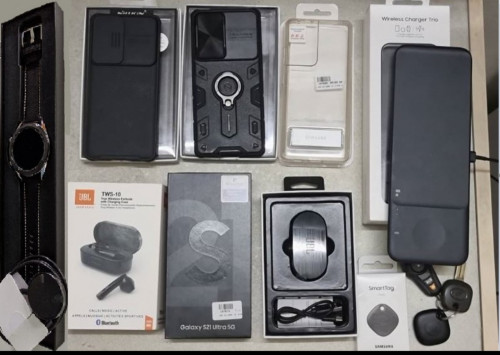 So if you are having issues, it is usually one of the rogue apps probably. |
|
|
Aug 14 2021, 02:21 PM
Return to original view | Post
#6
|
|
Senior Member
2,690 posts Joined: Aug 2005 From: Penang/ Kuala Lumpur
|
QUOTE(kumhoo @ Aug 14 2021, 12:31 PM) S21+ got update already same for the s21 as well. thansk for the update!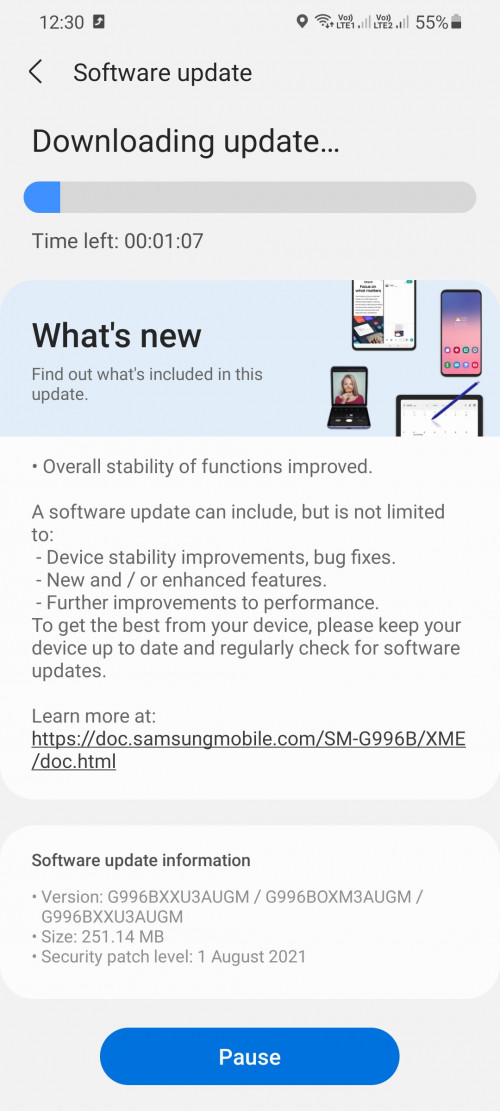 kumhoo liked this post
|
| Change to: |  0.1013sec 0.1013sec
 0.98 0.98
 7 queries 7 queries
 GZIP Disabled GZIP Disabled
Time is now: 1st December 2025 - 03:46 PM |
 Quote
Quote