

 May 13 2021, 06:07 PM


QUOTE(GHOSTVIC @ May 13 2021, 05:53 PM)
Hi guys, i just read through from page 1 to 89 surprisingly none talking about 8k or 4k video.
Mostly on purchase, accessories, battery drain, overheat, camera photo, setting for better performance.
- Based on my recent testing on video play over youtube, running 4k hdr 60fps video for 1 hour, from 68% reduced to 49% (drained 19%)
- Its not straight 1hour, it was 20min + 20min + 20min in between have to skip adds, because i could not find true 4k hdr 60p for 1 straight 1 hour.. only manage get for 20mins. if straight 1 hour probably could save battery slightly.
- my display setting with adaptive brightness, running on 120hz, qwhd, vivid
- Yes phone did get heat, but never had any overheating msg.
Ensure change your setting in youtube , to display highest quality turned on for viewing via wifi so you will get optimum display,
U never change, it will reduce to the lowest display suitable for lower data consumption.
And also your S21 ultra resolution must set to highest 120hz, QWHD.
Then automatically you would be able to see what resolution you playing in youtube
Sadly i never seen any 8K content 7680 x 4320, says 8k video but infact its 4k. I was in impression S21 ultra 8k capable phone would be compatible.
Or youtube do not have 8K video yet ?
So i wanted to test recording video in 8K 24fps , i did with 60hz display setting the video was sucks, then i switched to 120hz it is quite good.
Normal 8k video,the file also 7680 x 4320.
I uploaded that video in youtube, checked resolution it was like 720p.
Then i read somewhere once upload, it takes sometime for youtube to render the file to optimum format.
Now i can see that video resolution is 2160p, after few days i believe that is final.
Recorded a video in 8k 24fps HDR, but rendered to 2160p only.
I cannot find proper guide or videos about this camera & video setting.
If you guys have any tips and experience welcome to share.
[attachmentid=10878097] [attachmentid=10878098] [attachmentid=10878099]

as i know, recording near 4GB per file will auto stop, but i cannot test, using note10 lite no 8k, no hdr recordingMostly on purchase, accessories, battery drain, overheat, camera photo, setting for better performance.
- Based on my recent testing on video play over youtube, running 4k hdr 60fps video for 1 hour, from 68% reduced to 49% (drained 19%)
- Its not straight 1hour, it was 20min + 20min + 20min in between have to skip adds, because i could not find true 4k hdr 60p for 1 straight 1 hour.. only manage get for 20mins. if straight 1 hour probably could save battery slightly.
- my display setting with adaptive brightness, running on 120hz, qwhd, vivid
- Yes phone did get heat, but never had any overheating msg.
Ensure change your setting in youtube , to display highest quality turned on for viewing via wifi so you will get optimum display,
U never change, it will reduce to the lowest display suitable for lower data consumption.
And also your S21 ultra resolution must set to highest 120hz, QWHD.
Then automatically you would be able to see what resolution you playing in youtube
Sadly i never seen any 8K content 7680 x 4320, says 8k video but infact its 4k. I was in impression S21 ultra 8k capable phone would be compatible.
Or youtube do not have 8K video yet ?
So i wanted to test recording video in 8K 24fps , i did with 60hz display setting the video was sucks, then i switched to 120hz it is quite good.
Normal 8k video,the file also 7680 x 4320.
I uploaded that video in youtube, checked resolution it was like 720p.
Then i read somewhere once upload, it takes sometime for youtube to render the file to optimum format.
Now i can see that video resolution is 2160p, after few days i believe that is final.
Recorded a video in 8k 24fps HDR, but rendered to 2160p only.
I cannot find proper guide or videos about this camera & video setting.
If you guys have any tips and experience welcome to share.
[attachmentid=10878097] [attachmentid=10878098] [attachmentid=10878099]
as 8k playback, only for selected pc browser, even uploaded 8k video, most device, browser max can play 4k video
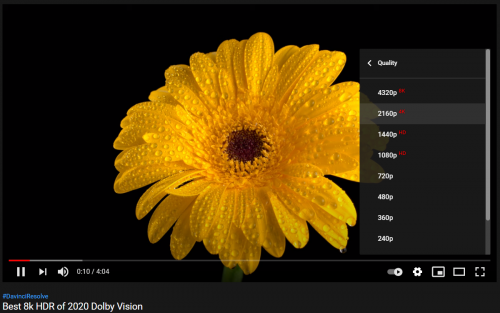
this on pc chrome
yes, as i read also, if upload high resolution video, youtube need some time to process
 Quote
Quote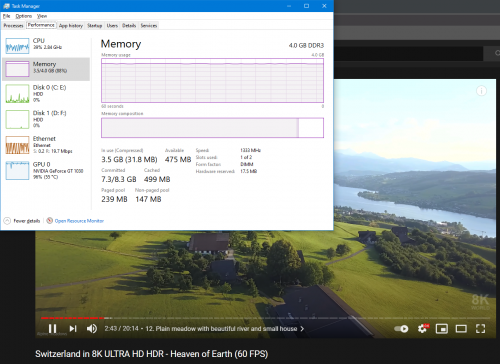
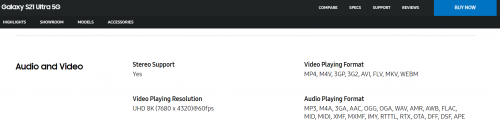



 0.1361sec
 0.17
0.17
 7 queries
 GZIP Disabled