Welcome Guest ( Log In | Register )

Bump Topic Topic Closed RSS Feed

Outline · [ Standard ] · Linear+

 Official TM UniFi High Speed Broadband Thread V39, READ 1ST PAGE FOR RELEVANT WIFI INFO

views
     
jacktiew
post Dec 14 2021, 10:14 AM

Getting Started
**
Junior Member
289 posts

Joined: Sep 2012
QUOTE(nicktaylor @ Dec 14 2021, 10:01 AM)
My advise, if they asking many question. try make sad stori a bit... for my case, lots kids use for PDPR learning and such, need more speed. But still want that competitive price since we are loyal customer and owez pay on time and all.

I tried to get to their human level, to persuade them.

If they right away processed it for u, no need any drama lo, but seems that many TMPOINT will reluctant or asking many question. The only known TMPOINT dat will do it with no question so far is TMPOINT Kajang.

Still waiting my account to be update for SWU pakage in portal since last Friday. zzzzz.. what taking them so long to process.. haizzzzz
*
Thanks for the tips. I will try Cyberjaya first since it's near my place. You don't bring the transfer ID all that right? And you're out of contract?
jacktiew
post Dec 14 2021, 10:23 AM

Getting Started
**
Junior Member
289 posts

Joined: Sep 2012
QUOTE(nicktaylor @ Dec 14 2021, 10:20 AM)
I don't have any transfer ID during my visit. Yes, i'm out of contract and been user since 2018. Use all these points oso to strength my plea.  laugh.gif  laugh.gif
*
Cool. Same case as me. Will report back the result. Tqvm. smile.gif
jacktiew
post Dec 14 2021, 01:50 PM

Getting Started
**
Junior Member
289 posts

Joined: Sep 2012
QUOTE(jacktiew @ Dec 14 2021, 10:23 AM)
Cool. Same case as me. Will report back the result. Tqvm. smile.gif
*
So here's my experience. Wait and sit outside around 45 mins for 7 person who are ahead of me during lunch hour due to max 7 concurrent person allowed inside the TMPoint. 10 mins waiting time due after got the queue number.

I told the staff I want the 300Mbps RM129 package, she seems doesn't know the existence of this package, then she asked her colleague. She said not everyone will get this package, I told her I already checked with customer service. She checked first and said processing time will takes around 3 working days. Then she proceed with the request. Scan thumbprint and all that good stuff. Everything done in 15 mins.

Thanks nicktaylor bro for sharing his experience.

This post has been edited by jacktiew: Dec 14 2021, 01:59 PM
jacktiew
post Dec 14 2021, 02:21 PM

Getting Started
**
Junior Member
289 posts

Joined: Sep 2012
QUOTE(Oltromen Ripot @ Dec 14 2021, 11:12 AM)
Managed to squeeze down RT-AX86U to RM1059.
I deliverated on TUF-AX5400 (for the vpn fusion, which, i currently have no use for) and RT-AX88U (for its overpowering wireless distance and strength over RT-AX86U), but eventually .....

... I originally aim for (i) availability from failover to B618 and (ii) promise of unbeatable consistent uptime from unusual count of cores and huge RAM. I'll brag or sulk about it afterward  😏 depending on achievement unlocked.

Also stumbled of complaints regarding trapped heat afflicting RT-AC86U, so hopefully this will be better and don't outright need ventilator.

I don't give much shit about the wireless shenanigans since I am relying on Deco wired backhaul to handle the freaks.
*
Deco X90? 🤭

jacktiew
post Dec 15 2021, 03:08 PM

Getting Started
**
Junior Member
289 posts

Joined: Sep 2012
QUOTE(jacktiew @ Dec 14 2021, 01:50 PM)
So here's my experience. Wait and sit outside around 45 mins for 7 person who are ahead of me during lunch hour due to max 7 concurrent person allowed inside the TMPoint. 10 mins waiting time due after got the queue number.

I told the staff I want the 300Mbps RM129 package, she seems doesn't know the existence of this package, then she asked her colleague. She said not everyone will get this package, I told her I already checked with customer service. She checked first and said processing time will takes around 3 working days. Then she proceed with the request. Scan thumbprint and all that good stuff. Everything done in 15 mins.

Thanks nicktaylor bro for sharing his experience.
*
Day 2 since application:

TMPoint staff who attended me yesterday called me this morning saying that my application has been approved. She wanted to schedule an appointment for the technician to come over to check modem and change the router to wifi 6 router (if I didn't misheard). I have scheduled it on Saturday. Let's see how things go.

This post has been edited by jacktiew: Dec 15 2021, 03:10 PM
jacktiew
post Dec 16 2021, 03:46 PM

Getting Started
**
Junior Member
289 posts

Joined: Sep 2012
Deleted.

This post has been edited by jacktiew: Dec 16 2021, 03:47 PM
jacktiew
post Dec 18 2021, 10:49 AM

Getting Started
**
Junior Member
289 posts

Joined: Sep 2012
QUOTE(jacktiew @ Dec 14 2021, 01:50 PM)
So here's my experience. Wait and sit outside around 45 mins for 7 person who are ahead of me during lunch hour due to max 7 concurrent person allowed inside the TMPoint. 10 mins waiting time due after got the queue number.

I told the staff I want the 300Mbps RM129 package, she seems doesn't know the existence of this package, then she asked her colleague. She said not everyone will get this package, I told her I already checked with customer service. She checked first and said processing time will takes around 3 working days. Then she proceed with the request. Scan thumbprint and all that good stuff. Everything done in 15 mins.

*
Final update about upgrade a.k.a installation:

They came at 10am. Setting everything up took around 25 minutes.

user posted image

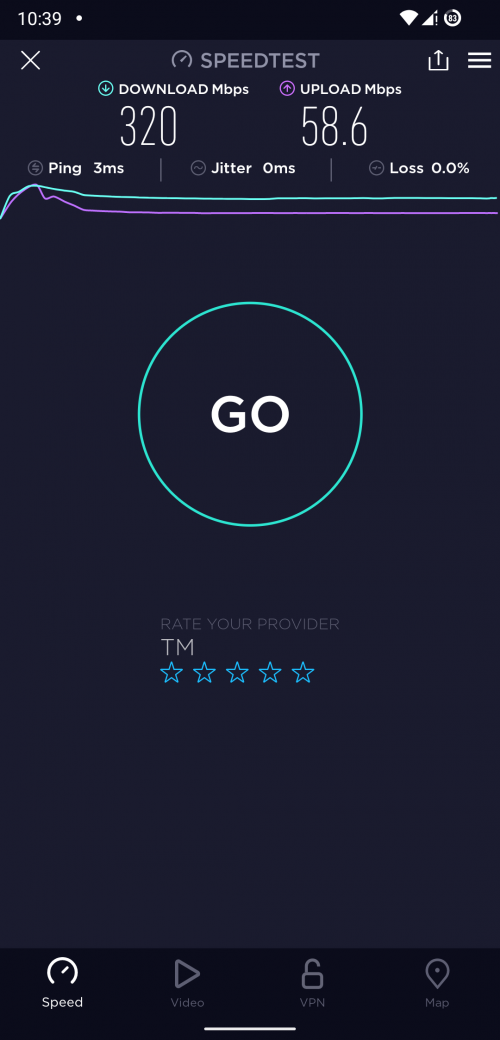
Above is my speedtest, using the new ZTE modem, ZXHN F620 they provide, with my own Deco X20. They did provide Fiberhome Wi-Fi 6 router but I don't use that.

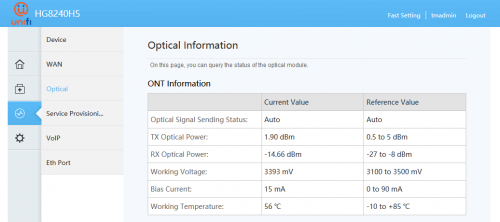
The weird thing is they didn't take back my old Huawei modem, I thought is TM's property. Hmmm. When they are checking my fiber reading, they said is around 31. Can anyone tell me is the signal good enough?

This post has been edited by jacktiew: Dec 18 2021, 11:38 AM
jacktiew
post Dec 18 2021, 11:00 AM

Getting Started
**
Junior Member
289 posts

Joined: Sep 2012
QUOTE(ycs @ Dec 18 2021, 10:53 AM)
» Click to show Spoiler - click again to hide... «

they gave free Deco x20 to you?
*
No la. Mine one hahaha
jacktiew
post Dec 18 2021, 11:02 AM

Getting Started
**
Junior Member
289 posts

Joined: Sep 2012
QUOTE(ycs @ Dec 18 2021, 11:01 AM)
oh, i only got a fiberhome router
*
Mine is around 7 years old already. I think that's the reason they gave the new modem.
jacktiew
post Dec 18 2021, 11:33 AM

Getting Started
**
Junior Member
289 posts

Joined: Sep 2012
QUOTE(akhito @ Dec 18 2021, 11:05 AM)
31 is cukup makan only around 35 will have problem ald. usually good installation can get around 17-25 la. well they offer 1 day gurrantee to solve any connection problem so just chill with it.
*
Oops. If got problem, then need to pull the fiber again. Need to get extra charges again. My fiber length is around 30m. 🥴

When they mentioned 31, I already suspect. But when I ask them is that good enough, they say okay zzzz.
jacktiew
post Dec 18 2021, 11:36 AM

Getting Started
**
Junior Member
289 posts

Joined: Sep 2012
QUOTE(jhleo1 @ Dec 18 2021, 11:26 AM)
I'm confused to read too. Good that you got new modem.
*
Updated to avoid confusion. 😌
jacktiew
post Dec 18 2021, 01:12 PM

Getting Started
**
Junior Member
289 posts

Joined: Sep 2012
QUOTE(aniq8676 @ Dec 18 2021, 01:00 PM)
my fibre reading
user posted image
*
Compared to yours, mine is really bad. It's okay, next time got issue then only call them. They act quite fast in my previous experience. Thanks for sharing. smile.gif
jacktiew
post Dec 18 2021, 09:09 PM

Getting Started
**
Junior Member
289 posts

Joined: Sep 2012
QUOTE(John42 @ Dec 18 2021, 08:32 PM)
Is anyone having problem with FB right now?

user posted image
*
Your area? No problem here from Cyberjaya with IPv6 enable using Google DNS.
jacktiew
post Dec 22 2021, 11:40 AM

Getting Started
**
Junior Member
289 posts

Joined: Sep 2012
QUOTE(xCryptik @ Dec 22 2021, 11:28 AM)
They're watching us.
*
Yes, I rather to use my own router/tools which can check the data usage than monitor by TM all the time.
jacktiew
post Dec 22 2021, 11:42 AM

Getting Started
**
Junior Member
289 posts

Joined: Sep 2012
QUOTE(ckl1998 @ Dec 22 2021, 09:51 AM)
During installation, the unifi installer mentioned that my fibre cable bended, and they tried to twist it back, though it works but not that reliable in long term. Same goes to my intercom system which has fibre cable connected, now the intercom phone is no longer working. Probably my fibre cable was damaged during renovation work since I relocated the fibre terminal box. I was thinking of laying new fibre cable since my renovation is still on going, any reliable fibre cable installer to recommend in Klang Valley?
*
Try to put it into a small tube to avoid getting spoiled easily and easy maintenance next time.
jacktiew
post Dec 22 2021, 08:43 PM

Getting Started
**
Junior Member
289 posts

Joined: Sep 2012
QUOTE(kcl2006ch @ Dec 22 2021, 07:56 PM)
user posted image

this is the latest speed test after UPGRADE to 300mbps STAY WITH UNIFI package
*
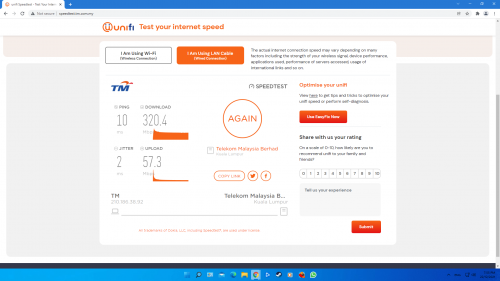
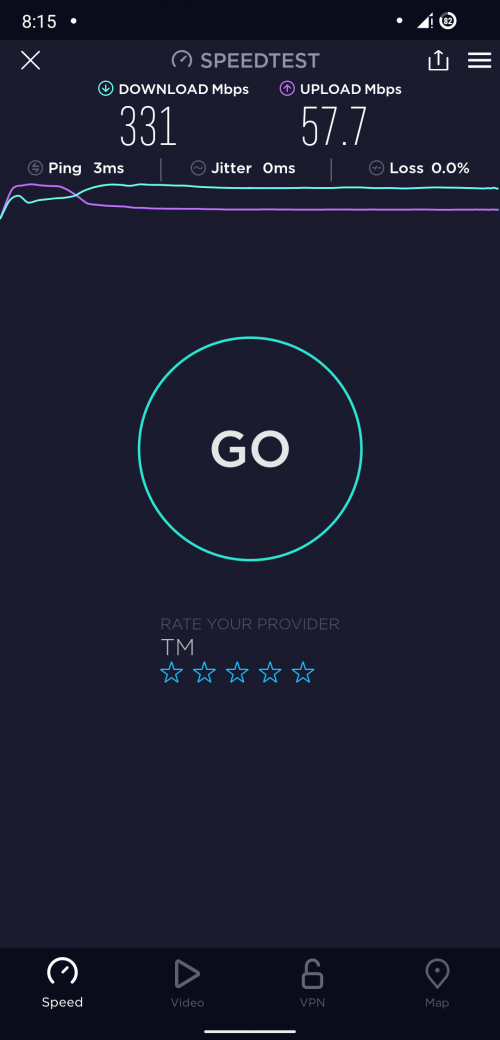
Yes, sometimes can gut 330 down 58 up, with 3ms ping.

user posted image

This post has been edited by jacktiew: Dec 22 2021, 08:44 PM
jacktiew
post Dec 24 2021, 08:04 PM

Getting Started
**
Junior Member
289 posts

Joined: Sep 2012
QUOTE(ultra.m.a.n @ Dec 24 2021, 07:48 PM)
After done the application for SWU RM129@300mbps at TM Point, how long we have to wait till the actual speed changeover?
I went to TM Point for that on last Friday, doc and application done, till now (1 week pass) still no news and no speed change yet….
*
Last time I ask, the staff said take max 3 working days to approve for application.

In my case is they call me next day to confirm that my application is approved and set for appointment for technician to come setup new router and activate the new speed.
jacktiew
post Dec 29 2021, 05:36 PM

Getting Started
**
Junior Member
289 posts

Joined: Sep 2012
QUOTE(crackedbox @ Dec 29 2021, 01:45 PM)
Getting 800mbps installed today.
Was told waiting time can be up to a month.
Lucky got brother who is with TM, got installation appoint in a 2 days 😂

Hoping all goes smooth.
*
How much you're paying for 800Mbps with brother's special price? 🤣

jacktiew
post Dec 30 2021, 09:29 AM

Getting Started
**
Junior Member
289 posts

Joined: Sep 2012
Anyone facing facebook/instagram IPv6 request timeout/not loading? IPv4 works fine.
jacktiew
post Jan 3 2022, 07:31 PM

Getting Started
**
Junior Member
289 posts

Joined: Sep 2012
QUOTE(Rainings @ Dec 30 2021, 11:04 PM)
I manage to get "SWU" upgrade from 100Mbps>300Mbps. I am still under contract, my contract end in June 2022.

How do I get it done.
1. Walk into the nearest TM Point. Tell the security guard you want to ask about Unifi package, get the number, sit down and wait.
2. Tell the staff that you received a call from TM regarding "SWU" offer, just say that during the call they told you, you can walk in to TM Point to get this offer for fast processing. (The truth is, I never get the call from TM, I lied) devil.gif. They will ask you which package they offer you. (You can just say 300Mbps or 500Mbps that you can't really rmb.)
3. Show ur phone that you received this "SWU T&C" pdf UnifiLink after the call. (To sounds more convincing), says that's why you are here at TM Point.
4. Show your IC, thumbprint, they will check the system. Yea, there is such a package in the system. Confirm you want the package and thumbprint again. Approved on the spot, got SMS modify order within 1hr.
5. Schedule date and time, next day TM technician come to my house for speed upgrade. (The guy brought a new router want to change it after I told him my Asus router was better, he just restarts my modem and router then ciao)

What I get:
- Price remained RM129, speed upgrade from 100Mbps > 300Mbps
- Get a new Wifi 6 Router (Will just keep it as a backup, since I just upgraded to Asus wifi6 router)
- Still can get free call, they told me at TM point (Surprise!)
- Unifi TV account (I didn't ask because I don't care lol)
- Renewed to 2 years contract.

Note: You can get 500Mbps for "SWU", but they are charging RM199 for 500Mbps. Current price for 500Mbps package is RM249. If you are okay with the price can go for it, coz is still cheaper than msrp.

I also had a backup plan if my lies didn't work out.
I brought the old Streamyx package account detail(paper) with me from year 2006,
wanna persuade the staff I am a loyal customer, nego abit and see if it works. Since I'm also "Loyal customer".

For those who want/plan to get this "SWU" package, I will suggest you to do it immediately, go to ur the nearest TM point request for the upgrade, try your luck. From my experience, they will stop the campaign when they realize ppl started to abusing it. Rmb few years back they launched a Streamyx package RM89 10Mbps, that time I was still paying RM110, I went to TM point immediately and switch to cheaper package. A few days later, they call off the campaign. If you don't have any plan or option to port out in the next 2 years, this is a great deal. Actually I already get free trial boost to 300Mbps for 1 month, but manage to get the permanent package before entering to new year feels pretty good. Good luck for those who trying to get the free upgrade.
user posted image
*
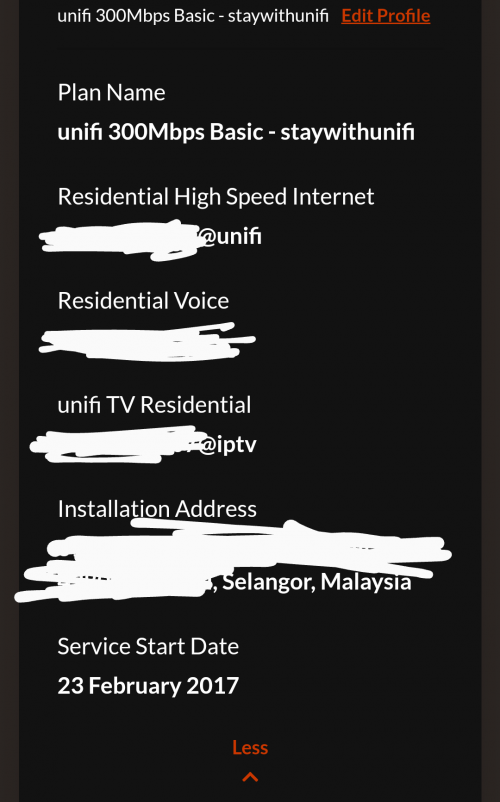
Is this the same as what you have in your package plan? When I asked them, they said only internet is included.

If yes then maybe I got free call as well. 🤣

user posted image

3 Pages < 1 2 3 >Top
Topic ClosedOptions
 

Change to:
| Lo-Fi Version
0.8874sec    0.60    7 queries    GZIP Disabled
Time is now: 17th December 2025 - 03:59 AM