Outline ·
[ Standard ] ·
Linear+
Official TM UniFi High Speed Broadband Thread V39, READ 1ST PAGE FOR RELEVANT WIFI INFO
|
haturaya
|
 Jan 23 2022, 01:25 PM Jan 23 2022, 01:25 PM
|
Look at all my stars!!


|
QUOTE(miyeonevermioff @ Jan 23 2022, 01:22 PM) hi. sorry in advance because i'm a noob at wifi. i will be moving in my new house this year end, and getting 100mbps unifi plan. my house has 3 floors, so i am expecting wifi coverage issues. i immediately thought of mesh wifi. questions are: 1. can i buy mesh wifi system myself and install? does it violate the t&c? 2. i am eyeing on tp link deco e4 ac1200 3 pack on lazada for rm349. will this work good? 3. as i will have 3 deco M4s, what is the recommended way to setup my network? shall i set the 1st deco at downstairs living room to serve as router or access point? next, i suppose the 2nd and 3rd unit to connect wirelessly to the 1st deco, right? would really appreciate for you guy's help. 1. Nope. Go ahead. 2. Entry level WiFi 5. More than enough for typical use. 3. Best setup - own router & Decos as access point. M4 not the best if the backhauls is wireless. Shared wifi band. |
|
|
|
|
|
haturaya
|
Jan 23 2022, 02:26 PM
|
Look at all my stars!!
|
QUOTE(miyeonevermioff @ Jan 23 2022, 02:19 PM) hey thanks... but i dont really understand ur answer for the 3rd one. still don't get the meaning of backhaul after google 😓 if i set the deco as access point, so does that mean i have 2 wifi at 1st floor? (router from tm + deco) Deco backhauls - connection from slave Deco(s) to master Deco either via WiFi itself or ethernet (wired). As for Deco M4, it work best with wired backhauls. And if you set Deco as access point, do disable your router's WiFi (from TM or personally bought). Let Deco handle all your WiFi connectivity. |
|
|
|
|
|
haturaya
|
Jan 24 2022, 09:53 AM
|
Look at all my stars!!
|
QUOTE(miyeonevermioff @ Jan 23 2022, 02:33 PM) thanks! i now get the meaning already. besides that, how about i just let the master deco serve as a router? no cons compared to connecting master deco to tm router with cable right? thanks Also can. But I prefer dedicated router to handle the routing / firewall / etc task. Let Deco handle the WiFi only. QUOTE(miyeonevermioff @ Jan 23 2022, 04:38 PM) 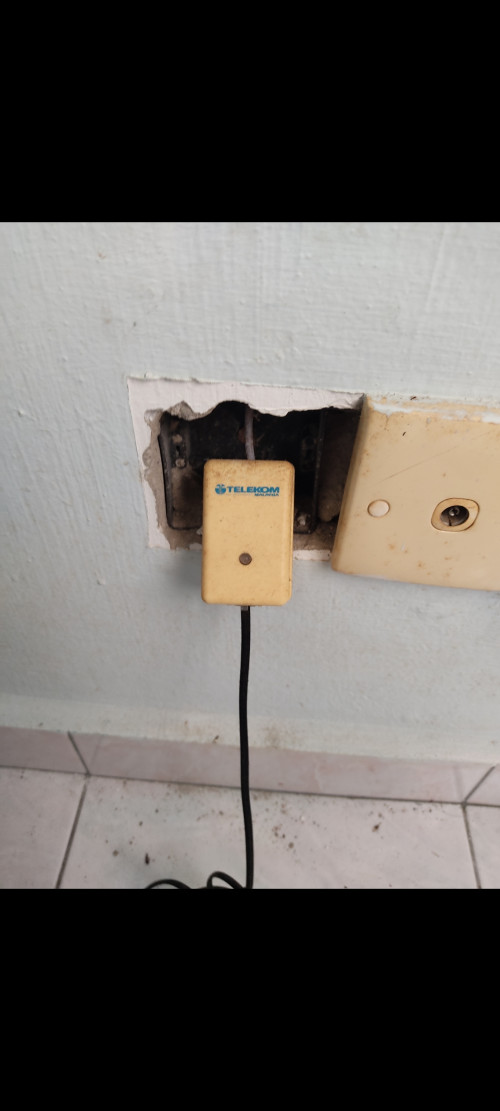 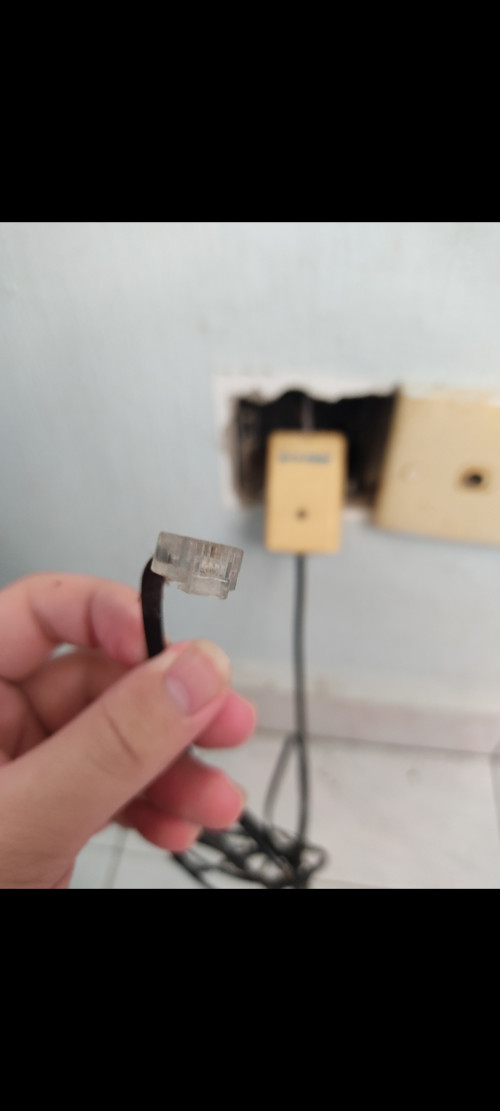 found some old ass cables at the 3rd floor. this should be the internet cables right.. however the head seems like its not the Ethernet cable head now. Can use back the trunking for ethernet cable. |
|
|
|
|
|
haturaya
|
Jan 25 2022, 01:03 PM
|
Look at all my stars!!
|
QUOTE(squall_12 @ Jan 24 2022, 07:43 PM) Finally can said goodbye to shitty unifi and go to TIME what a relief. Lucky you  |
|
|
|
|
|
haturaya
|
Feb 17 2022, 02:25 PM
|
Look at all my stars!!
|
QUOTE(spacelion @ Feb 17 2022, 12:43 PM) [attachmentid=11094884] Hey who to report for this ... Seems like dial 100 also nothing ... Tried few times So far connection is good but u know sooner or later will down Ask your neighbours to report too. Whole neighbourhood will be effected  |
|
|
|
|
|
haturaya
|
Feb 24 2022, 01:53 PM
|
Look at all my stars!!
|
QUOTE(crackedbox @ Feb 24 2022, 01:51 PM) Hi, I just received my Deco M9 Plus, ordered via TM Unifi. Have an issue the WiFi connected to deco M9 Plus is not showing WiFi6 on my Samsung S20+. Any settings I missed. Deco M9 is WiFi 5. Not Wifi 6. Deco X series is WiFi 6 This post has been edited by haturaya: Feb 24 2022, 01:53 PM |
|
|
|
|
|
haturaya
|
Mar 13 2022, 06:30 PM
|
Look at all my stars!!
|
QUOTE(soonwai @ Mar 13 2022, 05:30 PM) Here's mine: Jaring 14.4-28.8kbps TMNet ISDN 64k TMNet ISDN 128k Streamyx 1M -> 2M Unifi 5M (2011) RM149 Unifi 10M (2013) RM149 Unifi 30M (2015) RM179 Unifi 50M (Free Thank You Surprise 2017) RM179 Unifi 100M (RYE2017 +RM10 upgrade) RM189 Unifi 800M (Free Turbo Upgrade 2018) RM159 Similar like mine... from Jaring to ISDN to Streamyx to Unifi (5M to 800M too), but downgrade to 100M in 2019, paying too much, underutilised, now sticking to 300M, same price as 100M. And still underutilised   |
|
|
|
|



 Quote
Quote
 0.0320sec
 0.70
0.70
 7 queries
 GZIP Disabled