

Still old router compare to DIR-842.
Official TM UniFi High Speed Broadband Thread V39, READ 1ST PAGE FOR RELEVANT WIFI INFO
Official TM UniFi High Speed Broadband Thread V39, READ 1ST PAGE FOR RELEVANT WIFI INFO
|
|
 Feb 22 2021, 10:49 AM Feb 22 2021, 10:49 AM
Return to original view | Post
#21
|
 
Junior Member
864 posts Joined: May 2005 
|
Still old router compare to DIR-842.
|
|
|
|
|
|
Feb 22 2021, 02:35 PM
Return to original view | Post
#22
|
|
Junior Member
864 posts Joined: May 2005
|
QUOTE(ray8426 @ Feb 22 2021, 01:10 PM) if we have change to our own router, then they unable check that already right? TM can check your total usage, internet status, which sites you go, what apps you use, even if using own router. Even if you use VPN they still know how much bandwidth you use.  We live in a twilight world  |
|
|
Feb 24 2021, 12:59 PM
Return to original view | Post
#23
|
|
Junior Member
864 posts Joined: May 2005
|
QUOTE(aniq8676 @ Feb 23 2021, 01:48 PM) I recommend you make a voice call via100 and choose the fourth option (Products and promotions), from there it connects directly to the sales department, rather than to customer service. then, they will also ask for your unifi ID to confirm whether you are eligible or not for this exclusive promotion, they will also tell you in detail about this promotion including the terms and conditions Just took 2 M4 for RM 15 x 24 months. And the offered 500 mbps package is same as my existing one. How come no offer earlier 😭they will recommend you three exclusive packages 300mbps Loyalty Super Value - RM 159 (FREE MESH M4 + STD20) 500mbps Loyalty Super Value - RM 199 (FREE MESH M9 + STD20) 800mbps Loyalty Super Value - RM 239 (FREE MESH M9 + STD20) |
|
|
Feb 25 2021, 05:09 PM
Return to original view | Post
#24
|
|
Junior Member
864 posts Joined: May 2005
|
QUOTE(haturaya @ Feb 24 2021, 09:31 AM) Just do some network utilisation observation.. hourly, weekly, etc to get the usage trends. Agree, 100 Mbps more than enough for most people. Only sometimes exceed 100 Mbps eg Microsoft/Steam update or large download from office VPN.[attachmentid=10796091] Example - my daily utilisation. 100mbps is more than enough. As for upgrading / downgrading, it's possible, but be prepare to be locked into 24 months contract for every plan changes. 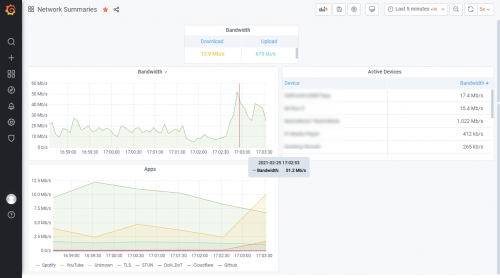 This post has been edited by taqu: Feb 25 2021, 05:10 PM |
|
|
Mar 1 2021, 04:35 PM
Return to original view | Post
#25
|
|
Junior Member
864 posts Joined: May 2005
|
My Adguard Home DNS server uses both Cloudflare DOT & Google DOH server, parallel requests so I always get fastest response from either one. I'm still getting faster response from Cloudflare, is it only their DNS servers problematic but their DOT servers still OK?
|
|
|
Mar 1 2021, 05:32 PM
Return to original view | Post
#26
|
|
Junior Member
864 posts Joined: May 2005
|
QUOTE(AV_2018 @ Mar 1 2021, 05:04 PM) Both DoT and normal is the same for me. Only difference is DoT higher initial connection latency due to TLS connection setup to DNS server. From my tests, averagely, Cloudflare DNS is now 2x slower than Google DNS in returning a reply. Cloudflare also returns Singapore IP for some CDNs instead of KL IP because it doesn't support ECS, causing video streaming to buffer alot because right now there is an issue connecting from Unifi to Singapore CDN server which goes all the way to HK and back according to traceroute by previous poster. If that's the case, I'll start seeing more response from Google over Cloudflare. It's good to have multiple resolvers for this situation 😁 |
|
|
Mar 6 2021, 12:41 PM
Return to original view | Post
#27
|
|
Junior Member
864 posts Joined: May 2005
|
Kids playing Monecraft & Roblox sometimes affected with high latency despite servers in Singapore. My work, heavy on VPN to office, Teams & O365 actually work well.
|
|
|
Mar 23 2021, 03:43 PM
Return to original view | Post
#28
|
|
Junior Member
864 posts Joined: May 2005
|
My D-Link DIR-850L can reach 500 Mbps. I still keep it as spare router.
|
|
Topic ClosedOptions
|
| Change to: |  0.2092sec 0.2092sec
 0.31 0.31
 7 queries 7 queries
 GZIP Disabled GZIP Disabled
Time is now: 3rd December 2025 - 10:33 AM |
 Quote
Quote