Welcome Guest ( Log In | Register )

Bump Topic Topic Closed RSS Feed

Outline · [ Standard ] · Linear+

 Official TM UniFi High Speed Broadband Thread V39, READ 1ST PAGE FOR RELEVANT WIFI INFO

views
     
michaelkkl
post Jun 29 2021, 03:48 PM

Casual
***
Junior Member
362 posts

Joined: Jan 2011
QUOTE(cyclone9 @ Jun 29 2021, 03:33 PM)
does changing DNS/gateway helps improvement connection to US server (gaming COH2). I have friend using same unifi (100mbps) have less latency than me. His latency ~200ms but mine 400~500ms.

[attachmentid=10914464]
*
You may try to reboot your router to get another IP range that have lower ping to US.
michaelkkl
post Jul 13 2021, 08:43 AM

Casual
***
Junior Member
362 posts

Joined: Jan 2011
QUOTE(nonamer @ Jul 13 2021, 07:14 AM)
since last night youtube autoloading at lower resolution?
*
No problem here, can stream 4k smoothly.

Do you disabled your IPv6?
If yes, then you should consider to enable IPv6 as many sites work better over IPv6 connection.
michaelkkl
post Aug 6 2021, 10:29 AM

Casual
***
Junior Member
362 posts

Joined: Jan 2011
QUOTE(sadlyfalways @ Aug 5 2021, 10:53 PM)
Thank you very much for the info !!

Really irritating when speedtests show 900mbps but 1080p Netflix lags on Ethernet ๐Ÿ˜ญ๐Ÿ˜ญ๐Ÿ˜‚๐Ÿ˜‚
*
You may try enable IPv6 to get better performance.

Websites that have IPv6 support (including Netflix, Cloudflare, Google, YouTube, Facebook) work better with IPv6 enabled.

This post has been edited by michaelkkl: Aug 6 2021, 10:30 AM
michaelkkl
post Aug 13 2021, 10:31 PM

Casual
***
Junior Member
362 posts

Joined: Jan 2011
QUOTE(sadlyfalways @ Aug 13 2021, 12:49 PM)
Guys why lowyat website also lagging so much now ๐Ÿ˜ญ๐Ÿ˜ญ sometimes click on a link and it just stuck on loading

Speedtest still normal
*
Kindly enable your IPv6.

Lowyat is using Cloudflare, and Cloudflare is better over IPv6.

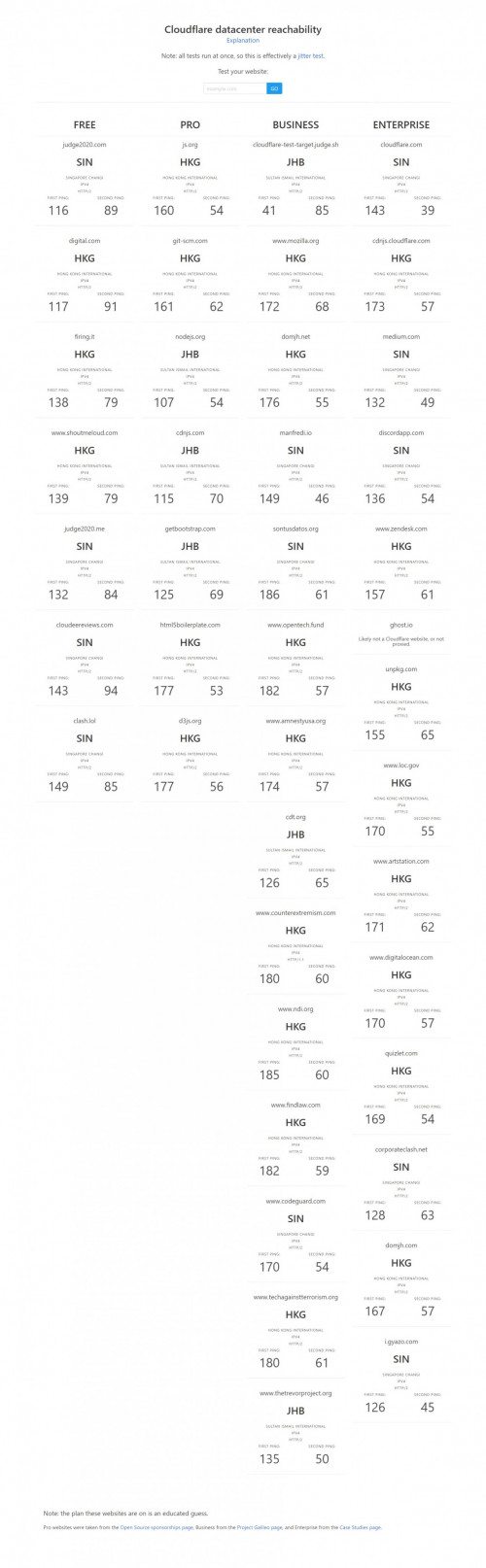
As far as my observation, Cloudflare in Unifi IPv4 is mostly route via HKG, NRT, SIN, and JHB colo. Problem is HKG, NRT via PCCW global link sometime will get congested. That's why sometime will get lag over Cloudflare IPv4.

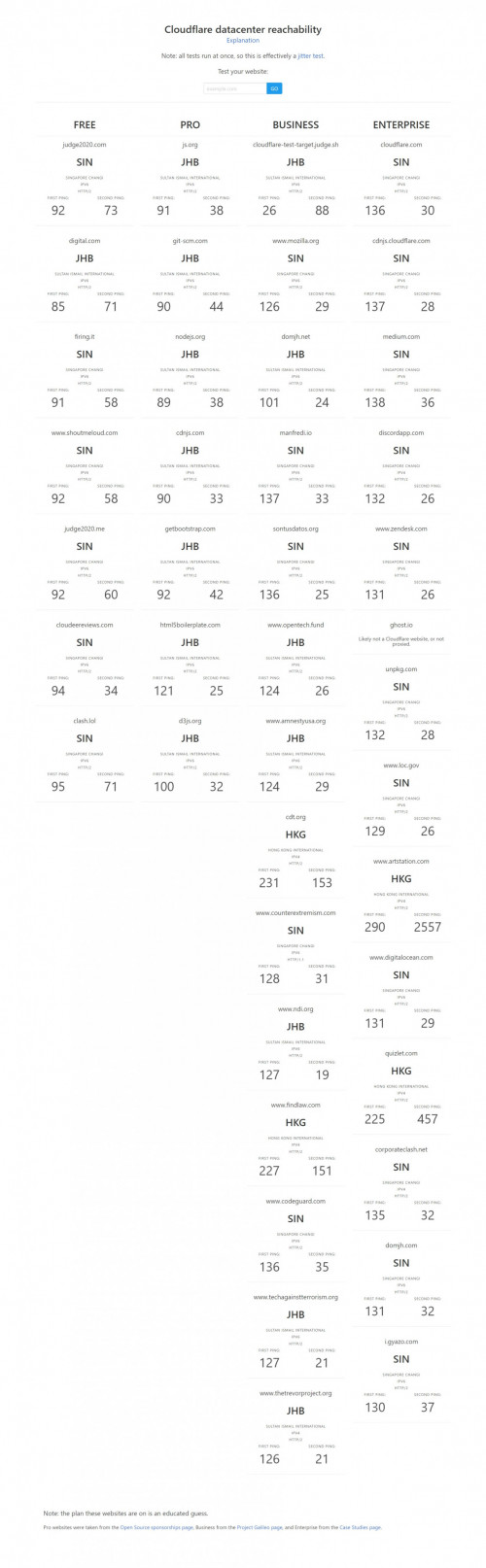
Cloudflare in Unifi IPv6 will mainly route via SIN, JHB colo which is more better performance. So far I didn't get lag to Cloudflare sites after enabling IPv6.

IPv4 only:
user posted image

With IPv6 enabled:
user posted image

This post has been edited by michaelkkl: Aug 13 2021, 10:48 PM
michaelkkl
post Aug 24 2021, 09:01 AM

Casual
***
Junior Member
362 posts

Joined: Jan 2011
QUOTE(AjkR06 @ Aug 24 2021, 03:03 AM)
Is it normal if you encounter some โ€˜delayโ€™ with wifi connection lately. I noticed this for about 1-2 weeks. What I mean is, it takes about 3-4 seconds before the web pages loaded if using wifi.

Same goes to youtube video, it takes 2-3 seconds for the video to load and after the page load everything runs smoothly without buffer. No problem with lan connection as my desktop loads everything instantly without delay.

Speedtest also normal, getting 520mbps download and 110mbps for upload with 7-12ms of ping (using 500mbps plan)

Problem only arises when using wifi, both 2.4 and 5.0 band. Iโ€™ve tried to hard reset my router, as well as update to the latest asus firmware, but it still persist. Btw, iโ€™m using zte onu with Asus Ax86u router.
*
How about testing other devices using wifi?
Does it have the same delay issue?
michaelkkl
post Aug 25 2021, 10:56 AM

Casual
***
Junior Member
362 posts

Joined: Jan 2011
QUOTE(PRSXFENG @ Aug 25 2021, 09:55 AM)
Quad9 actually have servers in Malaysia hosted by TIME/Global Transit Communications

But thanks to Unifi routing somehow it always defaults to SG server instead

I have tried forcing Malaysian servers before
Instead of going through MyIX (like on Maxis or TIME) it goes to SG, routes around and then back to Malaysia. bangwall.gif
*
Quad9 actually provided by PCH (AS42) which have PoP in KUL (MyIX, AIMS).
ISP that peer with PCH in MyIX will get Quad9 route via MyIX.

During Quad9 firstly launched in MyIX, I did feedback about TM routing to Quad9.
They replied that TM peering with them in SG but not in KUL.

That is why routing from TM to Quad9 will goes via Equinix SG instead of local MyIX.

This post has been edited by michaelkkl: Aug 25 2021, 10:58 AM
michaelkkl
post Aug 25 2021, 03:00 PM

Casual
***
Junior Member
362 posts

Joined: Jan 2011
QUOTE(PRSXFENG @ Aug 25 2021, 02:01 PM)
Interestingly, yeah traceroute shows pch.myix but dnslesktest says itโ€™s Global Transit Communications.
*
218.100.44.0/24 IP block previously owned by Global Transit before MyIX.
Some of the sites didn't update their IP database that's why it still showing old data.

You may try APNIC whois, it will shows the IP is under MyIX.
michaelkkl
post Sep 22 2021, 08:12 PM

Casual
***
Junior Member
362 posts

Joined: Jan 2011
QUOTE(bee993 @ Sep 22 2021, 07:39 PM)
hi can i ask is it within our right to change which dns we want?

the fcker installer purposely chg the default password for admin login because i exposed his lie to charge me with his so call "special casing"
*
If you're familiar with the router settings, you may reset it and reconfigure it back.
You may request your unifi pppoe login password through unifi live chat.
michaelkkl
post Sep 24 2021, 02:38 PM

Casual
***
Junior Member
362 posts

Joined: Jan 2011
QUOTE(filage @ Sep 24 2021, 12:15 PM)
I thought this is the Remote Connection or Remote Administration  feature which allow for outside your own network to access the login page of the router. Usually there is a checkbox to enable ot disable at the router. Is this the TR 069 thing? or is this a hidden feature like telnet of the router?
*
TR-069 is a protocol use by ISP for remote management and feature provisioning of CPE (ISP supplied modem and/or router).
Firmware update by ISP also can be pushed to CPE using this protocol.

As for remote management feature that you mentioned is mostly use by users to access the router page outside from router local network.
michaelkkl
post Oct 14 2021, 02:13 PM

Casual
***
Junior Member
362 posts

Joined: Jan 2011
QUOTE(lyt25_1234 @ Oct 14 2021, 01:04 PM)
So if I switch my router to only use IPv6, will i be able to get ipv6 public ip ar?
*
Normally we will use IPv4 and IPv6 dual stack, which mean we get an IPv4 and IPv6 address.

If you switch to IPv6 only, some of the website will be inaccessible as some website didn't have IPv6 or have IPv6 disabled.

Yes, your IPv6 is public IP address.

This post has been edited by michaelkkl: Oct 14 2021, 02:13 PM
michaelkkl
post Oct 14 2021, 09:24 PM

Casual
***
Junior Member
362 posts

Joined: Jan 2011
QUOTE(go626201 @ Oct 14 2021, 05:15 PM)
Not possible for them to fully disable the ipv4 network. I dont think they will implement the 6to4 tunnel or NAT,as currently does not needed for the usage.
The world never want to shutdown the ipv4 network,it is just because the ipv4 pool is not enough for device or server.
And i think the reason they want to move all user to private ip is because most user does not have the need for public ip, except for cctv,private game server,nas,torrenting,Game P2P connection,or something else.
For home web hosting,i think it is not a proper usage for home user,so i dont included on the needs.

And also if all change to IPv6 which mean in normal situation all device is public online without firewall,actually it is more easily to attack then having ipv4 with nat / firewall.
(In my memory currently most home router does not have the IPv6 firewall implementation? or currently not enough secure for ipv6?)
*
First, there is nothing to scare from being on a public IP allocation, as long as your router security are configured right. One of the most common myth regarding IPv6 security is that the lack of NAT makes IPv6 less secure.

NAT is often seen as a security feature in IPv4 networks, but the reality is NAT does not provide any real network security.

Although IPv6 is an global address, but it does not mean you can get there from wherever you are on the public internet. This is what firewalls were designed to do.
A stateful firewall uses state to determine which packets to allow into the network. That is, it remembers when you send packets out and to whom so that it can allow packets back in only from those hosts with which you initiated communication. In other words, a stateful firewall stops all incoming traffic unless it is a reply to valid traffic that you sent.

While the NAT may provide a bit of obfuscation, by hiding your internal addresses, it is really this stateful firewall function that protects your network from unwanted intrusion.

Reference:
https://blog.apnic.net/2019/03/18/common-mi...-ipv6-security/
https://www.internetsociety.org/blog/2015/0...-less-security/

This post has been edited by michaelkkl: Oct 14 2021, 09:24 PM

michaelkkl
post Oct 20 2021, 10:45 PM

Casual
***
Junior Member
362 posts

Joined: Jan 2011
QUOTE(Nicknamed666 @ Oct 20 2021, 10:29 PM)
Thank you!!
Seems like it is a bit higher than public ip. Is this normal ?
*
It is normal. The CGNAT router (at TM end) may add some latency (1~2ms).
The ping also depend on where are you geographically located and looks like northern states.
michaelkkl
post Oct 25 2021, 01:11 PM

Casual
***
Junior Member
362 posts

Joined: Jan 2011
QUOTE(John42 @ Oct 25 2021, 02:32 AM)
If I am using my own router need to enable is it? Currently it is on Auto mode. How to check whether the connection is on IPv4 or IPv6..
*
You may test on http://test-ipv6.com/
If you enabled IPv6, you'll get 10/10 marks and should have no problem for your connection.

This post has been edited by michaelkkl: Oct 25 2021, 01:13 PM
michaelkkl
post Dec 8 2021, 07:56 PM

Casual
***
Junior Member
362 posts

Joined: Jan 2011
QUOTE(rioven @ Dec 8 2021, 07:20 PM)
Something happen routing between TM and cloudflare, usually i get JB/Singapore server, this is the first time manage to get KL server

user posted image
*
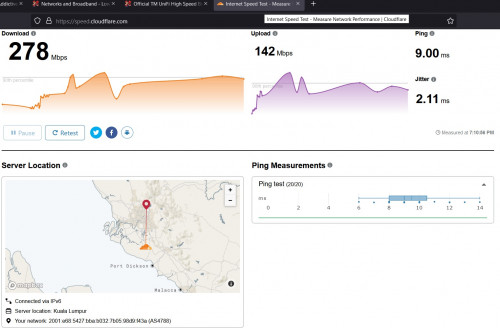
Cloudflare KUL PoP is now optimized since I feedback to Cloudflare team about performance issue in KUL PoP few week before.
It seems that before that KUL PoP only announced some of the Cloudflare prefixes, that is why the traffic is going through JHB/SIN PoP.
michaelkkl
post Dec 10 2021, 12:54 AM

Casual
***
Junior Member
362 posts

Joined: Jan 2011
QUOTE(sadlyfalways @ Dec 9 2021, 11:23 PM)
Hello guys! just now when i was running a speedtest on my ios safari browser, the ip that was showing was some random akamai technologies (172.224.228.21), this was i was using the digi speedtest.

if i open ookla direct on another tab it shows correctly unifi 175.xx.

i tried digi speedtest on my laptop and it was also 175.xx unifi

why would the safari one show an internal akamai ip addredd. is it just picking up something along the ip's route as my ip?
*
Did you enabled Apple iCloud private relay?
Private relay works in Safari to protect browsing activities, and Apple use Akamai, Fastly and Cloudflare for this feature.
That is why Akamai IP shows up in Safari speedtest.
michaelkkl
post Dec 13 2021, 01:11 PM

Casual
***
Junior Member
362 posts

Joined: Jan 2011
QUOTE(lyt25_1234 @ Dec 13 2021, 12:22 PM)
Why lately speedtest is using Singapore ar?
Is bringing down 3G affect speedtest on Unifi Broadband?
*
Do you mean speedtest.net?
Speedtest.net auto determine server using the lowest latency.
You can also manually select Malaysia server for speedtest.
michaelkkl
post Dec 13 2021, 02:41 PM

Casual
***
Junior Member
362 posts

Joined: Jan 2011
QUOTE(heLL_bOy @ Dec 13 2021, 01:12 PM)
tunnelbroker are recommended for international connectivity at least for now.ย   :thumbsup:
*
It is not recommend to use tunnel broker for IPv6 as it will cause performance issue. Native IPv6 is more recommended.
QUOTE(Hwoarang45 @ Dec 13 2021, 02:30 PM)
oh i just disable ipv6 in netword adapter properties , same right?
*
It is not recommended to disable IPv6 if you didn't experience any issue for your connection.
Disabling IPv6 also not recommended by Microsoft as Windows relies on IPv6 internally.

This post has been edited by michaelkkl: Dec 13 2021, 02:47 PM
michaelkkl
post Dec 14 2021, 12:37 PM

Casual
***
Junior Member
362 posts

Joined: Jan 2011
QUOTE(tomo7433 @ Dec 14 2021, 12:28 PM)
Oh, this one
*
Seems fine from your PC to your gigabit switch.
How about your gigabit switch to router?
michaelkkl
post Dec 25 2021, 03:12 PM

Casual
***
Junior Member
362 posts

Joined: Jan 2011
A quick lookup shows that Unifi IPv4 to Cloudflare HKG is having some packet loss issue.

IPv6 has no issue as Unifi IPv6 take different route to Cloudflare SGP (via Telstra SG).

Kindly enable IPv6 for better performance to Cloudflare sites.

This post has been edited by michaelkkl: Dec 25 2021, 03:12 PM
michaelkkl
post Dec 25 2021, 03:28 PM

Casual
***
Junior Member
362 posts

Joined: Jan 2011
QUOTE(go626201 @ Dec 25 2021, 03:04 PM)
Seems the site only monitor IPv4 connection.

QUOTE(BenYeeHua @ Dec 25 2021, 03:22 PM)
Can confirm, packet drop for SG CDN server too(they failed for downloading data from HK), have to connect JP CDN server to workaround it. doh.gif
All HK line are overloading now, including tencent and baidu.
*
Yes, can confirm some of the SG CDN server having packet loss.
But still ok for Cloudflare SGP IPv6, at least not much packet loss compared to Cloudflare HKG IPv4. tongue.gif


3 Pages < 1 2 3 >Top
Topic ClosedOptions
 

Change to:
| Lo-Fi Version
0.2069sec    0.46    7 queries    GZIP Disabled
Time is now: 24th December 2025 - 11:13 AM