Outline ·
[ Standard ] ·
Linear+
Official TM UniFi High Speed Broadband Thread V39, READ 1ST PAGE FOR RELEVANT WIFI INFO
|
laihuhng
|
 May 3 2021, 09:00 PM May 3 2021, 09:00 PM
|

|
Finally, getting full speed with the existing ASUS RT-AC86U. Followed recommendations from other forum to: 1. Disable QOS 2. Disable mu-mimo. As for slow LAN speed, instead of using the corporate laptop, I'm using my own PC instead. Some suggested that they can't get max speed too with their corporate laptop. Probably there are some security softwares running in the background. LAN 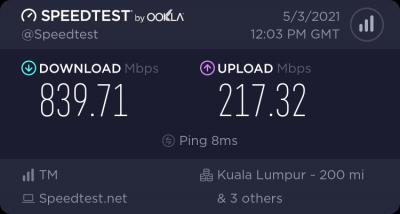
WIFI 5.0GHz through S21 Ultra 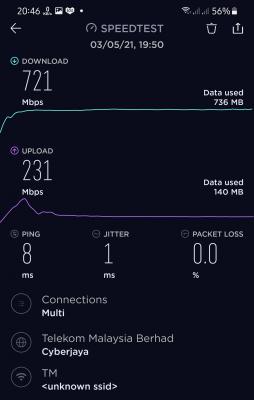
Satisfied 🙂👍 |
|
|
|
|
|
laihuhng
|
May 3 2021, 10:24 PM
|
|
|
QUOTE(aniq8676 @ May 3 2021, 09:30 PM) oh well, but why disable MU-MiMO? Preferably MU-MiMO does not need to be deactivated, just need to deactivate QOS only. What I understand is QOS and NAT cannot be activated simultaneously. When QOS is enable the NAT will be disable  (correct me if I'm wrong) QUOTE(go626201 @ May 3 2021, 09:35 PM) Only QOS is need to disabled for NAT acceleration for full speed. (Need QOS better buy a more stronger cpu router, normally more than 300mbps most consumer router enable QOS will having lower speed because router cpu will not be able to use NAT acceleration so speed will can run full,as cpu usage high) Mu-mimo can on or off,but for AC router Mu-Mimo is older generation,AX is better but still can on or off,not very helpful thing actually. Not too sure which one helps coz I blindly followed everything. However I remembered that when I disabled QOS, there isn't much improvement until I disable mu-mimo together with a few other settings related to it. Then, the speed suddenly shoot up. I'll snapshot the full list tomorrow. |
|
|
|
|
|
laihuhng
|
May 8 2021, 08:57 PM
|
|
|
QUOTE(fruitie @ May 8 2021, 05:17 PM) Managed to get it done after configuring with LAN cable using my laptop. May I know if AX73 comes with app that allow remotely change setting, parental control, monitoring stuffs etc? |
|
|
|
|
|
laihuhng
|
May 9 2021, 02:22 PM
|
|
|
QUOTE(PRSXFENG @ May 8 2021, 09:30 PM) QUOTE(fruitie @ May 8 2021, 10:40 PM) Yes, Tether app as answered below. This is for my sister's house, I have bought Asus TUF AX3000 for my own house, I hope I will not screw up like today.  Got it. Thanks. Used to ASUS router with its app. Very convenience to monitor and do changes to the router even when I wasn't at home. |
|
|
|
|



 Quote
Quote

 0.1852sec
 0.78
0.78
 7 queries
 GZIP Disabled