Outline ·
[ Standard ] ·
Linear+
Official TM UniFi High Speed Broadband Thread V39, READ 1ST PAGE FOR RELEVANT WIFI INFO
|
failed.hashcheck
|
 Dec 11 2021, 04:27 PM Dec 11 2021, 04:27 PM
|

|
QUOTE(LuckyLim @ Dec 11 2021, 04:03 PM) What is the benefit of having ipv6 enable ? The tm guy come to my house and disabled ipv6, as he said , it is better to disable to get better speed. and ipv6 will slow down the internet when using vpn. Not sure whether how true is it. Its true (at least for now) but entirely disabling ipv6 is lazy and retarded solution. If you are experiencing slowdown due to bad ipv6 routing, the preferred solution is to just set lower prority for ipv6 in your machines. This way ipv6 is only used when an address is unreachable via ipv4. One of biggest benefit of ipv6 for end user is end to end connection. Those poor sods that cried over cgnat, most of their problem I heard they ranted about can easily be solved with ipv6. This post has been edited by failed.hashcheck: Dec 11 2021, 09:31 PM |
|
|
|
|
|
failed.hashcheck
|
Dec 11 2021, 06:54 PM
|
|
|
QUOTE(heLL_bOy @ Dec 11 2021, 05:08 PM) imo for now.. ipv6 is good for local connectivity and for international just forget it I use tunnelbroker (poor man's ipv6) since whatever celcom trying to implement in their ipv6 is broken atm. If the 110mbps top speed and +10ms everywhere does not bother you, the real-world performance is almost transparent to ipv4  actually im getting better connection to my SYD OVH server lol 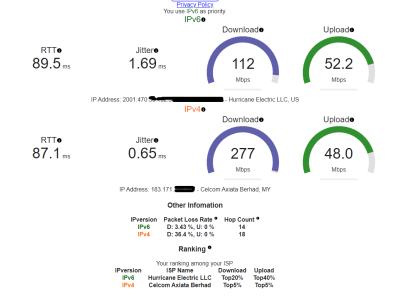 This post has been edited by failed.hashcheck: Dec 11 2021, 09:05 PM
 |
|
|
|
|
|
failed.hashcheck
|
Dec 19 2021, 02:11 AM
|
|
|
Flooding in Meru knocked out fiber internet. Pon still working, but ppp is offline. Anyone in flood area also offline?
This post has been edited by failed.hashcheck: Dec 19 2021, 02:13 AM
|
|
|
|
|
|
failed.hashcheck
|
Dec 19 2021, 01:02 PM
|
|
|
QUOTE(aniq8676 @ Dec 19 2021, 12:18 PM) Yeah I just discovered that there is 3 issue ongoing in Meru right now. General shutdown due to flood, in addition of cable cut in my area, and in addition of power cut in remote celcom infra. TM poles topples here and there with fiber box submerged. At least all three happen at the same time not back to back 😂 |
|
|
|
|
|
failed.hashcheck
|
Dec 20 2021, 05:02 PM
|
|
|
QUOTE(xCryptik @ Dec 20 2021, 03:19 PM) Anyone modem went into scuba dive at the flood? Any mercy from TM for equipment failure? For btu you can buy used for as low as rm15. https://mudah.my/malaysia/for-sale?q=gponhttps://mudah.my/malaysia/for-sale?q=unifi++modemRouter better just replace your own. This post has been edited by failed.hashcheck: Dec 20 2021, 05:05 PM |
|
|
|
|
|
failed.hashcheck
|
Dec 21 2021, 12:13 PM
|
|
|
QUOTE(stormaker @ Dec 21 2021, 11:13 AM) Anyone have any idea on the "Try it for 30 days FREE" promotion ? I subscribed online for 100Mbps package and it stated "Try it for 30 days FREE" on the website, but the CS at 100 told me it's 30 days free, terminate even within 30days will kena penalty. Go confirm again. Maybe she confused with 30 days speed uprade. Previously I have asked at least 3 times at tmpoint and confirmed there are no penalty as long you terminate like before 26th day (margin for administrative delay) and you just need to return all the equipments. This post has been edited by failed.hashcheck: Dec 21 2021, 12:15 PM |
|
|
|
|
|
failed.hashcheck
|
Dec 21 2021, 10:23 PM
|
|
|
QUOTE(Oltromen Ripot @ Dec 21 2021, 10:19 PM) i thought IP network should have multiple path to get to a point. But all those cable cuts causing whole end to outage suggests TM is using star network topology.... Those are bgp. its entirely different thing than last mile cabling. |
|
|
|
|
|
failed.hashcheck
|
Dec 24 2021, 12:23 PM
|
|
|
QUOTE(www.com.my @ Dec 24 2021, 12:12 PM) can i disable the TR-069 just put to deny? 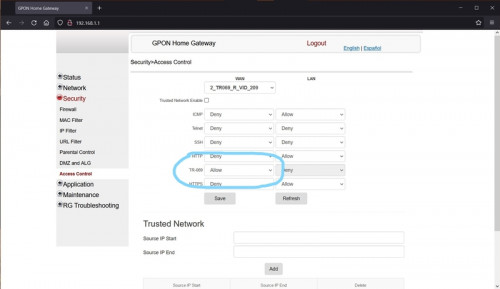 Yes But doesn't really matter when the modem operates in bridge mode anyway. This post has been edited by failed.hashcheck: Dec 24 2021, 12:25 PM |
|
|
|
|
|
failed.hashcheck
|
Dec 24 2021, 01:33 PM
|
|
|
QUOTE(ckl1998 @ Dec 24 2021, 01:10 PM) Can you share what is the best fibre optic cable to be used for unifi? I am planning to buy my own cable for in house wiring. External fiber cable, as I see they are black in color. Unlike copper, fiber cable (in consumer market) are all the same. Just make sure you buy one with blue connector (UPC). This post has been edited by failed.hashcheck: Dec 24 2021, 01:34 PM |
|
|
|
|
|
failed.hashcheck
|
Dec 24 2021, 02:22 PM
|
|
|
QUOTE(ckl1998 @ Dec 24 2021, 01:54 PM) There are black, white, yellow, and even some are like orange. Can use anyone of them? Cable color is not a really good indicator for its type. There is some guideline regarding which color is for which mode. But the standard wasn't really gaining much traction and everyone just go with their own way. Just buy whatever as long it is specified as single mode (NOT multimode) or for use with unifi. If it is marketed for consumer here, very high chance its single mode. Connector meanwhile has more successful adoption. If blue its UPC, if green its APC. This post has been edited by failed.hashcheck: Dec 24 2021, 02:35 PM |
|
|
|
|
|
failed.hashcheck
|
Dec 25 2021, 11:35 PM
|
|
|
QUOTE(XeactorZ @ Dec 25 2021, 11:27 PM) time to use vpn  Shinjiru and Celcom seem unaffected. If you got VPN server that uses these networks that's great. |
|
|
|
|
|
failed.hashcheck
|
Dec 26 2021, 06:43 PM
|
|
|
QUOTE(kelissa @ Dec 26 2021, 01:23 PM) How to test? I mean apart from slow loading that happen sometimes, how do you guys determine the problem of routing etc. For end users its traceroute/mtr most of times. With result and some knowledge on how bgp/peering/transit and its players work its enough to give you lots of useful information on the nature of fault. |
|
|
|
|
|
failed.hashcheck
|
Dec 27 2021, 12:49 PM
|
|
|
QUOTE(xxboxx @ Dec 27 2021, 12:30 PM) Time give public IP? Not that my place got Time  Public la They got like 740k ipv4 for their tiny customer base. |
|
|
|
|
|
failed.hashcheck
|
Dec 30 2021, 06:53 AM
|
|
|
QUOTE(avogadroz @ Dec 30 2021, 05:39 AM) Hi all, noob question here. I am trying to register for fibre broadband connection for my home. If Unifi told me there is no more port available in my housing area, should I try other ISPs such as Maxis or Celcom? Or will the port be unavailable for those ISPs also? All use the same infra. There are some little exceptions, but in general if unifi no port then others wont have as well. |
|
|
|
|
|
failed.hashcheck
|
Dec 30 2021, 10:40 AM
|
|
|
QUOTE(prescott2006 @ Dec 30 2021, 09:56 AM) My house address is not in the Unifi system as per check by the agent, they ask me to request to request port. My question is around how long will this process until Unifi finished installed? I have asked them the same question, they said cannot confirm. The general consensus is that it is faster to just move to new house that has fiber coverage. |
|
|
|
|
|
failed.hashcheck
|
Jan 8 2022, 06:52 PM
|
|
|
QUOTE(aniq8676 @ Jan 8 2022, 05:52 PM) Already restart everything and purge dns cache? |
|
|
|
|
|
failed.hashcheck
|
Jan 15 2022, 02:32 PM
|
|
|
QUOTE(willsiva @ Jan 15 2022, 11:14 AM) Hi, Just want to check if anyone face this same problem before. My Unifi port always got taken by someone else very often. Yesterday is the 3rd in the last 4 years. The last time (2 years ago), the Unifi technician had to pull additional fibre cable from the adjacent road dB box because the Unifi dB box (which also happens to be exactly behind my house ) where my original port was taken, was allocated to a Maxis customer. I have now lost connection again yesterday and this means my current port was most probably taken or given to another customer. The odd thing was that I lost thr connection at 4 am in the morning. It's been more than 24 hrs and TM can't solve my problem. Why does this still happen? Can't TM have a proper system assigning one port that is assigned permanently to one customer? If I were you I made police report. |
|
|
|
|
|
failed.hashcheck
|
Jan 24 2022, 12:31 PM
|
|
|
Anyone got factory firmware for the new fiberhome router?
|
|
|
|
|
|
failed.hashcheck
|
Jan 30 2022, 06:03 PM
|
|
|
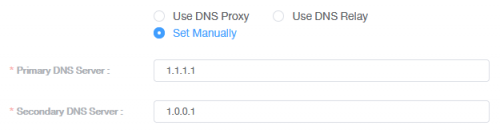
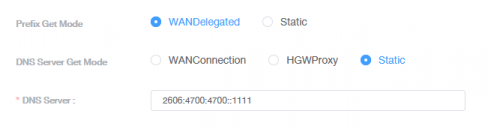
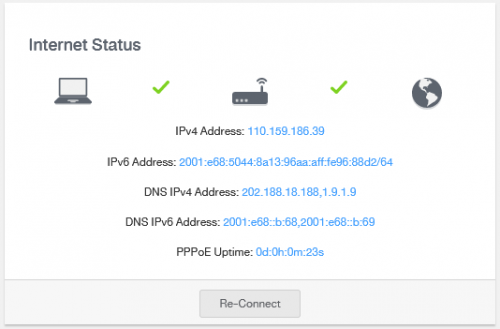
QUOTE(Jjuggler @ Jan 30 2022, 03:41 PM) I believe you received a unit of Wifi 6 Router (FiberHome - rounded shape). I just toy with the router yesterday. The router is kinda decent for regular home use, especially with superadmin access. Just login to superadmin account, disable TR-069, and change the DNS setting. The only problem is, even if you changed the DNS servers, the dashboard still displays TM's DNS server. However, using sites like dnsleaktest and ipleak, those sites showing cloudflare ip (I normally pick cloudflare over google dns). Otherwise, the router works just like how regular home router works. This router way better than those router supplied by TM previously especially the C1200. No reboot. Able to handle 800Mbps like charm. Downloaded test file (~20GB) maintains around ~86MiB/s - 100MiB/s. try reset. I did a full reset, and everything worked fine. now if only I can find factory firmware to get rid of that @unifi suffix. |
|
|
|
|
|
failed.hashcheck
|
Jan 31 2022, 01:43 AM
|
|
|
QUOTE(Jjuggler @ Jan 31 2022, 12:49 AM) Thanks for the suggestion. Will do that. BTW, are you enjoy using the router? If you asked me, the only thing that potong stim for me is the @unifi suffix, unless you hide the ssid and manually connect to the wireless network. I don't use it. Or more like I can't use it. My friend gave it to me since his house is too small to benefit from mesh setup. But that forced @unifi suffix makes it impossible to join my existing AP channels (for same ssid roaming). So that router just sitting around until I obtain the factory firmware or figure out how to remove that suffix. But honestly that router config page is horrible. What's up with that weird ass workflow layout? It's like the ui designer won a competition for the most inconvenient ui or something. |
|
|
|
|



 Quote
Quote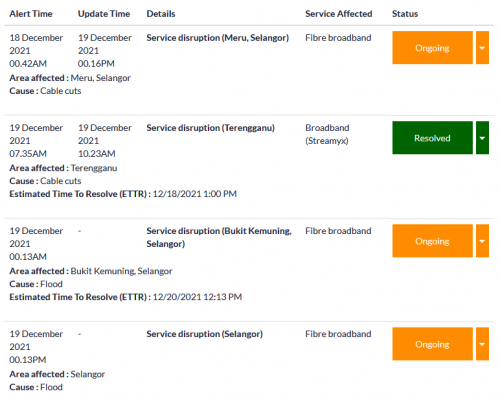


 0.2120sec
 0.35
0.35
 7 queries
 GZIP Disabled