

 Apr 16 2008, 07:09 PM


QUOTE(SubKi||er @ Aug 9 2007, 03:12 PM)
Updated : Small changes (29th February 08)
There is 3 part of the guide :
Slipsteam the RAID/SATA drivers to the XP Setup and create an updated driver setup disc
! I would recommend that if possible use a CD-RW for your work unless of course you don't mind throwing a CD in case something mess up !
! As to simplify most of the errors that i get through PM, I recommend you to use the vanilla version of Windows XP aka clean setup itself without slipstreams. Avoid any "D3vil SP3 Edition" or such. This is due to the fact that some of these CD might have already been slipstreamed with drivers before and the tools listed here might not recognise the previous slipstreamer and mess up the CD. !
There is an increasing amount of thread on the matter and wish that i could be of some help and solve it easy way. I dare not put this in the Guide section so hopefully if its not appropriate here too, Mods please delete the thread or move it elsewhere. Thanks.
Opening :
Even with the existance of Windows Vista, XP nonetheless is still the choice of OS for a lot of people for now. But because of how old XP is to date and with the emerging of new technologies, the original drivers that came with the XP Setup itself is almost obsolete.
To cut the crap short, laptop doesn't have a floppy drive and XP is unable to load SATA/RAID drivers from another location besides floppy. Of course, not all laptop BIOSes can enable native SATA to emulate PATA hence the existance of this guide. So the only ways to install XP on your ub3r new laptop that runs SATA HDD would be to update the driver database in XP Setup itself.
Tools needed :
First of all, copy the contents of your CD to a working path, in this case i'll use C:\WINXP
Download DriverPack BASE from the link above as well as DriverPack MassStorage. Extract the BASE pack into a new folder and put the MassStorage pack you downloaded into the DriverPacks folder.
If the setting is grey out like the image below :
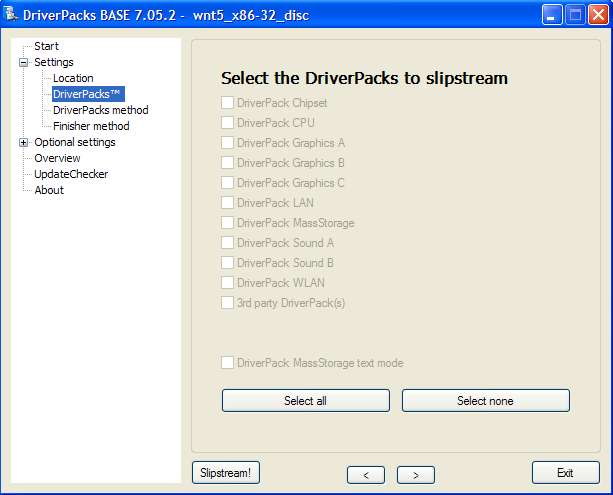
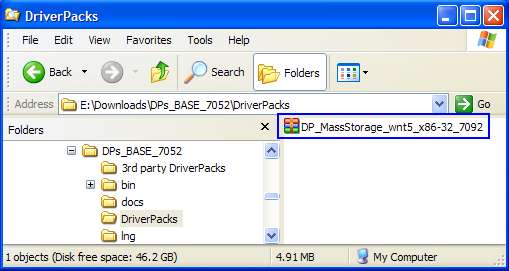
The solution : DO NOT extract the downloaded files into DriverPacks folder. Leave intact as is (i.e. copy that archive into DriverPacks folder). The DPs_BASE will automatically do the extraction. See the image below :
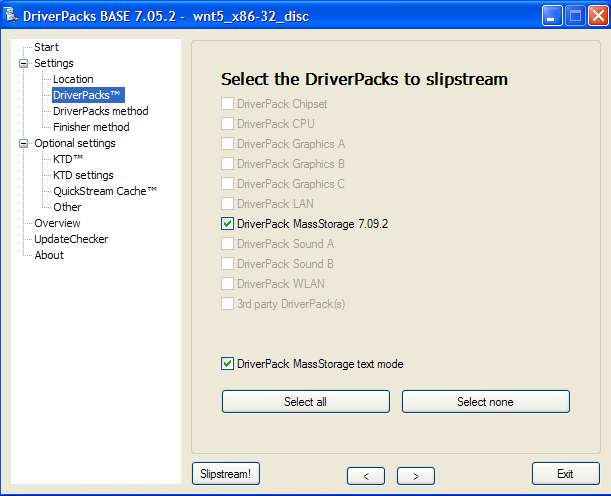
If you do it right, you can have the selection as below :
:
Credits: keyz
Execute DPs_BASE.exe and use the installation platform selected to disc. Browse to the XP working directory you copied from the CD just now, in my case C:\WINXP earlier. Select the DriverPacks list that will appear after loading the working directory and put a check mark on DriverPack MassStorage. Put a tick in the box which says "DriverPack MassStorage text mode". Leave all the other settings as it is if you don't know what is it for.

After you're done with everything, hit the SlipStream! button and wait for the process to finish. The process should finish in around 10 minutes. After the slipstream process is finish, proceed by downloading CDIMAGE GUI. Extract and run the application, only change the "Root DIR" to your working directory in my case C:\WINXP and the "Iso file Path" to where you want to save the ISO file generated.

Select the boot.img file to load the bootable image into the ISO file.

Leave all other settings intact as it should unless you know what its doing. (Thanks Sk8teR)
After the ISO file is generated, burn it with any burning software to a CD and proceed with booting the setup. Your SATA hard drive should be recognised now without the need to press F6 and load drivers.
The DriverPack should contain most SATA/RAID device drivers so it should work on most computers.
The End.

thank you but after the ISO file is created, just burn this file to cd directly? only one file in cd?There is 3 part of the guide :
- Slipsteam the RAID/SATA drivers to the XP Setup and create an updated driver setup disc
- Load the SATA/RAID drivers from floppy (USB Floppy needed for laptops)
- Slipstream only needed driver to the disc using nLite (Not providing help for this one since not written by me & credits to zea)
Slipsteam the RAID/SATA drivers to the XP Setup and create an updated driver setup disc
! I would recommend that if possible use a CD-RW for your work unless of course you don't mind throwing a CD in case something mess up !
! As to simplify most of the errors that i get through PM, I recommend you to use the vanilla version of Windows XP aka clean setup itself without slipstreams. Avoid any "D3vil SP3 Edition" or such. This is due to the fact that some of these CD might have already been slipstreamed with drivers before and the tools listed here might not recognise the previous slipstreamer and mess up the CD. !
There is an increasing amount of thread on the matter and wish that i could be of some help and solve it easy way. I dare not put this in the Guide section so hopefully if its not appropriate here too, Mods please delete the thread or move it elsewhere. Thanks.
Opening :
Even with the existance of Windows Vista, XP nonetheless is still the choice of OS for a lot of people for now. But because of how old XP is to date and with the emerging of new technologies, the original drivers that came with the XP Setup itself is almost obsolete.
To cut the crap short, laptop doesn't have a floppy drive and XP is unable to load SATA/RAID drivers from another location besides floppy. Of course, not all laptop BIOSes can enable native SATA to emulate PATA hence the existance of this guide. So the only ways to install XP on your ub3r new laptop that runs SATA HDD would be to update the driver database in XP Setup itself.
Tools needed :
- Windows XP Setup CD
- DriverPack
- CDIMAGE GUI
- CD/DVD Burner to burn CD
First of all, copy the contents of your CD to a working path, in this case i'll use C:\WINXP
Download DriverPack BASE from the link above as well as DriverPack MassStorage. Extract the BASE pack into a new folder and put the MassStorage pack you downloaded into the DriverPacks folder.
If the setting is grey out like the image below :
The solution : DO NOT extract the downloaded files into DriverPacks folder. Leave intact as is (i.e. copy that archive into DriverPacks folder). The DPs_BASE will automatically do the extraction. See the image below :
QUOTE(SubKi||er)
..put the MassStorage pack you downloaded into the DriverPacks folder.
If you do it right, you can have the selection as below
:Credits: keyz
Execute DPs_BASE.exe and use the installation platform selected to disc. Browse to the XP working directory you copied from the CD just now, in my case C:\WINXP earlier. Select the DriverPacks list that will appear after loading the working directory and put a check mark on DriverPack MassStorage. Put a tick in the box which says "DriverPack MassStorage text mode". Leave all the other settings as it is if you don't know what is it for.
After you're done with everything, hit the SlipStream! button and wait for the process to finish. The process should finish in around 10 minutes. After the slipstream process is finish, proceed by downloading CDIMAGE GUI. Extract and run the application, only change the "Root DIR" to your working directory in my case C:\WINXP and the "Iso file Path" to where you want to save the ISO file generated.
Select the boot.img file to load the bootable image into the ISO file.
Leave all other settings intact as it should unless you know what its doing. (Thanks Sk8teR)
After the ISO file is generated, burn it with any burning software to a CD and proceed with booting the setup. Your SATA hard drive should be recognised now without the need to press F6 and load drivers.
The DriverPack should contain most SATA/RAID device drivers so it should work on most computers.
The End.
Do I need to do anything with this ISO file? TQ
 Quote
Quote


 0.0260sec
 0.51
0.51
 7 queries
 GZIP Disabled